<?xml version="1.0" encoding="utf-8"?>
<feed xmlns="http://www.w3.org/2005/Atom">
	<title type="html"><![CDATA[Серый форум &mdash; AHK: Контекстное меню активной папки по клику в её верхнем левом углу]]></title>
	<link rel="self" href="https://forum.script-coding.com/extern.php?action=feed&amp;tid=11779&amp;type=atom" />
	<updated>2016-07-01T21:43:47Z</updated>
	<generator>PunBB</generator>
	<id>https://forum.script-coding.com/viewtopic.php?id=11779</id>
		<entry>
			<title type="html"><![CDATA[Re: AHK: Контекстное меню активной папки по клику в её верхнем левом углу]]></title>
			<link rel="alternate" href="https://forum.script-coding.com/viewtopic.php?pid=105791#p105791" />
			<content type="html"><![CDATA[<p>Спасибо большое, стало жутко удобно)) Добавил обработку пути в IE.</p><div class="fancy_spoiler_switcher"><div class="fancy_spoiler_switcher_header" data-lang-open="открыть спойлер" data-lang-close="скрыть спойлер"><strong>+</strong>&nbsp;открыть спойлер</div><div class="fancy_spoiler"><div class="codebox"><pre><code>#Include GetPaths.ahk
#Include ShellContextMenu.ahk

CoordMode,Mouse,Screen

#if GetClickIconTitle()
LButton::
RButton::
	WinGetClass,ClassActive,A
	
	if ClassActive ~= &quot;(Cabinet|Explore)WClass&quot;
	{
		if (	ePath := Explorer_GetPath()	) = &quot;ERROR&quot;
			Return
	}
	Else
	{
		WinGet,PidFocusWin,Pid,A
		for process in ComObjGet(&quot;winmgmts:&quot;).ExecQuery(&quot;Select * from Win32_Process&quot;)
			if process.ProcessId = PidFocusWin
			{
				ePath := process.ExecutablePath
				break
			}
	}

	If WinActive(&quot;ahk_class IEFrame&quot;)
	{
		ret:=doc:=markup:=pat:=&quot;n/a&quot; 
 
		If IsObject(ret:=HTMLGetObjectIEFrame(&quot;ahk_class IEFrame&quot;)) 
		And (markup:=(doc:=ret.document).documentElement.innerHTML, pat:=&quot;si).*?&lt;title&gt;(.*)?&lt;/title&gt;.*&quot;) 
		{ 
			;MsgBox, 262208, % &quot;Title:&quot;, % RegExReplace(markup, pat, &quot;$1&quot;) ;, 1.5 
			;MsgBox, 262208, % &quot;Path:&quot;, % doc.URL ;, 1.5 
			ttlName:=RegExReplace(markup, pat, &quot;$1&quot;)
			ePath:=doc.URL
		} 
		Else MsgBox, 262160, % &quot;Oops!&quot;, % &quot;An error has occured! (&quot;ret &quot;)&quot;, 1.5 
	}

	
	ShellContextMenu( ePath )
	Return
	
#if

GetClickIconTitle()
{
	Local x,y,id
	Static WM_NCHITTEST := 0x84,	HTSYSMENU := 0x3
	MouseGetPos,x,y,id
	SendMessage,% WM_NCHITTEST,,x|(y&lt;&lt;16),,ahk_id %id%
	if (ErrorLevel = HTSYSMENU)
		return True
}

; http://l.autohotkey.net/docs/commands/ComObjQuery.htm 
; http://www.autohotkey.com/board/topic/47052-basic-webpage-controls-with-javascript-com-tutorial 
HTMLGetObjectIEFrame(winTitle:=&quot;ahk_class IEFrame&quot;, instance:=1) 
{ 
	Static msg:=DllCall(&quot;RegisterWindowMessage&quot;, &quot;Str&quot;, &quot;WM_HTML_GETOBJECT&quot;, &quot;UInt&quot;) 
		, IID1:=&quot;{332C4425-26CB-11D0-B483-00C04FD90119}&quot; ; IID_IHTMLDocument2 
		, IID2:=&quot;{0002DF05-0000-0000-C000-000000000046}&quot; ; IID_IWebBrowserApp 
		, VT_DISPATCH:=9 
		, F_OWNVALUE:=1 
 
	SendMessage, msg,,, % &quot;Internet Explorer_Server&quot;instance, % winTitle 
	If % ErrorLevel!=&quot;FAIL&quot; And (lResult:=ErrorLevel, VarSetCapacity(GUID, 16, 0)) 
	If DllCall(&quot;ole32\CLSIDFromString&quot;, &quot;Str&quot;, IID1 
		, &quot;Ptr&quot;, &amp;GUID 
		, &quot;UInt&quot;)=0 
	If DllCall(&quot;oleacc\ObjectFromLresult&quot;, &quot;Ptr&quot;, lResult 
		, &quot;Ptr&quot;, &amp;GUID 
		, &quot;Ptr&quot;, 0 
		, &quot;Ptr*&quot;, pDoc 
		, &quot;UInt&quot;)=0 
	Return, ComObject(VT_DISPATCH, ComObjQuery(pDoc, IID2, IID2), F_OWNVALUE) 
		, ObjRelease(pDoc) 
	Return, ErrorLevel 
}</code></pre></div></div></div>]]></content>
			<author>
				<name><![CDATA[DD]]></name>
				<uri>https://forum.script-coding.com/profile.php?id=25263</uri>
			</author>
			<updated>2016-07-01T21:43:47Z</updated>
			<id>https://forum.script-coding.com/viewtopic.php?pid=105791#p105791</id>
		</entry>
		<entry>
			<title type="html"><![CDATA[Re: AHK: Контекстное меню активной папки по клику в её верхнем левом углу]]></title>
			<link rel="alternate" href="https://forum.script-coding.com/viewtopic.php?pid=105790#p105790" />
			<content type="html"><![CDATA[<p>Вот скрипт. Видит клик по иконке в шапке и вместо стандартного системного меню открывает как у дочернего по правому клику.<br />С папками скорость нормальная, а вот с приложениями чуток тормозит(сек 2) почему то. Тормоза на финальной функции <strong>ShellContextMenu.</strong><br /></p><div class="codebox"><pre><code>#Include GetPaths.ahk
#Include ShellContextMenu.ahk

CoordMode,Mouse,Screen

#if GetClickIconTitle()
LButton::
RButton::
	WinGetClass,ClassActive,A
	
	if ClassActive ~= &quot;(Cabinet|Explore)WClass&quot;
	{
		if (	ePath := Explorer_GetPath()	) = &quot;ERROR&quot;
			Return
	}
	Else
	{
		WinGet,PidFocusWin,Pid,A
		for process in ComObjGet(&quot;winmgmts:&quot;).ExecQuery(&quot;Select * from Win32_Process&quot;)
			if process.ProcessId = PidFocusWin
			{
				ePath := process.ExecutablePath
				break
			}
	}
	
	
	ShellContextMenu( ePath )
	Return
	
#if

GetClickIconTitle()
{
	Local x,y,id
	Static WM_NCHITTEST := 0x84,	HTSYSMENU := 0x3
	MouseGetPos,x,y,id
	SendMessage,% WM_NCHITTEST,,x|(y&lt;&lt;16),,ahk_id %id%
	if (ErrorLevel = HTSYSMENU)
		return True
}
</code></pre></div><p>Самая длительная пауза в строке:<br /></p><div class="codebox"><pre><code>DllCall(VTable(pIContextMenu, 3), &quot;Ptr&quot;, pIContextMenu, &quot;Ptr&quot;, hMenu, &quot;Uint&quot;, 0, &quot;Uint&quot;, 3, &quot;Uint&quot;, 0x7FFF, &quot;Uint&quot;, 0x100)   ;CMF_EXTENDEDVERBS</code></pre></div><p>Кто знает что сделать для оптимизации?</p>]]></content>
			<author>
				<name><![CDATA[yalanne]]></name>
				<uri>https://forum.script-coding.com/profile.php?id=32850</uri>
			</author>
			<updated>2016-07-01T20:13:33Z</updated>
			<id>https://forum.script-coding.com/viewtopic.php?pid=105790#p105790</id>
		</entry>
		<entry>
			<title type="html"><![CDATA[Re: AHK: Контекстное меню активной папки по клику в её верхнем левом углу]]></title>
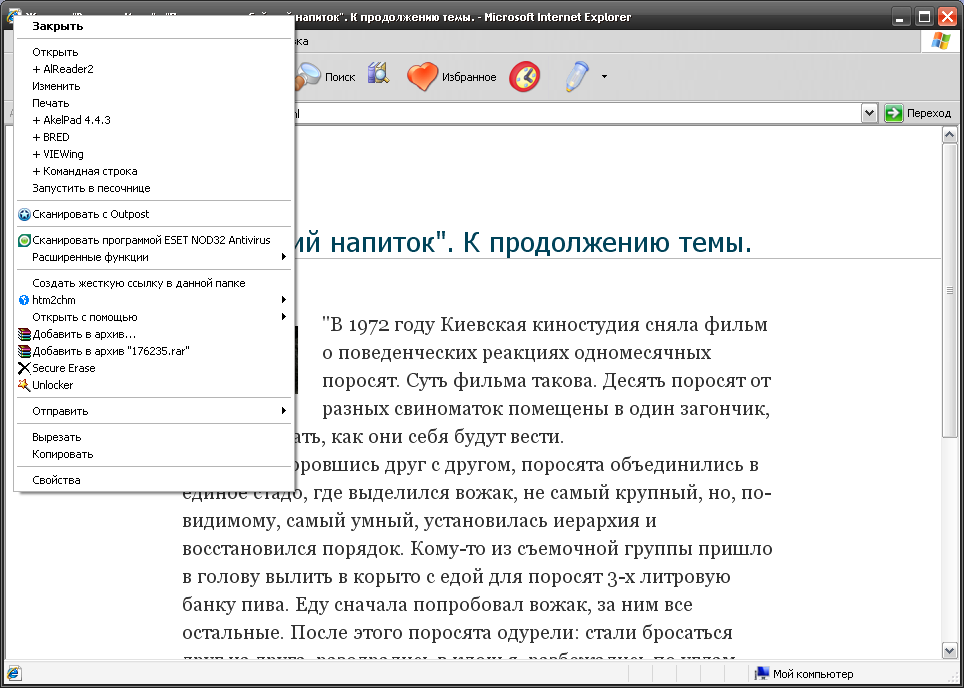
			<link rel="alternate" href="https://forum.script-coding.com/viewtopic.php?pid=105755#p105755" />
			<content type="html"><![CDATA[<p>Это то же самое внешнее меню, вот так оно показывалось на XP:</p><p><a href="http://i80.fastpic.ru/big/2016/0701/98/491f27ce83614f3211788c6d58c6c098.png"><span class="postimg"><img src="http://i80.fastpic.ru/thumb/2016/0701/98/491f27ce83614f3211788c6d58c6c098.jpeg" alt="http://i80.fastpic.ru/thumb/2016/0701/98/491f27ce83614f3211788c6d58c6c098.jpeg" /></span></a></p>]]></content>
			<author>
				<name><![CDATA[DD]]></name>
				<uri>https://forum.script-coding.com/profile.php?id=25263</uri>
			</author>
			<updated>2016-07-01T08:49:15Z</updated>
			<id>https://forum.script-coding.com/viewtopic.php?pid=105755#p105755</id>
		</entry>
		<entry>
			<title type="html"><![CDATA[Re: AHK: Контекстное меню активной папки по клику в её верхнем левом углу]]></title>
			<link rel="alternate" href="https://forum.script-coding.com/viewtopic.php?pid=105748#p105748" />
			<content type="html"><![CDATA[<p>Теперь я не понимаю что за контекстное меню ie надо.</p>]]></content>
			<author>
				<name><![CDATA[yalanne]]></name>
				<uri>https://forum.script-coding.com/profile.php?id=32850</uri>
			</author>
			<updated>2016-07-01T03:18:38Z</updated>
			<id>https://forum.script-coding.com/viewtopic.php?pid=105748#p105748</id>
		</entry>
		<entry>
			<title type="html"><![CDATA[Re: AHK: Контекстное меню активной папки по клику в её верхнем левом углу]]></title>
			<link rel="alternate" href="https://forum.script-coding.com/viewtopic.php?pid=105731#p105731" />
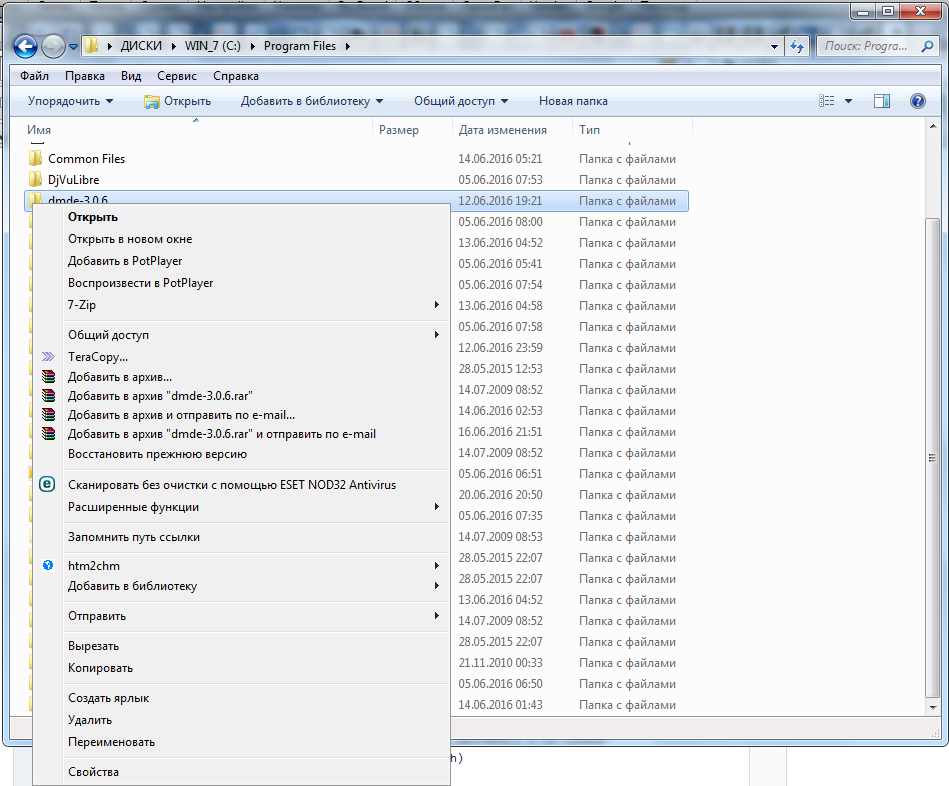
			<content type="html"><![CDATA[<div class="quotebox"><cite>wisgest пишет:</cite><blockquote><p>OFF: Ещё, как я помню, в IE6 правый щелчок по значку окна вызывал контекстное меню файла для локальных файлов, а для нелокальных — что-то наподобие контекстного меню ярлыка.</p></blockquote></div><p>Точно, я и забыл)) Тоже было удобно, тоже материализовать не худо б))</p><div class="quotebox"><cite>teadrinker пишет:</cite><blockquote><p>Я так и не понял, какое именно меню нужно. Скриншот можете сделать?</p></blockquote></div><p>Это стандартное меню со скриншота, только не для «DMDE», а для «Program Files», которое можно было бы там же вызвать, без необходимости перехода в родительскую папку:<br /><a href="http://i62.fastpic.ru/big/2016/0701/a6/a17d659d4a4523326bbd0c2b83307aa6.png"><span class="postimg"><img src="http://i62.fastpic.ru/thumb/2016/0701/a6/a17d659d4a4523326bbd0c2b83307aa6.jpeg" alt="http://i62.fastpic.ru/thumb/2016/0701/a6/a17d659d4a4523326bbd0c2b83307aa6.jpeg" /></span></a></p><div class="quotebox"><cite>yalanne пишет:</cite><blockquote><p>Это должно происходить?</p></blockquote></div><p>Спасибо, да. К коду возможно ещё IE прикрутить?</p>]]></content>
			<author>
				<name><![CDATA[DD]]></name>
				<uri>https://forum.script-coding.com/profile.php?id=25263</uri>
			</author>
			<updated>2016-06-30T21:33:58Z</updated>
			<id>https://forum.script-coding.com/viewtopic.php?pid=105731#p105731</id>
		</entry>
		<entry>
			<title type="html"><![CDATA[Re: AHK: Контекстное меню активной папки по клику в её верхнем левом углу]]></title>
			<link rel="alternate" href="https://forum.script-coding.com/viewtopic.php?pid=105728#p105728" />
			<content type="html"><![CDATA[<p>Это должно происходить?<br />Пока что без уголков. Просто на lwin.<br /></p><div class="codebox"><pre><code>#Include GetPaths.ahk
#Include ShellContextMenu.ahk

lwin::
if (	ePath := Explorer_GetPath()	) != &quot;ERROR&quot;
	ShellContextMenu(ePath)
Return</code></pre></div><div class="fancy_spoiler_switcher"><div class="fancy_spoiler_switcher_header"><strong>+</strong>&nbsp;GetPaths.ahk</div><div class="fancy_spoiler"><div class="codebox"><pre><code>;Автор: https://autohotkey.com/board/topic/60985-get-paths-of-selected-items-in-an-explorer-window/

Explorer_GetPath(hwnd=&quot;&quot;)
{
	if !(window := Explorer_GetWindow(hwnd))
		return ErrorLevel := &quot;ERROR&quot;
	if (window=&quot;desktop&quot;)
		return A_Desktop
	path := window.LocationURL
	path := RegExReplace(path, &quot;ftp://.*@&quot;,&quot;ftp://&quot;)
	StringReplace, path, path, file:///
	StringReplace, path, path, /, \, All 
	
	; thanks to polyethene
	Loop
		If RegExMatch(path, &quot;i)(?&lt;=%)[\da-f]{1,2}&quot;, hex)
			StringReplace, path, path, `%%hex%, % Chr(&quot;0x&quot; . hex), All
		Else Break
	return path
}
Explorer_GetAll(hwnd=&quot;&quot;)
{
	return Explorer_Get(hwnd)
}
Explorer_GetSelected(hwnd=&quot;&quot;)
{
	return Explorer_Get(hwnd,true)
}

Explorer_GetWindow(hwnd=&quot;&quot;)
{
	; thanks to jethrow for some pointers here
    WinGet, process, processName, % &quot;ahk_id&quot; hwnd := hwnd? hwnd:WinExist(&quot;A&quot;)
    WinGetClass class, ahk_id %hwnd%
	
	if (process!=&quot;explorer.exe&quot;)
		return
	if (class ~= &quot;(Cabinet|Explore)WClass&quot;)
	{
		for window in ComObjCreate(&quot;Shell.Application&quot;).Windows
			if (window.hwnd==hwnd)
				return window
	}
	else if (class ~= &quot;Progman|WorkerW&quot;) 
		return &quot;desktop&quot; ; desktop found
}
Explorer_Get(hwnd=&quot;&quot;,selection=false)
{
	if !(window := Explorer_GetWindow(hwnd))
		return ErrorLevel := &quot;ERROR&quot;
	if (window=&quot;desktop&quot;)
	{
		ControlGet, hwWindow, HWND,, SysListView321, ahk_class Progman
		if !hwWindow ; #D mode
			ControlGet, hwWindow, HWND,, SysListView321, A
		ControlGet, files, List, % ( selection ? &quot;Selected&quot;:&quot;&quot;) &quot;Col1&quot;,,ahk_id %hwWindow%
		base := SubStr(A_Desktop,0,1)==&quot;\&quot; ? SubStr(A_Desktop,1,-1) : A_Desktop
		Loop, Parse, files, `n, `r
		{
			path := base &quot;\&quot; A_LoopField
			IfExist %path% ; ignore special icons like Computer (at least for now)
				ret .= path &quot;`n&quot;
		}
	}
	else
	{
		if selection
			collection := window.document.SelectedItems
		else
			collection := window.document.Folder.Items
		for item in collection
			ret .= item.path &quot;`n&quot;
	}
	return Trim(ret,&quot;`n&quot;)
}</code></pre></div></div></div><div class="fancy_spoiler_switcher"><div class="fancy_spoiler_switcher_header"><strong>+</strong>&nbsp;ShellContextMenu.ahk</div><div class="fancy_spoiler"><div class="codebox"><pre><code>;Автор: https://autohotkey.com/board/topic/20376-invoking-directly-contextmenu-of-files-and-folders/

ShellContextMenu( sPath, win_hwnd = 0 )
{
   if ( !sPath  )
      return
   if !win_hwnd
   {
      Gui,SHELL_CONTEXT:New, +hwndwin_hwnd
      Gui,Show
   }
   
   If sPath Is Not Integer
      DllCall(&quot;shell32\SHParseDisplayName&quot;, &quot;Wstr&quot;, sPath, &quot;Ptr&quot;, 0, &quot;Ptr*&quot;, pidl, &quot;Uint&quot;, 0, &quot;Uint*&quot;, 0)
      ;This function is the preferred method to convert a string to a pointer to an item identifier list (PIDL).
   else
      DllCall(&quot;shell32\SHGetFolderLocation&quot;, &quot;Ptr&quot;, 0, &quot;int&quot;, sPath, &quot;Ptr&quot;, 0, &quot;Uint&quot;, 0, &quot;Ptr*&quot;, pidl)
   DllCall(&quot;shell32\SHBindToParent&quot;, &quot;Ptr&quot;, pidl, &quot;Ptr&quot;, GUID4String(IID_IShellFolder,&quot;{000214E6-0000-0000-C000-000000000046}&quot;), &quot;Ptr*&quot;, pIShellFolder, &quot;Ptr*&quot;, pidlChild)
   ;IShellFolder-&gt;GetUIObjectOf
   DllCall(VTable(pIShellFolder, 10), &quot;Ptr&quot;, pIShellFolder, &quot;Ptr&quot;, 0, &quot;Uint&quot;, 1, &quot;Ptr*&quot;, pidlChild, &quot;Ptr&quot;, GUID4String(IID_IContextMenu,&quot;{000214E4-0000-0000-C000-000000000046}&quot;), &quot;Ptr&quot;, 0, &quot;Ptr*&quot;, pIContextMenu)
   ObjRelease(pIShellFolder)
   CoTaskMemFree(pidl)
   
   hMenu := DllCall(&quot;CreatePopupMenu&quot;)
   ;IContextMenu-&gt;QueryContextMenu
   ;http://msdn.microsoft.com/en-us/library/bb776097%28v=VS.85%29.aspx
   DllCall(VTable(pIContextMenu, 3), &quot;Ptr&quot;, pIContextMenu, &quot;Ptr&quot;, hMenu, &quot;Uint&quot;, 0, &quot;Uint&quot;, 3, &quot;Uint&quot;, 0x7FFF, &quot;Uint&quot;, 0x100)   ;CMF_EXTENDEDVERBS
   ComObjError(0)
      global pIContextMenu2 := ComObjQuery(pIContextMenu, IID_IContextMenu2:=&quot;{000214F4-0000-0000-C000-000000000046}&quot;)
      global pIContextMenu3 := ComObjQuery(pIContextMenu, IID_IContextMenu3:=&quot;{BCFCE0A0-EC17-11D0-8D10-00A0C90F2719}&quot;)
   e := A_LastError ;GetLastError()
   ComObjError(1)
   if (e != 0)
      goTo, StopContextMenu
   Global   WPOld:= DllCall(&quot;SetWindowLongPtr&quot;, &quot;Ptr&quot;, win_hwnd, &quot;int&quot;,-4, &quot;Ptr&quot;,RegisterCallback(&quot;WindowProc&quot;),&quot;UPtr&quot;)
   DllCall(&quot;GetCursorPos&quot;, &quot;int64*&quot;, pt)
   DllCall(&quot;InsertMenu&quot;, &quot;Ptr&quot;, hMenu, &quot;Uint&quot;, 0, &quot;Uint&quot;, 0x0400|0x800, &quot;Ptr&quot;, 2, &quot;Ptr&quot;, 0)
   DllCall(&quot;InsertMenu&quot;, &quot;Ptr&quot;, hMenu, &quot;Uint&quot;, 0, &quot;Uint&quot;, 0x0400|0x002, &quot;Ptr&quot;, 1, &quot;Ptr&quot;, &amp;sPath)

   idn := DllCall(&quot;TrackPopupMenuEx&quot;, &quot;Ptr&quot;, hMenu, &quot;Uint&quot;, 0x0100|0x0001, &quot;int&quot;, pt &lt;&lt; 32 &gt;&gt; 32, &quot;int&quot;, pt &gt;&gt; 32, &quot;Ptr&quot;, win_hwnd, &quot;Uint&quot;, 0)

   /*
   typedef struct _CMINVOKECOMMANDINFOEX {
   DWORD   cbSize;          0
   DWORD   fMask;           4
   HWND    hwnd;            8
   LPCSTR  lpVerb;          8+A_PtrSize
   LPCSTR  lpParameters;    8+2*A_PtrSize
   LPCSTR  lpDirectory;     8+3*A_PtrSize
   int     nShow;           8+4*A_PtrSize
   DWORD   dwHotKey;        12+4*A_PtrSize
   HANDLE  hIcon;           16+4*A_PtrSize
   LPCSTR  lpTitle;         16+5*A_PtrSize
   LPCWSTR lpVerbW;         16+6*A_PtrSize
   LPCWSTR lpParametersW;   16+7*A_PtrSize
   LPCWSTR lpDirectoryW;    16+8*A_PtrSize
   LPCWSTR lpTitleW;        16+9*A_PtrSize
   POINT   ptInvoke;        16+10*A_PtrSize
   } CMINVOKECOMMANDINFOEX, *LPCMINVOKECOMMANDINFOEX;
   http://msdn.microsoft.com/en-us/library/bb773217%28v=VS.85%29.aspx
   */
   struct_size  :=  16+11*A_PtrSize
   VarSetCapacity(pici,struct_size,0)
   NumPut(struct_size,pici,0,&quot;Uint&quot;)         ;cbSize
   NumPut(0x4000|0x20000000|0x00100000,pici,4,&quot;Uint&quot;)   ;fMask
   NumPut(win_hwnd,pici,8,&quot;UPtr&quot;)       ;hwnd
   NumPut(1,pici,8+4*A_PtrSize,&quot;Uint&quot;)       ;nShow
   NumPut(idn-3,pici,8+A_PtrSize,&quot;UPtr&quot;)     ;lpVerb
   NumPut(idn-3,pici,16+6*A_PtrSize,&quot;UPtr&quot;)  ;lpVerbW
   NumPut(pt,pici,16+10*A_PtrSize,&quot;Uptr&quot;)    ;ptInvoke
   
   DllCall(VTable(pIContextMenu, 4), &quot;Ptr&quot;, pIContextMenu, &quot;Ptr&quot;, &amp;pici)   ; InvokeCommand

   DllCall(&quot;GlobalFree&quot;, &quot;Ptr&quot;, DllCall(&quot;SetWindowLongPtr&quot;, &quot;Ptr&quot;, win_hwnd, &quot;int&quot;, -4, &quot;Ptr&quot;, WPOld,&quot;UPtr&quot;))
   DllCall(&quot;DestroyMenu&quot;, &quot;Ptr&quot;, hMenu)
StopContextMenu:
   ObjRelease(pIContextMenu3)
   ObjRelease(pIContextMenu2)
   ObjRelease(pIContextMenu)
   pIContextMenu2:=pIContextMenu3:=WPOld:=0
   Gui,SHELL_CONTEXT:Destroy
   return idn
}
WindowProc(hWnd, nMsg, wParam, lParam)
{
   Global   pIContextMenu2, pIContextMenu3, WPOld
   If   pIContextMenu3
   {    ;IContextMenu3-&gt;HandleMenuMsg2
      If   !DllCall(VTable(pIContextMenu3, 7), &quot;Ptr&quot;, pIContextMenu3, &quot;Uint&quot;, nMsg, &quot;Ptr&quot;, wParam, &quot;Ptr&quot;, lParam, &quot;Ptr*&quot;, lResult)
         Return   lResult
   }
   Else If   pIContextMenu2
   {    ;IContextMenu2-&gt;HandleMenuMsg
      If   !DllCall(VTable(pIContextMenu2, 6), &quot;Ptr&quot;, pIContextMenu2, &quot;Uint&quot;, nMsg, &quot;Ptr&quot;, wParam, &quot;Ptr&quot;, lParam)
         Return   0
   }
   Return   DllCall(&quot;user32.dll\CallWindowProcW&quot;, &quot;Ptr&quot;, WPOld, &quot;Ptr&quot;, hWnd, &quot;Uint&quot;, nMsg, &quot;Ptr&quot;, wParam, &quot;Ptr&quot;, lParam)
}
VTable(ppv, idx)
{
   Return   NumGet(NumGet(1*ppv)+A_PtrSize*idx)
}
GUID4String(ByRef CLSID, String)
{
   VarSetCapacity(CLSID, 16,0)
   return DllCall(&quot;ole32\CLSIDFromString&quot;, &quot;wstr&quot;, String, &quot;Ptr&quot;, &amp;CLSID) &gt;= 0 ? &amp;CLSID : &quot;&quot;
}
CoTaskMemFree(pv)
{
   Return   DllCall(&quot;ole32\CoTaskMemFree&quot;, &quot;Ptr&quot;, pv)
}</code></pre></div></div></div>]]></content>
			<author>
				<name><![CDATA[yalanne]]></name>
				<uri>https://forum.script-coding.com/profile.php?id=32850</uri>
			</author>
			<updated>2016-06-30T20:04:25Z</updated>
			<id>https://forum.script-coding.com/viewtopic.php?pid=105728#p105728</id>
		</entry>
		<entry>
			<title type="html"><![CDATA[Re: AHK: Контекстное меню активной папки по клику в её верхнем левом углу]]></title>
			<link rel="alternate" href="https://forum.script-coding.com/viewtopic.php?pid=105726#p105726" />
			<content type="html"><![CDATA[<p>Я так и не понял, какое именно меню нужно. Скриншот можете сделать?</p>]]></content>
			<author>
				<name><![CDATA[teadrinker]]></name>
				<uri>https://forum.script-coding.com/profile.php?id=24515</uri>
			</author>
			<updated>2016-06-30T19:39:56Z</updated>
			<id>https://forum.script-coding.com/viewtopic.php?pid=105726#p105726</id>
		</entry>
		<entry>
			<title type="html"><![CDATA[Re: AHK: Контекстное меню активной папки по клику в её верхнем левом углу]]></title>
			<link rel="alternate" href="https://forum.script-coding.com/viewtopic.php?pid=105725#p105725" />
			<content type="html"><![CDATA[<p>Возможно, тут в конце полезные ссылки: <a href="http://rsdn.ru/forum/winapi/3473636.hot">http://rsdn.ru/forum/winapi/3473636.hot</a>.</p>]]></content>
			<author>
				<name><![CDATA[wisgest]]></name>
				<uri>https://forum.script-coding.com/profile.php?id=3850</uri>
			</author>
			<updated>2016-06-30T19:36:16Z</updated>
			<id>https://forum.script-coding.com/viewtopic.php?pid=105725#p105725</id>
		</entry>
		<entry>
			<title type="html"><![CDATA[Re: AHK: Контекстное меню активной папки по клику в её верхнем левом углу]]></title>
			<link rel="alternate" href="https://forum.script-coding.com/viewtopic.php?pid=105724#p105724" />
			<content type="html"><![CDATA[<p>OFF: Ещё, как я помню, в IE6 правый щелчок по значку окна вызывал контекстное меню файла для локальных файлов, а для нелокальных — что-то наподобие контекстного меню ярлыка.</p>]]></content>
			<author>
				<name><![CDATA[wisgest]]></name>
				<uri>https://forum.script-coding.com/profile.php?id=3850</uri>
			</author>
			<updated>2016-06-30T19:29:24Z</updated>
			<id>https://forum.script-coding.com/viewtopic.php?pid=105724#p105724</id>
		</entry>
		<entry>
			<title type="html"><![CDATA[Re: AHK: Контекстное меню активной папки по клику в её верхнем левом углу]]></title>
			<link rel="alternate" href="https://forum.script-coding.com/viewtopic.php?pid=105723#p105723" />
			<content type="html"><![CDATA[<div class="quotebox"><cite>DD пишет:</cite><blockquote><p>Для Win7 здорово недостает возможности, как на XP, вызывать контекстное меню активной папки по клику в области верхнего левого угла её окна. Имеется в виду меню, которое было бы выведено для текущей папки уровнем выше, по правой кнопке. Можно ли организовать? В качестве шаблона возможно пригодится&nbsp; скрипт, который обрабатывает эту часть окна:</p></blockquote></div><p>А объясните, пожалуйста, скриншотом, а то не понятно.</p>]]></content>
			<author>
				<name><![CDATA[Drugoy]]></name>
				<uri>https://forum.script-coding.com/profile.php?id=27463</uri>
			</author>
			<updated>2016-06-30T19:27:07Z</updated>
			<id>https://forum.script-coding.com/viewtopic.php?pid=105723#p105723</id>
		</entry>
		<entry>
			<title type="html"><![CDATA[Re: AHK: Контекстное меню активной папки по клику в её верхнем левом углу]]></title>
			<link rel="alternate" href="https://forum.script-coding.com/viewtopic.php?pid=105722#p105722" />
			<content type="html"><![CDATA[<div class="quotebox"><cite>teadrinker пишет:</cite><blockquote><p>Зачем целиться в верхний левый угол</p></blockquote></div><p>Чтобы не переходить в родительскую папку. (Верхний левый угол — значок окна.)</p><div class="quotebox"><cite>teadrinker пишет:</cite><blockquote><p>, когда можно просто кликнуть по клиентской области?</p></blockquote></div><p>Это другое меню.</p>]]></content>
			<author>
				<name><![CDATA[wisgest]]></name>
				<uri>https://forum.script-coding.com/profile.php?id=3850</uri>
			</author>
			<updated>2016-06-30T19:24:28Z</updated>
			<id>https://forum.script-coding.com/viewtopic.php?pid=105722#p105722</id>
		</entry>
		<entry>
			<title type="html"><![CDATA[Re: AHK: Контекстное меню активной папки по клику в её верхнем левом углу]]></title>
			<link rel="alternate" href="https://forum.script-coding.com/viewtopic.php?pid=105720#p105720" />
			<content type="html"><![CDATA[<p>Не совсем понимаю смысл. Зачем целиться в верхний левый угол, когда можно просто кликнуть по клиентской области?</p>]]></content>
			<author>
				<name><![CDATA[teadrinker]]></name>
				<uri>https://forum.script-coding.com/profile.php?id=24515</uri>
			</author>
			<updated>2016-06-30T18:43:38Z</updated>
			<id>https://forum.script-coding.com/viewtopic.php?pid=105720#p105720</id>
		</entry>
		<entry>
			<title type="html"><![CDATA[AHK: Контекстное меню активной папки по клику в её верхнем левом углу]]></title>
			<link rel="alternate" href="https://forum.script-coding.com/viewtopic.php?pid=105717#p105717" />
			<content type="html"><![CDATA[<p>Для Win7 здорово недостает возможности, как на XP, вызывать контекстное меню активной папки по клику в области верхнего левого угла её окна. Имеется в виду меню, которое было бы выведено для текущей папки уровнем выше, по правой кнопке. Можно ли организовать? В качестве шаблона возможно пригодится&nbsp; скрипт, который обрабатывает эту часть окна:</p><div class="codebox"><pre><code>
GroupAdd, ExplorerGrp, ahk_class CabinetWClass
GroupAdd, ExplorerGrp, ahk_class ExploreWClass

IsCursorInEdge(winTitle := &quot;&quot;)
{
  MouseGetPos, ClickX, ClickY, WindowUnderMouseID

  ; WM_NCHITTEST 
  SendMessage, 0x84,, ( ClickY &lt;&lt; 16 )|ClickX,, ahk_id %WindowUnderMouseID% 
  WM_NCHITTEST_Result =%ErrorLevel% 
  If WM_NCHITTEST_Result in 3 ; in titlebar enclosed area - top of window 
  {
    TOOLTIP WWWWWWWWWWWWWWWinEdge
    SLEEP 1000
    TOOLTIP
  }
  return ErrorLevel = 2
}
#if IsCursorInEdge(&quot;ahk_group ExplorerGrp&quot;)
{
  mbutton::
  Return
}
#if


~vkC0 &amp; Esc:: ; tilde + esc
   ExitApp
</code></pre></div>]]></content>
			<author>
				<name><![CDATA[DD]]></name>
				<uri>https://forum.script-coding.com/profile.php?id=25263</uri>
			</author>
			<updated>2016-06-30T17:11:57Z</updated>
			<id>https://forum.script-coding.com/viewtopic.php?pid=105717#p105717</id>
		</entry>
</feed>
