<?xml version="1.0" encoding="utf-8"?>
<feed xmlns="http://www.w3.org/2005/Atom">
	<title type="html"><![CDATA[Серый форум &mdash; AHK: Удаление вызова окна «Панель управления HD графикой Intel»]]></title>
	<link rel="self" href="https://forum.script-coding.com/extern.php?action=feed&amp;tid=12058&amp;type=atom" />
	<updated>2016-10-03T17:56:19Z</updated>
	<generator>PunBB</generator>
	<id>https://forum.script-coding.com/viewtopic.php?id=12058</id>
		<entry>
			<title type="html"><![CDATA[Re: AHK: Удаление вызова окна «Панель управления HD графикой Intel»]]></title>
			<link rel="alternate" href="https://forum.script-coding.com/viewtopic.php?pid=108187#p108187" />
			<content type="html"><![CDATA[<p>Спасибо! Очень помогли!</p>]]></content>
			<author>
				<name><![CDATA[Maxim]]></name>
				<uri>https://forum.script-coding.com/profile.php?id=32458</uri>
			</author>
			<updated>2016-10-03T17:56:19Z</updated>
			<id>https://forum.script-coding.com/viewtopic.php?pid=108187#p108187</id>
		</entry>
		<entry>
			<title type="html"><![CDATA[Re: AHK: Удаление вызова окна «Панель управления HD графикой Intel»]]></title>
			<link rel="alternate" href="https://forum.script-coding.com/viewtopic.php?pid=108183#p108183" />
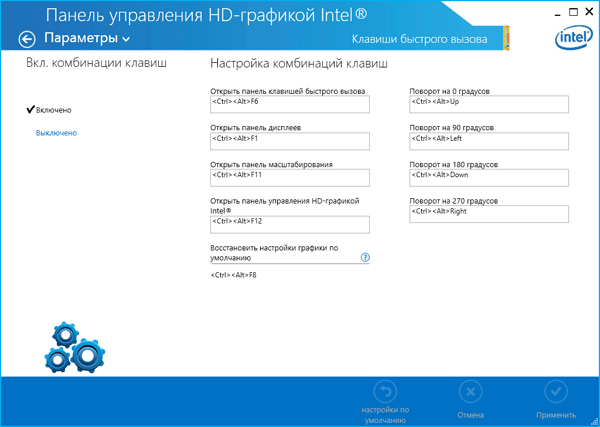
			<content type="html"><![CDATA[<p>Нужно зайти в эту панель управления и найти там &quot;горячие клавиши&quot; (или подобное) и отключить или переназначить их... наверно.<br /><span class="postimg"><img src="http://www.efxi.ru/file/asus_x550la_intel_hd_graphics.files/image008.gif" alt="http://www.efxi.ru/file/asus_x550la_intel_hd_graphics.files/image008.gif" /></span></p>]]></content>
			<author>
				<name><![CDATA[Alectric]]></name>
				<uri>https://forum.script-coding.com/profile.php?id=26027</uri>
			</author>
			<updated>2016-10-03T17:29:34Z</updated>
			<id>https://forum.script-coding.com/viewtopic.php?pid=108183#p108183</id>
		</entry>
		<entry>
			<title type="html"><![CDATA[AHK: Удаление вызова окна «Панель управления HD графикой Intel»]]></title>
			<link rel="alternate" href="https://forum.script-coding.com/viewtopic.php?pid=108181#p108181" />
			<content type="html"><![CDATA[<p>Уважаемые форумчане, я работаю в программе для переводчиков SDL Trados Sudio 2015 и с помощью нижеуказанного скрипта осуществляю отмену фильтрования по слову (то есть сбрасываю фильтр).</p><p>После перехода c Windows 8 на Windows 10, этот скрипт перестал работать, потому что после двойного нажатия клавиши «Enter» в правом нижнем углу клавиатуры появляется окно «Панель управления HD графикой Intel». Пожалуйста, подскажите как отключить появление окна «Панель управления HD графикой Intel» или что мне нужно сделать, чтобы скрипт заработал.</p><div class="codebox"><pre><code>;После двойного нажатия клавиши Enter на клавиатуре справа внизу происходит отмена фильтрования по слову/фразе в Студио, появляются All segments

NumpadEnter:: Gosub, PressCount            ; Запускается счётчик нажатий.
NumpadEnter(1):                            ; Код для одиночного нажатия .
  SendInput ^{ vkD }
Return
NumpadEnter(2):
 SendInput ^!{F6}                            ; Код для двойного нажатия .
 Return
 PressCount:
  Pause_=400     ; Если пауза меньше этого количества миллисекунд, то нажатие
                 ; двойное. Если больше, то оно расценивается как 2 одиночных.
  If not Second
  {
    Second=1
    SetTimer, DoublePress, -%Pause_%
  }
  Else
  {
    Second=0
    SetTimer, %A_ThisHotkey%(2), -1
  }
Return
DoublePress:
  If not Second
    Return
  Second=0
  SetTimer, %A_ThisHotkey%(1), -1
Return</code></pre></div>]]></content>
			<author>
				<name><![CDATA[Maxim]]></name>
				<uri>https://forum.script-coding.com/profile.php?id=32458</uri>
			</author>
			<updated>2016-10-03T17:09:58Z</updated>
			<id>https://forum.script-coding.com/viewtopic.php?pid=108181#p108181</id>
		</entry>
</feed>
