<?xml version="1.0" encoding="utf-8"?>
<feed xmlns="http://www.w3.org/2005/Atom">
	<title type="html"><![CDATA[Серый форум &mdash; AHK: Одинарное и двойное и тройное нажатие на клавиатуре - не работают]]></title>
	<link rel="self" href="https://forum.script-coding.com/extern.php?action=feed&amp;tid=5198&amp;type=atom" />
	<updated>2013-07-12T11:26:15Z</updated>
	<generator>PunBB</generator>
	<id>https://forum.script-coding.com/viewtopic.php?id=5198</id>
		<entry>
			<title type="html"><![CDATA[Re: AHK: Одинарное и двойное и тройное нажатие на клавиатуре - не работают]]></title>
			<link rel="alternate" href="https://forum.script-coding.com/viewtopic.php?pid=73684#p73684" />
			<content type="html"><![CDATA[<p>Если в поиске выбрать раздел Autohotkey и набрать &quot;тройное&quot;, в одном из двух результатов выдается сообщение от <strong>Николай</strong> за&nbsp; 2010 2010-11-21 19:28:46 из этой темы.<br />При открытии темы его нет и указано, что всего д.б. 6 сообщений. Как можно посмотреть остальные?</p>]]></content>
			<author>
				<name><![CDATA[monsoon]]></name>
				<uri>https://forum.script-coding.com/profile.php?id=6758</uri>
			</author>
			<updated>2013-07-12T11:26:15Z</updated>
			<id>https://forum.script-coding.com/viewtopic.php?pid=73684#p73684</id>
		</entry>
		<entry>
			<title type="html"><![CDATA[Re: AHK: Одинарное и двойное и тройное нажатие на клавиатуре - не работают]]></title>
			<link rel="alternate" href="https://forum.script-coding.com/viewtopic.php?pid=42090#p42090" />
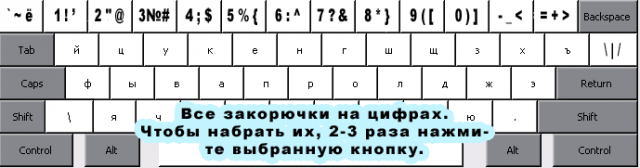
			<content type="html"><![CDATA[<p>Результаты работы. Полный скрипт<br />Этот скрипт переносит все спецсимволы на цифровые клавиши. </p><p>Спасибо за помощь!<br />Теперь в русской раскладке доступны все специальные символы:<br /><strong>квадратные [] и фигурные скобки {},<br />знак доллара $,<br />знаки больше-меньше &lt;&gt;, <br />решетка #<br />собака @</strong></p><p><a href="http://clip2net.com/s/DcEo"><span class="postimg"><img src="http://clip2net.com/clip/m20333/thumb640/1290466586-clip-15kb.png" alt="http://clip2net.com/clip/m20333/thumb640/1290466586-clip-15kb.png" /></span></a></p><div class="codebox"><pre><code>#UseHook
#SingleInstance force
Delay = 700      ; задержка

*1::
*2::
*3::
*4::
*5::
*6::
*7::
*8::
*9::
*0::
*-::
*=::
*\::
*`::
; и т. д.
   if GetKeyState(&quot;Shift&quot;, &quot;P&quot;)
   {
      Send, % SubStr(A_ThisHotkey, 2)
      Return
   }

   if (A_PriorHotkey = A_ThisHotkey &amp;&amp; A_TimeSincePriorHotkey &lt; Delay)
   {
      mod := Mod(++i, 3)
      Send, {BackSpace}
      if A_ThisHotkey = *1
         SendRaw, % mod = 1 ? &quot;!&quot; : mod = 2 ? &quot;&#039;&quot; : 1
      else if A_ThisHotkey = *2
         SendRaw, % mod = 1 ? &quot;&quot;&quot;&quot; : mod = 2 ? &quot;@&quot; : 2
      else if A_ThisHotkey = *3
         SendRaw, % mod = 1 ? &quot;№&quot; : mod = 2 ? &quot;#&quot;  : 3
      else if A_ThisHotkey = *4
         SendRaw, % mod = 1 ? &quot;`;&quot; : mod = 2 ? &quot;$&quot; : 4
      else if A_ThisHotkey = *5
         SendRaw, % mod = 1 ? &quot;%&quot; : mod = 2 ? &quot;{&quot; : 5
      else if A_ThisHotkey = *6
         SendRaw, % mod = 1 ? &quot;:&quot; : mod = 2 ? &quot;^&quot; : 6
      else if A_ThisHotkey = *7
         SendRaw, % mod = 1 ? &quot;?&quot; : mod = 2 ? &quot;&amp;&quot; : 7
      else if A_ThisHotkey = *8
         SendRaw, % mod = 1 ? &quot;*&quot; : mod = 2 ? &quot;}&quot; : 8
      else if A_ThisHotkey = *9
         SendRaw, % mod = 1 ? &quot;(&quot; : mod = 2 ? &quot;[&quot; : 9
      else if A_ThisHotkey = *0
         SendRaw, % mod = 1 ? &quot;)&quot; : mod = 2 ? &quot;]&quot; : 0
      else if A_ThisHotkey = *-
         SendRaw, % mod = 1 ? &quot;_&quot; : mod = 2 ? &quot;&lt;&quot; : &quot;-&quot;
      else if A_ThisHotkey = *=
         SendRaw, % mod = 1 ? &quot;+&quot; : mod = 2 ? &quot;&gt;&quot; : &quot;=&quot;
      else if A_ThisHotkey = *\
         SendRaw, % mod = 1 ? &quot;|&quot; : mod = 2 ? &quot;/&quot; : &quot;\&quot;
      else if A_ThisHotkey = *``
         SendRaw, % mod = 1 ? &quot;~&quot; : mod = 2 ? &quot;ё&quot; : &quot;``&quot;
      ; и т. д.
   }
   else
   {
      Send, % SubStr(A_ThisHotkey, 2)
      i = 0
   }
   Return</code></pre></div>]]></content>
			<author>
				<name><![CDATA[Николай2010]]></name>
			</author>
			<updated>2010-11-22T22:57:12Z</updated>
			<id>https://forum.script-coding.com/viewtopic.php?pid=42090#p42090</id>
		</entry>
		<entry>
			<title type="html"><![CDATA[Re: AHK: Одинарное и двойное и тройное нажатие на клавиатуре - не работают]]></title>
			<link rel="alternate" href="https://forum.script-coding.com/viewtopic.php?pid=42076#p42076" />
			<content type="html"><![CDATA[<p>Teadrinker, Спасибо огромное!!!<br />Без Вас я никогда не сделал бы его!<br />Когда запрограммирую все остальные клавиши, выложу скрипт в этой теме.<br />Спасибо ещё раз! <img src="//forum.script-coding.com/img/smilies/smile.png" width="15" height="15" /></p>]]></content>
			<author>
				<name><![CDATA[Николай2010]]></name>
			</author>
			<updated>2010-11-22T11:23:23Z</updated>
			<id>https://forum.script-coding.com/viewtopic.php?pid=42076#p42076</id>
		</entry>
		<entry>
			<title type="html"><![CDATA[Re: AHK: Одинарное и двойное и тройное нажатие на клавиатуре - не работают]]></title>
			<link rel="alternate" href="https://forum.script-coding.com/viewtopic.php?pid=42073#p42073" />
			<content type="html"><![CDATA[<p>Мне, честно говоря, не нравится ни один. По второму можно так:<br /></p><div class="codebox"><pre><code>#UseHook
Delay = 500      ; задержка

*2::
*3::
*4::
; и т. д.
   if GetKeyState(&quot;Shift&quot;, &quot;P&quot;)
   {
      Send, % SubStr(A_ThisHotkey, 2)
      Return
   }

   if (A_PriorHotkey = A_ThisHotkey &amp;&amp; A_TimeSincePriorHotkey &lt; Delay)
   {
      mod := Mod(++i, 3)
      Send, {BackSpace}
      if A_ThisHotkey = *2
         SendRaw, % mod = 1 ? &quot;@&quot; : mod = 2 ? &quot;&quot;&quot;&quot; : 2
      else if A_ThisHotkey = *3
         SendRaw, % mod = 1 ? &quot;#&quot; : mod = 2 ? &quot;№&quot;  : 3
      else if A_ThisHotkey = *4
         SendRaw, % mod = 1 ? &quot;$&quot; : mod = 2 ? &quot;`;&quot; : 4
      ; и т. д.
   }
   else
   {
      Send, % SubStr(A_ThisHotkey, 2)
      i = 0
   }
   Return</code></pre></div>]]></content>
			<author>
				<name><![CDATA[teadrinker]]></name>
				<uri>https://forum.script-coding.com/profile.php?id=24515</uri>
			</author>
			<updated>2010-11-22T10:36:25Z</updated>
			<id>https://forum.script-coding.com/viewtopic.php?pid=42073#p42073</id>
		</entry>
		<entry>
			<title type="html"><![CDATA[Re: AHK: Одинарное и двойное и тройное нажатие на клавиатуре - не работают]]></title>
			<link rel="alternate" href="https://forum.script-coding.com/viewtopic.php?pid=42045#p42045" />
			<content type="html"><![CDATA[<p>Тогда можно набирать цифры на цифровой клавиатуре, если она есть.</p><p><em>Или набирать просто цифры с нажатым Shift или CapsLock</em></p><p>Или сделать наоборот, чтобы эта функция работала с нажатым Shift или включенным CapsLock</p><p><strong>Получилось 3 варианта</strong></p><p>Мне больше нравится средний. Позвольте объяснить почему.</p><p>Значит стандартный режим, как в примере выше.<br />Если Вам нужно набрать много цифр (калькулятор), то рекомендую включить CapsLock.<br />&nbsp; &nbsp; Если -- быстро набрать несколько цифр, то придержать Shift.<br />&nbsp; &nbsp; &nbsp; &nbsp; &nbsp; А если совсем лень что-то нажимать, то не спеша набрать все нужные цифры с включенной функцией.</p>]]></content>
			<author>
				<name><![CDATA[Николай2010]]></name>
			</author>
			<updated>2010-11-21T23:42:04Z</updated>
			<id>https://forum.script-coding.com/viewtopic.php?pid=42045#p42045</id>
		</entry>
		<entry>
			<title type="html"><![CDATA[Re: AHK: Одинарное и двойное и тройное нажатие на клавиатуре - не работают]]></title>
			<link rel="alternate" href="https://forum.script-coding.com/viewtopic.php?pid=42043#p42043" />
			<content type="html"><![CDATA[<div class="quotebox"><cite>Николай2010 пишет:</cite><blockquote><p>Пример на клавише 2:<br />Один раз нажал кнопку - это цифра 2<br />2 раза нажал - это @<br />3 раза нажал - это &quot;</p></blockquote></div><p>А если нужно набрать несколько двоек подряд?</p>]]></content>
			<author>
				<name><![CDATA[teadrinker]]></name>
				<uri>https://forum.script-coding.com/profile.php?id=24515</uri>
			</author>
			<updated>2010-11-21T22:35:17Z</updated>
			<id>https://forum.script-coding.com/viewtopic.php?pid=42043#p42043</id>
		</entry>
		<entry>
			<title type="html"><![CDATA[AHK: Одинарное и двойное и тройное нажатие на клавиатуре - не работают]]></title>
			<link rel="alternate" href="https://forum.script-coding.com/viewtopic.php?pid=42037#p42037" />
			<content type="html"><![CDATA[<p>Здравствуйте!</p><p>Наверняка многим&nbsp; надоело постоянно переключаться между русским и английским языком, чтобы набрать фигурные {} или квадратные [] скобки, знаки больше-меньше &lt;&gt; и другие символы.</p><p>Хочу сделать, чтобы набор цифр и специальных символов на клавиатуре работал как на мобильном телефоне.</p><p>Это нужно для того, чтобы не переключаться на английский язык для набора @, квадратных [] и фигурных {} скобок, знаков больше-меньше &lt;&gt; и других.</p><p>Пример на клавише 2:<br />Один раз нажал кнопку - это цифра 2<br />2 раза нажал - это @<br />3 раза нажал - это &quot;<br />(см. клавиатуру)</p><p>Есть стандартный скрипт в документации, но он сначала определяет количество нажатий, а потом срабатывает. В результате не видно какой символ будет набран. А в мобильных телефонах, мы видим символы, которые набираем.</p><p>Подскажите, какие изменения нужно внести в скрипт, чтобы было как на мобильных телефонах?</p><div class="codebox"><pre><code>; Example #3: Detection of single, double, and triple-presses of a hotkey. This
; allows a hotkey to perform a different operation depending on how many times
; you press it:
#c::
if winc_presses &gt; 0 ; SetTimer already started, so we log the keypress instead.
{
    winc_presses += 1
    return
}
; Otherwise, this is the first press of a new series. Set count to 1 and start
; the timer:
winc_presses = 1
SetTimer, KeyWinC, 600 ; Wait for more presses within a 400 millisecond window.
return

KeyWinC:
SetTimer, KeyWinC, off
if winc_presses = 1 ; The key was pressed once.
{
SendInput 1 
;   Run, c:\  ; Open a folder.
}
else if winc_presses = 2 ; The key was pressed twice.
{
SendInput {Backspace}2
;    Run, c:\windows  ; Open a different folder.
}
else if winc_presses &gt; 2
{
SendInput {Backspace}3
;    MsgBox, Three or more clicks detected.
}
; Regardless of which action above was triggered, reset the count to
; prepare for the next series of presses:
winc_presses = 0
return</code></pre></div>]]></content>
			<author>
				<name><![CDATA[Николай2010]]></name>
			</author>
			<updated>2010-11-21T17:28:46Z</updated>
			<id>https://forum.script-coding.com/viewtopic.php?pid=42037#p42037</id>
		</entry>
</feed>