<?xml version="1.0" encoding="utf-8"?>
<feed xmlns="http://www.w3.org/2005/Atom">
	<title type="html"><![CDATA[Серый форум]]></title>
	<link rel="self" href="https://forum.script-coding.com/extern.php?action=feed&amp;type=atom" />
	<updated>2026-11-03T19:45:01Z</updated>
	<generator>PunBB</generator>
	<id>https://forum.script-coding.com/index.php</id>
		<entry>
			<title type="html"><![CDATA[AHK v2: Клиент Google Translate]]></title>
			<link rel="alternate" href="https://forum.script-coding.com/viewtopic.php?id=18628&amp;action=new" />
			<summary type="html"><![CDATA[<p>Это тема для вопросов и комментариев по скрипту из Коллекции <a href="https://forum.script-coding.com/viewtopic.php?id=18627">Клиент Google Translate</a></p>]]></summary>
			<author>
				<name><![CDATA[teadrinker]]></name>
				<uri>https://forum.script-coding.com/profile.php?id=24515</uri>
			</author>
			<updated>2026-11-03T19:45:01Z</updated>
			<id>https://forum.script-coding.com/viewtopic.php?id=18628&amp;action=new</id>
		</entry>
		<entry>
			<title type="html"><![CDATA[AHK v2: Клиент Google Translate]]></title>
			<link rel="alternate" href="https://forum.script-coding.com/viewtopic.php?id=18627&amp;action=new" />
			<summary type="html"><![CDATA[<p><strong>Google Translate для AutoHotkey v2</strong><br /> <br /> <span class="postimg"><img src="https://i.ibb.co/RkLjwTd8/a49ea0cc9f2b.png" alt="https://i.ibb.co/RkLjwTd8/a49ea0cc9f2b.png" /></span><br /> <br /><a href="https://github.com/jollycoder/GoogleTranslator-AHK">Исходный код (GitHub)</a></p><br /><p>Клиент Google Translate для Windows, позволяющий переводить выделенный текст из любого приложения с помощью горячей клавиши или работать через отдельное окно переводчика. Поддерживает озвучивание исходного текста и перевода. Регистрация и собственный API-ключ не требуются.</p><br /><p><strong>Быстрый старт</strong></p><br /><ol class="decimal"><li><p>Установите AutoHotkey v2.0 и запустите скрипт.</p></li><li><p>При первом запуске дождитесь подготовки языковых данных. Если откроется окно выбора языков, проверьте предложенную пару или укажите языки самостоятельно и нажмите «Сохранить».</p></li><li><p>Чтобы перевести текст из любого приложения, выделите его и нажмите <strong>Ctrl+C+C</strong>: удерживая <strong>Ctrl</strong>, нажмите <strong>C</strong> два раза подряд. Перевод появится в окне переводчика.</p></li><li><p>Открыть окно переводчика можно двойным щелчком по иконке программы в трее.</p></li></ol><br /><p><strong>Настройка языков</strong></p><br /><p>Для автоматического выбора направления перевода программа использует пару «родной язык — второй язык». Родной язык — ваш основной язык, на который обычно переводится иностранный текст; второй — язык, с которым вы чаще всего работаете. Например, для пары «русский — английский» английский текст переводится на русский, а русский — на английский. Если направление определить не удаётся, программа переводит на родной язык.</p><p>Языковая пара задаёт направление по умолчанию, но не ограничивает ручной выбор: в окне переводчика можно указать любые поддерживаемые исходный и целевой языки.</p><p>При первом запуске программа пытается выбрать пару автоматически. Сначала она проверяет список предпочитаемых языков Windows. Если в нём найдены два разных поддерживаемых языка, первые два из них сохраняются автоматически. Если для составления пары потребовались дополнительные сведения — язык интерфейса Windows, региональные настройки, текущая раскладка клавиатуры или запасной английский язык, — программа показывает заполненное окно выбора и просит подтвердить предложенный вариант. Если второй язык надёжно определить нельзя, его нужно выбрать самостоятельно. Выбранная пара сохраняется и используется при последующих запусках.</p><p>Изменить пару можно в любое время: щёлкните правой кнопкой мыши по иконке программы в трее, выберите <strong>Languages...</strong>, укажите родной и второй языки и нажмите «Сохранить». После сохранения программа перезапустится с новой парой. Окно выбора языков также можно открыть при запуске, передав скрипту параметр <strong>--language-setup</strong>.</p><br /><p><strong>Автоматический выбор направления перевода</strong></p><br /><p>При переводе выделенного текста программа пытается определить, к какому языку пары он относится, и выбирает противоположный язык для перевода. Для этого учитываются письменность и характерные признаки некоторых языков, а исходный язык запроса по-прежнему определяется Google автоматически. Если направление остаётся неоднозначным, сначала выполняется перевод на родной язык. Если Google определит исходный язык как совпадающий с выбранным целевым, программа один раз попробует обратное направление.</p><br /><p><strong>Окно переводчика</strong></p><br /><p>В верхнем поле можно ввести или вставить исходный текст, выбрать исходный и целевой языки, а затем нажать кнопку перевода или <strong>Enter</strong>. Если в поле выделен фрагмент текста, переводится этот фрагмент. Чтобы вставить перенос строки, нажмите <strong>Shift+Enter</strong>.</p><p>Кнопка обратного перевода переводит текст из нижнего поля в обратном направлении. То же делает <strong>Enter</strong>, нажатый в нижнем поле. Кнопки рядом со списками языков меняют исходный и целевой языки местами. При наведении указателя на кнопку появляется подсказка на родном языке.</p><p>Размер окна можно изменять мышью: при растягивании за верхний край увеличивается верхнее текстовое поле, а за нижний — нижнее. Если высота окна больше минимальной, то есть хотя бы одно поле увеличено, можно изменить и соотношение полей, не меняя высоту окна: перетащите нижнюю границу верхнего поля или верхнюю границу нижнего. После перевода нижнее поле увеличивается под текст, если в меню трея не включено <strong>Remember Window Size</strong>. Чтобы изменить размер шрифта отдельного поля, наведите на него указатель, удерживайте <strong>Ctrl</strong> и прокручивайте колесо мыши.</p><br /><p><strong>Меню трея</strong></p><br /><p>Щёлкните правой кнопкой мыши по иконке программы, чтобы открыть меню настроек. Основные команды:</p><ul><li><p><strong>Open GUI</strong> — открыть окно переводчика</p></li><li><p><strong>Languages...</strong> — изменить пару «родной язык — второй язык»</p></li><li><p><strong>Dark Theme</strong> — переключить тёмную и светлую темы</p></li><li><p><strong>Use Multiple GUIs</strong> — открывать отдельное окно для каждого нового перевода</p></li><li><p><strong>Windowless Mode</strong> — не показывать окно при переводе выделенного текста, а заменить выделение готовым переводом. Если до получения перевода переключиться в другое окно или поле, перевод только копируется в буфер обмена</p></li><li><p><strong>Copy Main Translation</strong> — автоматически копировать основной перевод в буфер обмена</p></li><li><p><strong>Remember Window Size</strong> — запоминать ширину окна и высоты обоих текстовых полей: новые окна открываются с этими размерами, а перевод не меняет размер окна</p></li><li><p><strong>Add To Startup</strong> — включить или отключить запуск программы вместе с Windows</p></li><li><p><strong>Clear Cache</strong> — очистить кэш переводов и озвучки</p></li></ul><br /><p>Двойной щелчок по иконке выполняет команду <strong>Open GUI</strong>. В меню также доступны открытие папки скрипта, перезапуск и завершение программы. При запуске исходного <strong>.ahk</strong>-файла дополнительно показывается команда <strong>Edit This Script</strong>.</p><br /><p><strong>Основные возможности</strong></p><br /><ul><li><p>Программа автоматически выбирает направление внутри сохранённой языковой пары.</p></li><li><p>При переводе отдельных слов могут отображаться дополнительные значения и варианты перевода.</p></li><li><p>Длинный текст автоматически разбивается на подходящие для запроса части, а результат собирается в единый перевод.</p></li><li><p>Переносы строк внутри предложения, например в тексте, скопированном из PDF или письма, перед переводом убираются, и предложение переводится целиком. Сам исходный текст при этом показывается без изменений.</p></li><li><p>Если все строки текста начинаются с одного и того же маркера комментария или цитаты (<strong>;</strong>, <strong>//</strong>, <strong>#</strong>, <strong>--</strong>, <strong>%</strong>, <strong>&gt;</strong>), маркер перед переводом убирается и возвращается в начало каждой строки результата. Многострочный комментарий переносится по исходной ширине, так что перевод можно вставить обратно в код.</p></li><li><p>Поддерживаются тёмная и светлая темы, несколько окон переводчика и режим работы без окна.</p></li></ul><br /><p><strong>Кэш</strong></p><br /><p>Переводы и озвучка сохраняются в кэше на диске и доступны после перезапуска программы. Когда кэш заполняется, самые старые записи заменяются новыми. По умолчанию его размер ограничен 100 МБ; изменить это значение можно параметром <strong>Cache Size MB</strong> в файле <strong>settings.ini</strong>. Для очистки используйте <strong>Clear Cache</strong> в меню трея.</p><br /><p><strong>Озвучивание</strong></p><br /><p>Кнопки воспроизведения рядом с текстовыми полями позволяют озвучить исходный текст или перевод, приостановить воспроизведение и остановить его. Для отдельных английских слов используется словарное произношение Oxford, когда оно доступно; в остальных случаях применяется Google TTS.</p><p>Озвучивание использует компоненты Windows Media Foundation. В редакциях Windows N/KN для этого может потребоваться установка Media Feature Pack.</p><br /><p><strong>Системные требования</strong></p><br /><ul><li><p>Windows 10/11</p></li><li><p>AutoHotkey v2.0 для запуска исходного <strong>.ahk</strong>-файла</p></li><li><p>Подключение к интернету для первоначальной настройки, новых переводов и озвучивания</p></li><li><p>Папка скрипта, доступная для записи: в ней хранятся настройки, список языков и кэш</p></li></ul><br /><p>Для перевода и озвучивания обрабатываемый текст отправляется сервисам Google. Программа обращается к тем же интерфейсам Google Translate, что и собственные браузерные клиенты Google (перевод сайтов в Google Translate и расширение Google Dictionary), поэтому собственный API-ключ не требуется. API-ключи в исходном коде — публичные ключи, встроенные в эти клиенты Google, а не личные ключи автора: они не привязаны ни к чьему аккаунту Google Cloud, и за использование программы никому не выставляется счёт. Эти интерфейсы могут измениться со стороны Google.</p><br /><p><a href="https://forum.script-coding.com/viewtopic.php?id=18628">Тема для вопросов и комментариев</a>.</p>]]></summary>
			<author>
				<name><![CDATA[teadrinker]]></name>
				<uri>https://forum.script-coding.com/profile.php?id=24515</uri>
			</author>
			<updated>2026-11-03T19:44:07Z</updated>
			<id>https://forum.script-coding.com/viewtopic.php?id=18627&amp;action=new</id>
		</entry>
		<entry>
			<title type="html"><![CDATA[AHK: Автоответчик на конкретный тип сообщения]]></title>
			<link rel="alternate" href="https://forum.script-coding.com/viewtopic.php?id=18625&amp;action=new" />
			<summary type="html"><![CDATA[<p>Добрый день всем , помогите пожайлуста . Есть ли возможность написать скрипт который будет <br />В браузере в переписке моментально отвечать на конкретное <br />Сообщение от конкретного пользователя , заданным сообщением <br />И что бы он так сказать отвечал на него от моего имени то есть нажимал на сообщение выбирал пункт ответить и отвечал заданным сообщением.<br />Или это лучше реализовывать через что то другое ?</p>]]></summary>
			<author>
				<name><![CDATA[B1ngo]]></name>
				<uri>https://forum.script-coding.com/profile.php?id=46144</uri>
			</author>
			<updated>2026-10-22T16:31:21Z</updated>
			<id>https://forum.script-coding.com/viewtopic.php?id=18625&amp;action=new</id>
		</entry>
		<entry>
			<title type="html"><![CDATA[В продолжение темы "Не убиваемый windows 10" (PowerShell)]]></title>
			<link rel="alternate" href="https://forum.script-coding.com/viewtopic.php?id=18624&amp;action=new" />
			<summary type="html"><![CDATA[<p>Продолжаем &quot;улучшаться в домике&quot;. <br />В ЭТИ трудные времена, когда некий поисковик скупил все ssd от производителей этих ssd на алиэкспрессе. Приходиться искать самые дешёвые ssd, которые не известно что имеют внутри. На алиэкспрессе,&nbsp; теперь&nbsp; нет вообще производителей ssd, остались подделки с названиями магазинов типа <br />&quot;Shop ....&quot;.&nbsp; &nbsp; <br />А хочется иметь :<br />1- надёжность<br />2- скорость<br />Выход из положение предоставила сама Wind-а. <br />...<br /></p><div class="fancy_spoiler_switcher"><div class="fancy_spoiler_switcher_header" data-lang-open="открыть спойлер" data-lang-close="скрыть спойлер"><strong>+</strong>&nbsp;открыть спойлер</div><div class="fancy_spoiler"><p>И да, немного отступление от темы..<br />Настоятельно рекомендую применять для сохранения инфы на загрузочном ssd, RAID1.<br />При этом применять железный контролёр, а не софтовый RAID. <br />И конечно же весь диск &quot;С&quot; оформлять в RAM прогой в вине <strong>&quot;uwfmgr.exe&quot;</strong>, про которую, я тут писал ранее. <br />Поработав уже &gt; полугода в таком режиме, могу сказать с уверенностью, что для диска &quot;С&quot; достаточно 1,5 гига памяти.<br />Но конечно если какая либо прога грузит,&nbsp; на него для &quot;темпа&quot;, типа торента или IDM, то конечно надо больше ей памяти.<br />Но можно и для этого эти каталоги типа &quot;темп&quot;, отключать из RAM-а. Но тогда опять у вас ssd будет под &quot;сбоем&quot; из-за ресурса его. <br />Немного уточнения про &quot;uwfmgr.exe&quot;... Ранее я тут описывал как мучился с ней по поводу &quot;рандомной&quot; ошибки при загрузки с диска &quot;С&quot;.<br />Но когда начал изготавливать себе свой домашний &quot;Дата центр&quot;, состоящий из 2-ух дешёвых мам (LGA11500) на целероне, и с 8-мью ssd на каждой такой маме, всё выяснил в чём дело. &quot;Дело было не в бобине - человек сидел в кабине&quot;.<br />Короче. При инициализации &quot;uwfmgr.exe&quot;, при первой перезагрузки, происходит анализ этой прогой всех дисков (<strong>КРОМЕ USB</strong>) и &quot;срисовывания&quot; с них серийников. Включая и ssd которые додцеплены были к компу через переходники USB3/SATA3, потому что эти переходники в винде ассоциируются не как USB, а настоящие SATA этим переходником. Это легко проверить прогой, &quot;trimcheck&quot;, которая проверяет на дисках ssd включения TRIM режима. Как известно режим TRIM не включается на устройствах USB. <br />При отсутствии любого из этих дисков &quot;uwfmgr.exe&quot; как бы &quot;портиться&quot; и при следующей загрузки вылетает ошибка. Лечиться &quot;просто&quot;. С помощью закладок из темы &quot;Не убиваемый windows 10&quot;. Делается закладка с включением &quot;uwfmgr.exe&quot;. Обзывается как &quot;mama safe&quot;, и уже от неё делается сама рабочая закладка в которой автоматом подключена &quot;uwfmgr.exe&quot;. При ошибки рабочей закладки, делается заного опять эта рабочая закладка в меню закладке &quot;boot_menu&quot;, методом VBS скрипта, расположенного на рабочем столе закладки.<br /></p><div class="codebox"><pre><code>
option explicit
dim objWshShell,objExec

&#039;=========== запуск от админа скрипта
Set objWshShell = WScript.CreateObject(&quot;WScript.Shell&quot;)
If WScript.Arguments.Length = 0 Then
  Set objExec = CreateObject(&quot;Shell.Application&quot;)
  objExec.ShellExecute &quot;wscript.exe&quot; _
    , &quot;&quot;&quot;&quot; &amp; WScript.ScriptFullName &amp; &quot;&quot;&quot; RunAsAdministrator&quot;, , &quot;runas&quot;, 1
Set objWshShell =nothing
  WScript.Quit
End if
&#039;=====================================


dim mama
dim str,child,OutStr
mama=&quot;ТУТ ПОЛНЫЙ ПУТЬ К ФАЙЛУ ВКЛЮЧАЯ И САМО ИМЯ ФАЙЛА mama_safe.VHDX&quot;
child=&quot;ТУТ ПОЛНЫЙ ПУТЬ К ФАЙЛУ ВКЛЮЧАЯ И САМО ИМЯ ФАЙЛА ВАШЕЙ ЗАКЛАДКИ .VHDX&quot;

set objWshShell =CreateObject(&quot;WScript.Shell&quot;)

&#039;-- В начале удаляем, закладкус ошибкой. 
str=&quot;del &quot;  &amp; child
set objExec = objWshShell.Exec(&quot;cmd &quot;)
OutStr=ExecuteDiskPartCommand(str,false)
ExecuteDiskPartCommand &quot;exit&quot;,false 
set objExec = Nothing
&#039;------------------------------
str = &quot;CREATE VDISK FILE=&quot; &amp; child &amp; &quot; PARENT=&quot; &amp; mama
set objExec = objWshShell.Exec(&quot;diskpart.exe&quot;)
OutStr=ExecuteDiskPartCommand(str,false)
str = &quot;exit&quot; 
OutStr=ExecuteDiskPartCommand(str,false)
Set objExec =Nothing
set objWshShell =nothing
WScript.Quit


Function ExecuteDiskPartCommand (strCommand,disp)
dim IgnoreThis: IgnoreThis=&quot;&quot;
    objExec.StdIn.Write strCommand &amp; VbCrLf
    Do While True
        IgnoreThis = objExec.StdOut.ReadLine &amp; vbcrlf              
        If InStr(IgnoreThis, &quot;DISKPART&gt;&quot;) &lt;&gt; 0 Then Exit Do
        If disp=false Then Exit Do
    Loop
    objExec.StdIn.Write VbCrLf
    ExecuteDiskPartCommand = &quot;&quot;    
    Do While True
        ExecuteDiskPartCommand = ExecuteDiskPartCommand &amp; objExec.StdOut.ReadLine &amp; vbcrlf              
        If InStr(ExecuteDiskPartCommand, &quot;DISKPART&gt;&quot;) &lt;&gt; 0 Then Exit Do
        If disp=false Then Exit Do
    Loop
End Function
</code></pre></div><p>Проверяется работоспособность RAM защиты скриптом bat<br /></p><div class="codebox"><pre><code>
uwfmgr overlay get-consumption
pause
</code></pre></div><p>Если в ответе там стоит &quot;0&quot; байт, то сама защита включена (прога защиты загружена ), но не пашет для диска &quot;С&quot;. И все данные пишутся на диск &quot;С&quot;. Т.е. ssd расходует свой потенциал жизни.</p></div></div>]]></summary>
			<author>
				<name><![CDATA[3wedsmncjklvjvd73734]]></name>
				<uri>https://forum.script-coding.com/profile.php?id=44630</uri>
			</author>
			<updated>2026-10-15T20:54:22Z</updated>
			<id>https://forum.script-coding.com/viewtopic.php?id=18624&amp;action=new</id>
		</entry>
		<entry>
			<title type="html"><![CDATA[CMD/BAT: (+JS) Скачиваем скрипты с GitHub Pages и патчим при этом]]></title>
			<link rel="alternate" href="https://forum.script-coding.com/viewtopic.php?id=18619&amp;action=new" />
			<summary type="html"><![CDATA[<p>Я публиковал здесь уже гибридный CMD/JS скрипт для скачивания видео при помощи yt-dlp, теперь дополнил внешним .js скриптом по поиску уже просмотренного видео в базе данных истории файлов Windows 10. Понятно, что такой сценарий работы не каждому нужен и доступен, поэтому написал скрипт &quot;Обновить скрипты для скачивания видео.cmd&quot;, в котором по умолчанию отключил скачивание Search.js и пропатчил y.cmd, отключив соответствующие проверки (хотя и без этого всё работает корректно) и сменив заодно кодировку в нём (все мои скрипты в последнее время написаны и опубликованы в кодировке utf-8), вот текущая версия:<br /></p><div class="codebox"><pre><code>@set @x=0 /*
@echo off
chcp 65001 &gt;nul
.\yt-dlp.exe -U
call :update_script y.cmd /coding:Windows-1251 /rep:&quot;^(set test_prev_downloaded=)1$`$10;(^set extension=)\S+$`$1mp4&quot;
::call :update_script Search.js
exit /b
:update_script
del /f %1.bak 2&gt;nul
rename .\%1 %1.bak 2&gt;nul
curl.exe  --output .\%1 https://kvk-2015.github.io/%1
cscript /nologo /e:javascript &quot;%~dpnx0&quot; %*
goto:eof */

// Для скачанного скрипта можно выполнить патчинг согласно вашим предпочтениям

var fso = new ActiveXObject(&quot;Scripting.FileSystemObject&quot;), WshShell = new ActiveXObject(&quot;WScript.Shell&quot;), newText, CodePagesTestsDone = false, CodePages = [];
var str, coding = WSH.Arguments.Named.Item(&quot;coding&quot;), processing = [], pair, lineIndex, line, lines, splitter = &quot;`&quot;;

with(str = new ActiveXObject(&quot;ADODB.Stream&quot;)){Type = 2; Mode = 3;}

if(WSH.Arguments.Unnamed.Count &amp;&amp; (fso.FileExists(scriptName=WSH.Arguments.Unnamed(0)))){
    if(rep=WSH.Arguments.Named.Item(&quot;rep&quot;)){
        lines = rep.split(&quot;;&quot;);
        for(lineIndex in lines){
            pair = lines[lineIndex].split(splitter);
            if(pair.length != 2)WSH.echo(DosToWin(&quot;\r\nОшибка в правиле: &quot; + lines[lineIndex] + &quot; - между шаблоном поиска и замены должен быть разделитель &#039;&quot; + splitter + &quot;&#039;...\r\n&quot;));
            processing.push([new RegExp(pair[0]), pair[1]]);
        }
    }
    with(new ActiveXObject(&quot;ADODB.Stream&quot;)){Type=2; Mode=3;
        if(coding || processing){Open(); Charset=&quot;utf-8&quot;; LoadFromFile(scriptName); Position=0; newText=ReadText().replace(/\r\n|\n|\r/g, &quot;\r\n&quot;); Close();
            lines = newText.split(&quot;\r\n&quot;); newText = &quot;&quot;;
            for(lineIndex in lines){
                line = lines[lineIndex];
                for(var i=0; i&lt;processing.length; i++)line = line.replace(processing[i][0], processing[i][1]);
                newText += &quot;\r\n&quot; + line;
            }
            if(fso.FileExists(scriptName))fso.DeleteFile(scriptName);
            Open(); Charset=coding || &quot;utf-8&quot;; Position=0; WriteText(newText.slice(2)); SaveToFile(scriptName); Close();
        }
    }
}

function getCodepage(oExec){
    while(!oExec.Status || !oExec.StdOut.AtEndOfStream){
        var new_codepage = /^[\s\S]*(?:REG_SZ|:)\s+(\S+)\s*$/.test(oExec.StdOut.ReadAll()) ? RegExp.$1 : &quot;&quot;;
    }
    return new_codepage;
}

function getCodepageName(oExec){
    var commandHead = &#039;reg.exe query &quot;HKCR\\MIME\\Database\\Codepage\\&#039;, codepage, WebCharset;
    oExec = WshShell.Exec(commandHead + (codepage = getCodepage(oExec)) + &#039;&quot; -v BodyCharset&#039;); var tempCodepageName = getCodepage(oExec);
    oExec = WshShell.Exec(commandHead + codepage + &#039;&quot; -v WebCharset&#039;); return (WebCharset = getCodepage(oExec)) ? WebCharset : tempCodepageName;
}
function DosToWin(dosString){
    var result;
    if(!CodePagesTestsDone){
        var oExec = WshShell.Exec(&#039;cmd.exe /c chcp&#039;);   var DOS_codepage = getCodepageName(oExec);
        oExec = WshShell.Exec(&#039;reg.exe query &quot;HKLM\\SYSTEM\\CurrentControlSet\\Control\\Nls\\CodePage&quot; -v ACP&#039;);    var Windows_codepage = getCodepageName(oExec);
        if(DOS_codepage != Windows_codepage)CodePages = [&quot;utf-8&quot; || DOS_codepage, Windows_codepage];
        CodePagesTestsDone = true;
    }
    if(!CodePages.length)return dosString;
    with(str){
        Open();
        Charset = CodePages[1];
        WriteText(dosString);
        Position = 0;
        Charset = CodePages[0];
        result = ReadText();
        Close();
    }
    return result;
}
</code></pre></div><p>В общем, ещё пример использования гибридных CMD/JS скриптов. И здесь тоже обработка текста...</p>]]></summary>
			<author>
				<name><![CDATA[kvk-2019]]></name>
				<uri>https://forum.script-coding.com/profile.php?id=40485</uri>
			</author>
			<updated>2026-08-29T06:00:58Z</updated>
			<id>https://forum.script-coding.com/viewtopic.php?id=18619&amp;action=new</id>
		</entry>
		<entry>
			<title type="html"><![CDATA[AHK: FileZones — быстрый доступ к файлам и папкам]]></title>
			<link rel="alternate" href="https://forum.script-coding.com/viewtopic.php?id=18618&amp;action=new" />
			<summary type="html"><![CDATA[<p>Скрипт создаёт компактное окно с 6 настраиваемыми зонами (3×2), в каждой из которых можно держать быстрый доступ к папкам и файлам.</p><p>Возможности:</p><p>- <strong>Привязка папки к зоне</strong> — содержимое папки отображается в зоне и обновляется автоматически; можно скрывать отдельные объекты или всю папку без удаления файлов с диска.<br />- <strong>Ручное добавление файлов и папок</strong> в любую зону вместе с содержимым привязанной папки.<br />- <strong>Drag &amp; Drop</strong> — перетаскивание файлов из Проводника в зону и между зонами; порядок объектов можно менять вручную.<br />- <strong>Три вида отображения</strong>: таблица с сортировкой по столбцам, крупные и обычные значки.<br />- <strong>Настройка внешнего вида</strong>: цвет каждой зоны, палитра, размер шрифтов, эскизы для выбранных типов файлов.<br />- <strong>Переименование зон</strong>, сброс к стандартному названию при очистке.<br />- <strong>Значок в трее</strong> с меню (показать/скрыть окно, настройки, справка, редактирование скрипта).<br />- <strong>Управление из внешнего AHK-скрипта</strong> — можно показывать/скрывать окно программно через оконное сообщение.<br />- <strong>Все настройки хранятся в INI-файле</strong> рядом со скриптом.<br />- <strong>Встроенная справка</strong> прямо в программе — описывает все команды, форматы файла настроек и способы внешнего управления.</p><p>---</p><p><strong><a href="https://github.com/Iskander1220/AutoHotkey_FileZones">https://github.com/Iskander1220/AutoHotkey_FileZones</a></strong></p>]]></summary>
			<author>
				<name><![CDATA[1srafel]]></name>
				<uri>https://forum.script-coding.com/profile.php?id=43566</uri>
			</author>
			<updated>2026-08-06T03:16:12Z</updated>
			<id>https://forum.script-coding.com/viewtopic.php?id=18618&amp;action=new</id>
		</entry>
		<entry>
			<title type="html"><![CDATA[CMD/BAT: (+JS) Демонстрация приёмов обработки текста, скачивание видео]]></title>
			<link rel="alternate" href="https://forum.script-coding.com/viewtopic.php?id=18616&amp;action=new" />
			<summary type="html"><![CDATA[<p>Писал уже на Хабре, скрипт обновляется периодически на GitHub, но как-то забыл опубликовать здесь - всё таки много полезного узнал в своё время на script-coding[.]info ещё, да и гибридные скрипты впервые здесь увидел. Задача в чём: нужно как можно быстрее скачать в нужном мне качестве видео посредством yt-dlp, проблема ещё в том, что с некоторых сайтов после редизайна стандартно не скачивает вообще. В общем нормальный батник, только &quot;продвинутая&quot; обработка текста передаётся js части скрипта, между ним и cmd частью организовано взаимодействие. Просто иллюстрация некоторых приёмов. Возможно, кому-то покажется интересным. Вот текущая версия скрипта:<br /></p><div class="codebox"><pre><code>
@set @x=0 /*
@echo off
chcp 65001 &gt;nul
setlocal
set VideoURL=https://smotrim.ru/brand/67607#playing_video=2627918
set head=
set suffix=
set series=%%(series)s. 
call :set_template
set format=b
set enable_format_recommendations=1
set extension=mkv
set AppPath=D:\kvk\Utilities\GitHub\yt-dlp\yt-dlp.cmd
if not exist %AppPath% set AppPath=yt-dlp.exe
if not -%1- == -- (set format=%1 &amp; set enable_format_recommendations=0)
set tempFileName=%random%.tmp
call %AppPath% -o &quot;%%template:.!=%%&quot; --windows-filenames --socket-timeout 45 --print-to-file filename %%tempFileName%% --skip-download %%VideoURL%%
if not errorlevel 0 if exist %tempFileName% del /q %tempFileName%
if exist %tempFileName% goto :normal_process
:: после редизайна сайта smotrim.ru
for /f &quot;tokens=1,2,3,4 delims=,&quot; %%i in (&#039;cscript /nologo /e:javascript &quot;%~dpnx0&quot; %tempFileName% /GetSmotrimData:&quot;%VideoURL%&quot;&#039;) do if not &quot;%%i&quot; == &quot;&quot; set new_url=&quot;%%i&quot;&amp;set id=%%j&amp;set json_url=%%k&amp;set duration=%%l
if not defined new_url exit /b
set /p title=&lt;%tempFileName%
set template=%head%%title% [+%id%]%suffix%.%extension%
if exist %tempFileName% del /q %tempFileName%
set filename=&quot;%template%.txt&quot;
echo %VideoURL% &gt; %filename%
echo. &gt;&gt; %filename%
echo %json_url% &gt;&gt; %filename%
echo %new_url% &gt;&gt; %filename%
set VideoURL=%new_url%
echo. &gt;&gt; %filename%
call %AppPath% --socket-timeout 45 --print formats_table %VideoURL% &gt;&gt; %filename%
cscript /nologo /e:javascript &quot;%~dpnx0&quot; %filename%
if -%1- == ---- exit /b
start &quot;yt-dlp: smotrim&quot; %AppPath% -k -o &quot;%template%&quot; --replace-in-metadata &quot;title&quot; &quot;playlist&quot; &quot;%title%&quot; --windows-filenames --remux-video %extension% --concurrent-fragments 10 --socket-timeout 45 --abort-on-unavailable-fragment --exec &quot;pause &quot; --embed-metadata --postprocessor-args &quot;Metadata+ffmpeg:-metadata duration_string=%duration%&quot; --format %format% %VideoURL%^&amp;exit/b
exit /b
:normal_process
cscript /nologo /e:javascript &quot;%~dpnx0&quot; %tempFileName%
set /p filename=&lt;%tempFileName%
set processed_series=%filename:!.=!%
if not &quot;%processed_series%&quot; == &quot;%filename%&quot; (setlocal enabledelayedexpansion &amp; set series=!series:~0,-2! &amp; setlocal disabledelayedexpansion &amp; call :set_template &amp; set filename=%processed_series%)
set filename_without_series=%filename:NA. =%
if not &quot;%filename_without_series%&quot; == &quot;%filename%&quot; (set series=&amp; call :set_template &amp; set filename=%filename_without_series%)
setlocal enabledelayedexpansion
set filename=!filename:.mp4=.%extension%!
set filename=!filename:.webm=.%extension%!.txt
setlocal disabledelayedexpansion
echo %VideoURL% &gt; &quot;%filename%&quot; &amp;&amp; del /q %tempFileName%
cscript /nologo /e:javascript &quot;%~dpnx0&quot; &quot;%filename%&quot;
call %AppPath% --socket-timeout 45 --print &quot;&lt;%%%%(webpage_url_domain)s:%%%%(uploader)s&gt;&quot; %%VideoURL%% &gt;&gt; &quot;%filename%&quot;
cscript /nologo /e:javascript &quot;%~dpnx0&quot; &quot;%filename%&quot; /toUTF-8:1
echo.&gt;&gt; &quot;%filename%&quot;
call :size &quot;%filename%&quot;
set tempsize=%filesize%
call %AppPath% --socket-timeout 45 --print formats_table %%VideoURL%% &gt;&gt; &quot;%filename%&quot;
if not errorlevel 0 exit /b
call :size &quot;%filename%&quot;
if %tempsize% == %filesize% exit /b
for /f %%i in (&#039;cscript /nologo /e:javascript &quot;%~dpnx0&quot; &quot;%filename%&quot; /FORMATRECOMMENDATIONS:%enable_format_recommendations%&#039;) do if defined enable_format_recommendations if &quot;%enable_format_recommendations%&quot; == &quot;1&quot; if not &quot;%%i&quot; == &quot;&quot; set format=%%i
if -%1- == ---- exit /b
rem --limit-rate 8.5M
start &quot;yt-dlp: %VideoURL%&quot; %AppPath% -k -o &quot;%template%&quot; --split-chapters --postprocessor-args &quot;SplitChapters+ffmpeg:-map_metadata -1&quot; --video-multistreams --audio-multistreams --windows-filenames --remux-video %extension% --concurrent-fragments 10 --socket-timeout 45 --abort-on-unavailable-fragment --exec &quot;pause &quot; --embed-metadata --format %format% %VideoURL% ^&amp;exit/b
:set_template
set template=%head%%series%%%(title)s [%%(id)s]%suffix%.%%(ext)s
exit /b
:size
set filesize=%~z1
goto:eof */

// Описание работы скрипта на основании подготовленного видео о скачивании с его помошью (с размышлениями о юридических тонкостях при этом),
// статьи в Дзене у меня, также текстов скриптов (там ещё про получение оглавления папки с видеофайлами)
// в Алисе Про: https://alicepro.yandex.ru/expert/projects/5f35ee4ef1a511f081018e7d0d775479
// (этот вариант описательного ИИ может использоваться только на территории Российской Федерации и Республики Беларусь)
// Ссылка на свежий вариант этого батника у меня на GitHub: https://kvk-2015.github.io/y.cmd
// У меня на компьютере установлена кодировка utf-8, если нужно, чтобы скрипт корректно выполнял поиск по регулярным выражениям на кирилице,
// сохраните его в кодировке Windows-1251, если она установлена на вашем компьютере

var fso = new ActiveXObject(&quot;Scripting.FileSystemObject&quot;), fName = &quot;&quot;, newText = &quot;&quot;, WshShell = new ActiveXObject(&quot;WScript.Shell&quot;), url, id, json_url;
var CodePagesTestsDone = false, CodePages = [], q_mark = decodeURIComponent(&quot;%EF%BC%9F&quot;), re_process_marks = new RegExp(&quot;([!&quot; + q_mark + &quot;])\\.(\\s)&quot;, &quot;g&quot;);
var lines, lineIndex, line, oExec, double_quotes = decodeURIComponent(&quot;%EF%BC%82&quot;), colon = decodeURIComponent(&quot;%EF%BC%9A&quot;);
if(url=WSH.Arguments.Named.Item(&quot;GetSmotrimData&quot;)){var duration=&quot;&quot;;
    if(!/:\/\/smotrim\.ru.*\/.*video[\/=](\d+)$/.test(url))WSH.Quit();
    with(str=new ActiveXObject(&quot;ADODB.Stream&quot;)){Type=2; Mode=3;}
    oExec = WshShell.Exec((json_url=&#039;curl.exe --raw &quot;https://player-api.smotrim.ru/api/v1/video/&#039; + (id=RegExp.$1)) + &#039;&quot;&#039;);
    while(!oExec.Status || !oExec.StdOut.AtEndOfStream)lines = oExec.StdOut.ReadAll().replace(/([&quot;}\d\]]|null),([&quot;{\[])/g, &quot;$1,\n$2&quot;).split(&quot;\n&quot;);
    for(lineIndex in lines){
        line = lines[lineIndex];
        if(/&quot;title&quot;:\s*&quot;(.+)&quot;(?:,|$)/.test(line))newText += &quot;. &quot; + DosToWin(decodeURIComponent(encodeURIComponent(RegExp.$1)
            .replace(/(?:%EF%BF%BD){2}/g, &quot;..&quot;))).replace(/\?/g, q_mark).replace(/\\&quot;/g, double_quotes).replace(/:/g, colon);
        if(!new_url &amp;&amp; /&quot;m3u8&quot;:\s*&quot;(.*episode[^&quot;]+)&quot;/.test(line))var new_url = RegExp.$1;
        if(!duration &amp;&amp; /&quot;duration&quot;:\s*(\d+)/.test(line)){dI = parseInt(RegExp.$1, 10); var HH = Math.floor(dI/3600); dI -= HH * 3600;
            var MM = Math.floor(dI/60); dI -= MM * 60; duration = &quot;&quot; + HH + &quot;:&quot; + (&quot;0&quot; + MM).slice(-2) + &quot;:&quot; + (&quot;0&quot; + dI).slice(-2);
        }
    }
    if(new_url &amp;&amp; id &amp;&amp; json_url)WSH.echo(new_url + &quot;,&quot; + id + &quot;,&quot; + json_url.slice(16) + &quot;,&quot; + duration);
    if(newText)newText = newText.slice(2).replace(re_process_marks, &quot;$1$2&quot;);
}
if(WSH.Arguments.Unnamed.Count &amp;&amp; (fso.FileExists(fName=WSH.Arguments.Unnamed(0)) || newText)){
    if(1*WSH.Arguments.Named.Item(&quot;toUTF-8&quot;)){
        oExec = WshShell.Exec(&#039;reg.exe query &quot;HKLM\\SYSTEM\\CurrentControlSet\\Control\\Nls\\CodePage&quot; -v ACP&#039;);
        var Windows_codepage = getCodepageName(oExec);
    } else Windows_codepage = &quot;UTF-8&quot;;
    with(new ActiveXObject(&quot;ADODB.Stream&quot;)){Type=2; Mode=3;
        if(!newText){Open(); Charset=Windows_codepage; LoadFromFile(fName); Position=0; newText=ReadText().replace(/(?:\s*&lt;[^:]*:NA&gt;)?\s*$/g, &quot;&quot;); Close()}
        newText = ((isTemp=/^\d+\.tmp$/.test(fName)) ? newText.replace(/\(/g, &quot;{&quot;).replace(/\)/g, &quot;}&quot;) : newText.replace(/ *\r\n|\n(\r\n)?/g, &quot;\r\n$1&quot;));
        if(fso.FileExists(fName))fso.DeleteFile(fName);
        Open(); Charset=&quot;UTF-8&quot;; Position=0; WriteText(newText + (isTemp ? &quot;&quot; : &quot;\r\n&quot;)); SaveToFile(fName); Close();
    }
}
if(1*WSH.Arguments.Named.Item(&quot;FORMATRECOMMENDATIONS&quot;) &amp;&amp; newText){
    var lines = newText.split(&quot;\r\n&quot;), recommended_audio_format = &quot;&quot;, recommended_video_format = &quot;&quot;, recommended_format = &quot;&quot;;
    var audio_regexp = &quot;&quot;, video_regexp = &quot;&quot;, regexp = &quot;&quot;, page_specific = {
        &quot;AM_Live,interviews_on_vkvideo&quot;:[/:\/\/vkvideo\.ru\/video-(?:21732035|20648295|35758136)_/,
                                        /(^hls\S+_2\D\S*)\s/, /(^hls\S+)\s.+(?:25|30) \|/],
        &quot;vkvideo.ru:Mobile-Review.com&quot;: [/&lt;vkvideo\.ru:Mobile-Review\.com&gt;/, /(^hls\S+_2\D\S*)\s/, /(^hls\S+)\s.+1920x1080\s+25 \|/],
        &quot;rutube.ru:Константин Кулаков&quot;: [/&lt;rutube\.ru:Константин Кулаков&gt;/, /(^default-\S+)\s/]
    }
    for(lineIndex in lines){
        line = lines[lineIndex];
        if(lineIndex&lt;=1)for(var i in page_specific)if(page_specific[i][0].test(line))
            if(page_specific[i].length==3){audio_regexp = page_specific[i][1]; video_regexp = page_specific[i][2]; break}
            else {regexp = page_specific[i][1]; break}
        if(regexp &amp;&amp; regexp.test(line))recommended_format = RegExp.$1;
        else if(!audio_regexp &amp;&amp; !video_regexp &amp;&amp; /(^\S+)\s+mp4\s+1920x1080\s+25\D.*m3u8\s+\|\s+(?:unknown\s+unknown|avc1[.\d]+\s+mp4a[.\d]+)(?:\s|$)/.test(line))recommended_format = RegExp.$1;
        if(/audio only/.test(line)){
            if(audio_regexp){if(audio_regexp.test(line))recommended_audio_format = RegExp.$1}
            else if(/(^hls\S+)\s/.test(line))recommended_audio_format = RegExp.$1;
            else if(!/^hls/.test(recommended_audio_format) &amp;&amp; /(^\S+)\s+m4a/.test(line))recommended_audio_format = RegExp.$1;
        } else if(/video only/.test(line)){
            if(video_regexp){if(video_regexp.test(line))recommended_video_format = RegExp.$1}
            else if(/(^hls\S+)\s/.test(line))recommended_video_format = RegExp.$1;
            else if(!/^hls/.test(recommended_video_format) &amp;&amp; /(^\S+)\s+mp4\s+1920x1080\s+.*avc1/.test(line))recommended_video_format = RegExp.$1;
        }
    }
    if(recommended_format)WSH.echo(recommended_format);
    else WSH.echo(recommended_audio_format &amp;&amp; recommended_video_format ? recommended_audio_format + &quot;+&quot; + recommended_video_format : &quot;&quot;);
}

function getCodepage(oExec){
    while(!oExec.Status || !oExec.StdOut.AtEndOfStream){
        var new_codepage = /^[\s\S]*(?:REG_SZ|:)\s+(\S+)\s*$/.test(oExec.StdOut.ReadAll()) ? RegExp.$1 : &quot;&quot;;
    }
    return new_codepage;
}

function getCodepageName(oExec){
    var commandHead = &#039;reg.exe query &quot;HKCR\\MIME\\Database\\Codepage\\&#039;, codepage, WebCharset;
    oExec = WshShell.Exec(commandHead + (codepage = getCodepage(oExec)) + &#039;&quot; -v BodyCharset&#039;); var tempCodepageName = getCodepage(oExec);
    oExec = WshShell.Exec(commandHead + codepage + &#039;&quot; -v WebCharset&#039;); return (WebCharset = getCodepage(oExec)) ? WebCharset : tempCodepageName;
}
function DosToWin(dosString){
    var result;
    if(!CodePagesTestsDone){
        var oExec = WshShell.Exec(&#039;cmd.exe /c chcp&#039;);   var DOS_codepage = getCodepageName(oExec);
        oExec = WshShell.Exec(&#039;reg.exe query &quot;HKLM\\SYSTEM\\CurrentControlSet\\Control\\Nls\\CodePage&quot; -v ACP&#039;);    var Windows_codepage = getCodepageName(oExec);
        if(DOS_codepage != Windows_codepage)CodePages = [DOS_codepage, Windows_codepage];
        CodePagesTestsDone = true;
    }
    if(!CodePages.length)return dosString;
    with(str){
        Open();
        Charset = CodePages[1];
        WriteText(dosString);
        Position = 0;
        Charset = CodePages[0];
        result = ReadText();
        Close();
    }
    return result;
}</code></pre></div>]]></summary>
			<author>
				<name><![CDATA[kvk-2019]]></name>
				<uri>https://forum.script-coding.com/profile.php?id=40485</uri>
			</author>
			<updated>2026-08-03T07:50:27Z</updated>
			<id>https://forum.script-coding.com/viewtopic.php?id=18616&amp;action=new</id>
		</entry>
		<entry>
			<title type="html"><![CDATA[AHK: Цвета в Popup меню]]></title>
			<link rel="alternate" href="https://forum.script-coding.com/viewtopic.php?id=18615&amp;action=new" />
			<summary type="html"><![CDATA[<p>Не знает ли кто примера использования цвета в таком меню? -</p><p><a href="https://s1.hostingkartinok.com/uploads/images/2026/08/17202f2a2b53d64f34327f6c9a2cf2ac.jpg"><span class="postimg"><img src="https://s1.hostingkartinok.com/uploads/thumbs/2026/08/17202f2a2b53d64f34327f6c9a2cf2ac.png" alt="https://s1.hostingkartinok.com/uploads/thumbs/2026/08/17202f2a2b53d64f34327f6c9a2cf2ac.png" /></span></a></p>]]></summary>
			<author>
				<name><![CDATA[1srafel]]></name>
				<uri>https://forum.script-coding.com/profile.php?id=43566</uri>
			</author>
			<updated>2026-08-02T22:18:21Z</updated>
			<id>https://forum.script-coding.com/viewtopic.php?id=18615&amp;action=new</id>
		</entry>
		<entry>
			<title type="html"><![CDATA[AHK: Проблема с нажатием клавиш с двух разных устройств ввода]]></title>
			<link rel="alternate" href="https://forum.script-coding.com/viewtopic.php?id=18610&amp;action=new" />
			<summary type="html"><![CDATA[<p>Добрый день! Потребовалось сделать одновременное нажатие комбинаций клавиш 4 и пробел, а так же по отдельности, сделал определение - все работает, даже если в момент нажатия на клавиатуре были нажаты другие клавиши, например, z.<br /></p><div class="codebox"><pre><code>4::1
space::2
4 &amp; space::3
space &amp; 4::4</code></pre></div><p>Но заметил проблему там, где ее не ожидал - помимо клавиатуры стал использовать мышку LG G600 с боковыми цифровыми клавишами и при зажимании любой клавиши на одном из устройств, например, 2, перестают действовать одиночные нажатия клавиш на другом устройстве :<br /></p><div class="codebox"><pre><code>Зажимаем на клавиатуре 2, потом на ней же нажимаем 4 - работает.
Зажимаем на клавиатуре 2, потом на мыши 4 - не работает.
Зажимаем на мыши 2, потом на ней же 4 - работает.
Зажимаем на мыши 2, потом на клавиатуре 4 - не работает.
Зажимаем на клавиатуре 2, потом на ней же пробел - работает.
Зажимаем на мыши 2, потом на клавиатуре пробел - не работает.</code></pre></div><p>Все остальное работает как и должно, в каких либо комбинациях и с каких либо устройств нажимаются вместе 4 и пробел.<br />П.С.: Проверить как будет при нажатии клавиш на двух разных клавиатурах пока не смог, но возможно и там так же будет.</p><p>Есть идеи из-за чего так и как это можно исправить?</p><p>Для чего это нужно? Нужно чтобы в игре срабатывали одиночные нажатия навыков на мыши при движении wasd с клавиатуры и при этом иметь возможность использовать комбо нажатия, таки руки всего две...просьба не предлагать вариант прилепить клавиатуру сверху на мышь и движением клавиатурой прицеливаться мышью)</p>]]></summary>
			<author>
				<name><![CDATA[ant_serg57]]></name>
				<uri>https://forum.script-coding.com/profile.php?id=42480</uri>
			</author>
			<updated>2026-07-08T12:48:01Z</updated>
			<id>https://forum.script-coding.com/viewtopic.php?id=18610&amp;action=new</id>
		</entry>
		<entry>
			<title type="html"><![CDATA[AHK: удобный скрипт для сохранения скриншотов]]></title>
			<link rel="alternate" href="https://forum.script-coding.com/viewtopic.php?id=18604&amp;action=new" />
			<summary type="html"><![CDATA[<p>Скрипт является развитием <a href="https://forum.script-coding.com/viewtopic.php?pid=41921#p41921">этой</a> разработки.</p><p><strong>ScreenCatcher — скрипт для быстрых скриншотов на AutoHotkey v1</strong></p><p>ScreenCatcher делает снимки всего экрана, активного окна или выбранной области. Снимок можно посмотреть в окне предпросмотра, отметить на нём нужное стрелками, рамками или маркером, а затем сохранить в файл, скопировать в буфер обмена или отправить на Imgbb и получить ссылку.</p><p>Скрипт пригодится, если нужно быстро вырезать фрагмент экрана, повторно снимать одну и ту же область, подогнать рамку с точностью до пикселя, показать на снимке, куда смотреть, и сразу поделиться картинкой.</p><p>Управление — через меню иконки в трее, контекстные меню окна выделения и окна предпросмотра и горячие клавиши.</p><p><strong>Что нового</strong></p><ul><li><p><strong>Рисование на превью:</strong> свободная линия, прямая линия, стрелка, прямоугольник, эллипс и маркер-выделитель. Нарисованное сохраняется вместе со снимком.</p></li><li><p><strong>Новое окно справки на HTML:</strong> оглавление с переходом к разделам, светлая и тёмная тема, таблица с текущими назначениями горячих клавиш. Размер и положение окна запоминаются.</p></li></ul><p><strong>Основные возможности</strong></p><ul><li><p>снимок всего экрана, активного окна (по видимой рамке, без тени) или выбранной области;</p></li><li><p>два способа выбрать область: постоянное окно выделения и быстрое выделение мышью поверх экрана;</p></li><li><p>точная подгонка границ окна выделения по пикселю — колесом мыши или стрелками с модификаторами;</p></li><li><p>плашки с координатами и размером области;</p></li><li><p>вывод в файл, в буфер обмена и на Imgbb — в любом сочетании;</p></li><li><p>форматы файлов png, jpg, bmp, tif, gif, настройка качества JPEG и папки сохранения;</p></li><li><p>окна предпросмотра: перемещение, масштаб колесом мыши, выбор интерполяции, сохранение в исходном или текущем размере;</p></li><li><p>рисование на превью с отменой и повтором;</p></li><li><p>захват курсора мыши на скриншоте;</p></li><li><p>уведомления о сохранении у иконки в трее;</p></li><li><p>цвет и прозрачность окна выделения, два варианта подсказок при изменении его размера;</p></li><li><p>настраиваемые горячие клавиши, в том числе с кнопками мыши;</p></li><li><p>запуск вместе с Windows;</p></li><li><p>справка с актуальными назначениями горячих клавиш.</p></li></ul><p><strong>Два способа выбрать область</strong></p><p><strong>1. Окно выделения</strong></p><p>Полупрозрачное цветное окно, которое можно показать, скрыть, переместить, отправить в центр экрана и растянуть мышью за края и углы. Снимается область, которая находится под ним. Сделать снимок можно двойным кликом по окну или горячей клавишей (по умолчанию F12). Горячая клавиша работает и при скрытом окне: снимается область по его последнему положению.</p><p>Рядом с окном показываются две плашки: сверху слева — координаты левого верхнего угла и размер области, снизу справа — координаты правого нижнего угла. В снимок плашки не попадают; при желании их можно отключить.</p><p>Для точной подгонки, когда окно выделения активно (кликните по нему), каждая граница сдвигается на 1 пиксель:</p><ul><li><p>левая — Ctrl + колесо или Ctrl + ← / →;</p></li><li><p>верхняя — Shift + колесо или Shift + ↑ / ↓;</p></li><li><p>правая — Alt + колесо или Alt + ← / →;</p></li><li><p>нижняя — Win + колесо или Win + ↑ / ↓.</p></li></ul><p>Через контекстное меню окна (правый клик) открываются настройки, там же можно быстро включить или выключить показ координат, захват курсора и скрытие окна после снимка.</p><p>Такой способ удобен, когда нужно:</p><ul><li><p>несколько раз снимать одну и ту же область;</p></li><li><p>заранее выставить точный размер кадра;</p></li><li><p>аккуратно подогнать рамку по границам окна, изображения или элемента интерфейса.</p></li></ul><p><strong>2. Быстрое выделение мышью поверх экрана</strong></p><p>Одноразовый выбор прямоугольника прямо на экране. По F4 включается режим ожидания: появляется крестик, рядом с ним — координаты курсора; выделение начинается с нажатия левой кнопки мыши. Быстрый вариант — левые Ctrl + Alt + левая кнопка мыши: выделение начинается сразу. Во время протяжки рядом с рамкой видны координаты и размер. Отмена — Esc или правая кнопка мыши. Выделение мышью работает на основном мониторе.</p><p>Такой способ удобен, когда нужно быстро снять произвольный фрагмент, не трогая окно выделения.</p><p><strong>Предпросмотр</strong></p><p>Если предпросмотр включён, после съёмки открывается окно со снимком. Его можно перетаскивать мышью и масштабировать колесом (шаг около 10%, с Ctrl — по одному пикселю). В контекстном меню можно сохранить снимок в исходном или текущем размере, отправить его в конкретное место (файл, буфер обмена, Imgbb), выбрать режим интерполяции, включить рисование или удалить окно. Esc закрывает предпросмотр.</p><p>На экране можно держать несколько окон предпросмотра; горячая клавиша (по умолчанию левый Ctrl + Space) по очереди подсвечивает их, чтобы найти нужное.</p><p><strong>Рисование на превью</strong></p><p>Перед сохранением на снимке можно отметить нужное место. Инструменты:</p><ul><li><p>свободная линия;</p></li><li><p>прямая линия;</p></li><li><p>стрелка;</p></li><li><p>прямоугольник;</p></li><li><p>эллипс;</p></li><li><p>маркер — толстая полупрозрачная линия для выделения текста.</p></li></ul><p>Режим рисования включается пунктом «Рисовать» в контекстном меню превью или клавишей D; курсор над превью становится крестиком. Рисуют протяжкой с зажатой левой кнопкой мыши. Shift во время протяжки выравнивает линию и стрелку по горизонтали, вертикали или под 45°, превращает прямоугольник в квадрат, эллипс — в круг, а маркер — в ровную горизонтальную полосу.</p><p>Клавиши при активном превью:</p><ul><li><p>D — включить или выключить режим рисования;</p></li><li><p>1–6 — выбрать инструмент (в порядке списка выше);</p></li><li><p>[ и ] — уменьшить или увеличить толщину;</p></li><li><p>Ctrl + Z — отменить, Ctrl + Y или Ctrl + Shift + Z — повторить;</p></li><li><p>Esc — отменить рисуемую фигуру или выйти из режима рисования.</p></li></ul><p>Цвет и толщина выбираются в контекстном меню; у маркера они свои, у остальных инструментов общие. Пункт «Стереть всё» убирает всё нарисованное, и это тоже можно отменить. Масштаб колесом работает и в режиме рисования — нарисованное масштабируется вместе со снимком. Снимок сохраняется вместе с рисунками и в исходном, и в текущем размере, в любое из назначений. Выбранные инструмент, цвета и толщины запоминаются между запусками.</p><p><strong>Вывод снимков</strong></p><p>В настройках можно выбрать один или несколько способов вывода: в файл, в буфер обмена, на Imgbb. Например, снимок может одновременно сохраняться в файл, копироваться в буфер обмена и отправляться на Imgbb. После отправки на Imgbb показывается окошко со ссылкой и кнопкой копирования.</p><p><strong>Настройка отправки на Imgbb</strong></p><ol class="decimal"><li><p>Зарегистрироваться на <a href="https://imgbb.com/">Imgbb</a>.</p></li><li><p>Получить API key на странице <a href="https://api.imgbb.com/">api.imgbb.com</a>.</p></li><li><p>В настройках ScreenCatcher на вкладке «Вывод» включить Imgbb.com и нажать «Применить». Если ключ ещё не задан, скрипт подскажет, что делать, и откроет файл настроек в Блокноте.</p></li><li><p>Вписать ключ в секцию [Imgbb] файла настроек:</p></li></ol><div class="codebox"><pre><code>[Imgbb]
ClientID=ВАШ_API_KEY</code></pre></div><p><strong>Горячие клавиши по умолчанию</strong></p><ul><li><p>F12 — снимок области под окном выделения;</p></li><li><p>правый Shift + PrintScreen — снимок активного окна;</p></li><li><p>PrintScreen — снимок всего экрана;</p></li><li><p>Pause — показать или скрыть окно выделения;</p></li><li><p>ScrollLock — окно выделения в центр экрана;</p></li><li><p>левый Ctrl + Space — подсветить окна предпросмотра по очереди;</p></li><li><p>F4 — выделить область мышью;</p></li><li><p>левые Ctrl + Alt + левая кнопка мыши — быстро выделить область мышью;</p></li><li><p>открыть папку вывода — по умолчанию не назначена.</p></li></ul><p>Эти клавиши можно изменить или очистить в настройках, на вкладке «Горячие клавиши». Клавиши точной подгонки окна выделения и клавиши окна предпросмотра фиксированные.</p><p><strong>Настройки</strong></p><p>Окно настроек открывается из меню в трее или из контекстного меню окна выделения. Вкладки:</p><ul><li><p>«Цвет» — цвет и прозрачность окна выделения;</p></li><li><p>«Вывод» — куда отправлять снимки, формат файла, качество JPEG и папка сохранения;</p></li><li><p>«Настройки» — показ координат, захват курсора, уведомления, предпросмотр, запуск вместе с Windows и вид подсказок при изменении размера окна выделения (изменённые курсоры или цветные маркеры);</p></li><li><p>«Горячие клавиши» — сочетания клавиш и кнопок мыши; одно сочетание нельзя назначить двум действиям.</p></li></ul><p>Пока окно настроек открыто, рабочие горячие клавиши ScreenCatcher временно отключаются, чтобы не мешать вводу новых сочетаний.</p><p>Настройки хранятся в файле ScreenCatcher.ini рядом со скриптом. Если папка со скриптом общая для нескольких компьютеров (например, синхронизируется через облако), каждому можно дать свои настройки: скопируйте или переименуйте ScreenCatcher.ini в <em>ИмяКомпьютера</em>_ScreenCatcher.ini — если такой файл есть, скрипт использует его.</p><p><strong>Справка</strong></p><p>Справка открывается из меню в трее или из контекстного меню окна выделения. В ней есть оглавление с переходом к разделам, светлая и тёмная тема (переключается кнопкой и запоминается) и таблица с текущими назначениями горячих клавиш. Окно можно растягивать, его размер и положение сохраняются между запусками.</p><p><strong>Трей</strong></p><p>Клик по иконке в трее показывает или скрывает окно выделения. В меню трея — справка, настройки вывода и программы, показ и скрытие окна выделения, перемещение его в центр экрана, открытие папки вывода и выход.</p><p><strong>Кому пригодится</strong></p><p>ScreenCatcher полезен, если часто нужно делать технические скриншоты, показывать фрагменты интерфейса с пометками, снимать повторяющиеся области экрана, быстро отправлять изображения по ссылке или держать под рукой несколько окон предпросмотра.</p><p>Скрипт написан для AutoHotkey v1.1 (Unicode-версия, 1.1.31 или новее).</p><div class="codebox"><pre><code>#NoEnv
#SingleInstance, force
#MaxHotkeysPerInterval 200
SetWinDelay, 0
SetBatchLines, -1
SetTitleMatchMode, 3
CoordMode, Mouse
OnExit(&quot;ShutdownApplication&quot;)
FixIE()

global App := {Config: {}, Settings: {}, Menu: {}, Selection: {}, Windows: {}}
App.Selection.Coordinates := {FontName: &quot;Segoe UI&quot;, FontSize: 10
							 , Gap: 5, PaddingX: 6, PaddingY: 3}

hIcon16 := CreateIconFromBase64(GetBase64String(16), 16)
Menu, Tray, Icon, HICON:*%hIcon16%

hIcon32 := CreateIconFromBase64(GetBase64String(32), 32)
DllCall(&quot;SendMessage&quot;, &quot;Ptr&quot;, A_ScriptHwnd, &quot;UInt&quot;, WM_SETICON := 0x80, &quot;Ptr&quot;, ICON_BIG := 1, &quot;Ptr&quot;, hIcon32)
App.GdipToken := GdipStartup()

				    ;  секция          ключ               имя переменной        умолчание
IniReadConfigSect(&quot;Color-Transparent&quot;, &quot;ARGB&quot;             , &quot;ARGB&quot;             , 0x82FFC700)

IniReadConfigSect(&quot;Output_Settings&quot;  , &quot;Output&quot;           , &quot;Output&quot;           , &quot;File&quot;
									 , &quot;Extension&quot;        , &quot;Ext&quot;              , &quot;png&quot;
									 , &quot;JPEG_Quality&quot;     , &quot;JPEGQuality&quot;      , 100
									 , &quot;Out_Directory&quot;    , &quot;OutDirectory&quot;     , A_ScriptDir)

IniReadConfigSect(&quot;Program_Settings&quot; , &quot;Capture_Cursor&quot;   , &quot;CaptureCursor&quot;    , 0
									 , &quot;Hide_After_Capture&quot;, &quot;HideAfterCapture&quot;, 0
									 , &quot;Show_Coordinates&quot; , &quot;ShowCoordinates&quot;  , 1
									 , &quot;Show_Preview&quot;     , &quot;ShowPreview&quot;      , 1
									 , &quot;Notify&quot;           , &quot;Notify&quot;           , 1
									 , &quot;Resize_Pointers&quot;  , &quot;ResizePointers&quot;   , &quot;Cursors&quot;
									 , &quot;InterpolationMode&quot;, &quot;InterpolationMode&quot;, 3)
										 
IniReadHotkeysSect(&quot;Hotkeys&quot;         , &quot;GetArea&quot;          , &quot;GetArea&quot;          , &quot;$F12&quot;
								     , &quot;GetActiveWindow&quot;  , &quot;GetActiveWindow&quot;  , &quot;&gt;+PrintScreen&quot;
								     , &quot;GetScreen&quot;        , &quot;GetScreen&quot;        , &quot;PrintScreen&quot;
								     , &quot;ShowHideSelWindow&quot;, &quot;ShowHideSelWindow&quot;, &quot;Pause&quot;
								     , &quot;SelWindowToCenter&quot;, &quot;SelWindowToCenter&quot;, &quot;ScrollLock&quot;
								     , &quot;SelectPreview&quot;    , &quot;SelectPreview&quot;    , &quot;&lt;^Space&quot;
								     , &quot;OpenOutputFolder&quot; , &quot;OpenOutputFolder&quot; , &quot; &quot;
								     , &quot;SelectAreaOverlay&quot;, &quot;SelectAreaOverlay&quot;, &quot;F4&quot;
								     , &quot;QuickSelectAreaOverlay&quot;, &quot;QuickSelectAreaOverlay&quot;, &quot;&lt;^&lt;!LButton&quot;)
NormalizeLoadedSettings()

Menu, Tray, NoStandard
Menu, Tray, Add, Справка, ShowHelp
Menu, Tray, Add
Menu, Tray, Add, Вывод, ShowSettingsFromMenu
Menu, Tray, Add, Настройки, ShowSettingsFromMenu
Menu, Tray, Add
App.Menu.TrayHide := MenuHotkeyCaption(&quot;Скрыть окно выделения&quot;, App.Hotkeys.ShowHideSelWindow)
App.Menu.TrayShow := MenuHotkeyCaption(&quot;Показать окно выделения&quot;, App.Hotkeys.ShowHideSelWindow)
App.Menu.TrayCenter := MenuHotkeyCaption(&quot;Окно выделения в центр экрана&quot;, App.Hotkeys.SelWindowToCenter)
App.Menu.TrayOpenOutDir := MenuHotkeyCaption(&quot;Открыть папку вывода&quot;, App.Hotkeys.OpenOutputFolder)
Menu, Tray, Add, % App.Menu.TrayShow, ToggleSelectionWindow
Menu, Tray, Add, % App.Menu.TrayCenter, CenterSelectionWindow
Menu, Tray, Add, % App.Menu.TrayOpenOutDir, OpenOutputDirectory
if !A_IsCompiled {
	Menu, Tray, Add
	Menu, Tray, Add, Редактировать скрипт, EditScript
	Menu, Tray, Add, Перезагрузка, ReloadScript
}
Menu, Tray, Add
Menu, Tray, Add, Выход, ShutdownApplication

Menu, MainMenu, Add, Вывод, ShowSettingsFromMenu
Menu, MainMenu, Add, Настройки, ShowSettingsFromMenu
Menu, MainMenu, Add
App.Menu.MainShowCoordinates := &quot;Показывать координаты&quot;
App.Menu.MainCaptureCursor := &quot;Включать курсор в скриншот&quot;
App.Menu.MainHideAfterCapture := &quot;Скрывать это окно после взятия скриншота&quot;
Menu, MainMenu, Add, % App.Menu.MainShowCoordinates, ToggleShowCoordinatesFromMenu
Menu, MainMenu, Add, % App.Menu.MainCaptureCursor, ToggleCaptureCursorFromMenu
Menu, MainMenu, Add, % App.Menu.MainHideAfterCapture, ToggleHideAfterCaptureFromMenu
Menu, MainMenu, Add
App.Menu.MainArea := MenuHotkeyCaption(&quot;Сделать скриншот&quot;, App.Hotkeys.GetArea)
App.Menu.MainHide := MenuHotkeyCaption(&quot;Скрыть окно выделения&quot;, App.Hotkeys.ShowHideSelWindow)
App.Menu.MainOpenOutDir := MenuHotkeyCaption(&quot;Открыть папку вывода&quot;, App.Hotkeys.OpenOutputFolder)
Menu, MainMenu, Add, % App.Menu.MainArea, CaptureAreaScreenshot
Menu, MainMenu, Add, % App.Menu.MainHide, ToggleSelectionWindow
Menu, MainMenu, Add, % App.Menu.MainOpenOutDir, OpenOutputDirectory
Menu, MainMenu, Add
Menu, MainMenu, Add, Справка, ShowHelp
SyncMainMenuChecks()

Menu, Interpolation, Add, Default, SetInterpolationMode
Menu, Interpolation, Add, LowQuality, SetInterpolationMode
Menu, Interpolation, Add, HighQuality, SetInterpolationMode
Menu, Interpolation, Add, Bilinear, SetInterpolationMode
Menu, Interpolation, Add, Bicubic, SetInterpolationMode
Menu, Interpolation, Add, NearestNeighbor, SetInterpolationMode
Menu, Interpolation, Add, HighQualityBilinear, SetInterpolationMode
Menu, Interpolation, Add, HighQualityBicubic, SetInterpolationMode
InterpolationModeString := &quot;Default|LowQuality|HighQuality|Bilinear|&quot;
	. &quot;Bicubic|NearestNeighbor|HighQualityBilinear|HighQualityBicubic&quot;
App.Menu.InterpolationItems := StrSplit(InterpolationModeString, &quot;|&quot;)

Menu, Interpolation, Check, % App.Menu.InterpolationItems[App.Config.InterpolationMode]

Menu, PreviewSaveToMenu, Add, файл, PreviewSaveToMenuHandling
Menu, PreviewSaveToMenu, Add, буфер обмена, PreviewSaveToMenuHandling
Menu, PreviewSaveToMenu, Add, imgbb.com, PreviewSaveToMenuHandling

Menu, PreviewSaveOriginalToMenu, Add, файл, PreviewSaveToMenuHandling
Menu, PreviewSaveOriginalToMenu, Add, буфер обмена, PreviewSaveToMenuHandling
Menu, PreviewSaveOriginalToMenu, Add, imgbb.com, PreviewSaveToMenuHandling

Menu, PreviewSaveCurrentToMenu, Add, файл, PreviewSaveCurrentToMenuHandling
Menu, PreviewSaveCurrentToMenu, Add, буфер обмена, PreviewSaveCurrentToMenuHandling
Menu, PreviewSaveCurrentToMenu, Add, imgbb.com, PreviewSaveCurrentToMenuHandling

InitPreviewDrawing()
for index, DrawTool in PreviewDrawTools()
	Menu, PreviewDrawToolMenu, Add, % PreviewDrawToolItemName(index, DrawTool), PreviewDrawToolMenuHandling, +Radio
for index, DrawColor in PreviewDrawColors()
	Menu, PreviewDrawColorMenu, Add, % DrawColor.label, PreviewDrawColorMenuHandling, +Radio
RebuildPreviewDrawWidthMenu()
App.Menu.PreviewDraw := &quot;Рисовать`tD&quot;
App.Menu.PreviewWidth := &quot;Толщина`t[ ]&quot;
App.Menu.PreviewClear := &quot;Стереть всё&quot;

Menu, ScreenShotMenu, Add, Сохранить в первоначальном размере, ScreenShotMenuHandling
Menu, ScreenShotMenu, Add, Сохранить в первоначальном размере в, :PreviewSaveOriginalToMenu
Menu, ScreenShotMenu, Add, Сохранить в текущем размере, ScreenShotMenuHandling
Menu, ScreenShotMenu, Add, Сохранить в текущем размере в, :PreviewSaveCurrentToMenu
Menu, ScreenShotMenu, Add
Menu, ScreenShotMenu, Add, % App.Menu.PreviewDraw, PreviewDrawModeMenuHandling
Menu, ScreenShotMenu, Add, Инструмент, :PreviewDrawToolMenu
Menu, ScreenShotMenu, Add, Цвет, :PreviewDrawColorMenu
Menu, ScreenShotMenu, Add, % App.Menu.PreviewWidth, :PreviewDrawWidthMenu
Menu, ScreenShotMenu, Add, % App.Menu.PreviewClear, PreviewClearMenuHandling
Menu, ScreenShotMenu, Add
Menu, ScreenShotMenu, Add, Удалить, ScreenShotMenuHandling

Menu, ScreenShotMenu2, Add, Интерполяция при изменении размеров, :Interpolation
Menu, ScreenShotMenu2, Add, Сохранить в, :PreviewSaveToMenu
Menu, ScreenShotMenu2, Add, Сохранить, ScreenShotMenuHandling
Menu, ScreenShotMenu2, Add
Menu, ScreenShotMenu2, Add, % App.Menu.PreviewDraw, PreviewDrawModeMenuHandling
Menu, ScreenShotMenu2, Add, Инструмент, :PreviewDrawToolMenu
Menu, ScreenShotMenu2, Add, Цвет, :PreviewDrawColorMenu
Menu, ScreenShotMenu2, Add, % App.Menu.PreviewWidth, :PreviewDrawWidthMenu
Menu, ScreenShotMenu2, Add, % App.Menu.PreviewClear, PreviewClearMenuHandling
Menu, ScreenShotMenu2, Add
Menu, ScreenShotMenu2, Add, Удалить, ScreenShotMenuHandling

Gui, +LastFound -Caption +AlwaysOnTop +Owner
StoreSelectionWindowHwnd()
WinSet, Transparent, 0, % &quot;ahk_id &quot; App.Selection.Hwnd
Gui, Color, % Format(&quot;{:X}&quot;, App.Config.ARGB &amp; 0xFFFFFF)

Locations = x190 y190|x0 y190|x0 y0|x190 y0|x190 y95|x95 y190|x0 y95|x95 y0
App.Selection.MarkerHwnds := []
Loop, parse, Locations, |			; SS_BITMAP = 0xE
{
	Gui, Add, Text, % &quot;w10 h10 +0xE hidden hwndMarkerHwnd &quot; A_LoopField
	App.Selection.MarkerHwnds.Push(MarkerHwnd)
}
UpdateMarkerColor()
CreateSelectionCoordinateWindows()

SetResizeHotkeyState(&quot;Off&quot;)

if !A_Args.Length() {
	CenterSelectionWindow()
} else {
	opts := &quot;x&quot; (A_ScreenWidth - 200)//2 &quot; y&quot; (A_ScreenHeight - 200)//2 &quot; h200 w200 Hide&quot;
	Gui, Show, % opts, ScreenСatcher
}
SetScriptHotkeys(1)

Esc := DllCall(&quot;RegisterWindowMessage&quot;, &quot;Str&quot;, &quot;Esc&quot;)
Wheel := DllCall(&quot;RegisterWindowMessage&quot;, &quot;Str&quot;, &quot;Wheel&quot;)

OnMessage( Esc,  &quot;WM_ESC&quot;)
OnMessage(Wheel, &quot;WM_WHEEL&quot;)
OnMessage(0x018, &quot;WM_SHOWWINDOW&quot;)
OnMessage(0x020, &quot;WM_APP_SETCURSOR&quot;)
OnMessage(0x047, &quot;WM_SELECTION_WINDOWPOSCHANGED&quot;)
OnMessage(0x201, &quot;WM_LBUTTONDOWN&quot;)
OnMessage(0x203, &quot;WM_LBUTTONDBLCLK&quot;)
OnMessage(0x204, &quot;WM_RBUTTONDOWN&quot;)
OnMessage(0x404, &quot;AHK_NOTIFYICON&quot;)
return

;###########################################################################################################
;*************************************** Окно Настроек *****************************************************
;###########################################################################################################

OpenSettingsWindow(ThisMenuItemPos) {
	HideHelpWindow()
	App.Config.RunOnWinStart := IsRunOnWindowsStartEnabled()
	SelectionHwnd := App.Selection.Hwnd
	Width := 310, Height := 230
	WindowWidth := Width - 1, WindowHeight := Height + 51
	Gui, 2:Default
	if WindowExistsByHwnd(App.Settings.WindowHwnd) {
		if WindowExistsByHwnd(App.Settings.HotkeysHwnd)
			Gui, 4:Hide
		GuiControl, Choose, % App.Settings.TabHwnd, % ThisMenuItemPos
		SuspendScriptHotkeysForSettings()
		ShowSettingsWindowNearSelection(SelectionHwnd, WindowWidth, WindowHeight)
		UpdateHotkeysTabVisibility()
		return
	}
	SavePreviousSettingsState()
	SuspendScriptHotkeysForSettings()
	Gui, 2:+LastFound +hwndSettingsHwnd
	App.Settings.WindowHwnd := SettingsHwnd
	App.Windows[2] := Object(&quot;Hwnd&quot;, SettingsHwnd)
	Gui, Font, s10 q5, Calibri
	Gui, Add, Tab3, gUpdateHotkeysTabVisibility x0 y0 w%Width% h%Height% hwndSettingsTabHwnd AltSubmit -Wrap
		, % &quot;   Цвет| Вывод|Настройки|Горячие клавиши&quot;
	App.Settings.TabHwnd := SettingsTabHwnd
	GuiControl, Choose, % App.Settings.TabHwnd, % ThisMenuItemPos

;********************************** Первая вкладка &quot;Цвет&quot; ***********************************

	Gui, Add, Pic, % &quot;x10 y+10 h184 +0x8 w&quot; Width - 21		; SS_GRAYFRAME = 0x8

	Gui, Font, s10, Segoe UI
	Gui, Add, Text, % &quot;Center c5021AC x15 yp+10 w&quot; Width-30, Настройки цвета и прозрачности
	Gui, Font, s8 q5, Verdana
	Gui, Add, Text, x25 yp+37 w30 cRed Center, Red
	Gui, Add, Text, xp-2 yp+30 wp cGreen Center, Green
	Gui, Add, Text, xp yp+30 wp cBlue Center, Blue
	Gui, Add, Text, xp yp+30 wp cEECC00 Center, Trans

	ColorState := App.Settings.Color := Object()
	ColorState.Red := (App.Config.ARGB &amp; 0xFF0000)&gt;&gt;16
	ColorState.Green := (App.Config.ARGB &amp; 0xFF00)&gt;&gt;8
	ColorState.Blue := App.Config.ARGB &amp; 0xFF
	ColorState.Trans := App.Config.ARGB&gt;&gt;24

	Options := &quot;x65 w&quot; Width - 115 &quot; h20 Range0-255 ToolTip AltSubmit&quot;
	Gui, Add, Slider, gUpdateSelectionColorFromGui %Options% yp-91 hwndRedSliderHwnd, % ColorState.Red
	Gui, Add, Slider, gUpdateSelectionColorFromGui %Options% yp+30 hwndGreenSliderHwnd, % ColorState.Green
	Gui, Add, Slider, gUpdateSelectionColorFromGui %Options% yp+30 hwndBlueSliderHwnd, % ColorState.Blue
	Gui, Add, Slider, gUpdateSelectionTransparencyFromGui %Options% yp+30 hwndTransSliderHwnd, % ColorState.Trans

	Gui, Add, Text, xp+195 yp-89 w30 cRed Center hwndRedValueHwnd, % ColorState.Red
	Gui, Add, Text, xp yp+30 wp cGreen Center hwndGreenValueHwnd, % ColorState.Green
	Gui, Add, Text, xp yp+30 wp cBlue Center hwndBlueValueHwnd, % ColorState.Blue
	Gui, Add, Text, xp yp+30 wp cEECC00 Center hwndTransValueHwnd, % ColorState.Trans
	App.Settings.RedSliderHwnd := RedSliderHwnd
	App.Settings.GreenSliderHwnd := GreenSliderHwnd
	App.Settings.BlueSliderHwnd := BlueSliderHwnd
	App.Settings.TransSliderHwnd := TransSliderHwnd
	App.Settings.RedValueHwnd := RedValueHwnd
	App.Settings.GreenValueHwnd := GreenValueHwnd
	App.Settings.BlueValueHwnd := BlueValueHwnd
	App.Settings.TransValueHwnd := TransValueHwnd

;********************************* Вторая вкладка &quot;Вывод&quot; ************************************

	Gui, Tab, 2
	Gui, Font, s10, Segoe UI
	Gui, Add, Text, % &quot;Center c5021AC x5 y+6 w&quot; Width-10, Как сохранять скриншоты:
	Gui, Font, s8 q5, Verdana
	Gui, Add, Checkbox
		, % &quot;gUpdateOutputTargetFromGui x15 yp+25 hwndOutputFileHwnd&quot; (InStr(App.Config.Output, &quot;File&quot;) ? &quot; Checked&quot; : &quot;&quot;), В файл
	Gui, Add, Checkbox
		, % &quot;gUpdateOutputTargetFromGui xp+75 yp hwndOutputClipHwnd&quot; (InStr(App.Config.Output, &quot;Clip&quot;) ? &quot; Checked&quot; : &quot;&quot;), В буфер обмена
	Gui, Add, Checkbox
		, % &quot;gUpdateOutputTargetFromGui xp+125 yp hwndOutputImgbbHwnd&quot; (InStr(App.Config.Output, &quot;Imgbb&quot;) ? &quot; Checked&quot; : &quot;&quot;), Imgbb.com
	App.Settings.OutputFileHwnd := OutputFileHwnd
	App.Settings.OutputClipHwnd := OutputClipHwnd
	App.Settings.OutputImgbbHwnd := OutputImgbbHwnd

	Gui, Add, Pic, % &quot;x2 yp+26 h2 +0x8 w&quot; Width - 4		; SS_GRAYFRAME = 0x8

	Gui, Font, s10, Segoe UI
	Gui, Add, Text, % &quot;Center c5021AC x5 yp+9 w&quot; Width-10, Тип файлов для вывода
	Gui, Font, s8 q5, Verdana
	Gui, Add, Radio, % &quot;gSetOutputExtensionFromGui x25 yp+23 hwndExtensionPngHwnd&quot; (App.Config.Ext = &quot;png&quot; ? &quot; Checked&quot; : &quot;&quot;), png
	Gui, Add, Radio, % &quot;gSetOutputExtensionFromGui xp+55 yp hwndExtensionJpgHwnd&quot; (App.Config.Ext = &quot;jpg&quot; ? &quot; Checked&quot; : &quot;&quot;), jpg
	Gui, Add, Radio, % &quot;gSetOutputExtensionFromGui xp+55 yp hwndExtensionBmpHwnd&quot; (App.Config.Ext = &quot;bmp&quot; ? &quot; Checked&quot; : &quot;&quot;), bmp
	Gui, Add, Radio, % &quot;gSetOutputExtensionFromGui xp+55 yp hwndExtensionTifHwnd&quot; (App.Config.Ext = &quot;tif&quot; ? &quot; Checked&quot; : &quot;&quot;), tif
	Gui, Add, Radio, % &quot;gSetOutputExtensionFromGui xp+55 yp hwndExtensionGifHwnd&quot; (App.Config.Ext = &quot;gif&quot; ? &quot; Checked&quot; : &quot;&quot;), gif
	App.Settings.ExtensionPngHwnd := ExtensionPngHwnd
	App.Settings.ExtensionJpgHwnd := ExtensionJpgHwnd
	App.Settings.ExtensionBmpHwnd := ExtensionBmpHwnd
	App.Settings.ExtensionTifHwnd := ExtensionTifHwnd
	App.Settings.ExtensionGifHwnd := ExtensionGifHwnd

	Gui, Font, s10, Segoe UI
	Gui, Add, Text, Left c5021AC x20 yp+23, Качество jpg:
	Gui, Add, Slider
		, gSetJpegQuality xp+107 yp w128 h20 Range50-100 ToolTip AltSubmit hwndJpegQualitySliderHwnd, % App.Config.JPEGQuality
	Gui, Font, s8 q5, Verdana
	Gui, Add, Text, Center c5021AC xp+132 yp+2 w30 hwndJpegQualityPercentHwnd, % App.Config.JPEGQuality &quot;`%&quot;
	App.Settings.JpegQualitySliderHwnd := JpegQualitySliderHwnd
	App.Settings.JpegQualityPercentHwnd := JpegQualityPercentHwnd

	Gui, Add, Pic, % &quot;x2 yp+26 h2 +0x8 w&quot; Width - 4		; SS_GRAYFRAME = 0x8

	Gui, Font, s10, Segoe UI
	Gui, Add, Text, % &quot;Center c5021AC x5 yp+9 w&quot; Width-10, Папка для сохранения файлов
	Gui, Font, s8 q5, Verdana
	Gui, Add, Edit, % &quot;hwndOutDirectoryEditHwnd x10 yp+24 h21 w&quot; Width-50, % App.Config.OutDirectory
	App.Settings.OutDirectoryEditHwnd := OutDirectoryEditHwnd
	Gui, Font, s10
	Gui, Add, Button, % &quot;gSelectOutputDirectory x&quot; Width-35 &quot; yp hp w23&quot;, ...

;************************** Третья вкладка &quot;Настройки программы&quot; ****************************

	Gui, Tab, 3
	Gui, Font, s8 q5, Verdana
	Gui, Add, Checkbox
		, % &quot;x20 y+15 hwndShowCoordinatesHwnd&quot; (App.Config.ShowCoordinates ? &quot; Checked&quot; : &quot;&quot;)
		, Показывать координаты
	Gui, Add, Checkbox
		, % &quot;xp yp+25 hwndCaptureCursorHwnd&quot; (App.Config.CaptureCursor ? &quot; Checked&quot; : &quot;&quot;)
		, Включать курсор в скриншот
	Gui, Add, Checkbox, % &quot;xp yp+25 hwndNotifyHwnd&quot; (App.Config.Notify ? &quot; Checked&quot; : &quot;&quot;)
		, Уведомлять о сохранении скриншота
	Gui, Add, Checkbox, % &quot;xp yp+25 hwndShowPreviewHwnd&quot; (App.Config.ShowPreview ? &quot; Checked&quot; : &quot;&quot;)
		, Показывать скриншот перед сохранением

	Gui, Add, Checkbox
		, % &quot;xp yp+25 hwndRunOnWinStartHwnd&quot; (App.Config.RunOnWinStart ? &quot; Checked&quot; : &quot;&quot;)
		, Запускать программу при загрузке системы
	App.Settings.CaptureCursorHwnd := CaptureCursorHwnd
	App.Settings.ShowCoordinatesHwnd := ShowCoordinatesHwnd
	App.Settings.ShowPreviewHwnd := ShowPreviewHwnd
	App.Settings.NotifyHwnd := NotifyHwnd
	App.Settings.RunOnWinStartHwnd := RunOnWinStartHwnd
	; Gui, Add, Pic, % &quot;x2 yp+30 h2 +0x8 w&quot; Width - 4		; SS_GRAYFRAME = 0x8

	Gui, Font, s10, Segoe UI
	Gui, Add, Text, % &quot;Center c5021AC x5 yp+25 w&quot; Width-10
		, Индикаторы при изменении размеров`nокна выделения
	Gui, Font, s8 q5, Verdana
	Gui, Add, Radio, xp+14 yp+40 hwndResizeCursorsHwnd, Изменённые курсоры
	Gui, Add, Radio, xp+153 yp hwndResizeMarkersHwnd, Цветные маркеры
	GuiControl,, % (App.Config.ResizePointers = &quot;Cursors&quot; ? ResizeCursorsHwnd : ResizeMarkersHwnd), 1
	App.Settings.ResizeCursorsHwnd := ResizeCursorsHwnd
	App.Settings.ResizeMarkersHwnd := ResizeMarkersHwnd
	
	Gui, Tab
	
;*************************** Четвёртая вкладка &quot;Горячие клавиши&quot; *****************************

	HotkeysTabPageHwnd := DllCall(&quot;GetWindow&quot;, &quot;Ptr&quot;, App.Settings.TabHwnd, &quot;UInt&quot;, GW_HWNDNEXT := 2)
	WinGetPos,,, W, H, ahk_id %HotkeysTabPageHwnd%
	
	Gui, 4: Default
	Gui, +Parent%HotkeysTabPageHwnd% -Caption +ToolWindow +hwndHotkeysHwnd
	App.Settings.HotkeysHwnd := HotkeysHwnd
	Gui, Add, Tab3, % &quot;gFocusSettingsSafeButton x&quot; 5 &quot; y&quot; 5 &quot; w&quot; W - 8 &quot; h&quot; H - 9 &quot; hwndHotkeysSubTabHwnd&quot;, Скриншоты|Окна скрипта|Служебные
	App.Settings.HotkeysSubTabHwnd := HotkeysSubTabHwnd
	Handles := []
	HotkeyControls := []
	HotkeyNames := ScreenCatcherHotkeyNames()
	for k, v in [ &quot;Скриншот под окном выделения&quot;
				, &quot;Скриншот активного окна&quot;
				, &quot;Скриншот всего экрана&quot;
				, &quot;Скрыть/показать окно выделения&quot;
				, &quot;Окно выделения в центр экрана&quot;
				, &quot;Выделить превью скриншота&quot;
				, &quot;Открыть папку вывода&quot;
				, &quot;Выбрать область для скриншота&quot;
				, &quot;Быстро выделить область для скриншота&quot; ]
	{
		if k = 4
			Gui, Tab, 2
		if k = 7
			Gui, Tab, 3
		Gui, Font, s10, Segoe UI
		Gui, Add, Text, % &quot;x0 y+8 w&quot; . (Width - 6) . &quot; Center c5021AC&quot;, %v%:
		Gui, Font, s11, calibri
		Gui, Add, Edit, % &quot;Center ReadOnly x15 y+5 h23 w&quot; . (Width-36) . &quot; hwndhHotkey&quot; . k
		SetStaticColor(hHotkey%k%, 0xFFFFFF)
		Handles.Push(hHotkey%k%)
		Options := &quot;KDMLR&quot;
		HotkeyControls.Push([HotkeyNames[k], hHotkey%k%, Options])
	}
	Hotkey_Register(HotkeyControls*)
	SetHotkeyControlsFromVars()
	Gui, Show, Hide x0 y0 w%W% h%H%
	App.Settings.MessageHandlers := {}
	App.Settings.MessageHandlers.WM_COMMAND := Func(&quot;WM_COMMAND&quot;).Bind(Handles)
	App.Settings.MessageHandlers.WM_SETCURSOR := Func(&quot;WM_SETCURSOR&quot;).Bind(Handles)
	OnMessage( 0x111, App.Settings.MessageHandlers.WM_COMMAND )
	OnMessage( 0x20, App.Settings.MessageHandlers.WM_SETCURSOR )
	
;***********************************************************************************************

	Gui, 2:Default
	
	Gui, Font, s8 q5, Verdana
	Gui, Add, Button, % &quot;gConfirmSettingsFromGui x&quot; Width - 286 &quot; y&quot; Height + 14 &quot; w85 h23&quot;, OK
	Gui, Add, Button, gApplySettingsFromGui xp+90 yp wp hp, Применить
	Gui, Add, Button, gCancelSettingsFromGui xp+90 yp wp hp, Отмена
	
	ShowSettingsWindowNearSelection(SelectionHwnd, WindowWidth, WindowHeight)
	return
}

ShowSettingsWindowNearSelection(SelectionHwnd, LogicalWidth, LogicalHeight) {
	WindowSize := GetSettingsWindowPhysicalSize(LogicalWidth, LogicalHeight)
	ShowOptions := &quot;w&quot; LogicalWidth &quot; h&quot; LogicalHeight
	if !WinExist(&quot;ahk_id &quot; SelectionHwnd) {
		Gui, 2:Show, % ShowOptions, Настройки
		return
	}

	OccupiedRect := GetSelectionOccupiedRect(SelectionHwnd)
	SysGet, PrimaryMonitor, MonitorPrimary
	SysGet, WorkArea, MonitorWorkArea, %PrimaryMonitor%
	Gap := Round(20 * A_ScreenDPI / 96)

	MaxX := WorkAreaRight - WindowSize.w
	if (MaxX &lt; WorkAreaLeft)
		CenteredX := WorkAreaLeft
	else
		CenteredX := Max(WorkAreaLeft
					, Min(OccupiedRect.left
						+ (OccupiedRect.right - OccupiedRect.left - WindowSize.w)//2, MaxX))

	MaxY := WorkAreaBottom - WindowSize.h
	if (MaxY &lt; WorkAreaTop) {
		X := CenteredX
		Y := WorkAreaTop
	} else {
		BelowY := OccupiedRect.bottom + Gap
		AboveY := OccupiedRect.top - Gap - WindowSize.h
		RightX := OccupiedRect.right + Gap
		LeftX := OccupiedRect.left - Gap - WindowSize.w
		SideY := Max(WorkAreaTop
				, Min(OccupiedRect.top
					+ (OccupiedRect.bottom - OccupiedRect.top - WindowSize.h)//2, MaxY))

		if (BelowY &gt;= WorkAreaTop &amp;&amp; BelowY &lt;= MaxY) {
			X := CenteredX
			Y := BelowY
		} else if (AboveY &gt;= WorkAreaTop &amp;&amp; AboveY &lt;= MaxY) {
			X := CenteredX
			Y := AboveY
		} else if (RightX &gt;= WorkAreaLeft &amp;&amp; RightX &lt;= MaxX) {
			X := RightX
			Y := SideY
		} else if (LeftX &gt;= WorkAreaLeft &amp;&amp; LeftX &lt;= MaxX) {
			X := LeftX
			Y := SideY
		} else {
			X := CenteredX
			Y := Max(WorkAreaTop, Min(BelowY, MaxY))
		}
	}

	Gui, 2:Show, % &quot;x&quot; X &quot; y&quot; Y &quot; &quot; ShowOptions, Настройки
}

GetSelectionOccupiedRect(SelectionHwnd) {
	WinGetPos, SelectionX, SelectionY, SelectionWidth, SelectionHeight
			, % &quot;ahk_id &quot; SelectionHwnd
	Rect := {left: SelectionX, top: SelectionY
			, right: SelectionX + SelectionWidth, bottom: SelectionY + SelectionHeight}

	Coordinates := App.Selection.Coordinates
	if !IsObject(Coordinates)
		return Rect
	for index, CoordinateHwnd in [Coordinates.TopWindowHwnd, Coordinates.BottomWindowHwnd] {
		if !CoordinateHwnd || !DllCall(&quot;IsWindowVisible&quot;, &quot;Ptr&quot;, CoordinateHwnd)
			continue
		WinGetPos, CoordinateX, CoordinateY, CoordinateWidth, CoordinateHeight
				, % &quot;ahk_id &quot; CoordinateHwnd
		if (CoordinateWidth = &quot;&quot; || CoordinateHeight = &quot;&quot;)
			continue
		Rect.left := Min(Rect.left, CoordinateX)
		Rect.top := Min(Rect.top, CoordinateY)
		Rect.right := Max(Rect.right, CoordinateX + CoordinateWidth)
		Rect.bottom := Max(Rect.bottom, CoordinateY + CoordinateHeight)
	}
	return Rect
}

GetSettingsWindowPhysicalSize(LogicalWidth, LogicalHeight) {
	WindowSize := App.Settings.WindowSize
	if IsObject(WindowSize) &amp;&amp; WindowSize.DPI = A_ScreenDPI
		return WindowSize

	DetectHiddenWindowsWasOn := A_DetectHiddenWindows
	Gui, 2:Show, % &quot;w&quot; LogicalWidth &quot; h&quot; LogicalHeight &quot; Hide&quot;, Настройки
	DetectHiddenWindows, On
	WinGetPos,,, PhysicalWidth, PhysicalHeight, % &quot;ahk_id &quot; App.Settings.WindowHwnd
	DetectHiddenWindows, %DetectHiddenWindowsWasOn%

	App.Settings.WindowSize := {w: PhysicalWidth, h: PhysicalHeight, DPI: A_ScreenDPI}
	return App.Settings.WindowSize
}

2GuiEscape() {
	CancelSettingsFromGui()
}

2GuiClose() {
	CancelSettingsFromGui()
}

;^^^^^^^^^^^^^^^^^^^^^^^^^^^^^^^^^^^ Конец окна Настроек ^^^^^^^^^^^^^^^^^^^^^^^^^^^^^^^^^^^^

ScreenShotMenu() {
	ScreenShotMenuHandling()
}

SetInterpolationMode() {
	SetInterpolationModeFromMenu(A_ThisMenuItemPos)
}

ReloadScript() {
	SelectionHwnd := App.Selection.Hwnd
	if WinExist(&quot;ahk_id &quot; SelectionHwnd) {
		Reload
		return
	}

	Run, % &quot;&quot;&quot;&quot; A_AhkPath &quot;&quot;&quot; /restart &quot;&quot;&quot; A_ScriptFullPath &quot;&quot;&quot; HideSelection&quot;, % A_ScriptDir
	ExitApp
}

EditScript() {
	Edit
}

ShowHelp() {
	global HelpBrowserObject   ; ActiveX associated var must be global; parked into App.Help.WB
	HideSettingsWindow()
	if !IsObject(App.Help)
		App.Help := {}
	if !App.Help.HasKey(&quot;Theme&quot;)
		App.Help.Theme := GetHelpTheme()

	if WindowExistsByHwnd(App.Help.WindowHwnd) {
		RenderHelpDocument()
		; Reveal with WinShow, not Gui, Show: a bare Gui, Show would revert the
		; window to AHK&#039;s remembered default geometry and discard the user&#039;s
		; current position and size.
		WinShow, % &quot;ahk_id &quot; App.Help.WindowHwnd
		WinActivate, % &quot;ahk_id &quot; App.Help.WindowHwnd
		FitHelpBrowser()
		return
	}

	Width := 560, Height := 520   ; logical units for Gui Show; control is fitted in physical px afterwards

	Gui, 6:New, +Resize +hwndHelpHwnd, Справка
	Gui, 6:Color, % HelpThemeBackColor(App.Help.Theme)
	Gui, 6:Margin, 0, 0
	App.Help.WindowHwnd := HelpHwnd

	; Persist the help window geometry across runs. Kept in App.Help so the
	; instance (and its move/size OnMessage hooks) live as long as the window.
	; The saved geometry is applied at show time via DoRestore() below.
	App.Help.CoordSaver := new SaveGuiCoordsLogical(HelpHwnd, IniFilePath(), &quot;HelpWindow&quot;, false)

	Gui, 6:Add, ActiveX, % &quot;x0 y0 w&quot; Width &quot; h&quot; Height &quot; vHelpBrowserObject hwndHelpWBHwnd&quot;, Shell.Explorer
	App.Help.WB := HelpBrowserObject
	App.Help.WBHwnd := HelpWBHwnd
	App.Help.WB.Silent := true
	ComObjConnect(App.Help.WB, &quot;HelpWB_&quot;)

	; Navigate to a tiny bootstrap document that already carries &lt;!DOCTYPE html&gt;
	; and X-UA-Compatible, so MSHTML enters IE standards mode. Content is then
	; written into that document and keeps the mode — unlike about:blank, whose
	; missing DOCTYPE forces quirks mode where border-radius is ignored.
	App.Help.WB.Navigate(HelpBootstrapDocument(App.Help.Theme))
	HelpWaitDocumentReady()
	RenderHelpDocument()

	; Realize the window hidden at the default size (this lays out the control
	; without ever showing the default frame), restore the saved full-window
	; geometry with WinMove while still hidden, then reveal it with WinShow.
	; WinMove sets the whole-window rect (matching WinGetPos used on save);
	; Gui, Show&#039;s w/h would size only the CLIENT area, and a bare Gui, Show would
	; re-apply AHK&#039;s remembered default geometry and undo WinMove. WinShow just
	; shows the window as-is, so the first visible frame is already correct — no
	; flicker.
	Gui, 6:Show, % &quot;w&quot; Width &quot; h&quot; Height &quot; Hide&quot;, Справка
	App.Help.CoordSaver.DoRestore()
	WinShow, % &quot;ahk_id &quot; HelpHwnd
	WinActivate, % &quot;ahk_id &quot; HelpHwnd
	FitHelpBrowser()
	return
}

; Bootstrap document with a DOCTYPE so the control starts in IE standards mode.
; Passed straight to Navigate; the themed background avoids a flash before the
; real content is written.
HelpBootstrapDocument(Theme) {
	Bg := (Theme = &quot;dark&quot;) ? &quot;#0D1117&quot; : &quot;#FFFFFF&quot;
	return &quot;about:&lt;!DOCTYPE html&gt;&lt;html&gt;&lt;head&gt;&quot;
		 . &quot;&lt;meta http-equiv=&quot;&quot;X-UA-Compatible&quot;&quot; content=&quot;&quot;IE=edge&quot;&quot;&gt;&quot;
		 . &quot;&lt;style&gt;html,body{height:100%;margin:0;background:&quot; Bg &quot;;overflow:hidden;}&lt;/style&gt;&quot;
		 . &quot;&lt;/head&gt;&lt;body&gt;&lt;/body&gt;&lt;/html&gt;&quot;
}

HelpThemeBackColor(Theme) {
	return (Theme = &quot;dark&quot;) ? &quot;0D1117&quot; : &quot;FFFFFF&quot;
}

HelpWaitDocumentReady() {
	WB := App.Help.WB
	if !IsObject(WB)
		return false
	EndTime := A_TickCount + 3000
	Loop {
		try {
			if (WB.ReadyState = 4 &amp;&amp; WB.document.readyState = &quot;complete&quot;)
				return true
		}
		if (A_TickCount &gt; EndTime)
			return false
		Sleep, 10
	}
}

; Rewrites the document in place. Only used on first show, reshow and hotkey
; refresh — never on theme toggle (that path swaps stylesheets in JS instead).
; The base document has a DOCTYPE, so the rewritten content stays in standards
; mode. document.write is synchronous, so no readiness wait is needed here.
RenderHelpDocument() {
	WB := App.Help.WB
	if !IsObject(WB)
		return
	try {
		doc := WB.document
		doc.open()
		doc.write(BuildHelpHtml(App.Help.Theme))
		doc.close()
	}
	FitHelpBrowser()
}

; Fills the ActiveX control to the client area in physical pixels. GetClientRect
; and MoveWindow share the same pixel space, so this stays correct under any DPI.
FitHelpBrowser() {
	if !IsObject(App.Help) || !App.Help.WBHwnd
		return
	if !WindowExistsByHwnd(App.Help.WindowHwnd)
		return
	VarSetCapacity(Rect, 16, 0)
	DllCall(&quot;GetClientRect&quot;, &quot;Ptr&quot;, App.Help.WindowHwnd, &quot;Ptr&quot;, &amp;Rect)
	W := NumGet(Rect, 8, &quot;Int&quot;)
	H := NumGet(Rect, 12, &quot;Int&quot;)
	if (W &lt;= 0 || H &lt;= 0)
		return
	DllCall(&quot;MoveWindow&quot;, &quot;Ptr&quot;, App.Help.WBHwnd, &quot;Int&quot;, 0, &quot;Int&quot;, 0, &quot;Int&quot;, W, &quot;Int&quot;, H, &quot;Int&quot;, true)
}

GetHelpTheme() {
	IniRead, Theme, % IniFilePath(), Help, Theme, dark
	return (Theme = &quot;light&quot;) ? &quot;light&quot; : &quot;dark&quot;
}

; Called on the ahk:theme= round-trip. The page has already switched its own
; look in JavaScript, so here we only persist the choice and repaint the host.
SetHelpTheme(Theme) {
	Theme := (Theme = &quot;light&quot;) ? &quot;light&quot; : &quot;dark&quot;
	App.Help.Theme := Theme
	IniWrite, % Theme, % IniFilePath(), Help, Theme
	if WindowExistsByHwnd(App.Help.WindowHwnd) {
		Gui, 6:Color, % HelpThemeBackColor(Theme)
		RelayoutHelpBrowser()
	}
}

; Forces MSHTML to rebuild its render tree after a stylesheet swap by resizing
; the control 1px and back in one tick (no message pump between, so no flicker).
RelayoutHelpBrowser() {
	if !IsObject(App.Help) || !App.Help.WBHwnd
		return
	if !WindowExistsByHwnd(App.Help.WindowHwnd)
		return
	VarSetCapacity(Rect, 16, 0)
	DllCall(&quot;GetClientRect&quot;, &quot;Ptr&quot;, App.Help.WindowHwnd, &quot;Ptr&quot;, &amp;Rect)
	W := NumGet(Rect, 8, &quot;Int&quot;)
	H := NumGet(Rect, 12, &quot;Int&quot;)
	if (W &lt;= 0 || H &lt;= 1)
		return
	DllCall(&quot;MoveWindow&quot;, &quot;Ptr&quot;, App.Help.WBHwnd, &quot;Int&quot;, 0, &quot;Int&quot;, 0, &quot;Int&quot;, W, &quot;Int&quot;, H - 1, &quot;Int&quot;, true)
	DllCall(&quot;MoveWindow&quot;, &quot;Ptr&quot;, App.Help.WBHwnd, &quot;Int&quot;, 0, &quot;Int&quot;, 0, &quot;Int&quot;, W, &quot;Int&quot;, H, &quot;Int&quot;, true)
}

HelpBrowserExecWB(Command) {
	if IsObject(App.Help) &amp;&amp; IsObject(App.Help.WB)
		try App.Help.WB.ExecWB(Command, 0, 0, 0)
}

IsHelpWindowActive() {
	return IsObject(App.Help) &amp;&amp; WinActive(&quot;ahk_id &quot; App.Help.WindowHwnd)
}

; COM event sink for the help WebBrowser (connected with prefix &quot;HelpWB_&quot;).
; Internal &quot;#&quot; anchors use scrollIntoView instead of navigation, so only
; external links and theme switching need interception here.
HelpWB_BeforeNavigate2(pDisp, ByRef URL, ByRef Flags, ByRef TargetFrame, ByRef PostData, ByRef Headers, ByRef Cancel) {
	if RegExMatch(URL, &quot;i)^https?://&quot;) {
		Cancel := true
		Run, % URL,, UseErrorLevel
	} else if RegExMatch(URL, &quot;i)^ahk:theme=(dark|light)&quot;, Match) {
		Cancel := true
		App.Help.PendingTheme := Match1
		SetTimer, ApplyHelpTheme, -1   ; defer to avoid re-entering the WebBrowser from its own event
	}
}

ApplyHelpTheme() {
	SetHelpTheme(App.Help.PendingTheme)
}

6GuiClose() {
	HideHelpWindow()
}

6GuiSize() {
	FitHelpBrowser()
}

HideHelpWindow() {
	if !IsObject(App.Help)
		return
	if WindowExistsByHwnd(App.Help.WindowHwnd)
		Gui, 6:Hide
}

HideSettingsWindow() {
	if WindowExistsByHwnd(App.Settings.HotkeysHwnd)
		Gui, 4:Hide
	if WindowExistsByHwnd(App.Settings.WindowHwnd) {
		Gui, 2:Hide
		ResumeScriptHotkeysAfterSettings()
	}
}

BuildHelpHtml(Theme) {
	Dpi := A_ScreenDPI / 96
	LightCss := ScaleCssPx(BuildHelpCss(&quot;light&quot;), Dpi)
	DarkCss := ScaleCssPx(BuildHelpCss(&quot;dark&quot;), Dpi)
	IsDark := (Theme = &quot;dark&quot;)
	InitDark := IsDark ? &quot;true&quot; : &quot;false&quot;
	Icon := IsDark ? Chr(0x2600) : Chr(0x263E)   ; sun / crescent moon

	HotkeysRows := BuildHelpHotkeysRows()
	; Legacy continuation section: literal HTML (no &quot;&quot;-doubling); variables are
	; inserted via %name% (no % option, so %var% dereferences). Both themes are
	; embedded as stylesheets; the JS toggle flips their disabled flags.
	Html =
	(
	&lt;!DOCTYPE html&gt;
	&lt;html&gt;

	&lt;head&gt;
		&lt;meta http-equiv=&quot;X-UA-Compatible&quot; content=&quot;IE=edge&quot;&gt;
		&lt;meta charset=&quot;utf-8&quot;&gt;
		&lt;style id=&quot;help-style-light&quot;&gt;
			%LightCss%
		&lt;/style&gt;
		&lt;style id=&quot;help-style-dark&quot;&gt;
			%DarkCss%
		&lt;/style&gt;
	&lt;/head&gt;

	&lt;body&gt;
		&lt;div id=&quot;help-theme-btn&quot; class=&quot;theme-btn&quot; title=&quot;Сменить тему&quot; onclick=&quot;return toggleHelpTheme();&quot;&gt;%Icon%&lt;/div&gt;
		&lt;div class=&quot;wrap&quot;&gt;
			&lt;h1 id=&quot;top&quot;&gt;ScreenCatcher&lt;/h1&gt;
			&lt;p&gt;ScreenCatcher делает снимки экрана, активного окна и произвольной области. Снимок можно сохранить в файл,
				скопировать в буфер обмена, открыть в предпросмотре или загрузить на Imgbb.com и получить ссылку.&lt;/p&gt;
			&lt;div class=&quot;toc&quot;&gt;
				&lt;div class=&quot;toc-title&quot;&gt;Содержание&lt;/div&gt;
				&lt;ul&gt;
					&lt;li&gt;&lt;a href=&quot;#&quot; onclick=&quot;return scrollToId(&#039;capture&#039;);&quot;&gt;Способы получения скриншота&lt;/a&gt;&lt;/li&gt;
					&lt;li&gt;&lt;a href=&quot;#&quot; onclick=&quot;return scrollToId(&#039;selwin&#039;);&quot;&gt;Окно выделения&lt;/a&gt;&lt;/li&gt;
					&lt;li&gt;&lt;a href=&quot;#&quot; onclick=&quot;return scrollToId(&#039;overlay&#039;);&quot;&gt;Выделение мышью&lt;/a&gt;&lt;/li&gt;
					&lt;li&gt;&lt;a href=&quot;#&quot; onclick=&quot;return scrollToId(&#039;preview&#039;);&quot;&gt;Предпросмотр&lt;/a&gt;&lt;/li&gt;
					&lt;li&gt;&lt;a href=&quot;#&quot; onclick=&quot;return scrollToId(&#039;draw&#039;);&quot;&gt;Рисование на превью&lt;/a&gt;&lt;/li&gt;
					&lt;li&gt;&lt;a href=&quot;#&quot; onclick=&quot;return scrollToId(&#039;output&#039;);&quot;&gt;Сохранение&lt;/a&gt;&lt;/li&gt;
					&lt;li&gt;&lt;a href=&quot;#&quot; onclick=&quot;return scrollToId(&#039;hotkeys&#039;);&quot;&gt;Горячие клавиши&lt;/a&gt;&lt;/li&gt;
					&lt;li&gt;&lt;a href=&quot;#&quot; onclick=&quot;return scrollToId(&#039;settings&#039;);&quot;&gt;Настройки&lt;/a&gt;&lt;/li&gt;
				&lt;/ul&gt;
			&lt;/div&gt;
			&lt;h2 id=&quot;capture&quot;&gt;Способы получения скриншота&lt;/h2&gt;
			&lt;ul&gt;
				&lt;li&gt;Область под окном выделения — горячей клавишей съёмки области или двойным кликом по самому окну
					выделения. При съёмке горячей клавишей окно выделения может быть скрыто: снимается область по его
					текущему (последнему) положению.&lt;/li&gt;
				&lt;li&gt;Активное окно — соответствующей горячей клавишей.&lt;/li&gt;
				&lt;li&gt;Весь экран — соответствующей горячей клавишей.&lt;/li&gt;
				&lt;li&gt;Произвольная область мышью — см. раздел «Выделение мышью».&lt;/li&gt;
			&lt;/ul&gt;
			&lt;h2 id=&quot;selwin&quot;&gt;Окно выделения&lt;/h2&gt;
			&lt;p&gt;Полупрозрачное цветное окно. Разместите его над нужным участком экрана, перемещая и меняя размер, — снимок
				захватит то, что оказалось под окном.&lt;/p&gt;
			&lt;ul&gt;
				&lt;li&gt;Показать или скрыть — горячей клавишей или кликом по значку в трее.&lt;/li&gt;
				&lt;li&gt;В центр экрана — соответствующей горячей клавишей.&lt;/li&gt;
				&lt;li&gt;Переместить — перетащить окно мышью.&lt;/li&gt;
				&lt;li&gt;Изменить размер — тянуть за края и углы (вид маркеров или курсоров задаётся в настройках).&lt;/li&gt;
			&lt;/ul&gt;
			&lt;p&gt;Точное позиционирование границ, по одному пикселю:&lt;/p&gt;
			&lt;table class=&quot;pos&quot;&gt;
				&lt;tr&gt;
					&lt;th&gt;Граница&lt;/th&gt;
					&lt;th&gt;Колесо мыши&lt;/th&gt;
					&lt;th&gt;Клавиши&lt;/th&gt;
				&lt;/tr&gt;
				&lt;tr&gt;
					&lt;td&gt;Левая&lt;/td&gt;
					&lt;td&gt;Ctrl + колесо&lt;/td&gt;
					&lt;td&gt;Ctrl + ← / →&lt;/td&gt;
				&lt;/tr&gt;
				&lt;tr&gt;
					&lt;td&gt;Верхняя&lt;/td&gt;
					&lt;td&gt;Shift + колесо&lt;/td&gt;
					&lt;td&gt;Shift + ↑ / ↓&lt;/td&gt;
				&lt;/tr&gt;
				&lt;tr&gt;
					&lt;td&gt;Правая&lt;/td&gt;
					&lt;td&gt;Alt + колесо&lt;/td&gt;
					&lt;td&gt;Alt + ← / →&lt;/td&gt;
				&lt;/tr&gt;
				&lt;tr&gt;
					&lt;td&gt;Нижняя&lt;/td&gt;
					&lt;td&gt;Win + колесо&lt;/td&gt;
					&lt;td&gt;Win + ↑ / ↓&lt;/td&gt;
				&lt;/tr&gt;
			&lt;/table&gt;
			&lt;p&gt;Клавиши точного позиционирования работают, только когда окно выделения активно (в фокусе).&lt;/p&gt;
				&lt;p&gt;Рядом с окном показываются плашки с координатами и размером.&lt;/p&gt;
				&lt;p&gt;Правый клик по окну выделения открывает контекстное меню: открыть «Вывод» и «Настройки», быстро включить или выключить показ координат, захват курсора и скрытие окна после снимка, сделать снимок, скрыть окно выделения, открыть папку вывода и справку.&lt;/p&gt;
			&lt;h2 id=&quot;overlay&quot;&gt;Выделение мышью&lt;/h2&gt;
			&lt;p&gt;Снимок произвольной области прямо поверх экрана.&lt;/p&gt;
			&lt;ul&gt;
				&lt;li&gt;Обычный режим: включите его горячей клавишей — появится перекрестие; зажмите левую кнопку мыши и
					протяните прямоугольник, затем отпустите — область будет снята.&lt;/li&gt;
				&lt;li&gt;Быстрый режим: зажмите горячую клавишу быстрого выделения (по умолчанию левые Ctrl + Alt + левая кнопка
					мыши) и сразу тяните прямоугольник; отпустите кнопку — снимок готов.&lt;/li&gt;
				&lt;li&gt;Отмена: Esc или правая кнопка мыши.&lt;/li&gt;
			&lt;/ul&gt;
			&lt;h2 id=&quot;preview&quot;&gt;Предпросмотр&lt;/h2&gt;
			&lt;p&gt;Окно со снимком, которое появляется после съёмки (если включено в настройках).&lt;/p&gt;
			&lt;ul&gt;
				&lt;li&gt;Переместить — перетащить мышью.&lt;/li&gt;
				&lt;li&gt;Изменить размер — колесо мыши над превью (пропорционально, шаг около 10`%); с зажатым Ctrl — по одному
					пикселю.&lt;/li&gt;
				&lt;li&gt;Контекстное меню (правая кнопка): сохранить в исходном или текущем размере, выбрать назначение (файл,
					буфер обмена, Imgbb), режим интерполяции, рисование на превью (см. следующий раздел), удалить.&lt;/li&gt;
				&lt;li&gt;Если открыто несколько превью — горячая клавиша «Выделить превью» подсвечивает их по очереди, чтобы
					найти нужное.&lt;/li&gt;
			&lt;/ul&gt;
			&lt;h2 id=&quot;draw&quot;&gt;Рисование на превью&lt;/h2&gt;
			&lt;p&gt;На превью можно рисовать свободные линии, прямые линии, стрелки, прямоугольники и эллипсы, а также
				выделять маркером. Нарисованное сохраняется вместе со снимком — и в исходном, и в текущем размере, в любое
				назначение.&lt;/p&gt;
			&lt;ul&gt;
				&lt;li&gt;Включить режим рисования — пункт «Рисовать» в контекстном меню превью или клавиша D. Выбор инструмента,
					цвета или толщины тоже включает режим. Над превью в этом режиме курсор становится крестиком.&lt;/li&gt;
				&lt;li&gt;Клавиши при активном превью: D — включить или выключить режим; 1–6 — инструмент (свободная линия,
					линия, стрелка, прямоугольник, эллипс, маркер); [ и ] — толщина меньше или больше. При нажатии
					рядом с курсором ненадолго появляется подсказка.&lt;/li&gt;
				&lt;li&gt;Рисовать — зажать левую кнопку мыши и протянуть. Пока режим включён, превью не перетаскивается мышью.&lt;/li&gt;
				&lt;li&gt;Shift во время протяжки: линия и стрелка ложатся по горизонтали, вертикали или под 45°, прямоугольник
					становится квадратом, эллипс — кругом, маркер — горизонтальной полосой.&lt;/li&gt;
				&lt;li&gt;Цвет и толщина: у маркера свои, у остальных инструментов общие. Выбранные инструмент, цвета и толщины
					запоминаются между запусками.&lt;/li&gt;
				&lt;li&gt;Отменить — Ctrl+Z, повторить — Ctrl+Y или Ctrl+Shift+Z. Стереть всё нарисованное — пункт «Стереть всё»
					в контекстном меню; это действие тоже можно отменить.&lt;/li&gt;
				&lt;li&gt;Колесо мыши по-прежнему меняет размер превью; нарисованное масштабируется вместе со снимком.&lt;/li&gt;
				&lt;li&gt;Esc во время протяжки отменяет фигуру, иначе выключает режим рисования; следующий Esc закрывает
					превью. Сохранение и удаление превью выключают режим автоматически.&lt;/li&gt;
			&lt;/ul&gt;
			&lt;h2 id=&quot;output&quot;&gt;Сохранение&lt;/h2&gt;
			&lt;p&gt;Снимок можно направить в файл, буфер обмена и на Imgbb — можно в несколько мест сразу. Формат файла, качество
				JPEG и папку вывода задают в настройках; открыть папку вывода можно отдельной горячей клавишей.&lt;/p&gt;
			&lt;h2 id=&quot;hotkeys&quot;&gt;Горячие клавиши&lt;/h2&gt;
			&lt;table class=&quot;hk&quot;&gt;%HotkeysRows%&lt;/table&gt;
			&lt;p&gt;Если клавиша не назначена, действие доступно из меню трея. Изменить назначения можно в настройках.&lt;/p&gt;
			&lt;h2 id=&quot;settings&quot;&gt;Настройки&lt;/h2&gt;
			&lt;p&gt;Окно настроек открывается из контекстного меню окна выделения или из меню трея (пункты «Вывод» и
				«Настройки») и состоит из четырёх вкладок.&lt;/p&gt;
			&lt;ul&gt;
				&lt;li&gt;&lt;b&gt;Цвет&lt;/b&gt; — цвет и прозрачность окна выделения (ползунки R, G, B и прозрачности).&lt;/li&gt;
				&lt;li&gt;&lt;b&gt;Вывод&lt;/b&gt; — куда направлять снимок (файл, буфер обмена, Imgbb — можно несколько сразу), тип файла
					(png, jpg, bmp, tif, gif), качество JPEG и папка для сохранения.&lt;/li&gt;
				&lt;li&gt;&lt;b&gt;Настройки&lt;/b&gt; — показывать координаты, включать курсор в скриншот, уведомлять о сохранении,
					показывать предпросмотр перед сохранением, запускать программу вместе с Windows, а также вид индикаторов
					при изменении размера окна выделения (изменённые курсоры или цветные маркеры).&lt;/li&gt;
				&lt;li&gt;&lt;b&gt;Горячие клавиши&lt;/b&gt; — назначение сочетаний по группам «Скриншоты», «Окна скрипта», «Служебные».&lt;/li&gt;
			&lt;/ul&gt;
			&lt;p&gt;Пункты «Показывать координаты», «Включать курсор в скриншот» и «Скрывать это окно после взятия скриншота»
				можно быстро переключать прямо из контекстного меню окна выделения. Пункт «Скрывать это окно после
				взятия скриншота» доступен только в этом меню: если он включён, окно выделения прячется сразу после
				съёмки области.&lt;/p&gt;
			&lt;p&gt;Настройки хранятся в файле ScreenCatcher.ini рядом со скриптом. Если рядом со скриптом есть файл с именем
				компьютера в начале (для этого компьютера — %A_ComputerName%_ScreenCatcher.ini), используется он. Так одна
				папка со скриптом, синхронизируемая между несколькими компьютерами, хранит для каждого свои настройки:
				достаточно скопировать или переименовать ScreenCatcher.ini.&lt;/p&gt;
		&lt;/div&gt;
		&lt;script type=&quot;text/javascript&quot;&gt;
			function scrollToId(id) { var e = document.getElementById(id); if (e) { e.scrollIntoView(true); } return false; }
			function helpStyle(id) { return document.getElementById(id); }
			function applyHelpTheme(dark) { window.helpDark = dark; var l = helpStyle(&#039;help-style-light&#039;), d = helpStyle(&#039;help-style-dark&#039;); if (l) { l.disabled = dark; } if (d) { d.disabled = !dark; } var b = helpStyle(&#039;help-theme-btn&#039;); if (b) { b.innerHTML = dark ? &#039;☀&#039; : &#039;☾&#039;; } }
			function toggleHelpTheme() { var dark = !window.helpDark; applyHelpTheme(dark); window.setTimeout(function () { window.location.href = dark ? &#039;ahk:theme=dark&#039; : &#039;ahk:theme=light&#039;; }, 0); return false; }
			applyHelpTheme(%InitDark%);
		&lt;/script&gt;
	&lt;/body&gt;

	&lt;/html&gt;
	)
	return Html
}

BuildHelpCss(Theme) {
	if (Theme = &quot;dark&quot;) {
		Bg := &quot;#0D1117&quot;, Fg := &quot;#C9D1D9&quot;, Head := &quot;#E6EDF3&quot;, Link := &quot;#58A6FF&quot;
		Border := &quot;#30363D&quot;, Panel := &quot;#161B22&quot;
		BtnBg := &quot;#30363D&quot;, BtnBorder := &quot;#555555&quot;
		SbFace := &quot;#30363D&quot;, SbTrack := &quot;#0D1117&quot;, SbArrow := &quot;#8B949E&quot;
	} else {
		Bg := &quot;#FFFFFF&quot;, Fg := &quot;#24292F&quot;, Head := &quot;#1F2328&quot;, Link := &quot;#0969DA&quot;
		Border := &quot;#D0D7DE&quot;, Panel := &quot;#F6F8FA&quot;
		BtnBg := &quot;#E1E4E8&quot;, BtnBorder := &quot;#CCCCCC&quot;
		SbFace := &quot;#D0D7DE&quot;, SbTrack := &quot;#FFFFFF&quot;, SbArrow := &quot;#57606A&quot;
	}
	Css := &quot;
	( LTrim Join`r`n %
		* { margin: 0; padding: 0; box-sizing: border-box; }
		html, body { width: 100%; height: 100%; }
		body {
			font-family: Segoe UI, Tahoma, sans-serif;
			font-size: 15px;
			line-height: 1.5;
			background: __BG__;
			color: __FG__;
			overflow-y: auto;
			overflow-x: hidden;
			scrollbar-face-color: __SBFACE__;
			scrollbar-track-color: __SBTRACK__;
			scrollbar-arrow-color: __SBARROW__;
			scrollbar-shadow-color: __SBTRACK__;
			scrollbar-highlight-color: __SBFACE__;
			scrollbar-3dlight-color: __SBFACE__;
			scrollbar-darkshadow-color: __SBTRACK__;
		}
		.wrap { padding: 20px 26px 28px 26px; }
		h1 { font-size: 24px; font-weight: 600; color: __HEAD__; margin-bottom: 10px; padding-right: 130px; }
		h2 { font-size: 18px; font-weight: 600; color: __HEAD__; margin-top: 22px; margin-bottom: 10px; padding-bottom: 5px; border-bottom: 1px solid __BORDER__; }
		p { margin-bottom: 10px; }
		ul { margin: 0 0 10px 22px; }
		li { margin-bottom: 4px; }
		a { color: __LINK__; text-decoration: none; cursor: pointer; }
		a:hover { text-decoration: underline; }
		.toc { background: __PANEL__; border: 1px solid __BORDER__; border-radius: 6px; padding: 12px 16px; margin-top: 14px; }
		.toc-title { font-weight: 600; color: __HEAD__; margin-bottom: 6px; }
		.toc ul { margin: 0 0 0 20px; }
		.toc li { margin-bottom: 3px; }
		table.hk { border-collapse: collapse; width: 100%; margin-bottom: 6px; }
		table.hk td { border: 1px solid __BORDER__; padding: 6px 10px; vertical-align: top; }
		td.hk-label { width: 70%; }
		td.hk-key { font-family: Consolas, monospace; color: __HEAD__; white-space: nowrap; }
		table.pos { border-collapse: collapse; width: 100%; margin-bottom: 6px; }
		table.pos th, table.pos td { border: 1px solid __BORDER__; padding: 6px 10px; text-align: left; vertical-align: top; }
		table.pos th { background: __PANEL__; font-weight: 600; color: __HEAD__; }
		.theme-btn { position: fixed; top: 14px; right: 14px; width: 30px; height: 30px; border-radius: 100px; background: __BTNBG__; color: __FG__; border: 1px solid __BTNBORDER__; font-size: 18px; line-height: 28px; text-align: center; cursor: pointer; opacity: 0.86; }
		.theme-btn:hover { opacity: 1; border-color: __LINK__; }
	)&quot;
	Css := StrReplace(Css, &quot;__BG__&quot;, Bg)
	Css := StrReplace(Css, &quot;__FG__&quot;, Fg)
	Css := StrReplace(Css, &quot;__HEAD__&quot;, Head)
	Css := StrReplace(Css, &quot;__LINK__&quot;, Link)
	Css := StrReplace(Css, &quot;__BORDER__&quot;, Border)
	Css := StrReplace(Css, &quot;__PANEL__&quot;, Panel)
	Css := StrReplace(Css, &quot;__BTNBG__&quot;, BtnBg)
	Css := StrReplace(Css, &quot;__BTNBORDER__&quot;, BtnBorder)
	Css := StrReplace(Css, &quot;__SBFACE__&quot;, SbFace)
	Css := StrReplace(Css, &quot;__SBTRACK__&quot;, SbTrack)
	Css := StrReplace(Css, &quot;__SBARROW__&quot;, SbArrow)
	return Css
}

BuildHelpHotkeysRows() {
	Labels := ScreenCatcherHotkeyLabels()
	Rows := &quot;&quot;
	for k, HotkeyName in ScreenCatcherHotkeyNames() {
		Key := HelpHotkeyText(App.Hotkeys[HotkeyName])
		Rows .= &quot;&lt;tr&gt;&lt;td class=&quot;&quot;hk-label&quot;&quot;&gt;&quot; HtmlEscape(Labels[HotkeyName]) &quot;&lt;/td&gt;&quot;
			  . &quot;&lt;td class=&quot;&quot;hk-key&quot;&quot;&gt;&quot; HtmlEscape(Key) &quot;&lt;/td&gt;&lt;/tr&gt;&quot;
	}
	return Rows
}

; Scales every &quot;&lt;number&gt;px&quot; in a CSS string by Ratio (A_ScreenDPI / 96). MSHTML
; in an embedded WebBrowser renders CSS px at 96 dpi, so fixed sizes must be
; pre-scaled to match the DPI-scaled host window.
ScaleCssPx(Css, Ratio) {
	Out := &quot;&quot;, Pos := 1
	while (Found := RegExMatch(Css, &quot;(-?\d+(?:\.\d+)?)px\b&quot;, M, Pos)) {
		Out .= SubStr(Css, Pos, Found - Pos) . Round(M1 * Ratio) . &quot;px&quot;
		Pos := Found + StrLen(M)
	}
	return Out . SubStr(Css, Pos)
}

HtmlEscape(Text) {
	Text := StrReplace(Text, &quot;&amp;&quot;, &quot;&amp;amp;&quot;)
	Text := StrReplace(Text, &quot;&lt;&quot;, &quot;&amp;lt;&quot;)
	Text := StrReplace(Text, &quot;&gt;&quot;, &quot;&amp;gt;&quot;)
	Text := StrReplace(Text, &quot;&quot;&quot;&quot;, &quot;&amp;quot;&quot;)
	return Text
}

HelpHotkeyText(HotkeyValue) {
	Text := Hotkey_HKToStr(HotkeyValue)
	return (Text = &quot;Нет&quot; || !IsHotkeyEnabled(HotkeyValue)) ? &quot;не назначена&quot; : Text
}

WindowExistsByHwnd(Hwnd) {
	if !Hwnd
		return false
	DetectHiddenWindowsWasOn := A_DetectHiddenWindows
	DetectHiddenWindows, On
	Exists := WinExist(&quot;ahk_id &quot; Hwnd)
	DetectHiddenWindows, %DetectHiddenWindowsWasOn%
	return Exists
}

ShowSettingsFromMenu(ItemName := &quot;&quot;, ItemPos := &quot;&quot;, MenuName := &quot;&quot;) {
	OpenSettingsWindow(SettingsTabFromMenu(MenuName, ItemPos))
}

SettingsTabFromMenu(MenuName, ItemPos) {
	if (MenuName = &quot;Tray&quot;)
		return ItemPos - 1
	return ItemPos + 1
}

StoreSelectionWindowHwnd() {
	WinGet, SelectionHwnd
	App.Selection.Hwnd := SelectionHwnd
}

ShutdownApplication() {
	SelectionHwnd := App.Selection.Hwnd

	Loop {
		if (MaxIndex := App.Windows.MaxIndex()) {
			Gui, %MaxIndex%:Destroy
			App.Windows.Remove(MaxIndex, &quot;&quot;)
			Sleep, 50
		}
	} until !MaxIndex

	if WinExist(&quot;ahk_id &quot; SelectionHwnd)
		Melt(SelectionHwnd, App.Config.ARGB&gt;&gt;24, 0)
	if IsObject(App.Selection.Overlay)
		App.Selection.Overlay.Dispose()

	RestoreCursors()
	GdipShutdown(App.GdipToken)

	SaveSettings()
	ExitApp
}

MenuHotkeyCaption(Text, HotkeyValue) {
	hk := Hotkey_HKToStr(HotkeyValue)
	return Text . (hk = &quot;Нет&quot; ? &quot;&quot; : A_Tab . hk)
}

UpdateMenuHotkeyCaptions() {
	SelectionHwnd := App.Selection.Hwnd

	NewTrayMenuHide := MenuHotkeyCaption(&quot;Скрыть окно выделения&quot;, App.Hotkeys.ShowHideSelWindow)
	NewTrayMenuShow := MenuHotkeyCaption(&quot;Показать окно выделения&quot;, App.Hotkeys.ShowHideSelWindow)
	NewTrayMenuCenter := MenuHotkeyCaption(&quot;Главное окно в центр экрана&quot;, App.Hotkeys.SelWindowToCenter)
	NewTrayMenuOpenOutDir := MenuHotkeyCaption(&quot;Открыть папку вывода&quot;, App.Hotkeys.OpenOutputFolder)
	NewMainMenuArea := MenuHotkeyCaption(&quot;Сделать скриншот&quot;, App.Hotkeys.GetArea)
	NewMainMenuHide := MenuHotkeyCaption(&quot;Скрыть окно выделения&quot;, App.Hotkeys.ShowHideSelWindow)
	NewMainMenuOpenOutDir := MenuHotkeyCaption(&quot;Открыть папку вывода&quot;, App.Hotkeys.OpenOutputFolder)

	if WinExist(&quot;ahk_id &quot; SelectionHwnd)
		Menu, Tray, Rename, % App.Menu.TrayHide, % NewTrayMenuHide
	else
		Menu, Tray, Rename, % App.Menu.TrayShow, % NewTrayMenuShow
	Menu, Tray, Rename, % App.Menu.TrayCenter, % NewTrayMenuCenter
	Menu, Tray, Rename, % App.Menu.TrayOpenOutDir, % NewTrayMenuOpenOutDir

	Menu, MainMenu, Rename, % App.Menu.MainArea, % NewMainMenuArea
	Menu, MainMenu, Rename, % App.Menu.MainHide, % NewMainMenuHide
	Menu, MainMenu, Rename, % App.Menu.MainOpenOutDir, % NewMainMenuOpenOutDir

	App.Menu.TrayHide := NewTrayMenuHide
	App.Menu.TrayShow := NewTrayMenuShow
	App.Menu.TrayCenter := NewTrayMenuCenter
	App.Menu.TrayOpenOutDir := NewTrayMenuOpenOutDir
	App.Menu.MainArea := NewMainMenuArea
	App.Menu.MainHide := NewMainMenuHide
	App.Menu.MainOpenOutDir := NewMainMenuOpenOutDir
}

SaveSettings() {
	S_FormatInteger := A_FormatInteger
	SetFormat, IntegerFast, H
					;  секция          ключ                     значение
	IniWriteSect(&quot;Color-Transparent&quot;, &quot;ARGB&quot;                  , App.Config.ARGB)

	SetFormat, IntegerFast, D
	IniWriteSect(&quot;Output_Settings&quot;  , &quot;Output&quot;                , App.Config.Output
								    , &quot;Extension&quot;             , App.Config.Ext
								    , &quot;JPEG_Quality&quot;          , App.Config.JPEGQuality
								    , &quot;Out_Directory&quot;         , App.Config.OutDirectory)

	IniWriteSect(&quot;Program_Settings&quot; , &quot;Capture_Cursor&quot;        , App.Config.CaptureCursor
									, &quot;Hide_After_Capture&quot;    , App.Config.HideAfterCapture
									, &quot;Show_Coordinates&quot;      , App.Config.ShowCoordinates
									, &quot;Show_Preview&quot;          , App.Config.ShowPreview
									, &quot;Notify&quot;                , App.Config.Notify
									, &quot;Resize_Pointers&quot;       , App.Config.ResizePointers
									, &quot;InterpolationMode&quot;     , App.Config.InterpolationMode)

	; Preview drawing: current tool, pen and marker colours/widths (read by InitPreviewDrawing)
	IniWriteSect(&quot;Drawing&quot;          , &quot;Tool&quot;                  , App.Drawing.Tool
									, &quot;PenColor&quot;              , Format(&quot;0x{:08X}&quot;, App.Drawing.Color)
									, &quot;PenWidth&quot;              , App.Drawing.Width
									, &quot;MarkerColor&quot;           , Format(&quot;0x{:08X}&quot;, App.Drawing.MarkerColor)
									, &quot;MarkerWidth&quot;           , App.Drawing.MarkerWidth)

	IniWriteSect(&quot;Hotkeys&quot;          , &quot;GetArea&quot;               , App.Hotkeys.GetArea
									, &quot;GetActiveWindow&quot;       , App.Hotkeys.GetActiveWindow
									, &quot;GetScreen&quot;             , App.Hotkeys.GetScreen
									, &quot;ShowHideSelWindow&quot;     , App.Hotkeys.ShowHideSelWindow
									, &quot;SelWindowToCenter&quot;     , App.Hotkeys.SelWindowToCenter
									, &quot;SelectPreview&quot;         , App.Hotkeys.SelectPreview
									, &quot;OpenOutputFolder&quot;      , App.Hotkeys.OpenOutputFolder
									, &quot;SelectAreaOverlay&quot;     , App.Hotkeys.SelectAreaOverlay
									, &quot;QuickSelectAreaOverlay&quot;, App.Hotkeys.QuickSelectAreaOverlay)
	SetFormat, IntegerFast, %S_FormatInteger%
}

SettingsStateVars() {
	return &quot;ARGB|Output|ext|JPEGQuality|OutDirectory|CaptureCursor|ShowCoordinates|ShowPreview|Notify|&quot;
		 . &quot;RunOnWinStart|ResizePointers|GetArea|GetActiveWindow|GetScreen|&quot;
		 . &quot;ShowHideSelWindow|SelWindowToCenter|SelectPreview|OpenOutputFolder|&quot;
		 . &quot;SelectAreaOverlay|QuickSelectAreaOverlay&quot;
}

SavePreviousSettingsState(StateVars := &quot;&quot;) {
	if (StateVars = &quot;&quot;)
		StateVars := SettingsStateVars()
	App.Settings.Previous := {}
	Loop, parse, StateVars, |
		App.Settings.Previous[A_LoopField] := SettingsStateValue(A_LoopField)
}

RestorePreviousSettingsState(StateVars := &quot;&quot;) {
	SelectionHwnd := App.Selection.Hwnd

	Previous := App.Settings.Previous
	if !IsObject(Previous)
		return

	if (App.Config.ARGB != Previous.ARGB)
		ColorChange := App.Config.ARGB

	if WinExist(&quot;ahk_id &quot; SelectionHwnd)
		SetResizePointerTimer(&quot;Off&quot;)

	if (StateVars = &quot;&quot;)
		StateVars := SettingsStateVars()
	Loop, parse, StateVars, |
		SetSettingsStateValue(A_LoopField, Previous[A_LoopField])
	App.Config.ResizePointers := NormalizeResizePointersValue(App.Config.ResizePointers)
	SyncSettingsColorFromARGB()
	SetHotkeyControlsFromVars()

	if WinExist(&quot;ahk_id &quot; SelectionHwnd)
		SetResizePointerTimer(50)

	if ColorChange {
		if WinExist(&quot;ahk_id &quot; SelectionHwnd)
			Melt(SelectionHwnd, ColorChange&gt;&gt;24, 0), PrevExist := 1
		Gui, 1:Color, % Format(&quot;{:X}&quot;, App.Config.ARGB &amp; 0xFFFFFF)
		UpdateMarkerColor()
		if PrevExist
			PrevExist := &quot;&quot;, Melt(SelectionHwnd, App.Config.ARGB&gt;&gt;24, 1)
		ColorChange := &quot;&quot;
	}
}

SyncSettingsColorFromARGB() {
	if !IsObject(App.Settings.Color)
		App.Settings.Color := {}
	App.Settings.Color.Red := (App.Config.ARGB &amp; 0xFF0000)&gt;&gt;16
	App.Settings.Color.Green := (App.Config.ARGB &amp; 0xFF00)&gt;&gt;8
	App.Settings.Color.Blue := App.Config.ARGB &amp; 0xFF
	App.Settings.Color.Trans := App.Config.ARGB&gt;&gt;24
}

SettingsStateValue(Name) {
	for index, HotkeyName in ScreenCatcherHotkeyNames()
		if (Name = HotkeyName)
			return App.Hotkeys[HotkeyName]

	for index, ConfigName in SettingsConfigNames()
		if (Name = ConfigName)
			return App.Config[ConfigName]

	if (Name = &quot;ResizePointers&quot;)
		return NormalizeResizePointersValue(App.Config.ResizePointers)
	if (Name = &quot;InterpolationMode&quot;)
		return App.Config.InterpolationMode
	return &quot;&quot;
}

SetSettingsStateValue(Name, Value) {
	for index, HotkeyName in ScreenCatcherHotkeyNames() {
		if (Name = HotkeyName) {
			App.Hotkeys[HotkeyName] := Value
			return
		}
	}

	for index, ConfigName in SettingsConfigNames() {
		if (Name = ConfigName) {
			App.Config[ConfigName] := Value
			return
		}
	}

	if (Name = &quot;ResizePointers&quot;)
		App.Config.ResizePointers := NormalizeResizePointersValue(Value)
	else if (Name = &quot;InterpolationMode&quot;)
		App.Config.InterpolationMode := Value
}

SettingsConfigNames() {
	return [ &quot;ARGB&quot;, &quot;Output&quot;, &quot;ext&quot;, &quot;JPEGQuality&quot;, &quot;OutDirectory&quot;
		   , &quot;CaptureCursor&quot;, &quot;ShowCoordinates&quot;, &quot;ShowPreview&quot;, &quot;Notify&quot;, &quot;RunOnWinStart&quot; ]
}

CloseSettingsWindow() {
	if IsObject(App.Settings.MessageHandlers) {
		OnMessage( 0x111, App.Settings.MessageHandlers.WM_COMMAND, 0 )
		OnMessage( 0x20, App.Settings.MessageHandlers.WM_SETCURSOR, 0 )
		App.Settings.MessageHandlers := &quot;&quot;
	}
	Gui, 2:Destroy
	ResumeScriptHotkeysAfterSettings()
}

SuspendScriptHotkeysForSettings() {
	if App.Settings.ScriptHotkeysSuspended
		return
	SetScriptHotkeys(0)
	App.Settings.ScriptHotkeysSuspended := true
}

ResumeScriptHotkeysAfterSettings() {
	if !App.Settings.ScriptHotkeysSuspended
		return
	App.Settings.ScriptHotkeysSuspended := false
	SetScriptHotkeys(1)
}

ApplySettingsFromGui(CtrlHwnd := &quot;&quot;, GuiEvent := &quot;&quot;, EventInfo := &quot;&quot;, EventErrorLevel := &quot;&quot;) {
	if !ApplyHotkeySettings()
		return false
	ApplyProgramSettings()
	CheckImgbbClientIdOnApply()
	SaveSettings()
	SavePreviousSettingsState()
	return true
}

CheckImgbbClientIdOnApply() {
	if !InStr(App.Config.Output, &quot;Imgbb&quot;)
		return

	EnsureImgbbClientId()
}

EnsureImgbbClientId() {
	IniPath := IniFilePath()
	MissingValue := Chr(1) . &quot;__ScreenCatcherMissing__&quot;
	IniRead, ClientID, % IniPath, Imgbb, ClientID, % MissingValue
	if (ClientID = MissingValue) {
		EmptyValue := &quot;&quot;
		IniWrite, % EmptyValue, % IniPath, Imgbb, ClientID
		ClientID := &quot;&quot;
	}

	if (Trim(ClientID) != &quot;&quot;)
		return ClientID

	Message := &quot;Для отправки скриншотов на Imgbb нужен API key.`n`n&quot;
		. &quot;Зарегистрируйтесь: https://imgbb.com/`n&quot;
		. &quot;Получите ключ: https://api.imgbb.com/`n`n&quot;
		. &quot;Впишите ключ в файл &quot; SettingsFileName() &quot;:`n&quot;
		. &quot;[Imgbb]`nClientID=...&quot;
	SetOwnDialogsForOpenWindows()
	MsgBox, 48, Нужен ключ Imgbb, %Message%
	Run, % &quot;notepad.exe &quot;&quot;&quot; IniPath &quot;&quot;&quot;&quot;
	return &quot;&quot;
}

SetOwnDialogsForOpenWindows() {
	if WindowExistsByHwnd(App.Selection.Hwnd)
		Gui, 1:+OwnDialogs
	if WindowExistsByHwnd(App.Settings.WindowHwnd)
		Gui, 2:+OwnDialogs
	if WindowExistsByHwnd(App.Settings.HotkeysHwnd)
		Gui, 4:+OwnDialogs
	if WindowExistsByHwnd(App.Menu.HighlightHwnd) || WinExist(&quot;Imgbb.com ahk_class AutoHotkeyGUI&quot;)
		Gui, 5:+OwnDialogs
	if IsObject(App.Help) &amp;&amp; WindowExistsByHwnd(App.Help.WindowHwnd)
		Gui, 6:+OwnDialogs
	if IsObject(App.Selection.Overlay) &amp;&amp; IsObject(App.Selection.Overlay.overlay)
			&amp;&amp; WindowExistsByHwnd(App.Selection.Overlay.overlay.hwnd)
		Gui, SelectionOverlay:+OwnDialogs

	for GuiNumber, WindowData in App.Windows {
		if IsObject(WindowData) &amp;&amp; WindowExistsByHwnd(WindowData.Hwnd)
			Gui, %GuiNumber%:+OwnDialogs
	}
}

ConfirmSettingsFromGui(CtrlHwnd := &quot;&quot;, GuiEvent := &quot;&quot;, EventInfo := &quot;&quot;, EventErrorLevel := &quot;&quot;) {
	if !ApplySettingsFromGui()
		return false
	CloseSettingsWindow()
	return true
}

CancelSettingsFromGui(CtrlHwnd := &quot;&quot;, GuiEvent := &quot;&quot;, EventInfo := &quot;&quot;, EventErrorLevel := &quot;&quot;) {
	RestorePreviousSettingsState()
	CloseSettingsWindow()
}

ScreenCatcherHotkeyNames() {
	return [&quot;GetArea&quot;, &quot;GetActiveWindow&quot;, &quot;GetScreen&quot;, &quot;ShowHideSelWindow&quot;
		  , &quot;SelWindowToCenter&quot;, &quot;SelectPreview&quot;, &quot;OpenOutputFolder&quot;
		  , &quot;SelectAreaOverlay&quot;, &quot;QuickSelectAreaOverlay&quot;]
}

ScreenCatcherHotkeyLabels() {
	return { GetArea:           &quot;Скриншот под окном выделения&quot;
		   , GetActiveWindow:   &quot;Скриншот активного окна&quot;
		   , GetScreen:         &quot;Скриншот всего экрана&quot;
		   , ShowHideSelWindow: &quot;Скрыть/показать окно выделения&quot;
		   , SelWindowToCenter: &quot;Окно выделения в центр экрана&quot;
		   , SelectPreview:     &quot;Выделить превью скриншота&quot;
		   , OpenOutputFolder:  &quot;Открыть папку вывода&quot;
		   , SelectAreaOverlay: &quot;Начать выделение мышью&quot;
		   , QuickSelectAreaOverlay: &quot;Быстро выделить область мышью&quot; }
}

ScreenCatcherHotkeyIndex(Name) {
	for k, v in ScreenCatcherHotkeyNames() {
		if (v = Name)
			return k
	}
	return 0
}

GetScriptHotkeys() {
	return { GetArea: App.Hotkeys.GetArea
		   , GetActiveWindow: App.Hotkeys.GetActiveWindow
		   , GetScreen: App.Hotkeys.GetScreen
		   , ShowHideSelWindow: App.Hotkeys.ShowHideSelWindow
		   , SelWindowToCenter: App.Hotkeys.SelWindowToCenter
		   , SelectPreview: App.Hotkeys.SelectPreview
		   , OpenOutputFolder: App.Hotkeys.OpenOutputFolder
		   , SelectAreaOverlay: App.Hotkeys.SelectAreaOverlay
		   , QuickSelectAreaOverlay: App.Hotkeys.QuickSelectAreaOverlay }
}

SetHotkeyControlsFromVars() {
	for k, name in ScreenCatcherHotkeyNames()
		Hotkey_Set(name, App.Hotkeys[name])
}

ApplyHotkeySettings() {
	if (Duplicate := FindDuplicateHotkey()) {
		ShowDuplicateHotkey(Duplicate)
		return false
	}

	oldHotkeys := GetScriptHotkeys()
	for k, name in ScreenCatcherHotkeyNames()
		App.Hotkeys[name] := Hotkey_Value(name)

	if !ScriptHotkeysEqual(oldHotkeys, GetScriptHotkeys()) {
		SetScriptHotkeys(0, oldHotkeys)
		if !App.Settings.ScriptHotkeysSuspended
			SetScriptHotkeys(1)
		UpdateMenuHotkeyCaptions()
	}
	return true
}

ScriptHotkeysEqual(a, b) {
	for k, v in a
		if (v != b[k])
			return false
	return true
}

IsHotkeyEnabled(HotkeyValue) {
	return Trim(HotkeyValue) != &quot;&quot;
}

UpdateHotkeysTabVisibility(CtrlHwnd := &quot;&quot;, GuiEvent := &quot;&quot;, EventInfo := &quot;&quot;, EventErrorLevel := &quot;&quot;) {
	ControlGet, NTab, Tab,,, % &quot;ahk_id &quot; App.Settings.TabHwnd
	if NTab = 4
		Gui, 4:Show, NA
	else
		Gui, 4:Show, Hide
}

UpdateSelectionColorFromGui(CtrlHwnd := &quot;&quot;, GuiEvent := &quot;&quot;, EventInfo := &quot;&quot;, EventErrorLevel := &quot;&quot;) {
	ReadColorControls()
	UpdateSelectionColor()
	UpdateColorValueLabels()
	UpdateMarkerColor()
}

ReadColorControls() {
	GuiControlGet, Red, 2:, % App.Settings.RedSliderHwnd
	GuiControlGet, Green, 2:, % App.Settings.GreenSliderHwnd
	GuiControlGet, Blue, 2:, % App.Settings.BlueSliderHwnd
	GuiControlGet, Trans, 2:, % App.Settings.TransSliderHwnd
	App.Settings.Color.Red := Red
	App.Settings.Color.Green := Green
	App.Settings.Color.Blue := Blue
	App.Settings.Color.Trans := Trans
}

UpdateColorValueLabels() {
	ColorState := App.Settings.Color
	GuiControl, 2:, % App.Settings.RedValueHwnd, % ColorState.Red
	GuiControl, 2:, % App.Settings.GreenValueHwnd, % ColorState.Green
	GuiControl, 2:, % App.Settings.BlueValueHwnd, % ColorState.Blue
	GuiControl, 2:, % App.Settings.TransValueHwnd, % ColorState.Trans
}

UpdateSelectionColor() {
	ColorState := App.Settings.Color
	ColorValue := (ColorState.Red&lt;&lt;16)|(ColorState.Green&lt;&lt;8)|ColorState.Blue
	App.Config.ARGB := (App.Config.ARGB &amp; 0xFF000000)|ColorValue
	SetFormat, IntegerFast, H
	Gui, 1:Color, % ColorValue
	SetFormat, IntegerFast, D
}

UpdateSelectionTransparencyFromGui(CtrlHwnd := &quot;&quot;, GuiEvent := &quot;&quot;, EventInfo := &quot;&quot;, EventErrorLevel := &quot;&quot;) {
	GuiControlGet, Trans, 2:, % App.Settings.TransSliderHwnd
	App.Settings.Color.Trans := Trans
	UpdateSelectionTransparency()
	UpdateColorValueLabels()
}

UpdateMarkerColor() {
	MarkerColor := (App.Config.ARGB &amp; 0xFFFFFF)^0xFFFFFF
	for index, MarkerHwnd in App.Selection.MarkerHwnds
		SetColorToControl(MarkerHwnd, MarkerColor)
}

UpdateSelectionTransparency() {
	SelectionHwnd := App.Selection.Hwnd

	Trans := App.Settings.Color.Trans
	WinSet, Transparent, % Trans, ahk_id %SelectionHwnd%
	App.Config.ARGB := Trans&lt;&lt;24|(App.Config.ARGB &amp; 0xFFFFFF)
}

UpdateOutputTargetFromGui(CtrlHwnd := &quot;&quot;, GuiEvent := &quot;&quot;, EventInfo := &quot;&quot;, EventErrorLevel := &quot;&quot;) {
	UpdateOutputTarget(OutputControlName(CtrlHwnd), CtrlHwnd)
}

OutputControlName(CtrlHwnd) {
	switch CtrlHwnd {
		case App.Settings.OutputFileHwnd  : return &quot;File&quot;
		case App.Settings.OutputClipHwnd  : return &quot;Clip&quot;
		case App.Settings.OutputImgbbHwnd : return &quot;Imgbb&quot;
		default: return &quot;&quot;
	}
}

UpdateOutputTarget(ControlName, CtrlHwnd := &quot;&quot;) {
	if (ControlName = &quot;&quot;)
		return
	GuiControlGet, OutVar, 2:, %CtrlHwnd%
	if OutVar
		App.Config.Output .= ControlName
	else {
		Output := App.Config.Output
		StringReplace, Output, Output, % ControlName,, 1
		App.Config.Output := Output
	}
}

SetOutputExtensionFromGui(CtrlHwnd := &quot;&quot;, GuiEvent := &quot;&quot;, EventInfo := &quot;&quot;, EventErrorLevel := &quot;&quot;) {
	SetOutputExtension(OutputExtensionFromHwnd(CtrlHwnd))
}

OutputExtensionFromHwnd(CtrlHwnd) {
	switch CtrlHwnd {
		case App.Settings.ExtensionPngHwnd: return &quot;png&quot;
		case App.Settings.ExtensionJpgHwnd: return &quot;jpg&quot;
		case App.Settings.ExtensionBmpHwnd: return &quot;bmp&quot;
		case App.Settings.ExtensionTifHwnd: return &quot;tif&quot;
		case App.Settings.ExtensionGifHwnd: return &quot;gif&quot;
		default: return &quot;&quot;
	}
}

SetOutputExtension(Extension) {
	if (Extension != &quot;&quot;)
		App.Config.Ext := Extension
}

SetJpegQuality() {
	GuiControlGet, JPEGQualityValue, 2:, % App.Settings.JpegQualitySliderHwnd
	App.Config.JPEGQuality := JPEGQualityValue
	GuiControl, 2:, % App.Settings.JpegQualityPercentHwnd, % App.Config.JPEGQuality &quot;`%&quot;
}

FocusSettingsSafeButton() {
	GuiControl, 2:Focus, Button17
}

ApplyProgramSettings() {
	SelectionHwnd := App.Selection.Hwnd

	OldResizePointers := App.Config.ResizePointers
	OldRunOnWinStart := App.Config.RunOnWinStart
	GuiControlGet, CaptureCursorChecked, 2:, % App.Settings.CaptureCursorHwnd
	App.Config.CaptureCursor := CaptureCursorChecked
	GuiControlGet, ShowCoordinatesChecked, 2:, % App.Settings.ShowCoordinatesHwnd
	App.Config.ShowCoordinates := ShowCoordinatesChecked
	GuiControlGet, ShowPreviewChecked, 2:, % App.Settings.ShowPreviewHwnd
	App.Config.ShowPreview := ShowPreviewChecked
	GuiControlGet, NotifyChecked, 2:, % App.Settings.NotifyHwnd
	App.Config.Notify := NotifyChecked
	GuiControlGet, RunOnWinStartChecked, 2:, % App.Settings.RunOnWinStartHwnd
	App.Config.RunOnWinStart := RunOnWinStartChecked
	GuiControlGet, CursorsChecked, 2:, % App.Settings.ResizeCursorsHwnd
	App.Config.ResizePointers := CursorsChecked ? &quot;Cursors&quot; : &quot;Markers&quot;

	if (OldRunOnWinStart != App.Config.RunOnWinStart)
		SetRunOnWindowsStart(App.Config.RunOnWinStart)

	if (OldResizePointers != App.Config.ResizePointers &amp;&amp; WinExist(&quot;ahk_id &quot; SelectionHwnd)) {
		SetResizePointerTimer(&quot;Off&quot;, OldResizePointers)
		SetResizePointerTimer(50, App.Config.ResizePointers)
	}

	; Apply the coordinate labels visibility immediately
	UpdateSelectionCoordinateWindows()

	; Keep the selection window menu checkmarks in sync with the dialog
	SyncMainMenuChecks()
}

; Sync the selection window menu checkmarks with App.Config
SyncMainMenuChecks() {
	Menu, MainMenu, % (App.Config.ShowCoordinates ? &quot;Check&quot; : &quot;UnCheck&quot;), % App.Menu.MainShowCoordinates
	Menu, MainMenu, % (App.Config.CaptureCursor ? &quot;Check&quot; : &quot;UnCheck&quot;), % App.Menu.MainCaptureCursor
	Menu, MainMenu, % (App.Config.HideAfterCapture ? &quot;Check&quot; : &quot;UnCheck&quot;), % App.Menu.MainHideAfterCapture
}

ToggleShowCoordinatesFromMenu() {
	App.Config.ShowCoordinates := !App.Config.ShowCoordinates
	Menu, MainMenu, % (App.Config.ShowCoordinates ? &quot;Check&quot; : &quot;UnCheck&quot;), % App.Menu.MainShowCoordinates
	; If the settings window is open, keep its cancel-snapshot in sync so closing
	; without confirmation keeps the menu value; confirming still lets the dialog win.
	SyncSettingsSnapshotFromMenu(&quot;ShowCoordinates&quot;, App.Config.ShowCoordinates)
	; Apply the coordinate labels visibility immediately
	UpdateSelectionCoordinateWindows()
}

ToggleCaptureCursorFromMenu() {
	App.Config.CaptureCursor := !App.Config.CaptureCursor
	Menu, MainMenu, % (App.Config.CaptureCursor ? &quot;Check&quot; : &quot;UnCheck&quot;), % App.Menu.MainCaptureCursor
	; Keep the cancel-snapshot in sync (see ToggleShowCoordinatesFromMenu)
	SyncSettingsSnapshotFromMenu(&quot;CaptureCursor&quot;, App.Config.CaptureCursor)
	; CaptureCursor only affects the next capture, nothing to apply now
}

ToggleHideAfterCaptureFromMenu() {
	App.Config.HideAfterCapture := !App.Config.HideAfterCapture
	Menu, MainMenu, % (App.Config.HideAfterCapture ? &quot;Check&quot; : &quot;UnCheck&quot;), % App.Menu.MainHideAfterCapture
	; Menu-only setting: it is not part of the settings dialog, so there is no
	; cancel-snapshot to keep in sync. It only affects the next area capture and
	; is persisted to ini by SaveSettings (on Apply/OK or on exit).
}

; When the settings window is open, update the cancel-restore snapshot so a menu
; toggle survives closing the window without confirmation (menu wins). Confirming
; the dialog re-snapshots from its own controls, so the dialog keeps priority.
SyncSettingsSnapshotFromMenu(Name, Value) {
	if (WindowExistsByHwnd(App.Settings.WindowHwnd) &amp;&amp; IsObject(App.Settings.Previous))
		App.Settings.Previous[Name] := Value
}

SelectOutputDirectory() {
	SelectionHwnd := App.Selection.Hwnd

	Old_OutDirectory := App.Config.OutDirectory
	SelectionWasVisible := WinExist(&quot;ahk_id &quot; SelectionHwnd)
	if (SelectionWasVisible)
		ToggleSelectionWindow()
	Gui, 2:+OwnDialogs
	CurrentOutDirectory := App.Config.OutDirectory
	FileSelectFolder, OutDir, *%CurrentOutDirectory%, 3, Выберите папку для вывода:
	App.Config.OutDirectory := OutDir ? OutDir : App.Config.OutDirectory
	if (App.Config.OutDirectory != Old_OutDirectory)
		GuiControl, 2:, % App.Settings.OutDirectoryEditHwnd, % App.Config.OutDirectory
	if (SelectionWasVisible &amp;&amp; !WinExist(&quot;ahk_id &quot; SelectionHwnd))
		ToggleSelectionWindow()
}

IsRunOnWindowsStartEnabled() {
	FileGetShortcut, % GetRunOnWindowsStartShortcutPath(), OutTarget,, OutArgs
	return (OutTarget = A_ScriptFullPath &amp;&amp; OutArgs = 1)
}

SetRunOnWindowsStart(Enable) {
	ShortcutPath := GetRunOnWindowsStartShortcutPath()
	if (Enable)
		FileCreateShortcut, % A_ScriptFullPath, % ShortcutPath, % A_ScriptDir, 1
	else
		FileDelete, % ShortcutPath
}

GetRunOnWindowsStartShortcutPath() {
	return A_Startup &quot;\&quot; RegExReplace(A_ScriptName, &quot;(.*)\..*&quot;, &quot;$1.lnk&quot;)
}

OpenOutputDirectory() {
	Run, % App.Config.OutDirectory
}

UpdateResizePointerHover(Mode) {
	if (Mode = &quot;Cursors&quot;)
		App.Selection.ResizeHandle := Cursors1()
	else
		App.Selection.ResizeHandle := Markers1()
}

GuiSize() {
	MoveSelectionResizeMarkers(A_GuiWidth, A_GuiHeight)
}

CreateSelectionCoordinateWindows() {
	Coordinates := App.Selection.Coordinates
	FontOptions := &quot;s&quot; . Coordinates.FontSize . &quot; q5 Bold cFFFFFF&quot;
	WindowOptions := &quot;-Caption +AlwaysOnTop +ToolWindow +Owner1 +E0x08000020&quot;

	Gui, SelectionCoordinatesTop:New, % WindowOptions . &quot; +hwndTopWindowHwnd&quot;
	Gui, SelectionCoordinatesTop:Color, 202020
	Gui, SelectionCoordinatesTop:Margin, 0, 0
	Gui, SelectionCoordinatesTop:Font, % FontOptions, % Coordinates.FontName
	Gui, SelectionCoordinatesTop:Add, Text, x0 y0 w1 h1 BackgroundTrans hwndTopTextHwnd

	Gui, SelectionCoordinatesBottom:New, % WindowOptions . &quot; +hwndBottomWindowHwnd&quot;
	Gui, SelectionCoordinatesBottom:Color, 202020
	Gui, SelectionCoordinatesBottom:Margin, 0, 0
	Gui, SelectionCoordinatesBottom:Font, % FontOptions, % Coordinates.FontName
	Gui, SelectionCoordinatesBottom:Add, Text, x0 y0 w1 h1 BackgroundTrans hwndBottomTextHwnd
	SetWindowCornerPreference(TopWindowHwnd)
	SetWindowCornerPreference(BottomWindowHwnd)

	Coordinates.TopWindowHwnd := TopWindowHwnd
	Coordinates.TopTextHwnd := TopTextHwnd
	Coordinates.BottomWindowHwnd := BottomWindowHwnd
	Coordinates.BottomTextHwnd := BottomTextHwnd
	Gui, 1:Default
}

SetWindowCornerPreference(hwnd, Preference := 3) {
	static DWMWA_WINDOW_CORNER_PREFERENCE := 33
	return DllCall(&quot;dwmapi\DwmSetWindowAttribute&quot;, &quot;Ptr&quot;, hwnd
												  , &quot;UInt&quot;, DWMWA_WINDOW_CORNER_PREFERENCE
												  , &quot;UInt*&quot;, Preference, &quot;UInt&quot;, 4, &quot;Int&quot;)
}

MeasureSelectionCoordinateText(ControlHwnd, Text) {
	if (Text = &quot;&quot;)
		return {w: 0, h: 0}

	hdc := DllCall(&quot;GetDC&quot;, &quot;Ptr&quot;, ControlHwnd, &quot;Ptr&quot;)
	if !hdc
		return {w: 0, h: 0}
	hFont := DllCall(&quot;SendMessage&quot;, &quot;Ptr&quot;, ControlHwnd, &quot;UInt&quot;, 0x31
							 , &quot;Ptr&quot;, 0, &quot;Ptr&quot;, 0, &quot;Ptr&quot;)
	if hFont
		hOldFont := DllCall(&quot;SelectObject&quot;, &quot;Ptr&quot;, hdc, &quot;Ptr&quot;, hFont, &quot;Ptr&quot;)
	VarSetCapacity(TextSize, 8, 0)
	DllCall(&quot;gdi32\GetTextExtentPoint32W&quot;, &quot;Ptr&quot;, hdc, &quot;WStr&quot;, Text
									, &quot;Int&quot;, StrLen(Text), &quot;Ptr&quot;, &amp;TextSize)
	if hOldFont
		DllCall(&quot;SelectObject&quot;, &quot;Ptr&quot;, hdc, &quot;Ptr&quot;, hOldFont)
	DllCall(&quot;ReleaseDC&quot;, &quot;Ptr&quot;, ControlHwnd, &quot;Ptr&quot;, hdc)
	Scale := A_ScreenDPI / 96
	return {w: Ceil(NumGet(TextSize, 0, &quot;Int&quot;) / Scale) + 2
		  , h: Ceil(NumGet(TextSize, 4, &quot;Int&quot;) / Scale) + 2}
}

UpdateSelectionCoordinateWindows() {
	Coordinates := App.Selection.Coordinates
	SelectionHwnd := App.Selection.Hwnd
	if !IsObject(Coordinates) || !Coordinates.TopWindowHwnd || !Coordinates.BottomWindowHwnd
		return
	if !App.Config.ShowCoordinates {
		HideSelectionCoordinateWindows()
		return
	}
	if !DllCall(&quot;IsWindowVisible&quot;, &quot;Ptr&quot;, SelectionHwnd) {
		HideSelectionCoordinateWindows()
		return
	}

	WinGetPos, SelectionXPhysical, SelectionYPhysical
				, SelectionWidthPhysical, SelectionHeightPhysical, % &quot;ahk_id &quot; SelectionHwnd
	if (SelectionWidthPhysical = &quot;&quot; || SelectionHeightPhysical = &quot;&quot;)
		return

	TopText := SelectionXPhysical . &quot;, &quot; . SelectionYPhysical . &quot;  &quot;
			 . SelectionWidthPhysical . &quot;x&quot; . SelectionHeightPhysical
	BottomText := (SelectionXPhysical + SelectionWidthPhysical) . &quot;, &quot;
				  . (SelectionYPhysical + SelectionHeightPhysical)
	TopTextMetrics := MeasureSelectionCoordinateText(Coordinates.TopTextHwnd, TopText)
	BottomTextMetrics := MeasureSelectionCoordinateText(Coordinates.BottomTextHwnd, BottomText)

	TopWidthLogical := TopTextMetrics.w + 2 * Coordinates.PaddingX
	TopHeightLogical := TopTextMetrics.h + 2 * Coordinates.PaddingY
	BottomWidthLogical := BottomTextMetrics.w + 2 * Coordinates.PaddingX
	BottomHeightLogical := BottomTextMetrics.h + 2 * Coordinates.PaddingY

	Scale := A_ScreenDPI / 96
	GapPhysical := Round(Coordinates.Gap * Scale)
	TopWidthPhysical := Round(TopWidthLogical * Scale)
	TopHeightPhysical := Round(TopHeightLogical * Scale)
	BottomWidthPhysical := Round(BottomWidthLogical * Scale)
	BottomHeightPhysical := Round(BottomHeightLogical * Scale)

	TopXPhysical := SelectionXPhysical
	TopYPhysical := SelectionYPhysical - GapPhysical - TopHeightPhysical
	BottomXPhysical := SelectionXPhysical + SelectionWidthPhysical - BottomWidthPhysical
	BottomYPhysical := SelectionYPhysical + SelectionHeightPhysical + GapPhysical

	TopLayout := {x: TopXPhysical, y: TopYPhysical
				, w: TopWidthLogical, h: TopHeightLogical
				, physicalW: TopWidthPhysical, physicalH: TopHeightPhysical
				, textW: TopTextMetrics.w, textH: TopTextMetrics.h}
	BottomLayout := {x: BottomXPhysical, y: BottomYPhysical
				   , w: BottomWidthLogical, h: BottomHeightLogical
				   , physicalW: BottomWidthPhysical, physicalH: BottomHeightPhysical
				   , textW: BottomTextMetrics.w, textH: BottomTextMetrics.h}

	ShowSelectionCoordinateWindow(&quot;SelectionCoordinatesTop&quot;, Coordinates.TopTextHwnd
								  , TopText, TopLayout, SelectionCoordinateWindowFitsScreen(TopLayout))
	ShowSelectionCoordinateWindow(&quot;SelectionCoordinatesBottom&quot;, Coordinates.BottomTextHwnd
								  , BottomText, BottomLayout, SelectionCoordinateWindowFitsScreen(BottomLayout))
}

ShowSelectionCoordinateWindow(GuiName, TextHwnd, Text, Layout, ShowWindow) {
	Coordinates := App.Selection.Coordinates
	GuiControl, % GuiName . &quot;:&quot;, % TextHwnd, % Text
	GuiControl, % GuiName . &quot;:MoveDraw&quot;, % TextHwnd
		, % &quot;x&quot; Coordinates.PaddingX &quot; y&quot; Coordinates.PaddingY
		. &quot; w&quot; Layout.textW &quot; h&quot; Layout.textH
	if ShowWindow {
		; Gui Show принимает физические x/y и логические w/h.
		Options := &quot;NA x&quot; Layout.x &quot; y&quot; Layout.y &quot; w&quot; Layout.w &quot; h&quot; Layout.h
		Gui, % GuiName . &quot;:Show&quot;, % Options
	} else {
		Gui, % GuiName . &quot;:Hide&quot;
	}
}

SelectionCoordinateWindowFitsScreen(Layout) {
	return Layout.x &gt;= 0 &amp;&amp; Layout.y &gt;= 0
		&amp;&amp; Layout.x + Layout.physicalW &lt;= A_ScreenWidth
		&amp;&amp; Layout.y + Layout.physicalH &lt;= A_ScreenHeight
}

HideSelectionCoordinateWindows() {
	Coordinates := App.Selection.Coordinates
	if !IsObject(Coordinates) || !Coordinates.TopWindowHwnd || !Coordinates.BottomWindowHwnd
		return
	Gui, SelectionCoordinatesTop:Hide
	Gui, SelectionCoordinatesBottom:Hide
}

IsSelectionCoordinateWindowHwnd(hwnd) {
	Coordinates := App.Selection.Coordinates
	return hwnd &amp;&amp; IsObject(Coordinates)
		&amp;&amp; (hwnd = Coordinates.TopWindowHwnd || hwnd = Coordinates.BottomWindowHwnd)
}

MoveSelectionResizeMarkers(Width, Height) {
	GuiControl, Move, Static1, % &quot;x&quot; Width - 10 &quot;y&quot; Height - 10
	GuiControl, Move, Static2, % &quot;x0 y&quot; Height - 10
	GuiControl, Move, Static3, % &quot;x0 y0&quot;
	GuiControl, Move, Static4, % &quot;x&quot; Width - 10 &quot;y0&quot;
	GuiControl, Move, Static5, % &quot;x&quot; Width - 10 &quot;y&quot; (Height - 10)/2
	GuiControl, Move, Static6, % &quot;x&quot; (Width - 10)/2 &quot;y&quot; Height - 10
	GuiControl, Move, Static7, % &quot;x0 y&quot; (Height - 10)/2
	GuiControl, Move, Static8, % &quot;x&quot; (Width - 10)/2 &quot;y0&quot;
}

GuiContextMenu() {
	RestoreCursors()
	Menu, MainMenu, Show
}

; Окно выделения в центр экрана
CenterSelectionWindow() {
	SelectionHwnd := App.Selection.Hwnd

	if WinExist(&quot;ahk_id &quot; SelectionHwnd)
		Melt(SelectionHwnd, App.Config.ARGB&gt;&gt;24, 0)
	else {
		Menu, Tray, Rename, % App.Menu.TrayShow, % App.Menu.TrayHide
		SetResizePointerTimer(50)
	}
	Gui, 1:Show, % &quot;x&quot; (A_ScreenWidth - 200)//2 &quot; y&quot; (A_ScreenHeight - 200)//2 &quot; h200 w200 Hide&quot;
	Melt(SelectionHwnd, App.Config.ARGB&gt;&gt;24, 1)
	UpdateSelectionCoordinateWindows()
}

GuiClose() {
	ToggleSelectionWindow()
}

GuiEscape() {
	ToggleSelectionWindow()
}

HideShow() {
	ToggleSelectionWindow()
}

ToggleSelectionWindow() {
	SelectionHwnd := App.Selection.Hwnd

	Exist := WinExist(&quot;ahk_id &quot; SelectionHwnd)
	Melt(SelectionHwnd, App.Config.ARGB&gt;&gt;24, !Exist)
	Menu, Tray, Rename, % Exist ? App.Menu.TrayHide : App.Menu.TrayShow
							, % Exist ? App.Menu.TrayShow : App.Menu.TrayHide
	SetResizePointerTimer(Exist ? &quot;Off&quot; : 50)
	( Exist &amp;&amp; NormalizeResizePointersValue(App.Config.ResizePointers) = &quot;Cursors&quot; &amp;&amp; RestoreCursors() )
}

; Keep the selection window hidden after an area capture (Hide_After_Capture).
; The window is already hidden by WinHide during the capture, so here we only sync
; the visible state: tray menu label, resize-pointer timer and cursors. Mirrors the
; hide branch of ToggleSelectionWindow without toggling the layered fade.
HideSelectionWindowAfterCapture() {
	Menu, Tray, Rename, % App.Menu.TrayHide, % App.Menu.TrayShow
	SetResizePointerTimer(&quot;Off&quot;)
	( NormalizeResizePointersValue(App.Config.ResizePointers) = &quot;Cursors&quot; &amp;&amp; RestoreCursors() )
}

CaptureAreaScreenshot() {
	CoordMode, Pixel, Screen
	MouseGetPos, mx, my
	prev_color := 0
	Loop {
		PixelGetColor, cur_color, %mx%, %my%
		if (cur_color = prev_color)
			break
		prev_color := cur_color
		Sleep, 30
	}
	GetScreenshot(&quot;Area&quot;)
}

SetInterpolationModeFromMenu(MenuItemPos) {
	Menu, Interpolation, UnCheck, % App.Menu.InterpolationItems[App.Config.InterpolationMode]
	App.Config.InterpolationMode := MenuItemPos
	Menu, Interpolation, Check, % App.Menu.InterpolationItems[App.Config.InterpolationMode]
}

FindDuplicateHotkey() {
	Names := ScreenCatcherHotkeyNames()
	Loop % Names.MaxIndex() {
		Name1 := Names[A_Index]
		Value1 := Hotkey_Value(Name1)
		if !IsHotkeyEnabled(Value1)
			continue
		i := A_Index + 1
		Loop % Names.MaxIndex() - A_Index {
			Name2 := Names[i]
			Value2 := Hotkey_Value(Name2)
			if (IsHotkeyEnabled(Value2) &amp;&amp; Hotkey_Equal(Value1, Value2))
				return {Name: Name2, OtherName: Name1, Hwnd: Hotkey_ID(Name2), Value: Value2}
			i++
		}
	}
	return &quot;&quot;
}

ShowDuplicateHotkey(Duplicate) {
	Labels := ScreenCatcherHotkeyLabels()
	ActivateHotkeyControl(Duplicate.Name)
	Hwnd := Duplicate.Hwnd
	WinGetPos, X, Y, W, H, ahk_id %Hwnd%
	Text := &quot;Эта горячая клавиша уже назначена:`n&quot; Labels[Duplicate.OtherName]
	new ToolTip({ text: Text, x: X, y: Y + H + 8, TimeOut: -3500
				, BackColor: 0x0055aa, TextColor: &quot;white&quot;, FontSize: 10, FontName: &quot;calibri&quot; })
	BlinkWindow(Hwnd)
}

ActivateHotkeyControl(Name) {
	Index := ScreenCatcherHotkeyIndex(Name)
	if !Index
		return
	SubTab := Index &lt; 4 ? 1 : Index &lt; 7 ? 2 : 3
	GuiControl, 2:Choose, % App.Settings.TabHwnd, 4
	Gui, 4:Show, NA
	GuiControl, 4:Choose, % App.Settings.HotkeysSubTabHwnd, %SubTab%
	Hwnd := Hotkey_ID(Name)
	ControlFocus,, ahk_id %Hwnd%
	Sleep, 50
}

BlinkWindow(Hwnd) {
	Loop 6 {
		DllCall(&quot;ShowWindowAsync&quot;, &quot;Ptr&quot;, Hwnd, &quot;Int&quot;, Mod(A_Index, 2) ? 0 : 4)
		Sleep, 70
	}
	DllCall(&quot;ShowWindowAsync&quot;, &quot;Ptr&quot;, Hwnd, &quot;Int&quot;, 4)
}

SetScriptHotkeys(Enable, Values := &quot;&quot;) {
	if !IsObject(Values)
		Values := GetScriptHotkeys()

	Hotkey, IfWinActive
	if IsHotkeyEnabled(Values.GetArea) {
		if Enable {
			obj := Func(&quot;GetScreenshot&quot;).Bind(&quot;Area&quot;)
			Hotkey, % Values.GetArea, % obj, On
		} else {
			Hotkey, % Values.GetArea, Off
		}
	}
	if IsHotkeyEnabled(Values.GetActiveWindow) {
		if Enable {
			obj := Func(&quot;GetScreenshot&quot;).Bind(&quot;ActiveWindow&quot;)
			Hotkey, % Values.GetActiveWindow, % obj, On
		} else {
			Hotkey, % Values.GetActiveWindow, Off
		}
	}
	if IsHotkeyEnabled(Values.GetScreen) {
		if Enable {
			obj := Func(&quot;GetScreenshot&quot;).Bind(&quot;Screen&quot;)
			Hotkey, % Values.GetScreen, % obj, On
		} else {
			Hotkey, % Values.GetScreen, Off
		}
	}
	if IsHotkeyEnabled(Values.ShowHideSelWindow) {
		if Enable
			Hotkey, % Values.ShowHideSelWindow, HideShow, On
		else
			Hotkey, % Values.ShowHideSelWindow, Off
	}
	if IsHotkeyEnabled(Values.SelWindowToCenter) {
		if Enable
			Hotkey, % Values.SelWindowToCenter, CenterSelectionWindow, On
		else
			Hotkey, % Values.SelWindowToCenter, Off
	}
	if IsHotkeyEnabled(Values.OpenOutputFolder) {
		if Enable
			Hotkey, % Values.OpenOutputFolder, OpenOutputDirectory, On
		else
			Hotkey, % Values.OpenOutputFolder, Off
	}
	if IsHotkeyEnabled(Values.SelectAreaOverlay) {
		if Enable {
			obj := Func(&quot;StartOverlaySelection&quot;).Bind(&quot;Arm&quot;)
			Hotkey, % Values.SelectAreaOverlay, % obj, On
		} else {
			Hotkey, % Values.SelectAreaOverlay, Off
		}
	}
	if IsHotkeyEnabled(Values.QuickSelectAreaOverlay) {
		if Enable {
			obj := Func(&quot;StartOverlaySelection&quot;).Bind(&quot;Quick&quot;)
			Hotkey, % Values.QuickSelectAreaOverlay, % obj, On
		} else {
			Hotkey, % Values.QuickSelectAreaOverlay, Off
		}
	}

	if IsHotkeyEnabled(Values.SelectPreview) {
		Hotkey, if, WinExist(&quot;ScreenShot ahk_class AutoHotkeyGUI&quot;)
		if Enable
			Hotkey, % Values.SelectPreview, FindHighlight, On
		else
			Hotkey, % Values.SelectPreview, Off
	}
	Hotkey, if
}

SetResizeHotkeyState(State) {
	Hotkey, IfWinActive
	Hotkey, LButton, WinResize, %State%
	Hotkey, if
}

Cursors1() {
	static
	SelectionHwnd := App.Selection.Hwnd
	NearDistance := Round(10 * A_ScreenDPI / 96)
	FarDistance := Round(20 * A_ScreenDPI / 96)
	MouseGetPos, X_M, Y_M, ID_Win
	for index, value in App.Windows {
		if (value.Hwnd = ID_Win) {
			if Cursor {
				RestoreCursors()
				SetResizeHotkeyState(&quot;Off&quot;)
				Cursor := &quot;&quot;
			}
			return
		}
	}
	WinGetPos, X, Y, W, H, ahk_id %SelectionHwnd%
	XW := X + W, YH := Y + H
	if ((X_M &lt;= XW) &amp;&amp; (X_M &gt; XW - FarDistance) &amp;&amp; (Y_M &lt;= YH) &amp;&amp; (Y_M &gt; YH - NearDistance))
					|| ((X_M &lt;= XW) &amp;&amp; (X_M &gt; XW - NearDistance) &amp;&amp; (Y_M &lt;= YH) &amp;&amp; (Y_M &gt; YH - FarDistance))
		Var := 1

	else if ((X_M &lt; X + FarDistance) &amp;&amp; (X_M &gt;= X) &amp;&amp; (Y_M &lt;= YH) &amp;&amp; (Y_M &gt; YH - NearDistance))
					|| ((X_M &lt; X + NearDistance) &amp;&amp; (X_M &gt;= X) &amp;&amp; (Y_M &lt;= YH) &amp;&amp; (Y_M &gt; YH - FarDistance))
		Var := 2

	else if ((X_M &lt; X + FarDistance) &amp;&amp; (X_M &gt;= X) &amp;&amp; (Y_M &lt; Y + NearDistance) &amp;&amp; (Y_M &gt;= Y))
					|| ((X_M &lt; X + NearDistance) &amp;&amp; (X_M &gt;= X) &amp;&amp; (Y_M &lt; Y + FarDistance) &amp;&amp; (Y_M &gt;= Y))
		Var := 3

	else if ((X_M &lt;= XW ) &amp;&amp; (X_M &gt; XW - FarDistance) &amp;&amp; (Y_M &lt; Y + NearDistance) &amp;&amp; (Y_M &gt;= Y))
					|| ((X_M &lt;= XW ) &amp;&amp; (X_M &gt; XW - NearDistance) &amp;&amp; (Y_M &lt; Y + FarDistance) &amp;&amp; (Y_M &gt;= Y))
		Var := 4

	else if (X_M &lt;= XW) &amp;&amp; (X_M &gt; XW - NearDistance)
			&amp;&amp; (Y_M &lt;= YH - NearDistance) &amp;&amp; (Y_M &gt;= Y + NearDistance)
		Var := 5
	else if (X_M &lt;= XW - NearDistance) &amp;&amp; (X_M &gt;= X + NearDistance)
			&amp;&amp; (Y_M &lt;= YH) &amp;&amp; (Y_M &gt; YH - NearDistance)
		Var := 6
	else if (X_M &lt; X + NearDistance) &amp;&amp; (X_M &gt;= X)
			&amp;&amp; (Y_M &lt;= YH - NearDistance) &amp;&amp; (Y_M &gt;= Y + NearDistance)
		Var := 7
	else if (X_M &lt;= XW - NearDistance) &amp;&amp; (X_M &gt;= X + NearDistance)
			&amp;&amp; (Y_M &lt; Y + NearDistance) &amp;&amp; (Y_M &gt;= Y)
		Var := 8
	else
		Var := &quot;&quot;

	if Var {
		SetResizeHotkeyState(&quot;On&quot;)
		if (Var = 1 || Var = 3) &amp;&amp; (Cursor != &quot;IDC_SIZENWSE&quot;)
			RestoreCursors(), SetSystemCursor(&quot;IDC_SIZENWSE&quot;), Cursor := &quot;IDC_SIZENWSE&quot;

		if (Var = 2 || Var = 4) &amp;&amp; (Cursor != &quot;IDC_SIZENESW&quot;)
			RestoreCursors(), SetSystemCursor(&quot;IDC_SIZENESW&quot;), Cursor := &quot;IDC_SIZENESW&quot;

		if (Var = 5 || Var = 7) &amp;&amp; (Cursor != &quot;IDC_SIZEWE&quot;)
			RestoreCursors(), SetSystemCursor(&quot;IDC_SIZEWE&quot;), Cursor := &quot;IDC_SIZEWE&quot;

		if (Var = 6 || Var = 8) &amp;&amp; (Cursor != &quot;IDC_SIZENS&quot;)
			RestoreCursors(), SetSystemCursor(&quot;IDC_SIZENS&quot;), Cursor := &quot;IDC_SIZENS&quot;
	} else {
		SetResizeHotkeyState(&quot;Off&quot;)
		RestoreCursors(), Cursor := &quot;&quot;
	}
	return Var
}

Markers1() {
	SelectionHwnd := App.Selection.Hwnd
	NearDistance := Round(10 * A_ScreenDPI / 96)
	FarDistance := Round(20 * A_ScreenDPI / 96)
	MouseGetPos, X_M, Y_M, ID_Win
	for index, value in App.Windows {
		if (value.Hwnd = ID_Win) {
			SetResizeHotkeyState(&quot;Off&quot;)
			Loop 8
				GuiControl, Hide, static%a_index%
			return
		}
	}
	WinGetPos, X, Y, W, H, ahk_id %SelectionHwnd%
	XW := X + W, YH := Y + H

	if (X_M &lt;= XW + FarDistance) &amp;&amp; (X_M &gt;= XW - NearDistance)
			&amp;&amp; (Y_M &lt;= YH + FarDistance) &amp;&amp; (Y_M &gt;= YH - NearDistance)
		Var := 1

	else if (X_M &lt;= X + NearDistance) &amp;&amp; (X_M &gt;= X - FarDistance)
			&amp;&amp; (Y_M &lt;= YH + FarDistance) &amp;&amp; (Y_M &gt;= YH - NearDistance)
		Var := 2

	else if (X_M &lt;= X + NearDistance) &amp;&amp; (X_M &gt;= X - FarDistance)
			&amp;&amp; (Y_M &lt;= Y + NearDistance) &amp;&amp; (Y_M &gt;= Y - FarDistance)
		Var := 3

	else if (X_M &lt;= XW + FarDistance) &amp;&amp; (X_M &gt;= XW - NearDistance)
			&amp;&amp; (Y_M &lt;= Y + NearDistance) &amp;&amp; (Y_M &gt;= Y - FarDistance)
		Var := 4

	else if (X_M &lt;= XW + FarDistance) &amp;&amp; (X_M &gt;= XW - NearDistance)
			&amp;&amp; (Y_M &lt; YH - NearDistance) &amp;&amp; (Y_M &gt; Y + NearDistance)
		Var := 5

	else if (X_M &lt; XW - NearDistance) &amp;&amp; (X_M &gt; X + NearDistance)
			&amp;&amp; (Y_M &lt;= YH + FarDistance) &amp;&amp; (Y_M &gt;= YH - NearDistance)
		Var := 6

	else if (X_M &lt;= X + NearDistance) &amp;&amp; (X_M &gt;= X - FarDistance)
			&amp;&amp; (Y_M &lt; YH - NearDistance) &amp;&amp; (Y_M &gt; Y + NearDistance)
		Var := 7

	else if (X_M &lt; XW - NearDistance) &amp;&amp; (X_M &gt; X + NearDistance)
			&amp;&amp; (Y_M &lt;= Y + NearDistance) &amp;&amp; (Y_M &gt;= Y - FarDistance)
		Var := 8

	else Var := &quot;&quot;

	if Var {
		SetResizeHotkeyState(&quot;On&quot;)
		GuiControl, Show, static%Var%
		Loop 8 {
			if (a_index != Var)
				GuiControl, Hide, static%a_index%
		}
	} else {
		SetResizeHotkeyState(&quot;Off&quot;)
		Loop 8 {
			GuiControl, Hide, static%a_index%
		}
	}
	return Var
}

WinResize() {
	SelectionHwnd := App.Selection.Hwnd
	ResizeVar := App.Selection.ResizeHandle
	SetResizePointerTimer(&quot;Off&quot;)
	MouseGetPos, X_M_Old, Y_M_Old
	WinGetPos, X, Y, W, H, ahk_id %SelectionHwnd%
	Left := X, Top := Y, Right := X + W, Bottom := Y + H
	MoveHorizontal := (ResizeVar = 1 || ResizeVar = 2 || ResizeVar = 3 || ResizeVar = 4
			|| ResizeVar = 5 || ResizeVar = 7)
	MoveVertical := (ResizeVar = 1 || ResizeVar = 2 || ResizeVar = 3 || ResizeVar = 4
			|| ResizeVar = 6 || ResizeVar = 8)
	HorizontalSide := (ResizeVar = 1 || ResizeVar = 4 || ResizeVar = 5) ? &quot;Right&quot; : &quot;Left&quot;
	VerticalSide := (ResizeVar = 1 || ResizeVar = 2 || ResizeVar = 6) ? &quot;Bottom&quot; : &quot;Top&quot;

	if MoveHorizontal {
		AnchorX := HorizontalSide = &quot;Right&quot; ? Left : Right
		StartEdgeX := HorizontalSide = &quot;Right&quot; ? Right : Left
	}
	if MoveVertical {
		AnchorY := VerticalSide = &quot;Bottom&quot; ? Top : Bottom
		StartEdgeY := VerticalSide = &quot;Bottom&quot; ? Bottom : Top
	}

	while GetKeyState(&quot;LButton&quot;, &quot;P&quot;) {
		MouseGetPos, X_M, Y_M
		dX := X_M - X_M_Old, dY := Y_M - Y_M_Old
		NewX := X, NewY := Y, NewW := W, NewH := H

		if MoveHorizontal {
			DraggedX := StartEdgeX + dX
			if (DraggedX &lt; AnchorX) {
				NewX := DraggedX
				NewW := AnchorX - DraggedX
				NewHorizontalSide := &quot;Left&quot;
			} else if (DraggedX &gt; AnchorX) {
				NewX := AnchorX
				NewW := DraggedX - AnchorX
				NewHorizontalSide := &quot;Right&quot;
			} else {
				NewX := HorizontalSide = &quot;Left&quot; ? AnchorX - 1 : AnchorX
				NewW := 1
				NewHorizontalSide := HorizontalSide
			}
		}

		if MoveVertical {
			DraggedY := StartEdgeY + dY
			if (DraggedY &lt; AnchorY) {
				NewY := DraggedY
				NewH := AnchorY - DraggedY
				NewVerticalSide := &quot;Top&quot;
			} else if (DraggedY &gt; AnchorY) {
				NewY := AnchorY
				NewH := DraggedY - AnchorY
				NewVerticalSide := &quot;Bottom&quot;
			} else {
				NewY := VerticalSide = &quot;Top&quot; ? AnchorY - 1 : AnchorY
				NewH := 1
				NewVerticalSide := VerticalSide
			}
		}

		NewResizeVar := SelectionResizeHandleFromSides(MoveHorizontal ? NewHorizontalSide : &quot;&quot;
				, MoveVertical ? NewVerticalSide : &quot;&quot;)
		if (NewResizeVar != ResizeVar) {
			UpdateActiveSelectionResizePointer(ResizeVar, NewResizeVar)
			ResizeVar := NewResizeVar
			HorizontalSide := NewHorizontalSide
			VerticalSide := NewVerticalSide
		}

		WinMove, ahk_id %SelectionHwnd%,, %NewX%, %NewY%, %NewW%, %NewH%
		Sleep, 10
	}
	SetResizePointerTimer(&quot;On&quot;)
}

SelectionResizeHandleFromSides(HorizontalSide, VerticalSide) {
	if (HorizontalSide = &quot;Right&quot;)
		return VerticalSide = &quot;Bottom&quot; ? 1 : VerticalSide = &quot;Top&quot; ? 4 : 5
	if (HorizontalSide = &quot;Left&quot;)
		return VerticalSide = &quot;Bottom&quot; ? 2 : VerticalSide = &quot;Top&quot; ? 3 : 7
	return VerticalSide = &quot;Bottom&quot; ? 6 : VerticalSide = &quot;Top&quot; ? 8 : &quot;&quot;
}

UpdateActiveSelectionResizePointer(OldHandle, NewHandle) {
	App.Selection.ResizeHandle := NewHandle
	if (NormalizeResizePointersValue(App.Config.ResizePointers) = &quot;Markers&quot;) {
		GuiControl, Hide, static%OldHandle%
		GuiControl, Show, static%NewHandle%
		return
	}

	if (NewHandle = 1 || NewHandle = 3)
		CursorName := &quot;IDC_SIZENWSE&quot;
	else if (NewHandle = 2 || NewHandle = 4)
		CursorName := &quot;IDC_SIZENESW&quot;
	else if (NewHandle = 5 || NewHandle = 7)
		CursorName := &quot;IDC_SIZEWE&quot;
	else
		CursorName := &quot;IDC_SIZENS&quot;
	RestoreCursors()
	SetSystemCursor(CursorName)
}

IsSelectionWindowActive() {
	SelectionHwnd := App.Selection.Hwnd
	return (SelectionHwnd &amp;&amp; WinActive(&quot;ahk_id &quot; SelectionHwnd))
}

NudgeSelectionEdge(Edge, Delta) {
	static MinSize := 1

	SelectionHwnd := App.Selection.Hwnd
	if !WinExist(&quot;ahk_id &quot; SelectionHwnd)
		return

	WinGetPos, X, Y, W, H, ahk_id %SelectionHwnd%
	if (Edge = &quot;Left&quot;) {
		if (W - Delta &lt; MinSize)
			return
		WinMove, ahk_id %SelectionHwnd%,, X + Delta, Y, W - Delta, H
	} else if (Edge = &quot;Top&quot;) {
		if (H - Delta &lt; MinSize)
			return
		WinMove, ahk_id %SelectionHwnd%,, X, Y + Delta, W, H - Delta
	} else if (Edge = &quot;Right&quot;) {
		if (W + Delta &lt; MinSize)
			return
		WinMove, ahk_id %SelectionHwnd%,, X, Y, W + Delta, H
	} else if (Edge = &quot;Bottom&quot;) {
		if (H + Delta &lt; MinSize)
			return
		WinMove, ahk_id %SelectionHwnd%,, X, Y, W, H + Delta
	}
}

NormalizeLoadedSettings() {
	if !IsIntegerSetting(App.Config.ARGB)
		App.Config.ARGB := 0x82FFC700

	if !RegExMatch(App.Config.Output, &quot;^(File|Clip|Imgbb)+$&quot;)
		App.Config.Output := &quot;File&quot;

	if !RegExMatch(App.Config.Ext, &quot;^(png|jpg|bmp|tif|gif)$&quot;)
		App.Config.Ext := &quot;png&quot;

	if (!IsIntegerSetting(App.Config.JPEGQuality) || App.Config.JPEGQuality &lt; 50 || App.Config.JPEGQuality &gt; 100)
		App.Config.JPEGQuality := 100

	if (App.Config.OutDirectory = &quot;&quot; || App.Config.OutDirectory = &quot;OutDirectory&quot;)
		App.Config.OutDirectory := A_ScriptDir

	if !IsBooleanSetting(App.Config.CaptureCursor)
		App.Config.CaptureCursor := 0
	if !IsBooleanSetting(App.Config.HideAfterCapture)
		App.Config.HideAfterCapture := 0
	if !IsBooleanSetting(App.Config.ShowCoordinates)
		App.Config.ShowCoordinates := 1
	if !IsBooleanSetting(App.Config.ShowPreview)
		App.Config.ShowPreview := 1
	if !IsBooleanSetting(App.Config.Notify)
		App.Config.Notify := 1

	App.Config.ResizePointers := NormalizeResizePointersValue(App.Config.ResizePointers)

	if (!IsIntegerSetting(App.Config.InterpolationMode) || App.Config.InterpolationMode &lt; 1 || App.Config.InterpolationMode &gt; 8)
		App.Config.InterpolationMode := 3
}

NormalizeResizePointersValue(Value) {
	return Value = &quot;Markers&quot; ? &quot;Markers&quot; : &quot;Cursors&quot;
}

SetResizePointerTimer(State, Value := &quot;&quot;) {
	TimerName := NormalizeResizePointersValue(Value = &quot;&quot; ? App.Config.ResizePointers : Value)
	SetTimer, %TimerName%, %State%
}

Cursors() {
	UpdateResizePointerHover(A_ThisFunc)
}

Markers() {
	UpdateResizePointerHover(A_ThisFunc)
}

IsIntegerSetting(Value) {
	return RegExMatch(Value, &quot;i)^\s*(?:0x[0-9a-f]+|\d+)\s*$&quot;)
}

IsBooleanSetting(Value) {
	return Value = 0 || Value = 1
}

IniReadConfigSect(Section, params*) {
; Читает секцию Section ini-файла в App.Config
	ConfigNames := [ &quot;ARGB&quot;, &quot;Output&quot;, &quot;Ext&quot;, &quot;JPEGQuality&quot;, &quot;OutDirectory&quot;, &quot;CaptureCursor&quot;
		           , &quot;HideAfterCapture&quot;, &quot;ShowCoordinates&quot;, &quot;ShowPreview&quot;, &quot;Notify&quot;, &quot;ResizePointers&quot;, &quot;InterpolationMode&quot; ]
	IniReadObjectSect(Section, App.Config, ConfigNames, params*)
}

IniReadHotkeysSect(Section, params*) {
; Читает секцию Section ini-файла в App.Hotkeys.
	if !IsObject(App.Hotkeys)
		App.Hotkeys := {}
	IniReadObjectSect(Section, App.Hotkeys, ScreenCatcherHotkeyNames(), params*)
}

IniReadObjectSect(Section, Target, AllowedNames, params*) {
; Читает секцию Section ini-файла в объект Target.
	IniName := IniFilePath()
	for index, param in params {
		if Mod(index, 3) = 1
			Key := param
		else if Mod(index, 3) = 2
			Name := param
		else {
			IniRead, Value, % IniName, % Section, % Key, % param
			SetObjectValue(Target, AllowedNames, Name, Value)
		}
	}
}

SetObjectValue(Target, AllowedNames, Name, Value) {
	for index, AllowedName in AllowedNames {
		if (Name = AllowedName) {
			Target[AllowedName] := Value
			return
		}
	}
}

IniWriteSect(Section, params*) {
; Пишет секцию Section ini-файла в директории скрипта.
    IniName := IniFilePath()
    for index, param in params {
		if Mod(index, 2)
			Key := param
		else
			IniWrite, % param, % IniName, % Section, % Key
	}
}

; Settings file next to the script. A per-computer file
; &lt;ComputerName&gt;_ScreenCatcher.ini is used when it exists: one synced script
; folder can serve several computers, each with its own settings. Otherwise
; the common ScreenCatcher.ini is used (and created on the first save).
IniFilePath() {
	SplitPath, % A_ScriptFullPath,, OutDir,, OutNameNoExt
	PerComputerPath := OutDir . &quot;\&quot; . A_ComputerName . &quot;_&quot; . OutNameNoExt . &quot;.ini&quot;
	if FileExist(PerComputerPath)
		return PerComputerPath
	return OutDir . &quot;\&quot; . OutNameNoExt . &quot;.ini&quot;
}

; File name (without the folder) of the settings file in use, for messages
SettingsFileName() {
	SplitPath, % IniFilePath(), FileName
	return FileName
}

; Opts the script executable into the IE11 edge rendering mode used by the
; embedded WebBrowser control (help window). Without this MSHTML falls back to
; an old document mode and modern CSS/anchors behave inconsistently.
FixIE() {
	static RegKey := &quot;HKCU\Software\Microsoft\Internet Explorer\MAIN\FeatureControl\FEATURE_BROWSER_EMULATION&quot;
	SplitPath, % (A_IsCompiled ? A_ScriptFullPath : A_AhkPath), ExeName
	try {
		RegRead, Current, % RegKey, % ExeName
		if (Current != 11001)
			RegWrite, REG_DWORD, % RegKey, % ExeName, 11001
	}
}

Melt(hWnd, Trans, Appear, N = 20) {
	WinShow, ahk_id %hWnd%
	while (i := A_Index * N) &lt; Trans {
		WinSet, Transparent, % Appear ? i : Trans - i, ahk_id %hWnd%
		Sleep, 10
	}
	if Appear
		WinSet, Transparent, % Trans, ahk_id %hWnd%
	else
		WinHide, ahk_id %hWnd%
}

SetSystemCursor(IDC) {
	static IDC_SIZENWSE := 32642, IDC_SIZENESW := 32643, IDC_SIZEWE := 32644
		 , IDC_SIZENS   := 32645, IDC_ARROW    := 32512
		 , sys_cursors  := [32512,32513,32514,32516,32642,32643,32644,32645,32646,32648,32649,32650]

	hCursor := DllCall(&quot;LoadCursor&quot;, &quot;UInt&quot;, 0, &quot;Int&quot;, %IDC%)
	for k, v in sys_cursors {
		hCopy := DllCall(&quot;CopyImage&quot;, &quot;Ptr&quot;, hCursor, &quot;UInt&quot;, 2, &quot;Int&quot;, 0, &quot;Int&quot;, 0, &quot;UInt&quot;, 0)
		DllCall(&quot;SetSystemCursor&quot;, &quot;UInt&quot;, hCopy, &quot;Int&quot;, v)
	}
}

RestoreCursors() {
    DllCall(&quot;SystemParametersInfo&quot;, &quot;UInt&quot;, SPI_SETCURSORS:=0x57, &quot;UInt&quot;, 0, &quot;UInt&quot;, 0, &quot;UInt&quot;, 0)
}

SetColorToControl(hwnd, Color) {	; окрашивает static-контрол со стилем SS_BITMAP = 0xE в цвет Color
	WinGetPos,,, w, h, ahk_id %hwnd%

	DllCall(&quot;gdiplus\GdipCreateSolidFill&quot;, &quot;UInt&quot;, 0xFF000000|Color, &quot;Ptr*&quot;, pBrush)
	DllCall(&quot;gdiplus\GdipCreateBitmapFromScan0&quot;, &quot;Int&quot;, w, &quot;Int&quot;, h, &quot;Int&quot;, 0, &quot;Int&quot;, 0x26200A, &quot;Ptr&quot;, 0, &quot;Ptr*&quot;, pBitmap)
	DllCall(&quot;gdiplus\GdipGetImageGraphicsContext&quot;, &quot;Ptr&quot;, pBitmap, &quot;Ptr*&quot;, G)
	DllCall(&quot;gdiplus\GdipFillRectangle&quot;, &quot;Ptr&quot;, G, &quot;Ptr&quot;, pBrush, &quot;Float&quot;, 0, &quot;Float&quot;, 0, &quot;Float&quot;, w, &quot;Float&quot;, h)
	DllCall(&quot;gdiplus\GdipCreateHBITMAPFromBitmap&quot;, &quot;Ptr&quot;, pBitmap, &quot;Ptr*&quot;, hBitmap, &quot;Int&quot;, 0xFFFFFFFF)
	SendMessage, STM_SETIMAGE := 0x172,, hBitmap,, ahk_id %hwnd%
	DllCall(&quot;DeleteObject&quot;, &quot;Ptr&quot;, ErrorLevel)
	DllCall(&quot;gdiplus\GdipDeleteBrush&quot;, &quot;Ptr&quot;, pBrush)
	DllCall(&quot;gdiplus\GdipDeleteGraphics&quot;, &quot;Ptr&quot;, G)
	DllCall(&quot;gdiplus\GdipDisposeImage&quot;, &quot;Ptr&quot;, pBitmap)
	DllCall(&quot;DeleteObject&quot;, &quot;Ptr&quot;, hBitmap)
}

DDLCreate(N) {
	Loop % N
		String .= A_Index-1 &quot;|&quot;
	return SubStr(String, 1, -1)
}

WM_SELECTION_WINDOWPOSCHANGED(wParam, lParam, msg, hwnd) {
	if (hwnd = App.Selection.Hwnd)
		UpdateSelectionCoordinateWindows()
}

WM_LBUTTONDOWN(wParam, lParam, msg, hwnd) {
	if IsOverlaySelectionHwnd(hwnd) || IsSelectionCoordinateWindowHwnd(hwnd)
		return
	if (A_Gui = 1 || A_Gui &gt; 9) {
		if (A_Gui &gt; 9) {
			App.Menu.CancelPreviewIntroHwnd := hwnd
			HidePreviewHighlight()
			; In drawing mode the left button draws instead of moving the preview
			if IsPreviewInDrawMode(A_Gui) {
				BeginPreviewDrag(A_Gui, hwnd, lParam)
				return
			}
		}
		PostMessage, WM_NCLBUTTONDOWN := 0xA1, HTCAPTION := 2,,, % &quot;ahk_id &quot; hwnd
	}

	else if (A_Gui = 2 &amp;&amp; WhichPageOfTab(App.Settings.TabHwnd) = 4)
	{
		MouseGetPos,,,, Control
		if InStr(Control, &quot;ComboBox&quot;)
		{
			GuiControlGet, OutputVar, 3:Enabled, % Control
			if OutputVar
				return
			else
				GuiControl, 3:Focus, TextT
		}
		else
			GuiControl, 3:Focus, TextT
	}
}

WM_LBUTTONDBLCLK(wParam, lParam, msg, hwnd) {
	if IsOverlaySelectionHwnd(hwnd) || IsSelectionCoordinateWindowHwnd(hwnd)
		return
	; GUI windows have CS_DBLCLKS, so a quick second click arrives here instead
	; of WM_LBUTTONDOWN; in drawing mode it must start a new shape as well.
	if IsPreviewInDrawMode(A_Gui) {
		BeginPreviewDrag(A_Gui, hwnd, lParam)
		return
	}
	(A_Gui = 1) &amp;&amp; GetScreenshot(&quot;Area&quot;)
}

WM_RBUTTONDOWN(wParam, lParam, msg, hwnd) {
	if IsOverlaySelectionHwnd(hwnd) || IsSelectionCoordinateWindowHwnd(hwnd)
		return
	if (A_Gui &lt; 10 || A_Gui = &quot;Imgbb&quot;)
		return
	; No menu while a shape is being dragged
	if IsObject(App.Drawing.Drag)
		return
	App.Menu.CurrentPreviewGui := A_Gui
	PreviewMenuName := App.Windows[A_Gui].Scale = 1 ? &quot;ScreenShotMenu&quot; : &quot;ScreenShotMenu2&quot;
	SyncPreviewDrawMenu(PreviewMenuName, A_Gui)
	Menu, % PreviewMenuName, Show
}

AHK_NOTIFYICON(wp, lp) {
	static WM_LBUTTONDOWN := 0x201
	(lp = WM_LBUTTONDOWN) &amp;&amp; ToggleSelectionWindow()
}

WhichPageOfTab(SettingsTabHwnd) {
	ControlGet, NTab, Tab,,, ahk_id %SettingsTabHwnd%
	return NTab
}

GetControlFocus(NGui) {
	GuiControlGet, Focus, %NGui%:Focus
	return Focus
}

GetOverlaySelection() {
	if !IsObject(App.Selection.Overlay) {
		gap := 5
		labelSpecs := [{style: {fontStyle: 1}
					  , provider: Func(&quot;OverlayTopLabelProvider&quot;).Bind(gap)}
					 , {style: {fontStyle: 1}
					  , provider: Func(&quot;OverlayBottomLabelProvider&quot;).Bind(gap)}]
		armedStyle := {fontStyle: 1, offsetX: 12, offsetY: 12}
		App.Selection.Overlay := new OverlaySelection(2, 0xFFAA00, labelSpecs, armedStyle)
		Gui, 1:Default
	}
	return App.Selection.Overlay
}

StartOverlaySelection(Mode) {
	Overlay := GetOverlaySelection()
	if (Overlay.state != &quot;idle&quot; || Overlay.busy)
		return
	HideSelectionCoordinateWindows()
	Callback := Func(&quot;CaptureOverlaySelection&quot;)
	if (Mode = &quot;Quick&quot;)
		Overlay.Quick(Callback)
	else
		Overlay.Arm(Callback)
}

CaptureOverlaySelection(Rect) {
	if (Rect.w &lt; 1 || Rect.h &lt; 1)
		return
	GetScreenshot(&quot;Area&quot;, Rect)
}

OverlayTopLabelProvider(Gap, Context) {
	Rect := Context.r
	return {text: Rect.x . &quot;, &quot; . Rect.y . &quot;  &quot; . Rect.w . &quot;x&quot; . Rect.h
		  , ax: Rect.x
		  , ay: Rect.y - Context.t - Round(Gap * Context.scale)
		  , side: &quot;top&quot;}
}

OverlayBottomLabelProvider(Gap, Context) {
	Rect := Context.r
	return {text: (Rect.x + Rect.w) . &quot;, &quot; . (Rect.y + Rect.h)
		  , ax: Rect.x + Rect.w
		  , ay: Rect.y + Rect.h + Context.t + Round(Gap * Context.scale)
		  , side: &quot;bottom&quot;}
}

IsOverlaySelectionState(State) {
	return IsObject(App.Selection.Overlay) &amp;&amp; App.Selection.Overlay.state = State
}

BeginOverlaySelectionDrag() {
	if IsObject(App.Selection.Overlay)
		App.Selection.Overlay.BeginDrag()
}

CancelOverlaySelection() {
	if IsObject(App.Selection.Overlay)
		App.Selection.Overlay.Cancel()
}

FinishOverlaySelection() {
	if IsObject(App.Selection.Overlay)
		App.Selection.Overlay.Finish()
}

GetScreenshot(Area, SelectionRect := &quot;&quot;) {
	SelectionHwnd := App.Selection.Hwnd
	SRCCOPY := 0x00CC0020, CAPTUREBLT := 0x40000000
	Critical
	HideSelectionCoordinateWindows()
	if (Area = &quot;Area&quot;) {
		IfWinExist, ahk_id %SelectionHwnd%
		{
			Vis = 1
			WinHide	; Melt(SelectionHwnd, App.Config.ARGB&gt;&gt;24, 0, 50)
		}
		if IsObject(SelectionRect) {
			X := SelectionRect.x
			Y := SelectionRect.y
			W := SelectionRect.w
			H := SelectionRect.h
		} else {
			DetectHiddenWindows, On
			WinGetPos, X, Y, W, H, ahk_id %SelectionHwnd%
		}
		Rect := X &quot;|&quot; Y &quot;|&quot; W &quot;|&quot; H
		pBitmap := BitmapFromScreen(Rect, App.Config.CaptureCursor, SRCCOPY|CAPTUREBLT)
		if Vis
		{
			Sleep, 50
			if (App.Config.HideAfterCapture)
				HideSelectionWindowAfterCapture()   ; keep it hidden and sync app state
			else
				WinShow	; Melt(SelectionHwnd, App.Config.ARGB&gt;&gt;24, 1, 50)
		}
	} else if (Area = &quot;ActiveWindow&quot;) {
		WinGet, hwnd, ID, A
		if !GetVisibleWindowRect(hwnd, X, Y, W, H)
			WinGetPos, X, Y, W, H, ahk_id %hwnd%
		pBitmap := BitmapFromScreen(X &quot;|&quot; Y &quot;|&quot; W &quot;|&quot; H, App.Config.CaptureCursor, SRCCOPY|CAPTUREBLT)
	} else {
		X := Y := 0
		W := A_ScreenWidth
		H := A_ScreenHeight
		pBitmap := BitmapFromScreen(0, App.Config.CaptureCursor, SRCCOPY|CAPTUREBLT)
	}
	UpdateSelectionCoordinateWindows()
	Critical, Off   ; capture is done; let the message queue flow for preview/notification

	Time := A_Year &quot;.&quot; A_MM  &quot;.&quot; A_DD &quot;-&quot; A_Hour &quot;.&quot; A_Min &quot;.&quot; A_Sec &quot;.&quot; SubStr(A_MSec, 1, 1)

	if (App.Config.ShowPreview) {
		ShowPreview(pBitmap, Time, X, Y, W, H)
	} else {
		SaveScreenshot(pBitmap, Time)
	}
}

BitmapFromHWND(hwnd) {
	WinGetPos,,, Width, Height, ahk_id %hwnd%
	hbm := CreateDIBSection(Width, Height)
	hdc := DllCall(&quot;CreateCompatibleDC&quot;, &quot;Ptr&quot;, 0)
	obm := DllCall(&quot;SelectObject&quot;, &quot;Ptr&quot;, hdc, &quot;Ptr&quot;, hbm)
	DllCall(&quot;PrintWindow&quot;, &quot;Ptr&quot;, hwnd, &quot;Ptr&quot;, hdc, &quot;UInt&quot;, PW_RENDERFULLCONTENT := 2)
	DllCall(&quot;gdiplus\GdipCreateBitmapFromHBITMAP&quot;, &quot;Ptr&quot;, hbm, &quot;Ptr&quot;, 0, &quot;Ptr*&quot;, pBitmap)
	DllCall(&quot;SelectObject&quot;, &quot;Ptr&quot;, hdc, &quot;Ptr&quot;, obm)
	DllCall(&quot;DeleteObject&quot;, &quot;Ptr&quot;, hbm)
	DllCall(&quot;DeleteDC&quot;, &quot;Ptr&quot;, hdc)
	return pBitmap
}

GetBitmapFromWindow(hwnd) {
	WinGetPos,,, W, H, ahk_id %hwnd%
	hWDC := DllCall(&quot;GetWindowDC&quot;, &quot;Ptr&quot;, hwnd, &quot;Ptr&quot;)
	hdc := DllCall(&quot;CreateCompatibleDC&quot;, &quot;Ptr&quot;, hWDC, &quot;Ptr&quot;)
	hbm := DllCall(&quot;CreateCompatibleBitmap&quot;, &quot;Ptr&quot;, hWDC, &quot;Int&quot;, W, &quot;Int&quot;, H)
	obm := DllCall(&quot;SelectObject&quot;, &quot;Ptr&quot;, hdc, &quot;Ptr&quot;, hbm)
	DllCall(&quot;BitBlt&quot;, &quot;Ptr&quot;, hdc, &quot;Int&quot;, 0, &quot;Int&quot;, 0, &quot;Int&quot;, W, &quot;Int&quot;, H, &quot;Ptr&quot;, hWDC, &quot;Int&quot;, 0, &quot;Int&quot;, 0, &quot;UInt&quot;, 0x00CC0020)
	DllCall(&quot;ReleaseDC&quot;, &quot;Ptr&quot;, hwnd, &quot;Ptr&quot;, hWDC)
	DllCall(&quot;gdiplus\GdipCreateBitmapFromHBITMAP&quot;, &quot;Ptr&quot;, hbm, &quot;Ptr&quot;, 0, &quot;Ptr*&quot;, pBitmap)
	DllCall(&quot;SelectObject&quot;, &quot;Ptr&quot;, hdc, &quot;Ptr&quot;, obm)
	DllCall(&quot;DeleteObject&quot;, &quot;Ptr&quot;, hbm)
	DllCall(&quot;DeleteDC&quot;, &quot;Ptr&quot;, hdc)
	return pBitmap
}

ShowPreview(pBitmap, Time, X, Y, W, H) {
	static WS_EX_LAYERED := 0x80000, IntroOffsetLogical := 10
	SelectionHwnd := App.Selection.Hwnd

	while App.Windows[i := A_Index+9]
		continue

	Gui, %i%: -Caption +E%WS_EX_LAYERED% +LastFound +AlwaysOnTop +ToolWindow +Owner
	WinGet, PreviewHwnd
	Gui, %i%: Show, NA, ScreenShot

	App.Windows[i] := Object(&quot;Hwnd&quot;, PreviewHwnd, &quot;Time&quot;, Time, &quot;pBM&quot;, pBitmap
		, &quot;Canvas&quot;, new PreviewCanvas(PreviewHwnd, pBitmap))
	App.Windows[i].Canvas.Render(X, Y, W, H)
	WinActivate, ahk_id %PreviewHwnd%

	SetWinDelay, 10
	Loop % IntroOffsetLogical {
		if (App.Menu.CancelPreviewIntroHwnd = PreviewHwnd)
			break
		OffsetPhysical := Round(A_Index * A_ScreenDPI / 96)
		WinMove, ahk_id %PreviewHwnd%,, X + OffsetPhysical, Y - OffsetPhysical
	}

	DetectHiddenWindows, Off
	if !WinExist(&quot;ahk_id &quot; SelectionHwnd)
		ShowPreviewHighlight(PreviewHwnd)
	if (App.Menu.CancelPreviewIntroHwnd = PreviewHwnd)
		App.Menu.CancelPreviewIntroHwnd := &quot;&quot;
}

ShowPreviewHighlight(PreviewHwnd) {
	Critical
	if (App.Menu.CancelPreviewIntroHwnd = PreviewHwnd) {
		Critical, Off
		return
	}
	Highlight(PreviewHwnd)
	Critical, Off
	Sleep, 300
	HidePreviewHighlight()
}

Highlight(TargetHwnd) {
	HidePreviewHighlight()
	WinActivate, ahk_id %TargetHwnd%
	; WS_EX_LAYERED := 0x80000, WS_EX_TRANSPARENT := 0x20
	Gui, 5:-Caption +E0x80020 +LastFound +AlwaysOnTop +ToolWindow +Owner
	WinGet, HighlightHwnd
	App.Menu.HighlightHwnd := HighlightHwnd
	Gui, 5:Show, NA
	WinGetPos, X, Y, W, H, ahk_id %TargetHwnd%
	hbm := CreateDIBSection(W, H)
	hdc := DllCall(&quot;CreateCompatibleDC&quot;, &quot;Ptr&quot;, 0)
	obm := DllCall(&quot;SelectObject&quot;, &quot;Ptr&quot;, hdc, &quot;Ptr&quot;, hbm)
	DllCall(&quot;gdiplus\GdipCreateFromHDC&quot;, &quot;Ptr&quot;, hdc, &quot;Ptr*&quot;, G)

	DllCall(&quot;gdiplus\GdipCreateSolidFill&quot;, &quot;UInt&quot;, 0xffffaa00, &quot;Ptr*&quot;, pBrush)
	TH := 5	; толщина линии подсветки
	Points := &quot;0,0|&quot; W &quot;,0|&quot; W &quot;,&quot; H &quot;|0,&quot; H &quot;|0,&quot; TH &quot;|&quot; TH &quot;,&quot; 
		. TH &quot;|&quot; TH &quot;,&quot; H - TH &quot;|&quot; W - TH &quot;,&quot; H - TH &quot;|&quot; W - TH &quot;,&quot; TH &quot;|0,&quot; TH
	FillPolygon(G, pBrush, Points)
	DllCall(&quot;gdiplus\GdipDeleteBrush&quot;, &quot;Ptr&quot;, pBrush)

	UpdateLayeredWindow(HighlightHwnd, hdc, X, Y, W, H)

	DllCall(&quot;SelectObject&quot;, &quot;Ptr&quot;, hdc, &quot;Ptr&quot;, obm)
	DllCall(&quot;DeleteObject&quot;, &quot;Ptr&quot;, hbm), DllCall(&quot;DeleteDC&quot;, &quot;Ptr&quot;, hdc)
	DllCall(&quot;gdiplus\GdipDeleteGraphics&quot;, &quot;Ptr&quot;, G)
}

HidePreviewHighlight() {
	HighlightHwnd := App.Menu.HighlightHwnd
	if (HighlightHwnd &amp;&amp; WinExist(&quot;ahk_id &quot; HighlightHwnd))
		Gui, 5:Destroy
	App.Menu.HighlightHwnd := &quot;&quot;
}

FindHighlight() {
	static CurrentScr

	if !CurrentScr
		CurrentScr := App.Windows.MaxIndex()
	else {
		while !App.Windows[CurrentScr := CurrentScr = 10 ? App.Windows.MaxIndex() : CurrentScr - 1]
			continue
	}
	Highlight(App.Windows[CurrentScr].Hwnd)
	KeyWait, Space
	HidePreviewHighlight()
}

SaveScreenshot(pBitmap, OutFileName, OutputOverride := &quot;&quot;) {
	Output := OutputOverride = &quot;&quot; ? App.Config.Output : OutputOverride
	OutDirectory := App.Config.OutDirectory
	Ext := App.Config.Ext
	JPEGQuality := App.Config.JPEGQuality
	ImgbbSent := false
	MissingImgbbClientID := false

	if (File := InStr(Output, &quot;File&quot;)) {
		Critical
		IfNotExist, % OutDirectory
		{
			FileCreateDir, % OutDirectory
			if ErrorLevel {
				File := &quot;&quot;
				MsgBox, 48, Невозможно создать папку
					, Невозможно создать папку вывода.`nОшибка %A_LastError%
			}
		}

		if (Result := SaveBitmap(pBitmap, OutDirectory &quot;\&quot; OutFileName &quot;.&quot; Ext, JPEGQuality)) {
			File := &quot;&quot;
			Errors := { 2: &quot;Could not get a list of encoders on system&quot;
						 , 3: &quot;Could not find matching encoder for specified file format&quot;
						 , 4: &quot;Could not save file to disk&quot; }
			MsgBox, 48, Ошибка записи в файл, % Errors[-Result]
		}
	}
	if Clip := InStr(Output, &quot;Clip&quot;)
		SetBitmapToClipboard(pBitmap)
	if InStr(Output, &quot;Imgbb&quot;) {
		ClientID := EnsureImgbbClientId()
		if (ClientID = &quot;&quot;)
			MissingImgbbClientID := true
		else {
			SendImageToImgbb(pBitmap, ClientID)
			ImgbbSent := true
		}
	}
	if (App.Config.Notify) {
		if File &amp;&amp; Clip &amp;&amp; ImgbbSent
			NotifyText := &quot;Скриншот сохранён в файл,`nпомещён в буфер обмена`nи отправлен на imgbb.com&quot;
		else {
			NotifyText := &quot;Скриншот &quot;
			if File
				NotifyText .= (NotifyText = &quot;Скриншот &quot; ? &quot;&quot; : &quot;`nи &quot;) . &quot;сохранён в файл&quot;
			if Clip
				NotifyText .= (NotifyText = &quot;Скриншот &quot; ? &quot;&quot; : &quot;`nи &quot;) . &quot;помещён в буфер обмена&quot;
			if ImgbbSent
				NotifyText .= (NotifyText = &quot;Скриншот &quot; ? &quot;&quot; : &quot;`nи &quot;) . &quot;отправлен на imgbb.com&quot;
			if MissingImgbbClientID {
				if (NotifyText = &quot;Скриншот &quot;)
					NotifyText .= &quot;не отправлен на Imgbb!`nВпишите ClientID в &quot; SettingsFileName()
				else
					NotifyText .= &quot;`nно не отправлен на Imgbb&quot;
			}
		}
		if (NotifyText = &quot;Скриншот &quot;)
			NotifyText := MissingImgbbClientID
				? &quot;Скриншот не отправлен на Imgbb!`nВпишите ClientID в &quot; SettingsFileName()
				: &quot;Скриншот не сохранён!`nУкажите в настройках во вкладке &quot;&quot;Вывод&quot;&quot;`nвариант сохранения скриншота!&quot;
		new ToolTip({ text: NotifyText, FontSize: 14, FontName: &quot;calibri&quot;, TrayTip: true
							, TimeOut: -3500, BackColor: 0x0055aa, TextColor: &quot;white&quot;
							, Margin: [10, 5, 10, 5] })
	}
	DllCall(&quot;gdiplus\GdipDisposeImage&quot;, &quot;Ptr&quot;, pBitmap)
}

SendImageToImgbb(pBitmap, apiKey) {
	Ext := App.Config.Ext
	JPEGQuality := App.Config.JPEGQuality
	buff := Ext
	if ( (size := SaveBitmap(pBitmap, buff, JPEGQuality, 1)) &lt; 0 ) {
		Errors := { 2: &quot;Could not get a list of encoders on system&quot;
				  , 3: &quot;Could not find matching encoder for specified file format&quot;
				  , 4: &quot;Не удалось сохранить битмап в буфер&quot; }
		MsgBox, 48, Ошибка записи в буфер, % Errors[-size]
		return
	}
    strBase64 := EncodeDecodeURI(CryptBinaryToStringBASE64(&amp;buff, size, 1))
    http := ComObjCreate(&quot;WinHttp.WinHttpRequest.5.1&quot;)
    http.open(&quot;POST&quot;, &quot;https://api.imgbb.com/1/upload&quot;, true)
    http.SetRequestHeader(&quot;Content-Type&quot;, &quot;application/x-www-form-urlencoded&quot;)
    body := &quot;key=&quot; . apiKey . &quot;&amp;image=&quot; . strBase64
    http.send(body)
    http.WaitForResponse()
    if (http.status != 200)
       throw &quot;failed to upload image. Status: &quot; . http.status
	responsetext := http.responsetext
    RegExMatch(responsetext, &quot;&quot;&quot;url&quot;&quot;:&quot;&quot;(.*?)&quot;&quot;&quot;, match)
    link := StrReplace(match1, &quot;\&quot;)
	Gui, 5: Default
	try Gui, Destroy
	Gui, Font, s9
	Gui, Add, Edit, % &quot;w250 h&quot; . (link ? 24 : 120), % link ? link : responsetext
	Gui, Font
	Gui, Add, Button, x+-80 y+7 w80 h24 gCopyResponse Default, Copy
	GuiControl, Focus, Button1
	Gui, Show,, Imgbb.com
	VarSetCapacity(strBase64, 0), VarSetCapacity(buff, 0)
}

EncodeDecodeURI(str, encode := true, component := true) {
    static document := &quot;&quot;, JS := &quot;&quot;
    if !document {
        document := ComObjCreate(&quot;htmlfile&quot;)
        document.write(&quot;&lt;meta http-equiv=&quot;&quot;X-UA-Compatible&quot;&quot; content=&quot;&quot;IE=9&quot;&quot;&gt;&quot;)
        JS := document.parentWindow
        (document.documentMode &lt; 9 &amp;&amp; JS.execScript())
    }
    return JS[(encode ? &quot;en&quot; : &quot;de&quot;) . &quot;codeURI&quot; . (component ? &quot;Component&quot; : &quot;&quot;)](str)
}

CopyResponse() {
	GuiControlGet, Clipboard, 5:, Edit1
	Gui, 5: Destroy
}

WM_SHOWWINDOW(wp, lp, msg, hwnd) {
	if (hwnd = App.Selection.Hwnd) {
		if wp
			UpdateSelectionCoordinateWindows()
		else
			HideSelectionCoordinateWindows()
		return
	}
	if IsOverlaySelectionHwnd(hwnd) || IsSelectionCoordinateWindowHwnd(hwnd)
		return
	if (A_Gui &lt; 10 || wp || A_Gui = &quot;Imgbb&quot;)	; окно показывается — wp = true, скрывается — wp = false
		return

	; Leaving the preview (save, delete, Esc) also ends its drawing mode
	ExitPreviewDrawMode(A_Gui)
	Gui, %A_Gui%:Destroy
	if IsObject(App.Windows[A_Gui].Canvas)
		App.Windows[A_Gui].Canvas.Dispose()
	DllCall(&quot;gdiplus\GdipDisposeImage&quot;, &quot;Ptr&quot;, App.Windows[A_Gui].pBM)
	App.Windows.Remove(A_Gui, &quot;&quot;)
}

WM_COMMAND(info, wp, lp) {
	static EN_SETFOCUS := 0x100, EN_KILLFOCUS := 0x200
	
	notify := wp &gt;&gt; 16
	if !(notify = EN_SETFOCUS || notify = EN_KILLFOCUS)
		return
	
	for k, v in info {
		if (v = lp) {
			( notify = EN_SETFOCUS &amp;&amp; DllCall(&quot;HideCaret&quot;, &quot;Ptr&quot;, v) )
			SetStaticColor(v, notify = EN_SETFOCUS ? 0xFECC53 : 0xFFFFFF, 0)
		}
	}
}

WM_SETCURSOR(info, wp) {
   static hCursor, OCR_NORMAL := 32512
   ( !hCursor &amp;&amp; hCursor := LoadCursor(OCR_NORMAL) )
	for k, v in info {
		if (v = wp)
			return DllCall(&quot;SetCursor&quot;, &quot;Ptr&quot;, hCursor)
	}
}

; Crosshair over the selection overlay and over previews in drawing mode.
; Only exact hwnd matches are handled; other windows keep their cursors.
WM_APP_SETCURSOR(wParam, lParam, msg, hwnd) {
	static hCross := DllCall(&quot;LoadCursor&quot;, &quot;Ptr&quot;, 0, &quot;Ptr&quot;, 32515, &quot;Ptr&quot;)
	if !(IsOverlaySelectionHwnd(hwnd) || IsPreviewDrawHwnd(hwnd))
		return
	DllCall(&quot;SetCursor&quot;, &quot;Ptr&quot;, hCross)
	return true
}

IsOverlaySelectionHwnd(hwnd) {
	return hwnd &amp;&amp; IsObject(App.Selection.Overlay)
		&amp;&amp; IsObject(App.Selection.Overlay.overlay)
		&amp;&amp; hwnd = App.Selection.Overlay.overlay.hwnd
}

LoadCursor(cursorId) {
   static IMAGE_CURSOR := 2, LR_DEFAULTSIZE := 0x40, LR_SHARED := 0x8000
   return DllCall(&quot;LoadImage&quot;, &quot;Ptr&quot;, 0
                             , &quot;UInt&quot;, cursorId
                             , &quot;UInt&quot;, IMAGE_CURSOR
                             , &quot;Int&quot;, 0, &quot;Int&quot;, 0
                             , &quot;UInt&quot;, LR_DEFAULTSIZE|LR_SHARED, &quot;Ptr&quot;)
}

WM_ESC() {
	; In drawing mode Esc cancels the shape being drawn, otherwise leaves the
	; mode. Only outside the mode does it close the preview.
	if IsPreviewInDrawMode(A_Gui) {
		if IsPreviewDragGui(A_Gui)
			EndPreviewDrag(false)
		else
			ExitPreviewDrawMode(A_Gui)
		return
	}
	Gui, %A_Gui%:Cancel
}

WM_WHEEL(wp, lp, msg, hwnd) {
	static PrevTime = 0
	Critical

	App.Windows[A_Gui].Scale := 1		; значит, размер скриншота изменён

	pBitmap := App.Windows[A_Gui].pBM
	GetImageDimensions(pBitmap, WidthBM, HeightBM)
	RatioBM := WidthBM/HeightBM
	SquareBM := WidthBM*HeightBM

	WinGetPos, X, Y, W, H, A
	DeltaW := Round(W/(!wp ? 10 : 11))
	CtrlState := GetKeyState(&quot;Ctrl&quot;, &quot;P&quot;)
	DeltaW := !wp ? (CtrlState ? 1 : DeltaW) : -(CtrlState ? 1 : DeltaW)
	ResultW := W + DeltaW
	ResultH := Round(ResultW/RatioBM)
	ResultX := X - (CtrlState ? 0 : Round(DeltaW/2))
	ResultY := Y - (CtrlState ? 0 : Round((ResultH - H)/2))
	SquareWin := ResultW*ResultH
	if (!wp &amp;&amp; SquareWin &gt; 13000000) || (wp &amp;&amp; SquareWin &lt; 1000 &amp;&amp; SquareWin &lt; SquareBM) {
		if (A_TickCount - PrevTime &gt; 200) {
			SoundBeep
			PrevTime := A_TickCount
		}
		return
	}

	App.Windows[A_Gui].Canvas.Render(ResultX, ResultY, ResultW, ResultH)
}

GetImageDimensions(pBitmap, ByRef Width, ByRef Height) {
	DllCall(&quot;gdiplus\GdipGetImageWidth&quot;, &quot;Ptr&quot;, pBitmap, &quot;UInt*&quot;, Width)
	DllCall(&quot;gdiplus\GdipGetImageHeight&quot;, &quot;Ptr&quot;, pBitmap, &quot;UInt*&quot;, Height)
}

GetVisibleWindowRect(hwnd, ByRef X, ByRef Y, ByRef W, ByRef H) {
	static DWMWA_EXTENDED_FRAME_BOUNDS := 9

	VarSetCapacity(rect, 16, 0)
	if DllCall(&quot;dwmapi\DwmGetWindowAttribute&quot;, &quot;Ptr&quot;, hwnd, &quot;UInt&quot;, DWMWA_EXTENDED_FRAME_BOUNDS
													, &quot;Ptr&quot;, &amp;rect, &quot;UInt&quot;, 16)
		return false

	left   := NumGet(rect,  0, &quot;Int&quot;)
	top    := NumGet(rect,  4, &quot;Int&quot;)
	right  := NumGet(rect,  8, &quot;Int&quot;)
	bottom := NumGet(rect, 12, &quot;Int&quot;)
	if (right &lt;= left || bottom &lt;= top)
		return false

	X := left, Y := top, W := right - left, H := bottom - top
	return true
}

FillPolygon(pGraphics, pBrush, Points, FillMode=0) {
	StringSplit, Points, Points, |
	VarSetCapacity(PointF, 8*Points0)   
	Loop, %Points0%
	{
		StringSplit, Coord, Points%A_Index%, `,
		NumPut(Coord1, PointF, 8*(A_Index-1), &quot;float&quot;), NumPut(Coord2, PointF, (8*(A_Index-1))+4, &quot;float&quot;)
	}   
	return DllCall(&quot;gdiplus\GdipFillPolygon&quot;, &quot;Ptr&quot;, pGraphics, &quot;Ptr&quot;, pBrush, &quot;Ptr&quot;, &amp;PointF, &quot;Int&quot;, Points0, &quot;Int&quot;, FillMode)
}

DrawImage(pGraphics, pBitmap, dx=&quot;&quot;, dy=&quot;&quot;, dw=&quot;&quot;, dh=&quot;&quot;, sx=&quot;&quot;, sy=&quot;&quot;, sw=&quot;&quot;, sh=&quot;&quot;) {
	if (sx = &quot;&quot; &amp;&amp; sy = &quot;&quot; &amp;&amp; sw = &quot;&quot; &amp;&amp; sh = &quot;&quot;) {
		if (dx = &quot;&quot; &amp;&amp; dy = &quot;&quot; &amp;&amp; dw = &quot;&quot; &amp;&amp; dh = &quot;&quot;) {
			sx := dx := 0, sy := dy := 0
			GetImageDimensions(pBitmap, sw, sh)
			dw := sw, dh := sh
		} else {
			sx := sy := 0
			GetImageDimensions(pBitmap, sw, sh)
		}
	}

	E := DllCall(&quot;gdiplus\GdipDrawImageRectRect&quot;, &quot;Ptr&quot;, pGraphics, &quot;Ptr&quot;, pBitmap, &quot;Float&quot;, dx, &quot;Float&quot;, dy, &quot;Float&quot;, dw, &quot;Float&quot;, dh
															  , &quot;Float&quot;, sx, &quot;Float&quot;, sy, &quot;Float&quot;, sw, &quot;Float&quot;, sh, &quot;int&quot;, 2, &quot;Ptr&quot;, 0, &quot;Ptr&quot;, 0, &quot;Ptr&quot;, 0)
	return E
}

BitmapFromScreen(Screen, Cursor, Raster=&quot;&quot;) {
	if (Screen = 0) {
		Sysget, x, 76
		Sysget, y, 77
		Sysget, w, 78
		Sysget, h, 79
	} else {
		StringSplit, S, Screen, |
		x := S1, y := S2, w := S3, h := S4
	}
	chdc := DllCall(&quot;CreateCompatibleDC&quot;, &quot;Ptr&quot;, 0, &quot;Ptr&quot;)
	VarSetCapacity(bi, 40, 0)
	NumPut(w, bi, 4, &quot;UInt&quot;), NumPut(h, bi, 8, &quot;UInt&quot;), NumPut(40, bi, 0, &quot;UInt&quot;), NumPut(1, bi, 12, &quot;UShort&quot;)
	NumPut(0, bi, 16), NumPut(32, bi, 14, &quot;UShort&quot;)
	hbm := DllCall(&quot;CreateDIBSection&quot;, &quot;Ptr&quot; , chdc, &quot;Ptr&quot; , &amp;bi, &quot;UInt&quot; , 0, &quot;Ptr*&quot;, 0, &quot;Ptr&quot; , 0, &quot;UInt&quot; , 0, &quot;Ptr&quot;)
	obm := DllCall(&quot;SelectObject&quot;, &quot;Ptr&quot;, chdc, &quot;Ptr&quot;, hbm, &quot;Ptr&quot;)
	hhdc := DllCall(&quot;GetDC&quot;, &quot;Ptr&quot;, 0, &quot;Ptr&quot;)
	DllCall(&quot;BitBlt&quot;, &quot;Ptr&quot;, chdc, &quot;Int&quot;, 0, &quot;Int&quot;, 0, &quot;Int&quot;, w, &quot;Int&quot;, h, &quot;Ptr&quot;, hhdc, &quot;Int&quot;, x, &quot;Int&quot;, y, &quot;UInt&quot;, Raster)
	DllCall(&quot;ReleaseDC&quot;, &quot;Ptr&quot;, 0, &quot;Ptr&quot;, hhdc)
	( Cursor &amp;&amp; CaptureCursor(chdc, x, y) )
	DllCall(&quot;gdiplus\GdipCreateBitmapFromHBITMAP&quot;, &quot;Ptr&quot;, hbm, &quot;Ptr&quot;, 0, &quot;Ptr*&quot;, pBitmap)
	DllCall(&quot;SelectObject&quot;, &quot;Ptr&quot;, chdc, &quot;Ptr&quot;, obm, &quot;Ptr&quot;)
	DllCall(&quot;DeleteObject&quot;, &quot;Ptr&quot;, hbm)
	DllCall(&quot;DeleteDC&quot;, &quot;Ptr&quot;, hhdc)
	DllCall(&quot;DeleteDC&quot;, &quot;Ptr&quot;, chdc)
	return pBitmap
}

CaptureCursor(hDC, x, y) {
	VarSetCapacity(CURSORINFO, szCI := 4*2 + A_PtrSize + 8, 0)
	NumPut(szCI, CURSORINFO)
	DllCall(&quot;GetCursorInfo&quot;, &quot;Ptr&quot;, &amp;CURSORINFO)
	bShow   := NumGet(CURSORINFO, 4, &quot;UInt&quot;)
	hCursor := NumGet(CURSORINFO, 4*2)
	xCursor := NumGet(CURSORINFO, 4*2 + A_PtrSize, &quot;Int&quot;)
	yCursor := NumGet(CURSORINFO, 4*2 + A_PtrSize + 4, &quot;Int&quot;)

	if bShow &amp;&amp; hCursor := DllCall(&quot;CopyIcon&quot;, &quot;Ptr&quot;, hCursor, &quot;Ptr&quot;) {
		VarSetCapacity(ICONINFO, 4*2 + A_PtrSize*3, 0)
		DllCall(&quot;GetIconInfo&quot;, &quot;Ptr&quot;, hCursor, &quot;Ptr&quot;, &amp;ICONINFO)
		bIcon    := NumGet(ICONINFO, &quot;UInt&quot;)
		xHotspot := NumGet(ICONINFO, 4, &quot;UInt&quot;)
		yHotspot := NumGet(ICONINFO, 4*2, &quot;UInt&quot;)
		hBMMask  := NumGet(ICONINFO, 4*2 + A_PtrSize)
		hBMColor := NumGet(ICONINFO, 4*2 + A_PtrSize*2)

		DllCall(&quot;DrawIcon&quot;, &quot;Ptr&quot;, hDC, &quot;Int&quot;, xCursor - xHotspot - x, &quot;Int&quot;, yCursor - yHotspot - y, &quot;Ptr&quot;, hCursor)
		DllCall(&quot;DestroyIcon&quot;, &quot;Ptr&quot;, hCursor)
		( hBMMask &amp;&amp; DllCall(&quot;DeleteObject&quot;, &quot;Ptr&quot;, hBMMask) )
		( hBMColor &amp;&amp; DllCall(&quot;DeleteObject&quot;, &quot;Ptr&quot;, hBMColor) )
	}
}

; Preview save handlers never pass the preview&#039;s own pBM to SaveScreenshot:
; SaveScreenshot disposes the bitmap it gets, and pBM is disposed again when
; the preview is hidden (WM_SHOWWINDOW). They always save a fresh composed copy.
ScreenShotMenuHandling() {
	CurrentGui := App.Menu.CurrentPreviewGui
	Time := App.Windows[CurrentGui].Time

	if (A_ThisMenuItem = &quot;Сохранить&quot; || A_ThisMenuItem = &quot;Сохранить в первоначальном размере&quot;)
		SaveScreenshot(ComposePreviewBitmap(CurrentGui), Time)
	else if (A_ThisMenuItem = &quot;Сохранить в текущем размере&quot;)
		SavePreviewCurrentSize(CurrentGui, Time)
	Gui, %CurrentGui%:Cancel
}

PreviewSaveToMenuHandling() {
	CurrentGui := App.Menu.CurrentPreviewGui
	Time := App.Windows[CurrentGui].Time
	Output := PreviewSaveToOutput(A_ThisMenuItem)

	if (Output != &quot;&quot;)
		SaveScreenshot(ComposePreviewBitmap(CurrentGui), Time, Output)
	Gui, %CurrentGui%:Cancel
}

PreviewSaveCurrentToMenuHandling() {
	CurrentGui := App.Menu.CurrentPreviewGui
	Time := App.Windows[CurrentGui].Time
	Output := PreviewSaveToOutput(A_ThisMenuItem)

	if (Output != &quot;&quot;)
		SavePreviewCurrentSize(CurrentGui, Time, Output)
	Gui, %CurrentGui%:Cancel
}

; Returns a new bitmap at the original capture size built from the preview:
; a copy of the captured image with the shapes drawn on the preview.
; The pixel format of the capture is kept, so saved files do not change.
; The caller owns the result (SaveScreenshot disposes what it is given).
ComposePreviewBitmap(GuiNumber) {
	pSource := App.Windows[GuiNumber].pBM
	GetImageDimensions(pSource, WidthBM, HeightBM)
	SourceFormat := 0, pComposed := 0
	DllCall(&quot;gdiplus\GdipGetImagePixelFormat&quot;, &quot;Ptr&quot;, pSource, &quot;UInt*&quot;, SourceFormat)
	DllCall(&quot;gdiplus\GdipCloneBitmapAreaI&quot;, &quot;Int&quot;, 0, &quot;Int&quot;, 0, &quot;Int&quot;, WidthBM, &quot;Int&quot;, HeightBM
		, &quot;UInt&quot;, SourceFormat, &quot;Ptr&quot;, pSource, &quot;Ptr*&quot;, pComposed)

	Canvas := App.Windows[GuiNumber].Canvas
	if (pComposed &amp;&amp; IsObject(Canvas) &amp;&amp; Canvas.CanClear()) {   ; has visible shapes
		pGraphics := 0
		DllCall(&quot;gdiplus\GdipGetImageGraphicsContext&quot;, &quot;Ptr&quot;, pComposed, &quot;Ptr*&quot;, pGraphics)
		DllCall(&quot;gdiplus\GdipSetSmoothingMode&quot;, &quot;Ptr&quot;, pGraphics, &quot;Int&quot;, 4)   ; AntiAlias
		Canvas.DrawShapes(pGraphics)
		DllCall(&quot;gdiplus\GdipDeleteGraphics&quot;, &quot;Ptr&quot;, pGraphics)
	}
	return pComposed
}

;********************************** Drawing on previews **********************************

; Drawing tools in menu order: id is stored in shapes, label is the menu item.
PreviewDrawTools() {
	return [ {id: &quot;free&quot;, label: &quot;Свободная линия&quot;}
		   , {id: &quot;line&quot;, label: &quot;Линия&quot;}
		   , {id: &quot;arrow&quot;, label: &quot;Стрелка&quot;}
		   , {id: &quot;rect&quot;, label: &quot;Прямоугольник&quot;}
		   , {id: &quot;ellipse&quot;, label: &quot;Эллипс&quot;}
		   , {id: &quot;marker&quot;, label: &quot;Маркер&quot;} ]
}

; Colours offered for every tool (RGB). The marker keeps its own alpha.
PreviewDrawColors() {
	return [ {label: &quot;Красный&quot;,    rgb: 0xFF0000}
		   , {label: &quot;Оранжевый&quot;,  rgb: 0xFF8C00}
		   , {label: &quot;Жёлтый&quot;,     rgb: 0xFFFF00}
		   , {label: &quot;Зелёный&quot;,    rgb: 0x00C000}
		   , {label: &quot;Голубой&quot;,    rgb: 0x00B0FF}
		   , {label: &quot;Синий&quot;,      rgb: 0x0040FF}
		   , {label: &quot;Фиолетовый&quot;, rgb: 0xA020F0}
		   , {label: &quot;Чёрный&quot;,     rgb: 0x000000}
		   , {label: &quot;Белый&quot;,      rgb: 0xFFFFFF} ]
}

; Widths in screenshot pixels; the marker uses larger ones
PreviewDrawWidths(Tool) {
	if (Tool = &quot;marker&quot;)
		return [8, 12, 18, 24, 32]
	return [1, 2, 3, 5, 8, 12]
}

; Reads the [Drawing] section of the ini; written back by SaveSettings().
InitPreviewDrawing() {
	IniPath := IniFilePath()
	IniRead, ToolValue, % IniPath, Drawing, Tool, rect
	IniRead, PenColorValue, % IniPath, Drawing, PenColor, 0xFFFF0000
	IniRead, PenWidthValue, % IniPath, Drawing, PenWidth, 3
	IniRead, MarkerColorValue, % IniPath, Drawing, MarkerColor, 0x66FFFF00
	IniRead, MarkerWidthValue, % IniPath, Drawing, MarkerWidth, 18

	; Current tool; pen and marker colours (ARGB) and widths in screenshot
	; pixels. The marker has its own semi-transparent colour and width.
	; Drag describes the shape being dragged: {Gui, Hwnd}, or &quot;&quot; when idle.
	App.Drawing := {Tool: NormalizeDrawTool(ToolValue)
				  , Color: NormalizeDrawColor(PenColorValue, 0xFFFF0000)
				  , Width: NormalizeDrawWidth(PenWidthValue, 3)
				  , MarkerColor: NormalizeDrawColor(MarkerColorValue, 0x66FFFF00)
				  , MarkerWidth: NormalizeDrawWidth(MarkerWidthValue, 18)
				  , Drag: &quot;&quot;}
	; Mouse handlers are registered only while a shape is being dragged
	App.Drawing.OnMove := Func(&quot;PreviewDrawMouseMove&quot;)
	App.Drawing.OnButtonUp := Func(&quot;PreviewDrawButtonUp&quot;)
	App.Drawing.OnCaptureChanged := Func(&quot;PreviewDrawCaptureChanged&quot;)
}

NormalizeDrawTool(Value) {
	for index, DrawTool in PreviewDrawTools() {
		if (DrawTool.id = Value)
			return DrawTool.id
	}
	return &quot;rect&quot;
}

; ARGB from the ini: decimal or 0x... integer with a non-zero alpha
NormalizeDrawColor(Value, DefaultValue) {
	if !IsIntegerSetting(Value)
		return DefaultValue
	Value := Trim(Value) + 0
	if (Value &gt; 0xFFFFFFFF || !(Value &gt;&gt; 24))
		return DefaultValue
	return Value
}

NormalizeDrawWidth(Value, DefaultValue) {
	if !IsIntegerSetting(Value)
		return DefaultValue
	Value := Trim(Value) + 0
	return (Value &gt;= 1 &amp;&amp; Value &lt;= 100) ? Value : DefaultValue
}

; The colour and width menus edit the marker&#039;s own pair when the marker is
; the current tool, otherwise the pen&#039;s pair shared by the other tools.
PreviewDrawCurrentColor() {
	return App.Drawing.Tool = &quot;marker&quot; ? App.Drawing.MarkerColor : App.Drawing.Color
}

PreviewDrawCurrentWidth() {
	return App.Drawing.Tool = &quot;marker&quot; ? App.Drawing.MarkerWidth : App.Drawing.Width
}

; Picking a colour also turns the drawing mode on, like picking a tool
PreviewDrawColorMenuHandling() {
	Colors := PreviewDrawColors()
	Rgb := Colors[A_ThisMenuItemPos].rgb
	; Keep the alpha of the colour being replaced (the marker is semi-transparent)
	if (App.Drawing.Tool = &quot;marker&quot;)
		App.Drawing.MarkerColor := (App.Drawing.MarkerColor &amp; 0xFF000000) | Rgb
	else
		App.Drawing.Color := (App.Drawing.Color &amp; 0xFF000000) | Rgb
	EnterPreviewDrawMode(App.Menu.CurrentPreviewGui)
}

PreviewDrawWidthMenuHandling() {
	Widths := PreviewDrawWidths(App.Drawing.Tool)
	SetPreviewDrawWidth(Widths[A_ThisMenuItemPos])
	EnterPreviewDrawMode(App.Menu.CurrentPreviewGui)
}

SetPreviewDrawWidth(Value) {
	if (App.Drawing.Tool = &quot;marker&quot;)
		App.Drawing.MarkerWidth := Value
	else
		App.Drawing.Width := Value
}

; Tool menu item: name plus its hotkey (the digit of its position)
PreviewDrawToolItemName(Index, DrawTool) {
	return DrawTool.label &quot;`t&quot; Index
}

; Hotkeys of the active preview (see the #if WinActive(&quot;ScreenShot ...&quot;) block):
;   &quot;Mode&quot;          - D toggles the drawing mode;
;   &quot;Tool&quot;, n       - 1-6 pick the n-th tool of PreviewDrawTools();
;   &quot;Width&quot;, +1/-1  - ] and [ step the width through PreviewDrawWidths().
; Like the menu, picking a tool or a width also turns the drawing mode on.
PreviewDrawHotkey(Action, Value := &quot;&quot;) {
	GuiNumber := PreviewGuiFromHwnd(WinExist(&quot;A&quot;))
	if !GuiNumber
		return
	if (Action = &quot;Mode&quot;) {
		if IsPreviewInDrawMode(GuiNumber) {
			ExitPreviewDrawMode(GuiNumber)
			ShowPreviewDrawTip(&quot;Рисование выключено&quot;)
		} else {
			EnterPreviewDrawMode(GuiNumber)
			ShowPreviewDrawTip(&quot;Рисование включено&quot;)
		}
		return
	}
	if (Action = &quot;Tool&quot;) {
		Tools := PreviewDrawTools()
		if !IsObject(Tools[Value])
			return
		App.Drawing.Tool := Tools[Value].id
		ShowPreviewDrawTip(Tools[Value].label)
	} else if (Action = &quot;Width&quot;) {
		StepPreviewDrawWidth(Value)
		ShowPreviewDrawTip(&quot;Толщина: &quot; PreviewDrawCurrentWidth() &quot; px&quot;)
	}
	EnterPreviewDrawMode(GuiNumber)
}

; Moves the current width to the next larger (Direction &gt; 0) or smaller value
; of the tool&#039;s width list. A width that is not in the list (edited ini) moves
; to the nearest list value in that direction; at the end of the list nothing
; changes.
StepPreviewDrawWidth(Direction) {
	Widths := PreviewDrawWidths(App.Drawing.Tool)
	CurrentWidth := PreviewDrawCurrentWidth()
	if (Direction &gt; 0) {
		for index, WidthValue in Widths {
			if (WidthValue &gt; CurrentWidth) {
				SetPreviewDrawWidth(WidthValue)
				return
			}
		}
	} else {
		Loop % Widths.Length() {
			WidthValue := Widths[Widths.Length() - A_Index + 1]
			if (WidthValue &lt; CurrentWidth) {
				SetPreviewDrawWidth(WidthValue)
				return
			}
		}
	}
}

; Short feedback for the drawing hotkeys (there is no toolbar to show the state)
ShowPreviewDrawTip(Text) {
	ToolTip, % Text,,, 20
	SetTimer, HidePreviewDrawTip, -1000
}

HidePreviewDrawTip() {
	ToolTip,,,, 20
}

; The width list depends on the tool, so the submenu is rebuilt (with the
; current width checked) right before a preview menu is shown.
RebuildPreviewDrawWidthMenu() {
	static Created := false
	if Created
		Menu, PreviewDrawWidthMenu, DeleteAll
	Created := true
	CurrentWidth := PreviewDrawCurrentWidth()
	for index, WidthValue in PreviewDrawWidths(App.Drawing.Tool) {
		ItemName := WidthValue &quot; px&quot;
		Menu, PreviewDrawWidthMenu, Add, % ItemName, PreviewDrawWidthMenuHandling, +Radio
		if (WidthValue = CurrentWidth)
			Menu, PreviewDrawWidthMenu, Check, % ItemName
	}
}

IsPreviewInDrawMode(GuiNumber) {
	return IsObject(App.Windows[GuiNumber]) &amp;&amp; App.Windows[GuiNumber].DrawMode
}

IsPreviewDrawHwnd(hwnd) {
	GuiNumber := PreviewGuiFromHwnd(hwnd)
	return GuiNumber &amp;&amp; App.Windows[GuiNumber].DrawMode
}

; GUI number of the preview window hwnd, or 0 if hwnd is not a preview
PreviewGuiFromHwnd(hwnd) {
	for GuiNumber, WindowData in App.Windows {
		if (GuiNumber &gt;= 10 &amp;&amp; WindowData.Hwnd = hwnd)
			return GuiNumber
	}
	return 0
}

; Undo and redo are hotkey-only (Ctrl+Z / Ctrl+Y); the menu has only &quot;Clear&quot;
PreviewClearMenuHandling() {
	PreviewHistoryAction(App.Menu.CurrentPreviewGui, &quot;Clear&quot;)
}

; Ctrl+Z / Ctrl+Y on the active preview
PreviewHistoryHotkey(Action) {
	GuiNumber := PreviewGuiFromHwnd(WinExist(&quot;A&quot;))
	if GuiNumber
		PreviewHistoryAction(GuiNumber, Action)
}

; Action: &quot;Undo&quot;, &quot;Redo&quot; or &quot;Clear&quot;. Ignored while a shape is being dragged.
PreviewHistoryAction(GuiNumber, Action) {
	if IsPreviewDragGui(GuiNumber)
		return
	Canvas := App.Windows[GuiNumber].Canvas
	if IsObject(Canvas)
		Canvas[Action]()
}

IsPreviewDragGui(GuiNumber) {
	return IsObject(App.Drawing.Drag) &amp;&amp; App.Drawing.Drag.Gui = GuiNumber
}

PreviewDrawModeMenuHandling() {
	CurrentGui := App.Menu.CurrentPreviewGui
	if IsPreviewInDrawMode(CurrentGui)
		ExitPreviewDrawMode(CurrentGui)
	else
		EnterPreviewDrawMode(CurrentGui)
}

; Picking a tool also turns the drawing mode on
PreviewDrawToolMenuHandling() {
	Tools := PreviewDrawTools()
	App.Drawing.Tool := Tools[A_ThisMenuItemPos].id
	EnterPreviewDrawMode(App.Menu.CurrentPreviewGui)
}

; The preview menus are shared by all previews, so the checkmarks are set
; from the clicked preview right before the menu is shown.
SyncPreviewDrawMenu(MenuName, GuiNumber) {
	Menu, % MenuName, % (IsPreviewInDrawMode(GuiNumber) ? &quot;Check&quot; : &quot;UnCheck&quot;), % App.Menu.PreviewDraw
	for index, DrawTool in PreviewDrawTools()
		Menu, PreviewDrawToolMenu, % (DrawTool.id = App.Drawing.Tool ? &quot;Check&quot; : &quot;UnCheck&quot;)
			, % PreviewDrawToolItemName(index, DrawTool)
	CurrentRgb := PreviewDrawCurrentColor() &amp; 0xFFFFFF
	for index, DrawColor in PreviewDrawColors()
		Menu, PreviewDrawColorMenu, % (DrawColor.rgb = CurrentRgb ? &quot;Check&quot; : &quot;UnCheck&quot;), % DrawColor.label
	RebuildPreviewDrawWidthMenu()
	Canvas := App.Windows[GuiNumber].Canvas
	Menu, % MenuName, % (Canvas.CanClear() ? &quot;Enable&quot; : &quot;Disable&quot;), % App.Menu.PreviewClear
}

EnterPreviewDrawMode(GuiNumber) {
	WindowData := App.Windows[GuiNumber]
	if !IsObject(WindowData) || WindowData.DrawMode
		return
	WindowData.DrawMode := true
	; Keep the render buffers between frames while drawing
	WindowData.Canvas.keepBuffers := true
	UpdatePreviewCursor(GuiNumber)
}

; Leaves the drawing mode. The shapes stay on the preview and are saved with it.
ExitPreviewDrawMode(GuiNumber) {
	WindowData := App.Windows[GuiNumber]
	if !IsObject(WindowData) || !WindowData.DrawMode
		return
	if IsPreviewDragGui(GuiNumber)
		EndPreviewDrag(false)
	WindowData.DrawMode := false
	WindowData.Canvas.keepBuffers := false
	WindowData.Canvas.ReleaseBuffers()
	UpdatePreviewCursor(GuiNumber)
}

; WM_SETCURSOR only arrives with the next mouse move, so after the drawing mode
; changes the cursor is set right away when the mouse is over this preview.
UpdatePreviewCursor(GuiNumber) {
	WindowData := App.Windows[GuiNumber]
	if !IsObject(WindowData)
		return
	MouseGetPos,,, HwndUnderMouse
	if (HwndUnderMouse != WindowData.Hwnd)
		return
	CursorId := WindowData.DrawMode ? 32515 : 32512   ; IDC_CROSS : IDC_ARROW
	DllCall(&quot;SetCursor&quot;, &quot;Ptr&quot;, DllCall(&quot;LoadCursor&quot;, &quot;Ptr&quot;, 0, &quot;Ptr&quot;, CursorId, &quot;Ptr&quot;))
}

BeginPreviewDrag(GuiNumber, hwnd, lParam) {
	if IsObject(App.Drawing.Drag)
		return
	pt := PreviewClientPoint(lParam)
	App.Windows[GuiNumber].Canvas.BeginShape(App.Drawing.Tool
		, PreviewDrawCurrentColor(), PreviewDrawCurrentWidth(), pt.x, pt.y)
	App.Drawing.Drag := {Gui: GuiNumber, Hwnd: hwnd}
	OnMessage(0x200, App.Drawing.OnMove)             ; WM_MOUSEMOVE
	OnMessage(0x202, App.Drawing.OnButtonUp)         ; WM_LBUTTONUP
	OnMessage(0x215, App.Drawing.OnCaptureChanged)   ; WM_CAPTURECHANGED
	DllCall(&quot;SetCapture&quot;, &quot;Ptr&quot;, hwnd)
}

; Ends the current drag: Commit keeps the shape, otherwise it is discarded.
EndPreviewDrag(Commit) {
	Drag := App.Drawing.Drag
	if !IsObject(Drag)
		return
	; Clear the state first: ReleaseCapture sends WM_CAPTURECHANGED synchronously
	App.Drawing.Drag := &quot;&quot;
	OnMessage(0x200, App.Drawing.OnMove, 0)
	OnMessage(0x202, App.Drawing.OnButtonUp, 0)
	OnMessage(0x215, App.Drawing.OnCaptureChanged, 0)
	if (DllCall(&quot;GetCapture&quot;, &quot;Ptr&quot;) = Drag.Hwnd)
		DllCall(&quot;ReleaseCapture&quot;)

	Canvas := App.Windows[Drag.Gui].Canvas
	if !IsObject(Canvas)
		return
	if Commit
		Canvas.CommitShape()
	else
		Canvas.CancelShape()
}

PreviewDrawMouseMove(wParam, lParam, msg, hwnd) {
	Drag := App.Drawing.Drag
	if (!IsObject(Drag) || hwnd != Drag.Hwnd)
		return
	pt := PreviewClientPoint(lParam)
	App.Windows[Drag.Gui].Canvas.UpdateShape(pt.x, pt.y, GetKeyState(&quot;Shift&quot;, &quot;P&quot;))
}

PreviewDrawButtonUp(wParam, lParam, msg, hwnd) {
	Drag := App.Drawing.Drag
	if (!IsObject(Drag) || hwnd != Drag.Hwnd)
		return
	pt := PreviewClientPoint(lParam)
	App.Windows[Drag.Gui].Canvas.UpdateShape(pt.x, pt.y, GetKeyState(&quot;Shift&quot;, &quot;P&quot;))
	EndPreviewDrag(true)
	return 0
}

; The capture was taken away (another window, Alt+Tab): keep what was drawn
PreviewDrawCaptureChanged(wParam, lParam, msg, hwnd) {
	Drag := App.Drawing.Drag
	if (!IsObject(Drag) || hwnd != Drag.Hwnd)
		return
	EndPreviewDrag(true)
}

; Client coordinates from a mouse message lParam (signed: with the mouse
; captured they can be outside the window).
PreviewClientPoint(lParam) {
	x := lParam &amp; 0xFFFF
	y := (lParam &gt;&gt; 16) &amp; 0xFFFF
	if (x &gt; 0x7FFF)
		x -= 0x10000
	if (y &gt; 0x7FFF)
		y -= 0x10000
	return {x: x, y: y}
}

SavePreviewCurrentSize(CurrentGui, Time, OutputOverride := &quot;&quot;) {
	pSource := ComposePreviewBitmap(CurrentGui)
	WinGetPos,,, W, H, % &quot;ahk_id &quot; App.Windows[CurrentGui].Hwnd
	DllCall(&quot;gdiplus\GdipCreateBitmapFromScan0&quot;, &quot;Int&quot;, W, &quot;Int&quot;, H, &quot;Int&quot;, 0, &quot;Int&quot;, 0x26200A, &quot;Ptr&quot;, 0, &quot;Ptr*&quot;, pBM)
	DllCall(&quot;gdiplus\GdipGetImageGraphicsContext&quot;, &quot;Ptr&quot;, pBM, &quot;Ptr*&quot;, G)
	DllCall(&quot;gdiplus\GdipSetInterpolationMode&quot;, &quot;Ptr&quot;, G, &quot;Int&quot;, App.Config.InterpolationMode-1)

	GetImageDimensions(pSource, WidthBM, HeightBM)
	DrawImage(G, pSource, -Round(W/400), -Round(H/400)
		, Ceil(W*1.005), Ceil(H*1.005), 0, 0, WidthBM, HeightBM)

	DllCall(&quot;gdiplus\GdipDeleteGraphics&quot;, &quot;Ptr&quot;, G)
	DllCall(&quot;gdiplus\GdipDisposeImage&quot;, &quot;Ptr&quot;, pSource)
	SaveScreenshot(pBM, Time, OutputOverride)
}

PreviewSaveToOutput(MenuItem) {
	if (MenuItem = &quot;файл&quot;)
		return &quot;File&quot;
	if (MenuItem = &quot;буфер обмена&quot;)
		return &quot;Clip&quot;
	if (MenuItem = &quot;imgbb.com&quot;)
		return &quot;Imgbb&quot;
	return &quot;&quot;
}

SaveBitmap(pBitmap, ByRef info, Quality := 75, tobuff := &quot;&quot;) {
	if tobuff
		Extension := info
	else
		SplitPath, info,,, Extension
   if Extension not in BMP,DIB,RLE,JPG,JPEG,JPE,JFIF,GIF,TIF,TIFF,PNG
      return -1

   DllCall(&quot;gdiplus\GdipGetImageEncodersSize&quot;, &quot;UInt*&quot;, nCount, &quot;UInt*&quot;, nSize)
   VarSetCapacity(ci, nSize)
   DllCall(&quot;gdiplus\GdipGetImageEncoders&quot;, &quot;UInt&quot;, nCount, &quot;UInt&quot;, nSize, &quot;Ptr&quot;, &amp;ci)
   if !(nCount &amp;&amp; nSize)
      return -2
   
	Loop, % nCount {
		sString := StrGet(NumGet(ci, (idx := (48+7*A_PtrSize)*(A_Index-1))+32+3*A_PtrSize), &quot;UTF-16&quot;)
		if !InStr(sString, &quot;*.&quot; Extension)
			continue
		
		pCodec := &amp;ci+idx
		break
	}
   
   if !pCodec
      return -3
	
	if RegExMatch(Extension, &quot;i)^J(PG|PEG|PE|FIF)$&quot;) &amp;&amp; Quality != 75 {
		DllCall(&quot;gdiplus\GdipGetEncoderParameterListSize&quot;, &quot;Ptr&quot;, pBitmap, &quot;Ptr&quot;, pCodec, &quot;UInt*&quot;, nSize)
		VarSetCapacity(EncoderParameters, nSize, 0)
		DllCall(&quot;gdiplus\GdipGetEncoderParameterList&quot;, &quot;Ptr&quot;, pBitmap, &quot;Ptr&quot;, pCodec, &quot;UInt&quot;, nSize, &quot;Ptr&quot;, &amp;EncoderParameters)
		Loop, % NumGet(EncoderParameters, &quot;UInt&quot;) {
			elem := (24+A_PtrSize)*(A_Index-1) + 4 + (pad := A_PtrSize = 8 ? 4 : 0)
			if (NumGet(EncoderParameters, elem+16, &quot;UInt&quot;) = 1) &amp;&amp; (NumGet(EncoderParameters, elem+20, &quot;UInt&quot;) = 6) {
				p := elem+&amp;EncoderParameters-pad-4
				NumPut(Quality, NumGet(NumPut(4, NumPut(1, p+0)+20, &quot;UInt&quot;)), &quot;UInt&quot;)
				break
			}
		}      
	}
	if !tobuff {
		if A_IsUnicode
			pOutput := &amp;info
		else {
			VarSetCapacity(wOutput, StrPut(info, &quot;UTF-16&quot;)*2, 0)
			StrPut(info, &amp;wOutput, &quot;UTF-16&quot;)
			pOutput := &amp;wOutput
		}
		E := DllCall(&quot;gdiplus\GdipSaveImageToFile&quot;, &quot;Ptr&quot;, pBitmap, &quot;Ptr&quot;, pOutput, &quot;Ptr&quot;, pCodec, &quot;UInt&quot;, p ? p : 0)
	}
	else {
		DllCall( &quot;ole32\CreateStreamOnHGlobal&quot;, &quot;UInt&quot;, 0, &quot;Int&quot;, 1, &quot;Ptr*&quot;, pStream )
		if E := DllCall( &quot;gdiplus\GdipSaveImageToStream&quot;, &quot;Ptr&quot;, pBitmap, &quot;Ptr&quot;, pStream, &quot;Ptr&quot;, pCodec, &quot;UInt&quot;, p ? p : 0 )
			DllCall( NumGet( NumGet( 1*pStream ) + A_PtrSize*2 ), &quot;Ptr&quot;, pStream )
		else {
			DllCall( &quot;ole32\GetHGlobalFromStream&quot;, &quot;Ptr&quot;, pStream, &quot;Ptr*&quot;, hData )
			pData := DllCall( &quot;GlobalLock&quot;, &quot;Ptr&quot;, hData )
			nSize := DllCall( &quot;GlobalSize&quot;, &quot;Ptr&quot;, hData )
			VarSetCapacity( info, 0), VarSetCapacity( info, nSize, 0 )
			DllCall( &quot;RtlMoveMemory&quot;, &quot;Ptr&quot;, &amp;info, &quot;Ptr&quot;, pData, &quot;UInt&quot;, nSize )
			DllCall( &quot;GlobalUnlock&quot;, &quot;Ptr&quot;, hData )
			DllCall( NumGet( NumGet( 1*pStream ) + A_PtrSize*2 ), &quot;Ptr&quot;, pStream )
			DllCall( &quot;GlobalFree&quot;, &quot;Ptr&quot;, hData )
		}
	}
   return E ? -4 : tobuff ? nSize : 0
}

SetBitmapToClipboard(pBitmap) {
	off1 := A_PtrSize = 8 ? 52 : 44, off2 := A_PtrSize = 8 ? 32 : 24
	DllCall(&quot;gdiplus\GdipCreateHBITMAPFromBitmap&quot;, &quot;Ptr&quot;, pBitmap, &quot;Ptr*&quot;, hBitmap, &quot;Int&quot;, 0xFFFFFFFF)
	DllCall(&quot;GetObject&quot;, &quot;Ptr&quot;, hBitmap, &quot;int&quot;, VarSetCapacity(oi, A_PtrSize = 8 ? 104 : 84, 0), &quot;Ptr&quot;, &amp;oi)
	hdib := DllCall(&quot;GlobalAlloc&quot;, &quot;UInt&quot;, 2, &quot;Ptr&quot;, 40+NumGet(oi, off1, &quot;UInt&quot;), &quot;Ptr&quot;)
	pdib := DllCall(&quot;GlobalLock&quot;, &quot;Ptr&quot;, hdib, &quot;Ptr&quot;)
	DllCall(&quot;RtlMoveMemory&quot;, &quot;Ptr&quot;, pdib, &quot;Ptr&quot;, &amp;oi+off2, &quot;Ptr&quot;, 40)
	DllCall(&quot;RtlMoveMemory&quot;, &quot;Ptr&quot;, pdib+40, &quot;Ptr&quot;, NumGet(oi, off2 - A_PtrSize, &quot;Ptr&quot;), &quot;Ptr&quot;, NumGet(oi, off1, &quot;UInt&quot;))
	DllCall(&quot;GlobalUnlock&quot;, &quot;Ptr&quot;, hdib)
	DllCall(&quot;DeleteObject&quot;, &quot;Ptr&quot;, hBitmap)
	DllCall(&quot;OpenClipboard&quot;, &quot;Ptr&quot;, 0)
	DllCall(&quot;EmptyClipboard&quot;)
	DllCall(&quot;SetClipboardData&quot;, &quot;UInt&quot;, 8, &quot;Ptr&quot;, hdib)
	DllCall(&quot;CloseClipboard&quot;)
}

CreateDIBSection(w, h, hdc=&quot;&quot;, bpp=32, ByRef ppvBits=0) {
	hdc2 := hdc ? hdc : DllCall(&quot;GetDC&quot;, &quot;Ptr&quot;, 0)
	VarSetCapacity(bi, 40, 0)
	
	NumPut(w, bi, 4, &quot;uint&quot;)
	NumPut(h, bi, 8, &quot;uint&quot;)
	NumPut(40, bi, 0, &quot;uint&quot;)
	NumPut(1, bi, 12, &quot;ushort&quot;)
	NumPut(0, bi, 16, &quot;uInt&quot;)
	NumPut(bpp, bi, 14, &quot;ushort&quot;)
	
	hbm := DllCall(&quot;CreateDIBSection&quot;, &quot;Ptr&quot;, hdc2, &quot;Ptr&quot;, &amp;bi, &quot;UInt&quot;, 0, &quot;Ptr*&quot;, ppvBits, &quot;Ptr&quot;, 0, &quot;UInt&quot;, 0, &quot;Ptr&quot;)

	( !hdc &amp;&amp; DllCall(&quot;ReleaseDC&quot;, &quot;Ptr&quot;, 0, &quot;Ptr&quot;, hdc2) )
	return hbm
}

UpdateLayeredWindow(hwnd, hdc, x=&quot;&quot;, y=&quot;&quot;, w=&quot;&quot;, h=&quot;&quot;, Alpha=255) {
	if ((x != &quot;&quot;) &amp;&amp; (y != &quot;&quot;))
		VarSetCapacity(pt, 8), NumPut(x, pt, 0, &quot;UInt&quot;), NumPut(y, pt, 4, &quot;UInt&quot;)

	if (w = &quot;&quot;) ||(h = &quot;&quot;)
		WinGetPos,,, w, h, ahk_id %hwnd%
   
	return DllCall( &quot;UpdateLayeredWindow&quot;, &quot;Ptr&quot;, hwnd, &quot;Ptr&quot;, 0, &quot;Ptr&quot;, ((x = &quot;&quot;) &amp;&amp; (y = &quot;&quot;)) ? 0 : &amp;pt, &quot;Int64*&quot;, w|h&lt;&lt;32
													, &quot;Ptr&quot;, hdc, &quot;Int64*&quot;, 0, &quot;UInt&quot;, 0, &quot;UInt*&quot;, Alpha&lt;&lt;16|1&lt;&lt;24, &quot;UInt&quot;, 2 )
}

GdipStartup() {
	if !DllCall(&quot;GetModuleHandle&quot;, &quot;Str&quot;, &quot;gdiplus&quot;, &quot;Ptr&quot;)
		DllCall(&quot;LoadLibrary&quot;, &quot;Str&quot;, &quot;gdiplus&quot;)
	VarSetCapacity(si, A_PtrSize = 8 ? 24 : 16, 0), si := Chr(1)
	DllCall(&quot;gdiplus\GdiplusStartup&quot;, &quot;Ptr*&quot;, pToken, &quot;Ptr&quot;, &amp;si, &quot;Ptr&quot;, 0)
	return pToken
}

GdipShutdown(pToken) {
	DllCall(&quot;gdiplus\GdiplusShutdown&quot;, &quot;Ptr&quot;, pToken)
	if hModule := DllCall(&quot;GetModuleHandle&quot;, &quot;Str&quot;, &quot;gdiplus&quot;, &quot;Ptr&quot;)
		DllCall(&quot;FreeLibrary&quot;, &quot;Ptr&quot;, hModule)
	return 0
}

SetStaticColor(hStatic, b_color, f_color := 0) {
	static arr := [], GWL_WNDPROC := -4
	b_color := DllCall(&quot;Ws2_32\ntohl&quot;, &quot;UInt&quot;, b_color &lt;&lt; 8, &quot;UInt&quot;)
	f_color := DllCall(&quot;Ws2_32\ntohl&quot;, &quot;UInt&quot;, f_color &lt;&lt; 8, &quot;UInt&quot;)
	hGui := DllCall(&quot;GetParent&quot;, &quot;Ptr&quot;, hStatic, &quot;Ptr&quot;)
	if !arr.HasKey(hGui) {
		arr[hGui] := {}, arr[hGui].Statics := []
		arr[hGui].ProcOld := DllCall(&quot;SetWindowLong&quot; . (A_PtrSize = 8 ? &quot;Ptr&quot; : &quot;&quot;), &quot;Ptr&quot;, hGui, &quot;Int&quot;, GWL_WNDPROC
														, &quot;Ptr&quot;, RegisterCallback(&quot;WindowProc&quot;, &quot;&quot;, 4, Object(arr[hGui])), &quot;Ptr&quot;)
	}
	else if arr[hGui].Statics.HasKey(hStatic)
		DllCall(&quot;DeleteObject&quot;, &quot;Ptr&quot;, arr[hGui].Statics[hStatic].hBrush)
	arr[hGui].Statics[hStatic] := { b_color: b_color, f_color: f_color
								  , hBrush: DllCall(&quot;CreateSolidBrush&quot;, &quot;UInt&quot;, b_color, &quot;Ptr&quot;) }
	WinSet, Redraw,, ahk_id %hStatic%
}

WindowProc(hwnd, uMsg, wParam, lParam) {
	Critical
	static WM_CTLCOLORSTATIC := 0x138
	obj := Object(A_EventInfo)
	if (uMsg = WM_CTLCOLORSTATIC &amp;&amp; k := obj.Statics[lParam]) {
		DllCall(&quot;SetBkColor&quot;, &quot;Ptr&quot;, wParam, &quot;UInt&quot;, k.b_color)
		DllCall(&quot;SetTextColor&quot;, &quot;Ptr&quot;, wParam, &quot;UInt&quot;, k.f_color)
		return k.hBrush
	}
	return DllCall(&quot;CallWindowProc&quot;, &quot;Ptr&quot;, obj.ProcOld, &quot;Ptr&quot;, hwnd, &quot;UInt&quot;, uMsg, &quot;Ptr&quot;, wParam, &quot;Ptr&quot;, lParam)
}

CryptBinaryToStringBASE64(pData, Bytes, NOCRLF = &quot;&quot;) {
    static CRYPT_STRING_BASE64 := 1, CRYPT_STRING_NOCRLF := 0x40000000
    CRYPT := CRYPT_STRING_BASE64 | (NOCRLF ? CRYPT_STRING_NOCRLF : 0)
    
    DllCall(&quot;Crypt32\CryptBinaryToString&quot;, &quot;Ptr&quot;, pData, &quot;UInt&quot;, Bytes, &quot;UInt&quot;, CRYPT, &quot;Ptr&quot;, 0, &quot;UInt*&quot;, Chars)
    VarSetCapacity(OutData, Chars * (A_IsUnicode ? 2 : 1))
    DllCall(&quot;Crypt32\CryptBinaryToString&quot;, &quot;Ptr&quot;, pData, &quot;UInt&quot;, Bytes, &quot;UInt&quot;, CRYPT, &quot;Str&quot;, OutData, &quot;UInt*&quot;, Chars)
    return OutData
}

CreateIconFromBase64(StringBASE64, Size) {
    DllCall(&quot;Crypt32.dll\CryptStringToBinary&quot;, &quot;Ptr&quot;, &amp;StringBase64
       , &quot;UInt&quot;, StrLen(StringBase64), &quot;UInt&quot;, CRYPT_STRING_BASE64 := 1, &quot;UInt&quot;, 0, &quot;UInt*&quot;, Bytes, &quot;UInt*&quot;, 0, &quot;UInt*&quot;, 0)
 
    VarSetCapacity(IconData, Bytes) 
    DllCall(&quot;Crypt32.dll\CryptStringToBinary&quot;, &quot;Ptr&quot;, &amp;StringBase64 
       , &quot;UInt&quot;, StrLen(StringBase64), &quot;UInt&quot;, CRYPT_STRING_BASE64, &quot;Str&quot;, IconData, &quot;UInt*&quot;, Bytes, &quot;UInt*&quot;, 0, &quot;UInt*&quot;, 0)
       
    return DllCall(&quot;CreateIconFromResourceEx&quot;, &quot;Ptr&quot;, &amp;IconData + 4
       , &quot;UInt&quot;, NumGet(&amp;IconData, &quot;UInt&quot;), &quot;UInt&quot;, true, &quot;UInt&quot;, 0x30000, &quot;Int&quot;, Size, &quot;Int&quot;, Size, &quot;UInt&quot;, 0, &quot;Ptr&quot;)
}

GetBase64String(Size) {
	Icon16 = 
	(RTrim Join
	aAQAACgAAAAQAAAAIAAAAAEAIAAAAAAAQAQAAAAAAAAAAAAAAAAAAAAAAAD///+3
	////////////////////////////////////////////////////////////////
	//////////////+3/////8H2/v865Pz/Gt/8/xrf/P8a3/z/Gt/8/xrf/P8a3/z/
	Gt/8/xrf/P8a3/z/Gt/8/zLi/P+u9P7///////////8w4vz/Gt/8/xrf/P8a3/z/
	Gt/8/xrf/P8a3/z/Gt/8/xrf/P8a3/z/Gt/8/xrf/P8a3/z/H+D8////////////
	Gt/8/xrf/P8a3/z/Gt/8/xrf/P8a3/z/Gt/8/xrf/P8a3/z/Gt/8/xrf/P8a3/z/
	Gt/8/xrf/P///////////xrf/P8a3/z/Gt/8/xrf/P8a3/z/Gt/8/xrf/P8a3/z/
	Gt/8/xrf/P8a3/z/Gt/8/xrf/P8a3/z///////////8a3/z/Gt/8/xrf/P8a3/z/
	Gt/8/xrf/P8a3/z/Gt/8/xrf/P8a3/z/Gt/8/xrf/P8a3/z/Gt/8////////////
	Gt/8/xrf/P8a3/z/Gt/8/xrf/P8a3/z/Gt/8/xrf/P8a3/z/Gt/8/xrf/P8a3/z/
	Gt/8/xrf/P///////////xrf/P8a3/z/Gt/8/xrf/P8a3/z/Gt/8/xrf/P8a3/z/
	Gt/8/xrf/P8a3/z/Gt/8/xrf/P8a3/z///////////8a3/z/Gt/8/xrf/P8a3/z/
	Gt/8/xrf/P8a3/z/Gt/8/xrf/P8a3/z/Gt/8/xrf/P8a3/z/Gt/8////////////
	Gt/8/xrf/P8a3/z/Gt/8/xrf/P8a3/z/Gt/8/xrf/P8a3/z/Gt/8/xrf/P8a3/z/
	Gt/8/xrf/P///////////xrf/P8a3/z/Gt/8/xrf/P8a3/z/Gt/8/xrf/P8a3/z/
	Gt/8/xrf/P8a3/z/Gt/8/xrf/P8a3/z///////////8a3/z/Gt/8/xrf/P8a3/z/
	Gt/8/xrf/P8a3/z/Gt/8/xrf/P8a3/z/Gt/8/xrf/P8a3/z/Gt/8////////////
	Gt/8/xrf/P8a3/z/Gt/8/xrf/P8a3/z/Gt/8/xrf/P8a3/z/Gt/8/xrf/P8a3/z/
	Gt/8/xrf/P///////////zDi/P8a3/z/Gt/8/xrf/P8a3/z/Gt/8/xrf/P8a3/z/
	Gt/8/xrf/P8a3/z/Gt/8/xrf/P8f4Pz////////////G9/7/Sub9/xrf/P8a3/z/
	Gt/8/xrf/P8a3/z/Gt/8/xrf/P8a3/z/Gt/8/xrf/P9A5Pz/tPT+//////////+3
	////////////////////////////////////////////////////////////////
	//////////////+3AAAAAAAAAAAAAAAAAAAAAAAAAAAAAAAAAAAAAAAAAAAAAAAA
	AAAAAAAAAAAAAAAAAAAAAAAAAAAAAAAAAAAAAA==
	)
	
	Icon32 = 
	(RTrim Join
	qBAAACgAAAAgAAAAQAAAAAEAIAAAAAAAgBAAAAAAAAAAAAAAAAAAAAAAAAC9vr5avb6+5L2+vv+9vr7/vb6+/72+vv+9vr7/vb6+/72+vv+9vr7/vb6+/72+vv+9vr7/
	vb6+/72+vv+9vr7/vb6+/72+vv+9vr7/vb6+/72+vv+9vr7/vb6+/72+vv+9vr7/vb6+/72+vv+9vr7/vb6+/72+vv+9vr7kvb6+Wr2+vvO9vr7/vb6+/72+vv+9vr7/
	vb6+/72+vv+9vr7/vb6+/72+vv+9vr7/vb6+/72+vv+9vr7/vb6+/72+vv+9vr7/vb6+/72+vv+9vr7/vb6+/72+vv+9vr7/vb6+/72+vv+9vr7/vb6+/72+vv+9vr7/
	vb6+/72+vv+9vr7zvb6+/72+vv+LyNH/Ldv1/xrf/P8a3/z/Gt/8/xrf/P8a3/z/Gt/8/xrf/P8a3/z/Gt/8/xrf/P8a3/z/Gt/8/xrf/P8a3/z/Gt/8/xrf/P8a3/z/
	Gt/8/xrf/P8a3/z/Gt/8/xrf/P8a3/z/Gt/8/y3b9f+LyNH/vb6+/72+vv+9vr7/vb6+/ybd+P8a3/z/Gt/8/xrf/P8a3/z/Gt/8/xrf/P8a3/z/Gt/8/xrf/P8a3/z/
	Gt/8/xrf/P8a3/z/Gt/8/xrf/P8a3/z/Gt/8/xrf/P8a3/z/Gt/8/xrf/P8a3/z/Gt/8/xrf/P8a3/z/Gt/8/ybd+P+9vr7/vb6+/72+vv+zwML/Gt/8/xrf/P8a3/z/
	Gt/8/xrf/P8a3/z/Gt/8/xrf/P8a3/z/Gt/8/xrf/P8a3/z/Gt/8/xrf/P8a3/z/Gt/8/xrf/P8a3/z/Gt/8/xrf/P8a3/z/Gt/8/xrf/P8a3/z/Gt/8/xrf/P8a3/z/
	Gt/8/7PAwv+9vr7/vb6+/7PAwv8a3/z/Gt/8/xrf/P8a3/z/Gt/8/xrf/P8a3/z/Gt/8/xrf/P8a3/z/Gt/8/xrf/P8a3/z/Gt/8/xrf/P8a3/z/Gt/8/xrf/P8a3/z/
	Gt/8/xrf/P8a3/z/Gt/8/xrf/P8a3/z/Gt/8/xrf/P8a3/z/s8DC/72+vv+9vr7/s8DC/xrf/P8a3/z/Gt/8/xrf/P8a3/z/Gt/8/xrf/P8a3/z/Gt/8/xrf/P8a3/z/
	Gt/8/xrf/P8a3/z/Gt/8/xrf/P8a3/z/Gt/8/xrf/P8a3/z/Gt/8/xrf/P8a3/z/Gt/8/xrf/P8a3/z/Gt/8/xrf/P+zwML/vb6+/72+vv+zwML/Gt/8/xrf/P8a3/z/
	Gt/8/xrf/P8a3/z/Gt/8/xrf/P8a3/z/Gt/8/xrf/P8a3/z/Gt/8/xrf/P8a3/z/Gt/8/xrf/P8a3/z/Gt/8/xrf/P8a3/z/Gt/8/xrf/P8a3/z/Gt/8/xrf/P8a3/z/
	Gt/8/7PAwv+9vr7/vb6+/7PAwv8a3/z/Gt/8/xrf/P8a3/z/Gt/8/xrf/P8a3/z/Gt/8/xrf/P8a3/z/Gt/8/xrf/P8a3/z/Gt/8/xrf/P8a3/z/Gt/8/xrf/P8a3/z/
	Gt/8/xrf/P8a3/z/Gt/8/xrf/P8a3/z/Gt/8/xrf/P8a3/z/s8DC/72+vv+9vr7/s8DC/xrf/P8a3/z/Gt/8/xrf/P8a3/z/Gt/8/xrf/P8a3/z/Gt/8/xrf/P8a3/z/
	Gt/8/xrf/P8a3/z/Gt/8/xrf/P8a3/z/Gt/8/xrf/P8a3/z/Gt/8/xrf/P8a3/z/Gt/8/xrf/P8a3/z/Gt/8/xrf/P+zwML/vb6+/72+vv+zwML/Gt/8/xrf/P8a3/z/
	Gt/8/xrf/P8a3/z/Gt/8/xrf/P8a3/z/Gt/8/xrf/P8a3/z/Gt/8/xrf/P8a3/z/Gt/8/xrf/P8a3/z/Gt/8/xrf/P8a3/z/Gt/8/xrf/P8a3/z/Gt/8/xrf/P8a3/z/
	Gt/8/7PAwv+9vr7/vb6+/7PAwv8a3/z/Gt/8/xrf/P8a3/z/Gt/8/xrf/P8a3/z/Gt/8/xrf/P8a3/z/Gt/8/xrf/P8a3/z/Gt/8/xrf/P8a3/z/Gt/8/xrf/P8a3/z/
	Gt/8/xrf/P8a3/z/Gt/8/xrf/P8a3/z/Gt/8/xrf/P8a3/z/s8DC/72+vv+9vr7/s8DC/xrf/P8a3/z/Gt/8/xrf/P8a3/z/Gt/8/xrf/P8a3/z/Gt/8/xrf/P8a3/z/
	Gt/8/xrf/P8a3/z/Gt/8/xrf/P8a3/z/Gt/8/xrf/P8a3/z/Gt/8/xrf/P8a3/z/Gt/8/xrf/P8a3/z/Gt/8/xrf/P+zwML/vb6+/72+vv+zwML/Gt/8/xrf/P8a3/z/
	Gt/8/xrf/P8a3/z/Gt/8/xrf/P8a3/z/Gt/8/xrf/P8a3/z/Gt/8/xrf/P8a3/z/Gt/8/xrf/P8a3/z/Gt/8/xrf/P8a3/z/Gt/8/xrf/P8a3/z/Gt/8/xrf/P8a3/z/
	Gt/8/7PAwv+9vr7/vb6+/7PAwv8a3/z/Gt/8/xrf/P8a3/z/Gt/8/xrf/P8a3/z/Gt/8/xrf/P8a3/z/Gt/8/xrf/P8a3/z/Gt/8/xrf/P8a3/z/Gt/8/xrf/P8a3/z/
	Gt/8/xrf/P8a3/z/Gt/8/xrf/P8a3/z/Gt/8/xrf/P8a3/z/s8DC/72+vv+9vr7/s8DC/xrf/P8a3/z/Gt/8/xrf/P8a3/z/Gt/8/xrf/P8a3/z/Gt/8/xrf/P8a3/z/
	Gt/8/xrf/P8a3/z/Gt/8/xrf/P8a3/z/Gt/8/xrf/P8a3/z/Gt/8/xrf/P8a3/z/Gt/8/xrf/P8a3/z/Gt/8/xrf/P+zwML/vb6+/72+vv+zwML/Gt/8/xrf/P8a3/z/
	Gt/8/xrf/P8a3/z/Gt/8/xrf/P8a3/z/Gt/8/xrf/P8a3/z/Gt/8/xrf/P8a3/z/Gt/8/xrf/P8a3/z/Gt/8/xrf/P8a3/z/Gt/8/xrf/P8a3/z/Gt/8/xrf/P8a3/z/
	Gt/8/7PAwv+9vr7/vb6+/7PAwv8a3/z/Gt/8/xrf/P8a3/z/Gt/8/xrf/P8a3/z/Gt/8/xrf/P8a3/z/Gt/8/xrf/P8a3/z/Gt/8/xrf/P8a3/z/Gt/8/xrf/P8a3/z/
	Gt/8/xrf/P8a3/z/Gt/8/xrf/P8a3/z/Gt/8/xrf/P8a3/z/s8DC/72+vv+9vr7/s8DC/xrf/P8a3/z/Gt/8/xrf/P8a3/z/Gt/8/xrf/P8a3/z/Gt/8/xrf/P8a3/z/
	Gt/8/xrf/P8a3/z/Gt/8/xrf/P8a3/z/Gt/8/xrf/P8a3/z/Gt/8/xrf/P8a3/z/Gt/8/xrf/P8a3/z/Gt/8/xrf/P+zwML/vb6+/72+vv+zwML/Gt/8/xrf/P8a3/z/
	Gt/8/xrf/P8a3/z/Gt/8/xrf/P8a3/z/Gt/8/xrf/P8a3/z/Gt/8/xrf/P8a3/z/Gt/8/xrf/P8a3/z/Gt/8/xrf/P8a3/z/Gt/8/xrf/P8a3/z/Gt/8/xrf/P8a3/z/
	Gt/8/7PAwv+9vr7/vb6+/7PAwv8a3/z/Gt/8/xrf/P8a3/z/Gt/8/xrf/P8a3/z/Gt/8/xrf/P8a3/z/Gt/8/xrf/P8a3/z/Gt/8/xrf/P8a3/z/Gt/8/xrf/P8a3/z/
	Gt/8/xrf/P8a3/z/Gt/8/xrf/P8a3/z/Gt/8/xrf/P8a3/z/s8DC/72+vv+9vr7/s8DC/xrf/P8a3/z/Gt/8/xrf/P8a3/z/Gt/8/xrf/P8a3/z/Gt/8/xrf/P8a3/z/
	Gt/8/xrf/P8a3/z/Gt/8/xrf/P8a3/z/Gt/8/xrf/P8a3/z/Gt/8/xrf/P8a3/z/Gt/8/xrf/P8a3/z/Gt/8/xrf/P+zwML/vb6+/72+vv+zwML/Gt/8/xrf/P8a3/z/
	Gt/8/xrf/P8a3/z/Gt/8/xrf/P8a3/z/Gt/8/xrf/P8a3/z/Gt/8/xrf/P8a3/z/Gt/8/xrf/P8a3/z/Gt/8/xrf/P8a3/z/Gt/8/xrf/P8a3/z/Gt/8/xrf/P8a3/z/
	Gt/8/7PAwv+9vr7/vb6+/7PAwv8a3/z/Gt/8/xrf/P8a3/z/Gt/8/xrf/P8a3/z/Gt/8/xrf/P8a3/z/Gt/8/xrf/P8a3/z/Gt/8/xrf/P8a3/z/Gt/8/xrf/P8a3/z/
	Gt/8/xrf/P8a3/z/Gt/8/xrf/P8a3/z/Gt/8/xrf/P8a3/z/s8DC/72+vv+9vr7/s8DC/xrf/P8a3/z/Gt/8/xrf/P8a3/z/Gt/8/xrf/P8a3/z/Gt/8/xrf/P8a3/z/
	Gt/8/xrf/P8a3/z/Gt/8/xrf/P8a3/z/Gt/8/xrf/P8a3/z/Gt/8/xrf/P8a3/z/Gt/8/xrf/P8a3/z/Gt/8/xrf/P+zwML/vb6+/72+vv+zwML/Gt/8/xrf/P8a3/z/
	Gt/8/xrf/P8a3/z/Gt/8/xrf/P8a3/z/Gt/8/xrf/P8a3/z/Gt/8/xrf/P8a3/z/Gt/8/xrf/P8a3/z/Gt/8/xrf/P8a3/z/Gt/8/xrf/P8a3/z/Gt/8/xrf/P8a3/z/
	Gt/8/7PAwv+9vr7/vb6+/7PAwv8a3/z/Gt/8/xrf/P8a3/z/Gt/8/xrf/P8a3/z/Gt/8/xrf/P8a3/z/Gt/8/xrf/P8a3/z/Gt/8/xrf/P8a3/z/Gt/8/xrf/P8a3/z/
	Gt/8/xrf/P8a3/z/Gt/8/xrf/P8a3/z/Gt/8/xrf/P8a3/z/s8DC/72+vv+9vr7/s8DC/xrf/P8a3/z/Gt/8/xrf/P8a3/z/Gt/8/xrf/P8a3/z/Gt/8/xrf/P8a3/z/
	Gt/8/xrf/P8a3/z/Gt/8/xrf/P8a3/z/Gt/8/xrf/P8a3/z/Gt/8/xrf/P8a3/z/Gt/8/xrf/P8a3/z/Gt/8/xrf/P+zwML/vb6+/72+vv+9vr7/Jt34/xrf/P8a3/z/
	Gt/8/xrf/P8a3/z/Gt/8/xrf/P8a3/z/Gt/8/xrf/P8a3/z/Gt/8/xrf/P8a3/z/Gt/8/xrf/P8a3/z/Gt/8/xrf/P8a3/z/Gt/8/xrf/P8a3/z/Gt/8/xrf/P8a3/z/
	Jt34/72+vv+9vr7/vb6+/72+vv+NyND/O9jw/xrf/P8a3/z/Gt/8/xrf/P8a3/z/Gt/8/xrf/P8a3/z/Gt/8/xrf/P8a3/z/Gt/8/xrf/P8a3/z/Gt/8/xrf/P8a3/z/
	Gt/8/xrf/P8a3/z/Gt/8/xrf/P8a3/z/Gt/8/zvY8P+NyND/vb6+/72+vv+9vr72vb6+/72+vv+9vr7/vb6+/72+vv+9vr7/vb6+/72+vv+9vr7/vb6+/72+vv+9vr7/
	vb6+/72+vv+9vr7/vb6+/72+vv+9vr7/vb6+/72+vv+9vr7/vb6+/72+vv+9vr7/vb6+/72+vv+9vr7/vb6+/72+vv+9vr7/vb6+9r2+vmC9vr7wvb6+/72+vv+9vr7/
	vb6+/72+vv+9vr7/vb6+/72+vv+9vr7/vb6+/72+vv+9vr7/vb6+/72+vv+9vr7/vb6+/72+vv+9vr7/vb6+/72+vv+9vr7/vb6+/72+vv+9vr7/vb6+/72+vv+9vr7/
	vb6+/72+vvC9vr5gAAAAAAAAAAAAAAAAAAAAAAAAAAAAAAAAAAAAAAAAAAAAAAAAAAAAAAAAAAAAAAAAAAAAAAAAAAAAAAAAAAAAAAAAAAAAAAAAAAAAAAAAAAAAAAAA
	AAAAAAAAAAAAAAAAAAAAAAAAAAAAAAAAAAAAAAAAAAAAAAAAAAAAAAAAAAA=
	)
	return Icon%Size%
}

; Renders a screenshot preview into its layered window and keeps the shapes
; drawn on it. One instance per preview, stored in App.Windows[i].Canvas; the
; preview&#039;s pBM stays owned by the window (disposed in WM_SHOWWINDOW), the
; canvas only reads it.
;
; Shapes are stored in screenshot (bitmap) pixels, so they follow the preview
; when it is resized with the wheel and are saved at the original size. On
; screen they are drawn through a GDI+ world transform (window / bitmap size).
;
; Buffers are sized to the window in physical pixels:
;   baked - the scaled capture plus committed shapes;
;   frame - baked copy plus the shape being dragged (only while dragging).
; By default the buffers are released right after each render, so idle
; previews hold no extra memory; keepBuffers = true keeps them (drawing mode).
class PreviewCanvas {
    __New(hwnd, pBitmap) {
        this.hwnd := hwnd
        this.pBitmap := pBitmap
        GetImageDimensions(pBitmap, WidthBM, HeightBM)
        this.bitmapW := WidthBM
        this.bitmapH := HeightBM
        this.keepBuffers := false
        ; Linear history: shapes and {type: &quot;clear&quot;} markers; only the shapes
        ; after the last marker are visible. Undo moves entries to redoStack.
        this.shapes := []
        this.redoStack := []
        this.current := &quot;&quot;
        this.w := 0
        this.h := 0
        this.baked := &quot;&quot;
        this.frame := &quot;&quot;
    }

    ; Draws the capture with its shapes scaled to w x h and shows it at screen
    ; position x, y. All values are physical pixels, as UpdateLayeredWindow expects.
    Render(x, y, w, h) {
        this.EnsureBaked(w, h)
        this.Bake()
        this.Present(x, y)
        if !this.keepBuffers
            this.ReleaseBuffers()
    }

    ; Rebuilds the baked buffer for the current window size if it is missing
    ; (released outside the drawing mode) or the window size has changed.
    Prepare() {
        WinGetPos,,, w, h, % &quot;ahk_id &quot; this.hwnd
        if (IsObject(this.baked) &amp;&amp; this.w = w &amp;&amp; this.h = h)
            return
        this.EnsureBaked(w, h)
        this.Bake()
    }

    EnsureBaked(w, h) {
        if (IsObject(this.baked) &amp;&amp; this.w = w &amp;&amp; this.h = h)
            return
        this.ReleaseBuffers()
        this.baked := this.CreateBuffer(w, h)
        this.w := w
        this.h := h
    }

    Bake() {
        G := this.baked.G
        DllCall(&quot;gdiplus\GdipGraphicsClear&quot;, &quot;Ptr&quot;, G, &quot;UInt&quot;, 0)
        ; At the original size no resampling is needed, so keep GDI+&#039;s default
        ; mode there; otherwise use the interpolation chosen in the menu.
        if (this.w = this.bitmapW &amp;&amp; this.h = this.bitmapH)
            Mode := 0
        else
            Mode := App.Config.InterpolationMode - 1
        DllCall(&quot;gdiplus\GdipSetInterpolationMode&quot;, &quot;Ptr&quot;, G, &quot;Int&quot;, Mode)
        DrawImage(G, this.pBitmap, 0, 0, this.w, this.h, 0, 0, this.bitmapW, this.bitmapH)
        this.DrawShapesScaled(G, this.VisibleShapes())
    }

    ; Re-renders at the current window position and size (after history changes)
    Refresh() {
        WinGetPos, x, y, w, h, % &quot;ahk_id &quot; this.hwnd
        if (w = &quot;&quot; || h = &quot;&quot;)
            return
        this.Render(x, y, w, h)
    }

    ; Puts the baked image on screen, with the shape being dragged on top.
    ; x, y: new window position, or &quot;&quot; to keep the current one.
    Present(x := &quot;&quot;, y := &quot;&quot;) {
        if !IsObject(this.baked)
            return
        hdc := this.baked.hdc
        if IsObject(this.current) {
            if !(IsObject(this.frame) &amp;&amp; this.frame.w = this.w &amp;&amp; this.frame.h = this.h) {
                this.FreeBuffer(this.frame)
                this.frame := this.CreateBuffer(this.w, this.h)
            }
            DllCall(&quot;BitBlt&quot;, &quot;Ptr&quot;, this.frame.hdc, &quot;Int&quot;, 0, &quot;Int&quot;, 0, &quot;Int&quot;, this.w, &quot;Int&quot;, this.h
                , &quot;Ptr&quot;, this.baked.hdc, &quot;Int&quot;, 0, &quot;Int&quot;, 0, &quot;UInt&quot;, 0x00CC0020)   ; SRCCOPY
            this.DrawShapesScaled(this.frame.G, [this.current])
            hdc := this.frame.hdc
        }
        UpdateLayeredWindow(this.hwnd, hdc, x, y, this.w, this.h)
    }

    ; --- shape being dragged; x, y are client coordinates of the window -----

    BeginShape(tool, color, width, x, y) {
        this.Prepare()
        bx := this.ToBitmapX(x)
        by := this.ToBitmapY(y)
        if this.IsStroke(tool)
            this.current := {type: tool, color: color, width: width
                           , points: [bx, by], lastX: x, lastY: y}
        else
            this.current := {type: tool, color: color, width: width
                           , x1: bx, y1: by, x2: bx, y2: by}
        this.Present()
    }

    ; constrain: Shift is held (see ConstrainEnd)
    UpdateShape(x, y, constrain := false) {
        shape := this.current
        if !IsObject(shape)
            return
        if (constrain &amp;&amp; shape.type = &quot;marker&quot;) {
            ; Shift: a straight horizontal marker stroke from the start point
            shape.points := [shape.points[1], shape.points[2], this.ToBitmapX(x), shape.points[2]]
            shape.lastX := x
            shape.lastY := y
        } else if this.IsStroke(shape.type) {
            ; Skip points closer than 2 logical pixels on screen to the previous one
            MinStep := Round(2 * A_ScreenDPI / 96)
            if (Abs(x - shape.lastX) &lt; MinStep &amp;&amp; Abs(y - shape.lastY) &lt; MinStep)
                return
            shape.points.Push(this.ToBitmapX(x), this.ToBitmapY(y))
            shape.lastX := x
            shape.lastY := y
        } else {
            x2 := this.ToBitmapX(x)
            y2 := this.ToBitmapY(y)
            if constrain
                this.ConstrainEnd(shape, x2, y2)
            shape.x2 := x2
            shape.y2 := y2
        }
        this.Present()
    }

    ; Shift: lines and arrows snap to multiples of 45 degrees, rectangles and
    ; ellipses become squares and circles. Works in bitmap coordinates.
    ConstrainEnd(shape, ByRef x2, ByRef y2) {
        dx := x2 - shape.x1
        dy := y2 - shape.y1
        sx := dx &lt; 0 ? -1 : 1
        sy := dy &lt; 0 ? -1 : 1
        if (shape.type = &quot;line&quot; || shape.type = &quot;arrow&quot;) {
            ; tan(22.5 deg) = 0.4142: within 22.5 degrees of an axis snaps to it
            if (Abs(dy) &lt;= Abs(dx) * 0.4142) {
                y2 := shape.y1
            } else if (Abs(dx) &lt;= Abs(dy) * 0.4142) {
                x2 := shape.x1
            } else {
                d := (Abs(dx) + Abs(dy)) / 2
                x2 := shape.x1 + sx * d
                y2 := shape.y1 + sy * d
            }
        } else if (shape.type = &quot;rect&quot; || shape.type = &quot;ellipse&quot;) {
            d := Max(Abs(dx), Abs(dy))
            x2 := shape.x1 + sx * d
            y2 := shape.y1 + sy * d
        }
    }

    CommitShape() {
        shape := this.current
        this.current := &quot;&quot;
        if this.IsShapeValid(shape) {
            this.shapes.Push(shape)
            this.redoStack := []
            if IsObject(this.baked)
                this.DrawShapesScaled(this.baked.G, [shape])
        }
        this.Present()
    }

    CancelShape() {
        this.current := &quot;&quot;
        this.Present()
    }

    ; --- history -------------------------------------------------------------

    ; Shapes after the last &quot;clear&quot; marker
    VisibleShapes() {
        First := 1
        Loop % this.shapes.Length() {
            if (this.shapes[A_Index].type = &quot;clear&quot;)
                First := A_Index + 1
        }
        Result := []
        Loop % this.shapes.Length() - First + 1
            Result.Push(this.shapes[First + A_Index - 1])
        return Result
    }

    CanUndo() {
        return this.shapes.Length() &gt; 0
    }

    CanRedo() {
        return this.redoStack.Length() &gt; 0
    }

    CanClear() {
        return this.VisibleShapes().Length() &gt; 0
    }

    Undo() {
        if (!this.CanUndo() || IsObject(this.current))
            return
        this.redoStack.Push(this.shapes.Pop())
        this.Refresh()
    }

    Redo() {
        if (!this.CanRedo() || IsObject(this.current))
            return
        this.shapes.Push(this.redoStack.Pop())
        this.Refresh()
    }

    ; Clearing is a history step too, so it can be undone
    Clear() {
        if (!this.CanClear() || IsObject(this.current))
            return
        this.shapes.Push({type: &quot;clear&quot;})
        this.redoStack := []
        this.Refresh()
    }

    IsShapeValid(shape) {
        if !IsObject(shape)
            return false
        ; Strokes need two different points (a Shift marker stroke may have
        ; its end right on the start point)
        if this.IsStroke(shape.type)
            return shape.points.Length() &gt;= 4
                &amp;&amp; (shape.points[1] != shape.points[3] || shape.points[2] != shape.points[4])
        ; Ignore accidental clicks: at least 2 screenshot pixels in size
        dx := Abs(shape.x2 - shape.x1)
        dy := Abs(shape.y2 - shape.y1)
        if (shape.type = &quot;line&quot; || shape.type = &quot;arrow&quot;)
            return Max(dx, dy) &gt;= 2
        return dx &gt;= 2 &amp;&amp; dy &gt;= 2
    }

    ; Shapes made of a list of points rather than two corners
    IsStroke(type) {
        return type = &quot;free&quot; || type = &quot;marker&quot;
    }

    ; Client coordinates (clamped to the window) -&gt; bitmap coordinates
    ToBitmapX(x) {
        return Max(0, Min(x, this.w)) * this.bitmapW / this.w
    }

    ToBitmapY(y) {
        return Max(0, Min(y, this.h)) * this.bitmapH / this.h
    }

    ; --- drawing shapes ------------------------------------------------------

    ; Visible shapes in bitmap coordinates, without scaling (for saving).
    DrawShapes(G) {
        for index, shape in this.VisibleShapes()
            this.DrawShape(G, shape)
    }

    ; Shapes onto a window-sized buffer: bitmap coordinates scaled to the window.
    DrawShapesScaled(G, shapeList) {
        if !shapeList.Length()
            return
        DllCall(&quot;gdiplus\GdipScaleWorldTransform&quot;, &quot;Ptr&quot;, G
            , &quot;Float&quot;, this.w / this.bitmapW, &quot;Float&quot;, this.h / this.bitmapH, &quot;Int&quot;, 0)
        for index, shape in shapeList
            this.DrawShape(G, shape)
        DllCall(&quot;gdiplus\GdipResetWorldTransform&quot;, &quot;Ptr&quot;, G)
    }

    DrawShape(G, shape) {
        pPen := 0
        ; UnitWorld (0): the pen width scales together with the shape
        DllCall(&quot;gdiplus\GdipCreatePen1&quot;, &quot;UInt&quot;, shape.color, &quot;Float&quot;, shape.width, &quot;Int&quot;, 0, &quot;Ptr*&quot;, pPen)
        if !pPen
            return
        if (shape.type = &quot;rect&quot;) {
            DllCall(&quot;gdiplus\GdipDrawRectangle&quot;, &quot;Ptr&quot;, G, &quot;Ptr&quot;, pPen
                , &quot;Float&quot;, Min(shape.x1, shape.x2), &quot;Float&quot;, Min(shape.y1, shape.y2)
                , &quot;Float&quot;, Abs(shape.x2 - shape.x1), &quot;Float&quot;, Abs(shape.y2 - shape.y1))
        } else if (shape.type = &quot;ellipse&quot;) {
            DllCall(&quot;gdiplus\GdipDrawEllipse&quot;, &quot;Ptr&quot;, G, &quot;Ptr&quot;, pPen
                , &quot;Float&quot;, Min(shape.x1, shape.x2), &quot;Float&quot;, Min(shape.y1, shape.y2)
                , &quot;Float&quot;, Abs(shape.x2 - shape.x1), &quot;Float&quot;, Abs(shape.y2 - shape.y1))
        } else if (shape.type = &quot;line&quot;) {
            DllCall(&quot;gdiplus\GdipSetPenStartCap&quot;, &quot;Ptr&quot;, pPen, &quot;Int&quot;, 2)   ; LineCapRound
            DllCall(&quot;gdiplus\GdipSetPenEndCap&quot;, &quot;Ptr&quot;, pPen, &quot;Int&quot;, 2)     ; LineCapRound
            DllCall(&quot;gdiplus\GdipDrawLine&quot;, &quot;Ptr&quot;, G, &quot;Ptr&quot;, pPen
                , &quot;Float&quot;, shape.x1, &quot;Float&quot;, shape.y1, &quot;Float&quot;, shape.x2, &quot;Float&quot;, shape.y2)
        } else if (shape.type = &quot;arrow&quot;) {
            this.DrawArrow(G, pPen, shape)
        } else if this.IsStroke(shape.type) {
            ; One DrawLines call for the whole stroke: GDI+ fills the widened
            ; outline once, so a semi-transparent marker does not get darker
            ; where the stroke crosses itself or where segments meet.
            PointCount := shape.points.Length() // 2
            VarSetCapacity(PointsF, 8 * PointCount, 0)
            Loop % PointCount {
                NumPut(shape.points[2 * A_Index - 1], PointsF, 8 * (A_Index - 1), &quot;Float&quot;)
                NumPut(shape.points[2 * A_Index], PointsF, 8 * (A_Index - 1) + 4, &quot;Float&quot;)
            }
            ; Round ends for the pen, flat ends for the marker
            LineCap := (shape.type = &quot;marker&quot;) ? 0 : 2   ; LineCapFlat : LineCapRound
            DllCall(&quot;gdiplus\GdipSetPenStartCap&quot;, &quot;Ptr&quot;, pPen, &quot;Int&quot;, LineCap)
            DllCall(&quot;gdiplus\GdipSetPenEndCap&quot;, &quot;Ptr&quot;, pPen, &quot;Int&quot;, LineCap)
            DllCall(&quot;gdiplus\GdipSetPenLineJoin&quot;, &quot;Ptr&quot;, pPen, &quot;Int&quot;, 2)   ; LineJoinRound
            DllCall(&quot;gdiplus\GdipDrawLines&quot;, &quot;Ptr&quot;, G, &quot;Ptr&quot;, pPen, &quot;Ptr&quot;, &amp;PointsF, &quot;Int&quot;, PointCount)
        }
        DllCall(&quot;gdiplus\GdipDeletePen&quot;, &quot;Ptr&quot;, pPen)
    }

    ; Arrow from (x1, y1) to (x2, y2). The head is a filled triangle and the
    ; shaft stops at its base, so the tip stays sharp at any pen width (a pen
    ; end cap would round it off). The head grows with the pen width and is
    ; shortened to the arrow length for very short arrows.
    DrawArrow(G, pPen, shape) {
        dx := shape.x2 - shape.x1
        dy := shape.y2 - shape.y1
        ArrowLen := Sqrt(dx * dx + dy * dy)
        if (ArrowLen &lt; 1)
            return
        HeadLen := Min(10 + 4 * shape.width, ArrowLen)
        HalfWidth := HeadLen * 0.35            ; about 39 degrees at the tip
        ux := dx / ArrowLen                    ; unit vector along the arrow
        uy := dy / ArrowLen
        BaseX := shape.x2 - ux * HeadLen       ; centre of the head base
        BaseY := shape.y2 - uy * HeadLen

        ; The shaft goes half a pen width into the head to hide the antialiased
        ; seam between them (the pen colours are opaque, so no darker overlap).
        ShaftLen := ArrowLen - HeadLen + Min(shape.width / 2, HeadLen)
        DllCall(&quot;gdiplus\GdipSetPenStartCap&quot;, &quot;Ptr&quot;, pPen, &quot;Int&quot;, 2)   ; LineCapRound
        DllCall(&quot;gdiplus\GdipSetPenEndCap&quot;, &quot;Ptr&quot;, pPen, &quot;Int&quot;, 0)     ; LineCapFlat
        DllCall(&quot;gdiplus\GdipDrawLine&quot;, &quot;Ptr&quot;, G, &quot;Ptr&quot;, pPen
            , &quot;Float&quot;, shape.x1, &quot;Float&quot;, shape.y1
            , &quot;Float&quot;, shape.x1 + ux * ShaftLen, &quot;Float&quot;, shape.y1 + uy * ShaftLen)

        VarSetCapacity(HeadPoints, 24, 0)
        NumPut(shape.x2, HeadPoints, 0, &quot;Float&quot;)
        NumPut(shape.y2, HeadPoints, 4, &quot;Float&quot;)
        NumPut(BaseX - uy * HalfWidth, HeadPoints, 8, &quot;Float&quot;)
        NumPut(BaseY + ux * HalfWidth, HeadPoints, 12, &quot;Float&quot;)
        NumPut(BaseX + uy * HalfWidth, HeadPoints, 16, &quot;Float&quot;)
        NumPut(BaseY - ux * HalfWidth, HeadPoints, 20, &quot;Float&quot;)
        pBrush := 0
        DllCall(&quot;gdiplus\GdipCreateSolidFill&quot;, &quot;UInt&quot;, shape.color, &quot;Ptr*&quot;, pBrush)
        DllCall(&quot;gdiplus\GdipFillPolygon&quot;, &quot;Ptr&quot;, G, &quot;Ptr&quot;, pBrush, &quot;Ptr&quot;, &amp;HeadPoints, &quot;Int&quot;, 3, &quot;Int&quot;, 0)
        DllCall(&quot;gdiplus\GdipDeleteBrush&quot;, &quot;Ptr&quot;, pBrush)
    }

    ; --- buffers -------------------------------------------------------------

    CreateBuffer(w, h) {
        buf := {w: w, h: h}
        buf.hbm := CreateDIBSection(w, h)
        buf.hdc := DllCall(&quot;CreateCompatibleDC&quot;, &quot;Ptr&quot;, 0, &quot;Ptr&quot;)
        buf.oldBm := DllCall(&quot;SelectObject&quot;, &quot;Ptr&quot;, buf.hdc, &quot;Ptr&quot;, buf.hbm, &quot;Ptr&quot;)
        pGraphics := 0
        DllCall(&quot;gdiplus\GdipCreateFromHDC&quot;, &quot;Ptr&quot;, buf.hdc, &quot;Ptr*&quot;, pGraphics)
        DllCall(&quot;gdiplus\GdipSetSmoothingMode&quot;, &quot;Ptr&quot;, pGraphics, &quot;Int&quot;, 4)   ; AntiAlias, for shapes
        buf.G := pGraphics
        return buf
    }

    FreeBuffer(buf) {
        if !IsObject(buf)
            return
        if (buf.G)
            DllCall(&quot;gdiplus\GdipDeleteGraphics&quot;, &quot;Ptr&quot;, buf.G)
        if (buf.hdc) {
            DllCall(&quot;SelectObject&quot;, &quot;Ptr&quot;, buf.hdc, &quot;Ptr&quot;, buf.oldBm)
            DllCall(&quot;DeleteDC&quot;, &quot;Ptr&quot;, buf.hdc)
        }
        if (buf.hbm)
            DllCall(&quot;DeleteObject&quot;, &quot;Ptr&quot;, buf.hbm)
    }

    ReleaseBuffers() {
        this.FreeBuffer(this.baked)
        this.FreeBuffer(this.frame)
        this.baked := &quot;&quot;
        this.frame := &quot;&quot;
        this.w := 0
        this.h := 0
    }

    Dispose() {
        this.current := &quot;&quot;
        this.ReleaseBuffers()
    }

    __Delete() {
        this.Dispose()
    }
}

; Persist and restore a GUI window&#039;s position (and size) across runs, DPI-safe.
; Position is stored as the window centre expressed as a fraction of the primary
; monitor work area; size is stored in logical (96-dpi) units. Physical geometry
; from WinGetPos/WinMove is converted through A_ScreenDPI, so a window saved at
; one display scale restores correctly at another.
;
; posOnly: persist/restore only the position (window centre), not the size.
; Use when the window size is content-driven and may differ between runs.
class SaveGuiCoordsLogical {
    WM_MOVE := 0x3
    WM_SIZE := 0x5

    __New(hGui, iniPath := &quot;&quot;, section := &quot;Coords&quot;, posOnly := false) {
        this.hGui      := IsObject(hGui) ? hGui.hwnd : hGui
        this.iniPath   := iniPath = &quot;&quot; ? A_ScriptDir . &quot;\coords_logical.ini&quot; : iniPath
        this.section   := section
        this.posOnly   := posOnly
        this.restoring := false

        this.onMvSz  := ObjBindMethod(this, &quot;OnMoveSize&quot;)
        this.tmrSave := ObjBindMethod(this, &quot;Save&quot;)

        OnMessage(this.WM_MOVE, this.onMvSz)
        OnMessage(this.WM_SIZE, this.onMvSz)
    }

    __Delete() {
        OnMessage(this.WM_MOVE, this.onMvSz, 0)
        OnMessage(this.WM_SIZE, this.onMvSz, 0)
    }

    ; --- message handlers ---------------------------------------------------

    OnMoveSize(wp, lp, msg, hwnd) {
        ; Ignore move/size events caused by our own Restore.
        if (this.restoring)
            return
        if (hwnd = this.hGui &amp;&amp; DllCall(&quot;IsWindowVisible&quot;, &quot;Ptr&quot;, this.hGui)) {
            ; SetTimer needs a simple variable holding the func object, not a
            ; member expression like this.tmrSave.
            tmr := this.tmrSave
            SetTimer, % tmr, -300
        }
    }

    ; --- unit / geometry helpers -------------------------------------------

    Dpi() {
        return A_ScreenDPI
    }

    WorkArea() {
        SysGet, PrimaryMonitor, MonitorPrimary
        SysGet, WA, MonitorWorkArea, %PrimaryMonitor%
        return [WALeft, WATop, WARight, WABottom]
    }

    ClampAxis(pos, len, lo, hi) {
        if (pos + len &gt; hi)
            pos := hi - len
        if (pos &lt; lo)
            pos := lo          ; oversized window pins to the low edge
        return pos
    }

    ; --- Save: physical geometry -&gt; logical size + centre percentage --------

    Save(p*) {
        if (this.restoring)
            return
        if !DllCall(&quot;IsWindowVisible&quot;, &quot;Ptr&quot;, this.hGui)
            return
        ; Only persist geometry for a NORMAL window. A minimized window reports
        ; off-screen junk coords and a maximized one reports full-screen bounds;
        ; either would overwrite the last valid normal geometry in the .ini.
        ; Checked here (at timer fire time), not in OnMoveSize, because the -300ms
        ; debounce can fire after the window has already been minimized.
        WinGet, MinMaxState, MinMax, % &quot;ahk_id &quot; this.hGui
        if (MinMaxState != 0)
            return

        WinGetPos, x, y, w, h, % &quot;ahk_id &quot; this.hGui
        wa := this.WorkArea()
        workW := wa[3] - wa[1]
        workH := wa[4] - wa[2]
        if (workW &lt;= 0 || workH &lt;= 0 || w &lt;= 0 || h &lt;= 0)
            return

        ; Position is always the window centre as a fraction of the work area.
        xPct := (x + w / 2 - wa[1]) / workW
        yPct := (y + h / 2 - wa[2]) / workH
        IniWrite, % Round(xPct, 6), % this.iniPath, % this.section, xPct
        IniWrite, % Round(yPct, 6), % this.iniPath, % this.section, yPct

        ; Size is stored only in full mode; in posOnly the size is content-driven.
        if (!this.posOnly) {
            dpi := this.Dpi()
            IniWrite, % Round(w * 96 / dpi), % this.iniPath, % this.section, wLog
            IniWrite, % Round(h * 96 / dpi), % this.iniPath, % this.section, hLog
        }
    }

    ; --- Restore: position (+ size in full mode), atomic, no jump -----------

    DoRestore(p*) {
        ; Space defaults + Trim: IniRead with an empty default is ambiguous in v1.
        IniRead, xPct, % this.iniPath, % this.section, xPct, %A_Space%
        IniRead, yPct, % this.iniPath, % this.section, yPct, %A_Space%
        xPct := Trim(xPct)
        yPct := Trim(yPct)
        if (xPct = &quot;&quot; || yPct = &quot;&quot;)
            return

        wa := this.WorkArea()
        workW := wa[3] - wa[1]
        workH := wa[4] - wa[2]
        if (workW &lt;= 0 || workH &lt;= 0)
            return

        this.restoring := true
        ; The window may still be hidden (geometry is restored before it is shown,
        ; to avoid a flicker). Hidden windows must be detectable or WinMove and
        ; WinGetPos would target nothing and silently do nothing.
        prevDHW := A_DetectHiddenWindows
        DetectHiddenWindows, On

        if (this.posOnly) {
            ; Size stays content-driven: read the actual size, position only.
            WinGetPos, , , wUse, hUse, % &quot;ahk_id &quot; this.hGui
        } else {
            IniRead, wLog, % this.iniPath, % this.section, wLog, %A_Space%
            IniRead, hLog, % this.iniPath, % this.section, hLog, %A_Space%
            wLog := Trim(wLog)
            hLog := Trim(hLog)
            if (wLog = &quot;&quot; || hLog = &quot;&quot;) {
                DetectHiddenWindows, %prevDHW%
                this.restoring := false
                return
            }
            ; Use the REQUESTED size for centring and apply it atomically with the
            ; position below, so the first painted frame is already correct.
            dpi := this.Dpi()
            wUse := Round(wLog * dpi / 96)
            hUse := Round(hLog * dpi / 96)
        }

        nx := Round(wa[1] + xPct * workW - wUse / 2)
        ny := Round(wa[2] + yPct * workH - hUse / 2)
        nx := this.ClampAxis(nx, wUse, wa[1], wa[3])
        ny := this.ClampAxis(ny, hUse, wa[2], wa[4])

        if (this.posOnly)
            WinMove, % &quot;ahk_id &quot; this.hGui, , nx, ny             ; position only
        else
            WinMove, % &quot;ahk_id &quot; this.hGui, , nx, ny, wUse, hUse ; position + size, atomic

        DetectHiddenWindows, %prevDHW%
        this.restoring := false
    }
}

; Full-screen mouse selection overlay.
class OverlaySelection {
    static WM_MOUSEMOVE := 0x0200

    __New(thickness := 2, color := 0x00FF00, labelSpecs := &quot;&quot;, armedStyle := &quot;&quot;) {
        this.scale := A_ScreenDPI / 96
        this.overlay := new SelectionOverlayFrame(thickness, color, this.scale)
        this.state := &quot;idle&quot;
        this.busy := false
        this.startX := 0
        this.startY := 0
        this.curX := 0
        this.curY := 0
        this.callback := &quot;&quot;
        this.callbackTimer := &quot;&quot;
        this.disposed := false
        this.onMove := ObjBindMethod(this, &quot;OnMouseMove&quot;)
        this.labels := []
        this.providers := []

        specs := IsObject(labelSpecs) ? labelSpecs : OverlaySelection.DefaultSpecs()
        for index, spec in specs {
            style := spec.HasKey(&quot;style&quot;) ? spec.style : {}
            this.labels.Push(new SelectionOverlayLabel(style, this.scale))
            this.providers.Push(spec.provider)
        }

        if !IsObject(armedStyle)
            armedStyle := {}
        this.armedLabel := new SelectionOverlayLabel(armedStyle, this.scale)
        this.armedOffsetX := armedStyle.HasKey(&quot;offsetX&quot;) ? armedStyle.offsetX : 12
        this.armedOffsetY := armedStyle.HasKey(&quot;offsetY&quot;) ? armedStyle.offsetY : 12
    }

    DefaultSpecs() {
        gap := 5
        return [ {style: {}, provider: Func(&quot;OverlayTopLabelProvider&quot;).Bind(gap)}
               , {style: {}, provider: Func(&quot;OverlayBottomLabelProvider&quot;).Bind(gap)} ]
    }

    Arm(callback, showArmedLabel := true) {
        if (this.state != &quot;idle&quot; || this.busy)
            return

        this.callback := callback
        this.overlay.ClearFrame()
        this.overlay.Show()
        this.state := &quot;armed&quot;
        OnMessage(this.WM_MOUSEMOVE, this.onMove)
        MouseGetPos, mx, my
        this.curX := mx
        this.curY := my
        if showArmedLabel
            this.UpdateArmed()
    }

    BeginDrag() {
        if (this.state != &quot;armed&quot;)
            return

        MouseGetPos, mx, my
        this.startX := mx
        this.startY := my
        this.curX := mx
        this.curY := my
        this.overlay.ClearFrame()
        this.state := &quot;dragging&quot;
        this.Update()
    }

    Quick(callback) {
        if (this.state != &quot;idle&quot; || this.busy)
            return

        this.Arm(callback, false)
        this.BeginDrag()
        if !GetKeyState(&quot;LButton&quot;, &quot;P&quot;)
            this.Finish()
    }

    Cancel() {
        if (this.state != &quot;armed&quot; &amp;&amp; this.state != &quot;dragging&quot;)
            return

        OnMessage(this.WM_MOUSEMOVE, this.onMove, 0)
        this.overlay.Hide()
        this.state := &quot;idle&quot;
        UpdateSelectionCoordinateWindows()
    }

    OnMouseMove(wParam, lParam, msg, hwnd) {
        if (hwnd != this.overlay.hwnd)
            return

        pt := this.ClientPoint(lParam)
        this.curX := pt.x
        this.curY := pt.y
        if (this.state = &quot;dragging&quot;)
            this.Update()
        else if (this.state = &quot;armed&quot;)
            this.UpdateArmed()
    }

    ClientPoint(lParam) {
        x := lParam &amp; 0xFFFF
        y := (lParam &gt;&gt; 16) &amp; 0xFFFF
        if (x &gt; 0x7FFF)
            x -= 0x10000
        if (y &gt; 0x7FFF)
            y -= 0x10000

        VarSetCapacity(pt, 8, 0)
        NumPut(x, pt, 0, &quot;Int&quot;)
        NumPut(y, pt, 4, &quot;Int&quot;)
        DllCall(&quot;ClientToScreen&quot;, &quot;Ptr&quot;, this.overlay.hwnd, &quot;Ptr&quot;, &amp;pt)
        return {x: NumGet(pt, 0, &quot;Int&quot;), y: NumGet(pt, 4, &quot;Int&quot;)}
    }

    Rect() {
        x := Min(this.startX, this.curX)
        y := Min(this.startY, this.curY)
        w := Abs(this.curX - this.startX)
        h := Abs(this.curY - this.startY)
        return {x: x, y: y, w: w, h: h}
    }

    Update() {
        r := this.Rect()
        if !App.Config.ShowCoordinates {
            this.overlay.Render(r, [])
            return
        }
        ctx := {r: r, t: this.overlay.PhysT(), scale: this.scale}
        for index, provider in this.providers {
            spec := provider.Call(ctx)
            this.labels[index].SetText(spec.text, spec.ax, spec.ay, spec.side)
        }
        this.overlay.Render(r, this.labels)
    }

    UpdateArmed() {
        if !App.Config.ShowCoordinates
            return
        x := this.curX
        y := this.curY
        anchorX := x - Round(this.armedOffsetX * this.scale)
        anchorY := y - Round(this.armedOffsetY * this.scale)
        this.armedLabel.SetText(x . &quot;, &quot; . y, anchorX, anchorY, &quot;topLeft&quot;)
        this.overlay.RenderLabels([this.armedLabel])
    }

    Finish() {
        if (this.state != &quot;dragging&quot;)
            return

        this.state := &quot;idle&quot;
        OnMessage(this.WM_MOUSEMOVE, this.onMove, 0)
        this.overlay.Hide()
        callback := this.callback
        if IsObject(callback) {
            this.busy := true
            r := this.Rect()
            this.callbackTimer := ObjBindMethod(this, &quot;InvokeCallback&quot;, callback, r)
            timer := this.callbackTimer
            SetTimer, % timer, -1
        }
    }

    InvokeCallback(callback, r) {
        try callback.Call(r)
        finally {
            this.busy := false
            this.callbackTimer := &quot;&quot;
            UpdateSelectionCoordinateWindows()
        }
    }

    Dispose() {
        if (this.disposed)
            return
        this.disposed := true

        if (this.state = &quot;armed&quot; || this.state = &quot;dragging&quot;)
            OnMessage(this.WM_MOUSEMOVE, this.onMove, 0)
        if IsObject(this.callbackTimer) {
            timer := this.callbackTimer
            SetTimer, % timer, Delete
            this.callbackTimer := &quot;&quot;
        }
        for index, label in this.labels
            label.Dispose()
        if IsObject(this.armedLabel)
            this.armedLabel.Dispose()
        if IsObject(this.overlay)
            this.overlay.Dispose()
        this.state := &quot;idle&quot;
    }

    __Delete() {
        this.Dispose()
    }
}

class SelectionOverlayFrame {
    __New(thickness, color, scale := 1) {
        this.t := thickness
        this.scale := scale
        this.color := 0xFF000000 | color
        this.w := A_ScreenWidth
        this.h := A_ScreenHeight
        this.prev := &quot;&quot;
        this.disposed := false
		this.guiName := &quot;SelectionOverlay&quot;

		Gui, % this.guiName . &quot;:New&quot;, +AlwaysOnTop -Caption +ToolWindow -DPIScale +E0x80000 +hwndOverlayHwnd
        this.hwnd := OverlayHwnd
		this.hArrow := DllCall(&quot;LoadCursor&quot;, &quot;Ptr&quot;, 0, &quot;Ptr&quot;, 32512, &quot;Ptr&quot;)
        this.CreateBuffer()
    }

    CreateBuffer() {
        this.hdcMem := DllCall(&quot;CreateCompatibleDC&quot;, &quot;Ptr&quot;, 0, &quot;Ptr&quot;)

        VarSetCapacity(bi, 40, 0)
        NumPut(40, bi, 0, &quot;UInt&quot;)
        NumPut(this.w, bi, 4, &quot;Int&quot;)
        NumPut(-this.h, bi, 8, &quot;Int&quot;)
        NumPut(1, bi, 12, &quot;UShort&quot;)
        NumPut(32, bi, 14, &quot;UShort&quot;)
        NumPut(0, bi, 16, &quot;UInt&quot;)

        this.hbm := DllCall(&quot;CreateDIBSection&quot;, &quot;Ptr&quot;, this.hdcMem, &quot;Ptr&quot;, &amp;bi
            , &quot;UInt&quot;, 0, &quot;Ptr*&quot;, pBits, &quot;Ptr&quot;, 0, &quot;UInt&quot;, 0, &quot;Ptr&quot;)
        this.pBits := pBits
        this.oldBm := DllCall(&quot;SelectObject&quot;, &quot;Ptr&quot;, this.hdcMem, &quot;Ptr&quot;, this.hbm, &quot;Ptr&quot;)

        DllCall(&quot;gdiplus\GdipCreateBitmapFromScan0&quot;, &quot;Int&quot;, this.w, &quot;Int&quot;, this.h
            , &quot;Int&quot;, this.w * 4, &quot;Int&quot;, 0xE200B, &quot;Ptr&quot;, this.pBits, &quot;Ptr*&quot;, pBitmap)
        this.pBitmap := pBitmap
        DllCall(&quot;gdiplus\GdipGetImageGraphicsContext&quot;, &quot;Ptr&quot;, this.pBitmap, &quot;Ptr*&quot;, pGraphics)
        this.pGraphics := pGraphics
        DllCall(&quot;gdiplus\GdipSetCompositingMode&quot;, &quot;Ptr&quot;, this.pGraphics, &quot;Int&quot;, 1)
        DllCall(&quot;gdiplus\GdipSetTextRenderingHint&quot;, &quot;Ptr&quot;, this.pGraphics, &quot;Int&quot;, 4)
        DllCall(&quot;gdiplus\GdipSetSmoothingMode&quot;, &quot;Ptr&quot;, this.pGraphics, &quot;Int&quot;, 3)

        DllCall(&quot;gdiplus\GdipCreateSolidFill&quot;, &quot;UInt&quot;, this.color, &quot;Ptr*&quot;, pBrush)
        this.pBrush := pBrush
        DllCall(&quot;gdiplus\GdipCreateSolidFill&quot;, &quot;UInt&quot;, 0x01000000, &quot;Ptr*&quot;, pErase)
        this.pErase := pErase
        DllCall(&quot;gdiplus\GdipGraphicsClear&quot;, &quot;Ptr&quot;, this.pGraphics, &quot;UInt&quot;, 0x01000000)
    }

    Show() {
        options := &quot;NA x0 y0 w&quot; . this.w . &quot; h&quot; . this.h
		Gui, % this.guiName . &quot;:Show&quot;, % options
    }

    Hide() {
        if (this.disposed)
            return
        DllCall(&quot;gdiplus\GdipGraphicsClear&quot;, &quot;Ptr&quot;, this.pGraphics, &quot;UInt&quot;, 0x01000000)
        this.prev := &quot;&quot;
        this.Flush()
		Gui, % this.guiName . &quot;:Hide&quot;
		DllCall(&quot;SetCursor&quot;, &quot;Ptr&quot;, this.hArrow)
    }

    ClearFrame() {
        DllCall(&quot;gdiplus\GdipGraphicsClear&quot;, &quot;Ptr&quot;, this.pGraphics, &quot;UInt&quot;, 0x01000000)
        this.prev := &quot;&quot;
        this.Flush()
    }

    SetRect(x, y, w, h) {
        cur := {x: x, y: y, w: w, h: h}
        if IsObject(this.prev)
            this.Strips(this.prev, this.pErase)
        this.Strips(cur, this.pBrush)
        this.prev := cur
        this.Flush()
    }

    Render(rect, labels) {
        for index, label in labels
            label.Erase(this.pGraphics, this.pErase)
        if IsObject(this.prev)
            this.Strips(this.prev, this.pErase)

        cur := {x: rect.x, y: rect.y, w: rect.w, h: rect.h}
        this.Strips(cur, this.pBrush)
        this.prev := cur
        for index, label in labels
            label.Draw(this.pGraphics, this.w, this.h)

        this.Flush()
        for index, label in labels
            label.Commit()
    }

    RenderLabels(labels) {
        for index, label in labels
            label.Erase(this.pGraphics, this.pErase)
        for index, label in labels
            label.Draw(this.pGraphics, this.w, this.h)

        this.Flush()
        for index, label in labels
            label.Commit()
    }

    PhysT() {
        return Max(1, Round(this.t * this.scale))
    }

    Strips(r, brush) {
        t := this.PhysT()
        this.Fill(brush, r.x - t, r.y - t, r.w + 2 * t, t)
        this.Fill(brush, r.x - t, r.y + r.h, r.w + 2 * t, t)
        this.Fill(brush, r.x - t, r.y, t, r.h)
        this.Fill(brush, r.x + r.w, r.y, t, r.h)
    }

    Fill(brush, x, y, w, h) {
        if (w &lt; 1 || h &lt; 1)
            return
        DllCall(&quot;gdiplus\GdipFillRectangle&quot;, &quot;Ptr&quot;, this.pGraphics
            , &quot;Ptr&quot;, brush, &quot;Float&quot;, x, &quot;Float&quot;, y, &quot;Float&quot;, w, &quot;Float&quot;, h)
    }

    Flush() {
        VarSetCapacity(pt, 8, 0)
        VarSetCapacity(sz, 8, 0)
        NumPut(this.w, sz, 0, &quot;Int&quot;)
        NumPut(this.h, sz, 4, &quot;Int&quot;)
        VarSetCapacity(src, 8, 0)
        VarSetCapacity(blend, 4, 0)
        NumPut(255, blend, 2, &quot;UChar&quot;)
        NumPut(1, blend, 3, &quot;UChar&quot;)

        DllCall(&quot;UpdateLayeredWindow&quot;, &quot;Ptr&quot;, this.hwnd, &quot;Ptr&quot;, 0
            , &quot;Ptr&quot;, &amp;pt, &quot;Ptr&quot;, &amp;sz, &quot;Ptr&quot;, this.hdcMem, &quot;Ptr&quot;, &amp;src
            , &quot;UInt&quot;, 0, &quot;Ptr&quot;, &amp;blend, &quot;UInt&quot;, 2)
    }

    Dispose() {
        if (this.disposed)
            return
        this.disposed := true

        if (this.pBrush)
            DllCall(&quot;gdiplus\GdipDeleteBrush&quot;, &quot;Ptr&quot;, this.pBrush)
        if (this.pErase)
            DllCall(&quot;gdiplus\GdipDeleteBrush&quot;, &quot;Ptr&quot;, this.pErase)
        if (this.pGraphics)
            DllCall(&quot;gdiplus\GdipDeleteGraphics&quot;, &quot;Ptr&quot;, this.pGraphics)
        if (this.pBitmap)
            DllCall(&quot;gdiplus\GdipDisposeImage&quot;, &quot;Ptr&quot;, this.pBitmap)
        if (this.hbm) {
            DllCall(&quot;SelectObject&quot;, &quot;Ptr&quot;, this.hdcMem, &quot;Ptr&quot;, this.oldBm)
            DllCall(&quot;DeleteObject&quot;, &quot;Ptr&quot;, this.hbm)
        }
        if (this.hdcMem)
            DllCall(&quot;DeleteDC&quot;, &quot;Ptr&quot;, this.hdcMem)
		if (this.hwnd &amp;&amp; DllCall(&quot;IsWindow&quot;, &quot;Ptr&quot;, this.hwnd))
			Gui, % this.guiName . &quot;:Destroy&quot;

        this.pBrush := 0
        this.pErase := 0
        this.pGraphics := 0
        this.pBitmap := 0
        this.hbm := 0
        this.hdcMem := 0
		this.hArrow := 0
        this.hwnd := 0
    }

    __Delete() {
        this.Dispose()
    }
}

class SelectionOverlayLabel {
    __New(style := &quot;&quot;, scale := 1) {
        if !IsObject(style)
            style := {}

        fontName := this.StyleValue(style, &quot;fontName&quot;, &quot;Segoe UI&quot;)
        fontSize := this.StyleValue(style, &quot;fontSize&quot;, 14) * scale
        fontStyle := this.StyleValue(style, &quot;fontStyle&quot;, 0)
        textColor := this.StyleValue(style, &quot;textColor&quot;, 0xFFFFFF)
        backColor := this.StyleValue(style, &quot;backColor&quot;, 0x202020)
        this.padX := Round(this.StyleValue(style, &quot;padX&quot;, 6) * scale)
        this.padY := Round(this.StyleValue(style, &quot;padY&quot;, 3) * scale)
        this.radius := Round(this.StyleValue(style, &quot;radius&quot;, 6) * scale)
        this.text := &quot;&quot;
        this.box := &quot;&quot;
        this.eraseBox := &quot;&quot;
        this.prevErase := &quot;&quot;
        this.disposed := false

        DllCall(&quot;gdiplus\GdipCreateFontFamilyFromName&quot;, &quot;WStr&quot;, fontName
            , &quot;Ptr&quot;, 0, &quot;Ptr*&quot;, family)
        this.family := family
        DllCall(&quot;gdiplus\GdipCreateFont&quot;, &quot;Ptr&quot;, this.family, &quot;Float&quot;, fontSize
            , &quot;Int&quot;, fontStyle, &quot;Int&quot;, 2, &quot;Ptr*&quot;, font)
        this.font := font

        DllCall(&quot;gdiplus\GdipCreateStringFormat&quot;, &quot;Int&quot;, 0, &quot;Int&quot;, 0, &quot;Ptr*&quot;, fmt)
        this.fmt := fmt
        DllCall(&quot;gdiplus\GdipSetStringFormatAlign&quot;, &quot;Ptr&quot;, this.fmt, &quot;Int&quot;, 0)
        DllCall(&quot;gdiplus\GdipSetStringFormatLineAlign&quot;, &quot;Ptr&quot;, this.fmt, &quot;Int&quot;, 1)

        DllCall(&quot;gdiplus\GdipCreateSolidFill&quot;, &quot;UInt&quot;, 0xFF000000 | textColor, &quot;Ptr*&quot;, textBrush)
        this.textBrush := textBrush
        DllCall(&quot;gdiplus\GdipCreateSolidFill&quot;, &quot;UInt&quot;, 0xFF000000 | backColor, &quot;Ptr*&quot;, backBrush)
        this.backBrush := backBrush
    }

    StyleValue(style, key, defaultValue) {
        return style.HasKey(key) ? style[key] : defaultValue
    }

    SetText(text, anchorX, anchorY, side := &quot;top&quot;) {
        this.text := text
        this.ax := anchorX
        this.ay := anchorY
        this.side := side
    }

    Measure(pGraphics) {
        VarSetCapacity(layout, 16, 0)
        NumPut(0, layout, 0, &quot;Float&quot;)
        NumPut(0, layout, 4, &quot;Float&quot;)
        NumPut(9999, layout, 8, &quot;Float&quot;)
        NumPut(9999, layout, 12, &quot;Float&quot;)
        VarSetCapacity(bounds, 16, 0)
        DllCall(&quot;gdiplus\GdipMeasureString&quot;, &quot;Ptr&quot;, pGraphics, &quot;WStr&quot;, this.text
            , &quot;Int&quot;, -1, &quot;Ptr&quot;, this.font, &quot;Ptr&quot;, &amp;layout, &quot;Ptr&quot;, this.fmt
            , &quot;Ptr&quot;, &amp;bounds, &quot;Int*&quot;, chars, &quot;Int*&quot;, lines)
        return {w: NumGet(bounds, 8, &quot;Float&quot;), h: NumGet(bounds, 12, &quot;Float&quot;)}
    }

    ComputeBox(pGraphics, screenW, screenH) {
        metrics := this.Measure(pGraphics)
        bw := Ceil(metrics.w) + this.padX * 2
        bh := Ceil(metrics.h) + this.padY * 2

        if (this.side = &quot;top&quot;) {
            bx := this.ax
            by := this.ay - bh - 1
        } else if (this.side = &quot;bottom&quot;) {
            bx := this.ax - bw
            by := this.ay
        } else if (this.side = &quot;left&quot;) {
            bx := this.ax - bw
            by := this.ay - bh // 2
        } else if (this.side = &quot;right&quot;) {
            bx := this.ax
            by := this.ay - bh // 2
        } else if (this.side = &quot;topLeft&quot;) {
            bx := this.ax - bw
            by := this.ay - bh - 1
        } else {
            bx := this.ax - bw // 2
            by := this.ay - bh // 2
        }

        bx := Max(0, Min(bx, screenW - bw))
        by := Max(0, Min(by, screenH - bh))
        return {x: bx, y: by, w: bw, h: bh}
    }

    Draw(pGraphics, screenW, screenH) {
        if (this.text = &quot;&quot;) {
            this.box := &quot;&quot;
            this.eraseBox := &quot;&quot;
            return
        }

        box := this.ComputeBox(pGraphics, screenW, screenH)
        this.box := box
        ex := Max(0, box.x - 1)
        ey := Max(0, box.y - 1)
        er := Min(screenW, box.x + box.w + 1)
        eb := Min(screenH, box.y + box.h + 1)
        this.eraseBox := {x: ex, y: ey, w: er - ex, h: eb - ey}

        DllCall(&quot;gdiplus\GdipSetCompositingMode&quot;, &quot;Ptr&quot;, pGraphics, &quot;Int&quot;, 0)
        this.FillRoundRect(pGraphics, box.x, box.y, box.w, box.h, this.radius, this.backBrush)

        VarSetCapacity(rect, 16, 0)
        NumPut(box.x + this.padX, rect, 0, &quot;Float&quot;)
        NumPut(box.y, rect, 4, &quot;Float&quot;)
        NumPut(box.w, rect, 8, &quot;Float&quot;)
        NumPut(box.h, rect, 12, &quot;Float&quot;)
        DllCall(&quot;gdiplus\GdipDrawString&quot;, &quot;Ptr&quot;, pGraphics, &quot;WStr&quot;, this.text
            , &quot;Int&quot;, -1, &quot;Ptr&quot;, this.font, &quot;Ptr&quot;, &amp;rect, &quot;Ptr&quot;, this.fmt
            , &quot;Ptr&quot;, this.textBrush)
        DllCall(&quot;gdiplus\GdipSetCompositingMode&quot;, &quot;Ptr&quot;, pGraphics, &quot;Int&quot;, 1)
    }

    FillRoundRect(pGraphics, x, y, w, h, radius, brush) {
        radius := Min(radius, Min(w // 2, h // 2))
        diameter := radius * 2
        DllCall(&quot;gdiplus\GdipCreatePath&quot;, &quot;Int&quot;, 0, &quot;Ptr*&quot;, path)
        if (radius &gt; 0) {
            DllCall(&quot;gdiplus\GdipAddPathArc&quot;, &quot;Ptr&quot;, path, &quot;Float&quot;, x
                , &quot;Float&quot;, y, &quot;Float&quot;, diameter, &quot;Float&quot;, diameter, &quot;Float&quot;, 180, &quot;Float&quot;, 90)
            DllCall(&quot;gdiplus\GdipAddPathArc&quot;, &quot;Ptr&quot;, path, &quot;Float&quot;, x + w - diameter
                , &quot;Float&quot;, y, &quot;Float&quot;, diameter, &quot;Float&quot;, diameter, &quot;Float&quot;, 270, &quot;Float&quot;, 90)
            DllCall(&quot;gdiplus\GdipAddPathArc&quot;, &quot;Ptr&quot;, path, &quot;Float&quot;, x + w - diameter
                , &quot;Float&quot;, y + h - diameter, &quot;Float&quot;, diameter, &quot;Float&quot;, diameter, &quot;Float&quot;, 0, &quot;Float&quot;, 90)
            DllCall(&quot;gdiplus\GdipAddPathArc&quot;, &quot;Ptr&quot;, path, &quot;Float&quot;, x
                , &quot;Float&quot;, y + h - diameter, &quot;Float&quot;, diameter, &quot;Float&quot;, diameter, &quot;Float&quot;, 90, &quot;Float&quot;, 90)
            DllCall(&quot;gdiplus\GdipClosePathFigure&quot;, &quot;Ptr&quot;, path)
        } else {
            DllCall(&quot;gdiplus\GdipAddPathRectangle&quot;, &quot;Ptr&quot;, path
                , &quot;Float&quot;, x, &quot;Float&quot;, y, &quot;Float&quot;, w, &quot;Float&quot;, h)
        }

        DllCall(&quot;gdiplus\GdipSetSmoothingMode&quot;, &quot;Ptr&quot;, pGraphics, &quot;Int&quot;, 4)
        DllCall(&quot;gdiplus\GdipFillPath&quot;, &quot;Ptr&quot;, pGraphics, &quot;Ptr&quot;, brush, &quot;Ptr&quot;, path)
        DllCall(&quot;gdiplus\GdipSetSmoothingMode&quot;, &quot;Ptr&quot;, pGraphics, &quot;Int&quot;, 3)
        DllCall(&quot;gdiplus\GdipDeletePath&quot;, &quot;Ptr&quot;, path)
    }

    Erase(pGraphics, eraseBrush) {
        if !IsObject(this.prevErase)
            return
        box := this.prevErase
        DllCall(&quot;gdiplus\GdipFillRectangle&quot;, &quot;Ptr&quot;, pGraphics, &quot;Ptr&quot;, eraseBrush
            , &quot;Float&quot;, box.x, &quot;Float&quot;, box.y, &quot;Float&quot;, box.w, &quot;Float&quot;, box.h)
    }

    Commit() {
        this.prevErase := this.eraseBox
    }

    Dispose() {
        if (this.disposed)
            return
        this.disposed := true

        if (this.textBrush)
            DllCall(&quot;gdiplus\GdipDeleteBrush&quot;, &quot;Ptr&quot;, this.textBrush)
        if (this.backBrush)
            DllCall(&quot;gdiplus\GdipDeleteBrush&quot;, &quot;Ptr&quot;, this.backBrush)
        if (this.fmt)
            DllCall(&quot;gdiplus\GdipDeleteStringFormat&quot;, &quot;Ptr&quot;, this.fmt)
        if (this.font)
            DllCall(&quot;gdiplus\GdipDeleteFont&quot;, &quot;Ptr&quot;, this.font)
        if (this.family)
            DllCall(&quot;gdiplus\GdipDeleteFontFamily&quot;, &quot;Ptr&quot;, this.family)

        this.textBrush := 0
        this.backBrush := 0
        this.fmt := 0
        this.font := 0
        this.family := 0
    }

    __Delete() {
        this.Dispose()
    }
}

class ToolTip {
    ; Default options. Any option omitted by the caller falls back to the value here.
    ; Color options use &quot;&quot; to mean &quot;leave the system default&quot; (0 is a valid black).
    DefaultOptions() {
        return { text: &quot;&quot;, title: &quot;&quot;, icon: 0
               , x: &quot;&quot;, y: &quot;&quot;, TimeOut: &quot;&quot;, ShowNow: true
               , FontName: &quot;&quot;, FontSize: 0, FontStyle: &quot;&quot;
               , BackColor: &quot;&quot;, TextColor: &quot;&quot;, Margin: &quot;&quot;
               , BalloonTip: false, CloseButton: false
			   , transparent: true, RightBottom: false, TrayTip: false }
    }

    __New( options ) {
        defaults := this.DefaultOptions()
        for k, v in defaults
            this[k] := options.HasKey(k) ? options[k] : v
        this._CreateToolTip()
        ( this.ShowNow &amp;&amp; this.Show(this.x, this.y, this.TimeOut) )
    }
    
    _CreateToolTip() {
        static WS_POPUP := 0x80000000, WS_EX_TOPMOST := 8, WS_EX_TRANSPARENT := 0x20
              , TTS_NOPREFIX := 2, TTS_ALWAYSTIP := 1, TTS_BALLOON := 0x40, TTS_CLOSE := 0x80
              , TTF_TRACK := 0x20, TTF_ABSOLUTE := 0x80, szTI := A_PtrSize = 4 ? 48 : 72
      
        VarSetCapacity(TOOLINFO, szTI, 0)
        this.pTI := &amp;TOOLINFO
        NumPut(szTI, TOOLINFO)
        (this.TrayTip &amp;&amp; this.BalloonTip := true)
        (this.CloseButton &amp;&amp; this.transparent := false)
        NumPut(TTF_TRACK|(this.BalloonTip ? 0 : TTF_ABSOLUTE), &amp;TOOLINFO + 4)
        
        this.hwnd := DllCall(&quot;CreateWindowEx&quot;, &quot;UInt&quot;, WS_EX_TOPMOST|(this.transparent ? WS_EX_TRANSPARENT : 0)
          , &quot;Str&quot;, &quot;tooltips_class32&quot;, &quot;Str&quot;, &quot;&quot;
          , &quot;UInt&quot;, WS_POPUP | TTS_NOPREFIX | TTS_ALWAYSTIP | (this.CloseButton ? TTS_CLOSE : 0) | (this.BalloonTip ? TTS_BALLOON : 0)
          , &quot;Int&quot;, 0, &quot;Int&quot;, 0, &quot;Int&quot;, 0, &quot;Int&quot;, 0, &quot;Ptr&quot;, 0, &quot;Ptr&quot;, 0, &quot;Ptr&quot;, 0, &quot;Ptr&quot;, 0)
          
        if (this.FontName || this.FontSize || this.FontStyle)
            this._SetFont()
        
        if (this.TextColor != &quot;&quot; || this.BackColor != &quot;&quot;)
            this._SetColor()
        
        this._SetInfo()
    }
    
    _SetFont() {
        static WM_GETFONT := 0x31, mult := A_IsUnicode ? 2 : 1, szLF := 28 + 32 * mult
             , LOGPIXELSY := 90, ANTIALIASED_QUALITY := 4
             , styles := { bold: {value: 700, offset: 16, size: &quot;Int&quot;}
                         , italic: {value: 1, offset: 20, size: &quot;Char&quot;}
                         , underline: {value: 1, offset: 21, size: &quot;Char&quot;}
                         , strikeout: {value: 1, offset: 22, size: &quot;Char&quot;} }
                              
        hPrevFont := this._SendMessage(WM_GETFONT)
        VarSetCapacity(LOGFONT, szLF, 0)
        DllCall(&quot;GetObject&quot;, &quot;Ptr&quot;, hPrevFont, &quot;Int&quot;, szLF, &quot;Ptr&quot;, &amp;LOGFONT)
        DllCall(&quot;DeleteObject&quot;, &quot;Ptr&quot;, hPrevFont)
        
        if this.FontSize {
            hDC := DllCall(&quot;GetDC&quot;, &quot;Ptr&quot;, this.hwnd, &quot;Ptr&quot;)
			picH := DllCall(&quot;GetDeviceCaps&quot;, &quot;Ptr&quot;, hDC, &quot;Int&quot;, LOGPIXELSY)
            height := -DllCall(&quot;MulDiv&quot;, &quot;Int&quot;, this.FontSize, &quot;Int&quot;, picH, &quot;Int&quot;, 72)
            DllCall(&quot;ReleaseDC&quot;, &quot;Ptr&quot;, this.hwnd, &quot;Ptr&quot;, hDC)
            NumPut(height, LOGFONT, &quot;Int&quot;)
        }
        FontStyle := this.FontStyle
        Loop, parse, FontStyle, %A_Space%
		{
            if obj := styles[A_LoopField]
                NumPut(obj.value, &amp;LOGFONT + obj.offset, obj.size)
		}
        (this.FontSize &gt; 24 &amp;&amp; NumPut(ANTIALIASED_QUALITY, &amp;LOGFONT + 26, &quot;Char&quot;))
        this.FontName &amp;&amp; StrPut(this.FontName, &amp;LOGFONT + 28, StrLen(this.FontName) * mult, A_IsUnicode ? &quot;UTF-16&quot; : &quot;CP0&quot;)
        this.hFont := DllCall(&quot;CreateFontIndirect&quot;, &quot;Ptr&quot;, &amp;LOGFONT, &quot;Ptr&quot;)
    }
    
    _SetColor() {
        static WM_USER := 0x400, TTM_SETTIPBKCOLOR := WM_USER + 19, TTM_SETTIPTEXTCOLOR := WM_USER + 20
        
        VarSetCapacity(empty, 2, 0)
        DllCall(&quot;UxTheme\SetWindowTheme&quot;, &quot;Ptr&quot;, this.hwnd, &quot;Ptr&quot;, 0, &quot;Ptr&quot;, &amp;empty)   
        ( this.TextColor != &quot;&quot; &amp;&amp; this._SendMessage(TTM_SETTIPTEXTCOLOR, this._GetColor(this.TextColor)) )
        ( this.BackColor != &quot;&quot; &amp;&amp; this._SendMessage(TTM_SETTIPBKCOLOR, this._GetColor(this.BackColor)) )
    }
    
    _GetColor(color) {
        static WS_CHILD := 0x40000000, WM_CTLCOLORSTATIC := 0x138
        
        Gui, New, +hwndhGui +%WS_CHILD%
        Gui, Color, % color + 0 = &quot;&quot; ? color : Format(&quot;{:x}&quot;, color)
        Gui, Add, Text, hwndhText
        hdc := DllCall(&quot;GetDC&quot;, &quot;Ptr&quot;, hText, &quot;Ptr&quot;)
        SendMessage, WM_CTLCOLORSTATIC, hdc, hText,, ahk_id %hGui%
        clr := DllCall(&quot;GetBkColor&quot;, &quot;Ptr&quot;, hdc)
        DllCall(&quot;ReleaseDC&quot;, &quot;Ptr&quot;, hText, &quot;Ptr&quot;, hdc)
        Gui, Destroy
        return clr
    }
    
    _SetInfo() {
        static WM_USER := 0x400, TTM_SETMAXTIPWIDTH := WM_USER + 24
              , TTM_ADDTOOL := WM_USER + (A_IsUnicode ? 50 : 4), WM_SETFONT := 0x30
        
        this._SendMessage(WM_SETFONT, this.hFont, 1)
        this._SendMessage(TTM_ADDTOOL, 0, this.pTI)
        this.SetTitle(this.icon, this.title)
        this._SendMessage(TTM_SETMAXTIPWIDTH, 0, A_ScreenWidth)
        this._SetMargin()
        this.SetText(this.text)
    }
    
    _SetMargin() {
        static WM_USER := 0x400, TTM_SETMARGIN := WM_USER + 26
        
        margin := this.Margin
        if !(IsObject(margin) &amp;&amp; margin.MaxIndex() = 4)
            return
        VarSetCapacity(RECT, 16, 0)
        for i, offset in margin
            NumPut(offset, &amp;RECT + (i - 1) * 4, &quot;Int&quot;)
        this._SendMessage(TTM_SETMARGIN, 0, &amp;RECT)
    }
    
    SetText(text) {
        static WM_USER := 0x400, TTM_UPDATETIPTEXT := WM_USER + (A_IsUnicode ? 57 : 12)
        NumPut(&amp;text, this.pTI + (A_PtrSize = 4 ? 36 : 48))
        this._SendMessage(TTM_UPDATETIPTEXT, 0, this.pTI)
    }
    
    SetTitle(icon := &quot;&quot;, title := &quot;&quot;) {
        static WM_USER := 0x400, TTM_SETTITLE := WM_USER + (A_IsUnicode ? 33 : 32), TTM_UPDATE := WM_USER + 29
        
        ((icon || this.CloseButton) &amp;&amp; title = &quot;&quot;) &amp;&amp; title := &quot; &quot;
        this._SendMessage(TTM_SETTITLE, icon, &amp;title)
        (icon &gt; 3 &amp;&amp; DllCall(&quot;DestroyIcon&quot;, &quot;Ptr&quot;, icon))
        this._SendMessage(TTM_UPDATE)
    }
    
    Show(x := &quot;&quot;, y := &quot;&quot;, timeout := &quot;&quot;) {
        static WM_USER := 0x400, TTM_TRACKACTIVATE := WM_USER + 17, TTM_TRACKPOSITION := WM_USER + 18
        
        SysGet, MonPrimary, MonitorPrimary
        SysGet, Mon, MonitorWorkArea, %MonPrimary%
        xTT := x, yTT := y
        
        ; TrayTip mode: anchor the balloon to the script&#039;s tray icon (one-shot)
        if this.TrayTip {
            this._GetTrayIconCoords(xTT, yTT)
        ; RightBottom mode: push beyond the work area so the post-activation
        ; clamp below pins the tip to the bottom-right corner, above the taskbar
        } else if this.RightBottom {
            xTT := MonRight, yTT := MonBottom
        } else if (xTT = &quot;&quot; || yTT = &quot;&quot;) {
            CoordMode, Mouse
            MouseGetPos, xm, ym
            (xTT = &quot;&quot; &amp;&amp; xTT := xm + 10)
            (yTT = &quot;&quot; &amp;&amp; yTT := ym + 10)
        }
        
        this._SendMessage(TTM_TRACKPOSITION, 0, xTT|(yTT&lt;&lt;16))
        this._SendMessage(TTM_TRACKACTIVATE, 1, this.pTI)
        
        if this.BalloonTip
            xMax := MonRight, yMax := MonBottom
        else {
            WinGetPos,,, W, H, % &quot;ahk_id&quot; this.hwnd
            xMax := MonRight - W - 10
            yMax := MonBottom - H - 10
        }
        
        if (xTT &gt; xMax || yTT &gt; yMax) {
            (xTT &gt; xMax &amp;&amp; xTT := xMax)
            (yTT &gt; yMax &amp;&amp; yTT := yMax)
            this._SendMessage(TTM_TRACKPOSITION, 0, xTT|(yTT&lt;&lt;16))
        }

        if timeout {
            timer := this.timer
            try SetTimer, % timer, Delete
            this.timer := timer := ObjBindMethod(this, timeout &gt; 0 ? &quot;Hide&quot; : &quot;Destroy&quot;)
            SetTimer % timer, % &quot;-&quot; . Abs(timeout)
        }
    }
    
    Hide() {
        static WM_USER := 0x400, TTM_TRACKACTIVATE := WM_USER + 17
        this._SendMessage(TTM_TRACKACTIVATE, 0, this.pTI)
    }
    
    Destroy() {
        this.__Delete()
        this.SetCapacity(0)
        this.base := &quot;&quot;
    }
    
    _SendMessage(msg, wp := 0, lp := 0) {
        return DllCall(&quot;SendMessage&quot;, &quot;Ptr&quot;, this.hwnd, &quot;UInt&quot;, msg, &quot;Ptr&quot;, wp, &quot;Ptr&quot;, lp, &quot;Ptr&quot;)
    }
    
    _GetTrayIconCoords(ByRef x, ByRef y) {
        static AHK_NOTIFYICON := 0x404, szNII := 16 + 3 * A_PtrSize
        
        ; Modern, Win11-safe way: ask the shell for the icon&#039;s screen rect directly.
        VarSetCapacity(NII, szNII, 0)
        NumPut(szNII, NII, 0, &quot;UInt&quot;)
        NumPut(A_ScriptHwnd, NII, A_PtrSize, &quot;Ptr&quot;)
        NumPut(AHK_NOTIFYICON, NII, A_PtrSize * 2, &quot;UInt&quot;)
        VarSetCapacity(RECT, 16, 0)
        
        if (DllCall(&quot;Shell32\Shell_NotifyIconGetRect&quot;, &quot;Ptr&quot;, &amp;NII, &quot;Ptr&quot;, &amp;RECT, &quot;UInt&quot;) = 0) {
            xL := NumGet(RECT, 0, &quot;Int&quot;), yT := NumGet(RECT, 4, &quot;Int&quot;)
            xR := NumGet(RECT, 8, &quot;Int&quot;)
            x := (xL + xR) // 2   ; balloon anchors its tail at this point
            y := yT
        } else {
            ; Fallback: aim at the tray notification area as a whole.
            for k, v in [&quot;TrayNotifyWnd&quot;, &quot;SysPager&quot;, &quot;ToolbarWindow32&quot;]
                hTray := DllCall(&quot;FindWindowEx&quot;, &quot;Ptr&quot;, k = 1 ? WinExist(&quot;ahk_class Shell_TrayWnd&quot;) : hTray, &quot;Ptr&quot;, 0, &quot;Str&quot;, v, &quot;UInt&quot;, 0, &quot;Ptr&quot;)
            WinGetPos, xTray, yTray, wTray,, % &quot;ahk_id&quot; hTray
            x := xTray + wTray // 2, y := yTray
        }
    }
    
    __Delete() {
        (this.hFont &amp;&amp; DllCall(&quot;DeleteObject&quot;, &quot;Ptr&quot;, this.hFont))
        (this.Icon &gt; 3 &amp;&amp; DllCall(&quot;DestroyIcon&quot;, &quot;Ptr&quot;, this.Icon))
        DllCall(&quot;DestroyWindow&quot;, &quot;Ptr&quot;, this.hwnd)
    }
}

;*************************************************************** HotKeys ***************************************************************

;  Автор - serzh82saratov
;  E-Mail: serzh82saratov@mail.ru
;  Описание - http://forum.script-coding.com/viewtopic.php?id=8343

Hotkey_Register(Controls*) {
    static IsStart
    for k, v in Controls
    {
        Hotkey_ID(v[2], v[1]), Hotkey_ID(v[1], v[2])
        Hotkey_Options(v[2], v[3] = &quot;&quot; ? &quot;K&quot; : v[3])
        Hotkey_Value(v[2], Hotkey_Value(v[1]))
        PostMessage, 0x00CF, 1, , , % &quot;ahk_id&quot; v[2]   ;  EM_SETREADONLY
        if RegExMatch(v[3], &quot;i)G(\d+)&quot;, g)
            Hotkey_Group(&quot;Set&quot;, v[1], g1)
    }
    if IsStart
        return Hotkey_IsRegFocus()
    #HotkeyInterval 0
    Hotkey_SetWinEventHook(0x8005, 0x8005, 0, RegisterCallback(&quot;Hotkey_EventFocus&quot;, &quot;F&quot;), 0, 0, 0)   ;  EVENT_OBJECT_FOCUS := 0x8005
    Hotkey_InitHotkeys(), Hotkey_IsRegFocus(), IsStart := 1
}

Hotkey_Main(Param1, Param2 = &quot;&quot;) {
    static OnlyMods, ControlHandle, Hotkey, KeyName, K := {}
    , Prefix := {&quot;LAlt&quot;:&quot;&lt;!&quot;,&quot;LCtrl&quot;:&quot;&lt;^&quot;,&quot;LShift&quot;:&quot;&lt;+&quot;,&quot;LWin&quot;:&quot;&lt;#&quot;
                ,&quot;RAlt&quot;:&quot;&gt;!&quot;,&quot;RCtrl&quot;:&quot;&gt;^&quot;,&quot;RShift&quot;:&quot;&gt;+&quot;,&quot;RWin&quot;:&quot;&gt;#&quot;
                ,&quot;Alt&quot;:&quot;!&quot;,&quot;Ctrl&quot;:&quot;^&quot;,&quot;Shift&quot;:&quot;+&quot;,&quot;Win&quot;:&quot;#&quot;}
    , EngSym := {&quot;sc2&quot;:&quot;1&quot;,&quot;sc3&quot;:&quot;2&quot;,&quot;sc4&quot;:&quot;3&quot;,&quot;sc5&quot;:&quot;4&quot;,&quot;sc6&quot;:&quot;5&quot;,&quot;sc7&quot;:&quot;6&quot;
                ,&quot;sc8&quot;:&quot;7&quot;,&quot;sc9&quot;:&quot;8&quot;,&quot;scA&quot;:&quot;9&quot;,&quot;scB&quot;:&quot;0&quot;,&quot;scC&quot;:&quot;-&quot;,&quot;scD&quot;:&quot;=&quot;
                ,&quot;sc10&quot;:&quot;Q&quot;,&quot;sc11&quot;:&quot;W&quot;,&quot;sc12&quot;:&quot;E&quot;,&quot;sc13&quot;:&quot;R&quot;,&quot;sc14&quot;:&quot;T&quot;,&quot;sc15&quot;:&quot;Y&quot;
                ,&quot;sc16&quot;:&quot;U&quot;,&quot;sc17&quot;:&quot;I&quot;,&quot;sc18&quot;:&quot;O&quot;,&quot;sc19&quot;:&quot;P&quot;,&quot;sc1A&quot;:&quot;[&quot;,&quot;sc1B&quot;:&quot;]&quot;
                ,&quot;sc1E&quot;:&quot;A&quot;,&quot;sc1F&quot;:&quot;S&quot;,&quot;sc20&quot;:&quot;D&quot;,&quot;sc21&quot;:&quot;F&quot;,&quot;sc22&quot;:&quot;G&quot;,&quot;sc23&quot;:&quot;H&quot;
                ,&quot;sc24&quot;:&quot;J&quot;,&quot;sc25&quot;:&quot;K&quot;,&quot;sc26&quot;:&quot;L&quot;,&quot;sc27&quot;:&quot;`;&quot;,&quot;sc28&quot;:&quot;&#039;&quot;,&quot;sc29&quot;:&quot;``&quot;
                ,&quot;sc2B&quot;:&quot;\&quot;,&quot;sc2C&quot;:&quot;Z&quot;,&quot;sc2D&quot;:&quot;X&quot;,&quot;sc2E&quot;:&quot;C&quot;,&quot;sc2F&quot;:&quot;V&quot;,&quot;sc30&quot;:&quot;B&quot;
                ,&quot;sc31&quot;:&quot;N&quot;,&quot;sc32&quot;:&quot;M&quot;,&quot;sc33&quot;:&quot;,&quot;,&quot;sc34&quot;:&quot;.&quot;,&quot;sc35&quot;:&quot;/&quot;}

    if Param1 = GetMod
        return K.MLCtrl K.MRCtrl K.MLAlt K.MRAlt K.MLShift K.MRShift K.MLWin K.MRWin K.MCtrl K.MAlt K.MShift K.MWin
    if Param2
    {
        if OnlyMods
        {
            SendMessage, 0xC, 0, &quot;&quot; Hotkey_Arr(&quot;Empty&quot;), , ahk_id %ControlHandle%
            OnlyMods := 0, K := {}
        }
        ControlHandle := Param2
        Hotkey_Arr(&quot;Hook&quot;, Hotkey_Options(ControlHandle))
        PostMessage, 0x00B1, -1, -1, , ahk_id %ControlHandle%   ;  EM_SETSEL
    }
    else if Hotkey_Arr(&quot;Hook&quot;)
    {
        Hotkey_Arr(&quot;Hook&quot;, 0), K := {}
        if OnlyMods
            SendMessage, 0xC, 0, &quot;&quot; Hotkey_Arr(&quot;Empty&quot;), , ahk_id %ControlHandle%
        SetTimer, Hotkey_IsRegFocus, -200
    }
    return

Hotkey_Mods:
    if InStr(Hotkey_Arr(&quot;Hook&quot;), &quot;S&quot;)
        GoTo Hotkey_View
    IsMod := InStr(Hotkey_Arr(&quot;Hook&quot;), &quot;D&quot;) ? A_ThisHotkey : SubStr(A_ThisHotkey, 2)
    if (K[&quot;M&quot; IsMod] != &quot;&quot;)
        return
    K[&quot;M&quot; IsMod] := IsMod &quot;+&quot;, K[&quot;P&quot; IsMod] := Prefix[IsMod]
    GoTo Hotkey_ViewMod

Hotkey_ModsUp:
    if InStr(Hotkey_Arr(&quot;Hook&quot;), &quot;S&quot;)
        return
    IsMod := InStr(Hotkey_Arr(&quot;Hook&quot;), &quot;D&quot;) ? SubStr(A_ThisHotkey, 1, -3) : SubStr(A_ThisHotkey, 2, -3)
    K[&quot;M&quot; IsMod] := &quot;&quot;, K[&quot;P&quot; IsMod] := &quot;&quot;
    if (Hotkey != &quot;&quot;)
        return

Hotkey_ViewMod:
    Hotkey := &quot;&quot;, OnlyMods := 1, Hotkey_Value(Hotkey_ID(ControlHandle), K.Prefix Hotkey), Hotkey_Value(ControlHandle, K.Prefix Hotkey)
    K.Mods := K.MLCtrl K.MRCtrl K.MLAlt K.MRAlt K.MLShift K.MRShift K.MLWin K.MRWin K.MCtrl K.MAlt K.MShift K.MWin
    Text := K.Mods = &quot;&quot; ? Hotkey_Arr(&quot;Empty&quot;) : K.Mods
    SendMessage, 0xC, 0, &amp;Text, , ahk_id %ControlHandle%
    return

Hotkey_ViewNum:
    if InStr(Hotkey_Arr(&quot;Hook&quot;), &quot;N&quot;)
        KeyName := Hotkey := GetKeyName(A_ThisHotkey)
    else
        KeyName := GetKeyName(A_ThisHotkey), Hotkey := Format(&quot;sc{:x}&quot;, GetKeySC(A_ThisHotkey))
    GoTo, Hotkey_Put

Hotkey_ViewSC:
    KeyName := Hotkey_Arr(&quot;OnlyEngSym&quot;) ? EngSym[A_ThisHotkey] : Format(&quot;{:U}&quot;, GetKeyName(A_ThisHotkey))
    Hotkey := A_ThisHotkey
    GoTo, Hotkey_Put

Hotkey_View:
    if (A_ThisHotkey = &quot;Backspace&quot;)
        GoTo, Hotkey_Clear
    if Hotkey_IsMouseInput(A_ThisHotkey)
        Hotkey_SyncPhysicalModifiers(K)
    KeyName := Hotkey := A_ThisHotkey

Hotkey_Put:
    OnlyMods := 0
    K.Prefix := K.PLCtrl K.PRCtrl K.PLAlt K.PRAlt K.PLShift K.PRShift K.PLWin K.PRWin K.PCtrl K.PAlt K.PShift K.PWin
    Hotkey_Value(Hotkey_ID(ControlHandle), K.Prefix Hotkey), Hotkey_Value(ControlHandle, K.Prefix Hotkey)
    K.Mods := K.MLCtrl K.MRCtrl K.MLAlt K.MRAlt K.MLShift K.MRShift K.MLWin K.MRWin K.MCtrl K.MAlt K.MShift K.MWin
    Text := K.Mods KeyName = &quot;&quot; ? Hotkey_Arr(&quot;Empty&quot;) : K.Mods KeyName
    SendMessage, 0xC, 0, &amp;Text, , ahk_id %ControlHandle%
    if Hotkey_Group(&quot;Get&quot;, Hotkey_ID(ControlHandle)) &amp;&amp; Hotkey_Group(&quot;SaveCheck&quot;, ControlHandle)
        SetTimer, Hotkey_Group, -70
    return

Hotkey_Clear:
    OnlyMods := 0, K := {}
    Hotkey_Value(Hotkey_ID(ControlHandle), &quot; &quot;), Hotkey_Value(ControlHandle, &quot; &quot;)
    Text := Hotkey_Arr(&quot;Empty&quot;)
    SendMessage, 0xC, 0, &amp;Text, , ahk_id %ControlHandle%
    if Hotkey_Group(&quot;Get&quot;, Hotkey_ID(ControlHandle)) &amp;&amp; Hotkey_Group(&quot;SaveCheck&quot;, ControlHandle)
        SetTimer, Hotkey_Group, -70
    return
}

Hotkey_InitHotkeys() {
    static nmMods := &quot;LAlt|RAlt|LCtrl|RCtrl|LShift|RShift|LWin|RWin&quot;
    , nmMouse := &quot;MButton|WheelDown|WheelUp|WheelRight|WheelLeft|XButton1|XButton2&quot;
    , scSymb := &quot;2|3|4|5|6|7|8|9|A|B|C|D|10|11|12|13|14|15|16|17|18|19|1A|1B|&quot;
        . &quot;1E|1F|20|21|22|23|24|25|26|27|28|29|2B|2C|2D|2E|2F|30|31|32|33|34|35&quot;
    ; , scNumSymb := &quot;53|52|4F|50|51|4B|4C|4D|47|48|49&quot;
    , scOther := &quot;1|E|F|1C|37|39|3A|3B|3C|3D|3E|3F|40|41|42|43|44|45|46|4A|4E|54|57|58|63|64|65|&quot;
        . &quot;66|67|68|69|6A|6B|6C|6D|6E|76|11C|135|147|148|149|14B|14D|14F|150|151|152|153|15D&quot;
    , vkNum := &quot;2E|6E|60|2D|61|23|62|28|63|22|64|25|65|C|66|27|67|24|68|26|69&quot;
    , vkOther := &quot;3|13|5F|A6|A7|A8|A9|AA|AB|AC|AD|AE|AF|B0|B1|B2|B3|B4|B5|B6|B7&quot;
    S_BatchLines := A_BatchLines
    SetBatchLines, -1
    #IF Hotkey_IsRegControl()
    #IF Hotkey_Hook(&quot;K&quot;)
    #IF Hotkey_Hook(&quot;M&quot;)
    #IF Hotkey_Hook(&quot;L&quot;) &amp;&amp; Hotkey_HasKeyboardModifier()
    #IF Hotkey_Hook(&quot;R&quot;) &amp;&amp; Hotkey_HasKeyboardModifier()
    #IF Hotkey_Hook(&quot;J&quot;) &amp;&amp; !Hotkey_Main(&quot;GetMod&quot;)
    #IF Hotkey_Arr(&quot;Hook&quot;) &amp;&amp; !Hotkey_Hook(&quot;K&quot;)
    #IF
    Hotkey, IF, Hotkey_Hook(&quot;M&quot;)
    Loop, Parse, nmMouse, |
        Hotkey, % A_LoopField, Hotkey_View
    Hotkey, IF, Hotkey_Hook(&quot;K&quot;)
    Loop, Parse, nmMods, |
    {
        Hotkey, % A_LoopField, Hotkey_Mods
        Hotkey, % A_LoopField &quot; Up&quot;, Hotkey_ModsUp
    }
    Loop, Parse, scSymb, |
        Hotkey, % &quot;sc&quot; A_LoopField, Hotkey_ViewSC
    Loop, Parse, scOther, |
        Hotkey, % GetKeyName(&quot;sc&quot; A_LoopField), Hotkey_View
    Loop, Parse, vkNum, |
        Hotkey, % &quot;vk&quot; A_LoopField, Hotkey_ViewNum
    Loop, Parse, vkOther, |
        Hotkey, % GetKeyName(&quot;vk&quot; A_LoopField), Hotkey_View
	Hotkey, IF, Hotkey_Hook(&quot;L&quot;) &amp;&amp; Hotkey_HasKeyboardModifier()
    Hotkey, LButton, Hotkey_View
    Hotkey, IF, Hotkey_Hook(&quot;R&quot;) &amp;&amp; Hotkey_HasKeyboardModifier()
    Hotkey, RButton, Hotkey_View
    S_FormatInteger := A_FormatInteger
    SetFormat, IntegerFast, D
    Hotkey, IF, Hotkey_Hook(&quot;J&quot;) &amp;&amp; !Hotkey_Main(&quot;GetMod&quot;)
    Loop, 128
        Hotkey % Ceil(A_Index / 32) &quot;Joy&quot; Mod(A_Index - 1, 32) + 1, Hotkey_View
    SetFormat, IntegerFast, %S_FormatInteger%
    Hotkey, IF, Hotkey_IsRegControl()
    Hotkey, RButton, Hotkey_RButton
    Hotkey, RButton Up, Hotkey_Return
    Hotkey, IF, Hotkey_Arr(&quot;Hook&quot;) &amp;&amp; !Hotkey_Hook(&quot;K&quot;)
    Hotkey, AppsKey Up, Hotkey_Return
    Hotkey, +F10, Hotkey_Return
    Hotkey, IF
    SetBatchLines, %S_BatchLines%
    return

    Hotkey_RButton:
        Click
    Hotkey_Return:
        return
}

Hotkey_IsRegControl() {
    MouseGetPos,,,, Control, 2
    return Hotkey_ID(Control) != &quot;&quot;
}

Hotkey_IsMouseInput(Key) {
    static MouseInputs := &quot;|LButton|RButton|MButton|WheelDown|WheelUp|WheelRight|WheelLeft|XButton1|XButton2|&quot;
    return InStr(MouseInputs, &quot;|&quot; Key &quot;|&quot;)
}

Hotkey_HasKeyboardModifier() {
    return GetKeyState(&quot;Ctrl&quot;, &quot;P&quot;) || GetKeyState(&quot;Shift&quot;, &quot;P&quot;)
        || GetKeyState(&quot;Alt&quot;, &quot;P&quot;) || GetKeyState(&quot;LWin&quot;, &quot;P&quot;)
        || GetKeyState(&quot;RWin&quot;, &quot;P&quot;)
}

Hotkey_SyncPhysicalModifiers(K) {
    static Modifiers := { LCtrl: &quot;&lt;^&quot;, RCtrl: &quot;&gt;^&quot;, LAlt: &quot;&lt;!&quot;, RAlt: &quot;&gt;!&quot;
                        , LShift: &quot;&lt;+&quot;, RShift: &quot;&gt;+&quot;, LWin: &quot;&lt;#&quot;, RWin: &quot;&gt;#&quot; }
    for Name, Prefix in Modifiers {
        IsDown := GetKeyState(Name, &quot;P&quot;)
        K[&quot;M&quot; Name] := IsDown ? Name &quot;+&quot; : &quot;&quot;
        K[&quot;P&quot; Name] := IsDown ? Prefix : &quot;&quot;
    }
    K.MCtrl := K.MAlt := K.MShift := K.MWin := &quot;&quot;
    K.PCtrl := K.PAlt := K.PShift := K.PWin := &quot;&quot;
}

Hotkey_IsRegFocus() {
    ControlGetFocus, ControlNN, A
    ControlGet, hFocus, Hwnd, , %ControlNN%, A
    Hotkey_ID(hFocus) != &quot;&quot; ? Hotkey_Main(&quot;Control&quot;, hFocus) : 0
}

Hotkey_EventFocus(hWinEventHook, event, hwnd) {
    Hotkey_ID(hwnd) != &quot;&quot; ? Hotkey_Main(&quot;Control&quot;, hwnd) : Hotkey_Main(&quot;Control&quot;)
}

Hotkey_SetWinEventHook(eventMin, eventMax, hmodWinEventProc, lpfnWinEventProc, idProcess, idThread, dwFlags) {
    return DllCall(&quot;SetWinEventHook&quot; , &quot;UInt&quot;, eventMin, &quot;UInt&quot;, eventMax, &quot;Ptr&quot;, hmodWinEventProc
            , &quot;Ptr&quot;, lpfnWinEventProc, &quot;UInt&quot;, idProcess, &quot;UInt&quot;, idThread, &quot;UInt&quot;, dwFlags, &quot;Ptr&quot;)
}

; -------------------------------------- Save and get --------------------------------------

Hotkey_Arr(P*) {
    static Arr := {&quot;Empty&quot;:&quot;Нет&quot;}
    return P.MaxIndex() = 1 ? Arr[P[1]] : (Arr[P[1]] := P[2])
}

Hotkey_ID(P*) {
    static Arr := {}
    return P.MaxIndex() = 1 ? Arr[P[1]] : P.MaxIndex() = 2 ? (Arr[P[1]] := P[2]) : Arr.Delete(P[1])
}

Hotkey_Value(P*) {
    static Arr := {}
    return P.MaxIndex() = 1 ? Arr[P[1]] : P.MaxIndex() = 2 ? (Arr[P[1]] := P[2]) : Arr.Delete(P[1])
}

Hotkey_Options(P*) {
    static Arr := {}
    return P.MaxIndex() = 1 ? Arr[P[1]] : P.MaxIndex() = 2 ? (Arr[P[1]] := P[2]) : Arr.Delete(P[1])
}

Hotkey_ChangeOption(ID, Option) {
    (ID + 0 = &quot;&quot;) ? (Hwnd := Hotkey_ID(ID), Name := ID) : (Hwnd := ID, Name := Hotkey_ID(ID))
    if RegExMatch(Hotkey_Options(Hwnd), &quot;i)G(\d+)&quot;, g)
        Hotkey_Group(&quot;Delete&quot;, Name)
    if RegExMatch(Option, &quot;i)G(\d+)&quot;, g)
        Hotkey_Group(&quot;Set&quot;, Name, g1)
    return Hotkey_Options(Hwnd, Option)
}

Hotkey_Hook(Option) {
    return Hotkey_Arr(&quot;Hook&quot;) &amp;&amp; !!InStr(Hotkey_Arr(&quot;Hook&quot;), Option)
}

Hotkey_Delete(ID, Destroy = 0) {
    (ID + 0 = &quot;&quot;) ? (Hwnd := Hotkey_ID(ID), Name := ID) : (Hwnd := ID, Name := Hotkey_ID(ID))
    Hotkey_Group(&quot;Delete&quot;, Name)
    Hotkey_ID(Hwnd, &quot;&quot;, 1), Hotkey_ID(Name, &quot;&quot;, 1)
    Hotkey_Value(Hwnd, &quot;&quot;, 1), Hotkey_Value(Name, &quot;&quot;, 1)
    Hotkey_Options(Hwnd, &quot;&quot;, 1)
    ControlGetFocus, ControlNN, A
    ControlGet, hFocus, Hwnd, , %ControlNN%, A
    (hFocus = Hwnd ? Hotkey_Main(&quot;Control&quot;) : 0)
    if Destroy
        DllCall(&quot;DestroyWindow&quot;, &quot;Ptr&quot;, Hwnd)
    else
        PostMessage, 0x00CF, 0, , , % &quot;ahk_id&quot; Hwnd		;  EM_SETREADONLY
    return Hwnd
}

Hotkey_Set(Name, Value = &quot;&quot;) {
    Text := Hotkey_HKToStr(Value)
    SendMessage, 0xC, 0, &amp;Text, , % &quot;ahk_id&quot; Hotkey_ID(Name)
    return Text, Hotkey_Value(Name, Value), Hotkey_Value(Hotkey_ID(Name), Value)
}

Hotkey_Read(Name, Section = &quot;&quot;, FilePath = &quot;&quot;) {
    HK := Hotkey_IniRead(Name, Section, FilePath), Hotkey_Value(Name, HK)
    return Hotkey_HKToStr(HK)
}

Hotkey_IniPath(Path = &quot;&quot;) {
    return Path = &quot;&quot; ? Hotkey_Arr(&quot;IniPath&quot;) : Hotkey_Arr(&quot;IniPath&quot;, Path)
}

Hotkey_IniSection(Section = &quot;&quot;) {
    return Section = &quot;&quot; ? Hotkey_Arr(&quot;IniSection&quot;) : Hotkey_Arr(&quot;IniSection&quot;, Section)
}

Hotkey_IniRead(Name, Section = &quot;&quot;, FilePath = &quot;&quot;) {
    IniRead, Data, % FilePath = &quot;&quot; ? Hotkey_IniPath() : FilePath, % Section = &quot;&quot; ? Hotkey_IniSection() : Section, % Name, % A_Space
    return Data
}

Hotkey_IniWrite(ID, Section = &quot;&quot;, FilePath = &quot;&quot;) {
    Key := (ID + 0 = &quot;&quot;) ? ID : Hotkey_ID(ID)
    if (Key != &quot;&quot;)
        IniWrite, % Hotkey_Value(ID), % FilePath = &quot;&quot; ? Hotkey_IniPath() : FilePath, % Section = &quot;&quot; ? Hotkey_IniSection() : Section, % Key
}

; -------------------------------------- Group --------------------------------------

Hotkey_Group(Key = &quot;&quot;, p1 = &quot;&quot;, p2 = &quot;&quot;) {
    static NG := {}, GN := [], Blink := [], SaveCheck := [], i := 0
    if (Key = &quot;&quot;) {
        for k, Name in SaveCheck {
            if ((Value := Hotkey_Value(Name)) != &quot;&quot;) {
                (f := Hotkey_Arr(&quot;GroupEvents&quot;)) != &quot;&quot; &amp;&amp; (r := {}, r.names := [])
                for m, n in GN[NG[Name]] {
                    if (n != Name &amp;&amp; Hotkey_Equal(Value, Hotkey_Value(n))) {
                        Hotkey_Set(Name)
                        (f != &quot;&quot;) &amp;&amp; (r.names.Push(n), r.this := Name, r.value := Value, r.group := NG[Name])
                        if !DllCall(&quot;IsWindowVisible&quot;, &quot;Ptr&quot;, Hotkey_ID(n))
                            continue
                        DllCall(&quot;ShowWindowAsync&quot;, &quot;Ptr&quot;, Hotkey_ID(n), &quot;Int&quot;, 0)
                        Blink[Hotkey_ID(n)] := 1, i := 3
                        SetTimer, Hotkey_BlinkControl, -50
                    }
                }
            }
            SaveCheck.Delete(k)
        }
        (f != &quot;&quot;) &amp;&amp; (r.this != &quot;&quot;) &amp;&amp; %f%(r)
    }
    else if (Key = &quot;Set&quot;)
        NG[p1] := p2, IsObject(GN[p2]) ? GN[p2].Push(p1) : GN[p2] := [p1]
    else if (Key = &quot;SaveCheck&quot;)
        return 1, SaveCheck[p1] := Hotkey_ID(p1)
    else if (Key = &quot;Get&quot;)
        return NG[p1] != &quot;&quot;
    else if (Key = &quot;CheckAll&quot;) {
        for k, v in GN {
            for k, n in v {
                if ((Value := Hotkey_Value(n)) != &quot;&quot;) {
                    for k, m in v {
                        if (n != m &amp;&amp; Hotkey_Equal(Value, Hotkey_Value(m)))
                            Hotkey_Set(m)
					}
				}
			}
		}
    }
    else if (Key = &quot;Delete&quot;) {
        for k, v in GN[NG[p1]] {
            if (v = p1) {
                GN[NG[p1]].RemoveAt(k)
                break
            }
		}
        NG.Delete(p1)
    }
    return

    Hotkey_BlinkControl:
        for k in Blink
            DllCall(&quot;ShowWindowAsync&quot;, &quot;Ptr&quot;, k, &quot;Int&quot;, Mod(i, 2) ? 4 : 0)
        if (--i &gt; 0) || !(Blink := [])
            SetTimer, Hotkey_BlinkControl, -50
        return
}

Hotkey_Equal(HK1, HK2) {
    if (HK2 = &quot;&quot;)
        return 0
    if (HK1 = HK2)
        return 1
    if !(HK1 ~= &quot;S)[\^\+!#]&quot;) || !(HK2 ~= &quot;S)[\^\+!#]&quot;)
        return 0
    if (HK1 ~= &quot;S)[&lt;&gt;]&quot;) &amp;&amp; (HK2 ~= &quot;S)[&lt;&gt;]&quot;)
        return 0
    return (Hotkey_ModsSub(HK1) = Hotkey_ModsSub(HK2))
}

Hotkey_ModsSub(Value) {
    if !(Value ~= &quot;[&lt;&gt;]&quot;)
        return Value
    Value := StrReplace(Value, &quot;&lt;&quot;)
    Value := StrReplace(Value, &quot;&gt;&quot;)
    Value := StrReplace(Value, &quot;^^&quot;, &quot;^&quot;, , 1)
    Value := StrReplace(Value, &quot;!!&quot;, &quot;!&quot;, , 1)
    Value := StrReplace(Value, &quot;++&quot;, &quot;+&quot;, , 1)
    return StrReplace(Value, &quot;##&quot;, &quot;#&quot;, , 1)
}

; -------------------------------------- Format --------------------------------------

; http://forum.script-coding.com/viewtopic.php?pid=105023#p105023

Hotkey_HKToStr(HK) {
    static LRPrefix := [[&quot;&lt;^&quot;,&quot;LCtrl&quot;],[&quot;&gt;^&quot;,&quot;RCtrl&quot;],[&quot;&lt;!&quot;,&quot;LAlt&quot;],[&quot;&gt;!&quot;,&quot;RAlt&quot;]
                    ,[&quot;&lt;+&quot;,&quot;LShift&quot;],[&quot;&gt;+&quot;,&quot;RShift&quot;],[&quot;&lt;#&quot;,&quot;LWin&quot;],[&quot;&gt;#&quot;,&quot;RWin&quot;]]
    , Prefix := [[&quot;^&quot;,&quot;Ctrl&quot;],[&quot;!&quot;,&quot;Alt&quot;],[&quot;+&quot;,&quot;Shift&quot;],[&quot;#&quot;,&quot;Win&quot;]]
    , EngSym := {&quot;sc2&quot;:&quot;1&quot;,&quot;sc3&quot;:&quot;2&quot;,&quot;sc4&quot;:&quot;3&quot;,&quot;sc5&quot;:&quot;4&quot;,&quot;sc6&quot;:&quot;5&quot;,&quot;sc7&quot;:&quot;6&quot;
                ,&quot;sc8&quot;:&quot;7&quot;,&quot;sc9&quot;:&quot;8&quot;,&quot;scA&quot;:&quot;9&quot;,&quot;scB&quot;:&quot;0&quot;,&quot;scC&quot;:&quot;-&quot;,&quot;scD&quot;:&quot;=&quot;
                ,&quot;sc10&quot;:&quot;Q&quot;,&quot;sc11&quot;:&quot;W&quot;,&quot;sc12&quot;:&quot;E&quot;,&quot;sc13&quot;:&quot;R&quot;,&quot;sc14&quot;:&quot;T&quot;,&quot;sc15&quot;:&quot;Y&quot;
                ,&quot;sc16&quot;:&quot;U&quot;,&quot;sc17&quot;:&quot;I&quot;,&quot;sc18&quot;:&quot;O&quot;,&quot;sc19&quot;:&quot;P&quot;,&quot;sc1A&quot;:&quot;[&quot;,&quot;sc1B&quot;:&quot;]&quot;
                ,&quot;sc1E&quot;:&quot;A&quot;,&quot;sc1F&quot;:&quot;S&quot;,&quot;sc20&quot;:&quot;D&quot;,&quot;sc21&quot;:&quot;F&quot;,&quot;sc22&quot;:&quot;G&quot;,&quot;sc23&quot;:&quot;H&quot;
                ,&quot;sc24&quot;:&quot;J&quot;,&quot;sc25&quot;:&quot;K&quot;,&quot;sc26&quot;:&quot;L&quot;,&quot;sc27&quot;:&quot;`;&quot;,&quot;sc28&quot;:&quot;&#039;&quot;,&quot;sc29&quot;:&quot;``&quot;
                ,&quot;sc2B&quot;:&quot;\&quot;,&quot;sc2C&quot;:&quot;Z&quot;,&quot;sc2D&quot;:&quot;X&quot;,&quot;sc2E&quot;:&quot;C&quot;,&quot;sc2F&quot;:&quot;V&quot;,&quot;sc30&quot;:&quot;B&quot;
                ,&quot;sc31&quot;:&quot;N&quot;,&quot;sc32&quot;:&quot;M&quot;,&quot;sc33&quot;:&quot;,&quot;,&quot;sc34&quot;:&quot;.&quot;,&quot;sc35&quot;:&quot;/&quot;

                ,&quot;vk31&quot;:&quot;1&quot;,&quot;vk32&quot;:&quot;2&quot;,&quot;vk33&quot;:&quot;3&quot;,&quot;vk34&quot;:&quot;4&quot;,&quot;vk35&quot;:&quot;5&quot;,&quot;vk36&quot;:&quot;6&quot;
                ,&quot;vk37&quot;:&quot;7&quot;,&quot;vk38&quot;:&quot;8&quot;,&quot;vk39&quot;:&quot;9&quot;,&quot;vk30&quot;:&quot;0&quot;,&quot;vkBD&quot;:&quot;-&quot;,&quot;vkBB&quot;:&quot;=&quot;
                ,&quot;vk51&quot;:&quot;Q&quot;,&quot;vk57&quot;:&quot;W&quot;,&quot;vk45&quot;:&quot;E&quot;,&quot;vk52&quot;:&quot;R&quot;,&quot;vk54&quot;:&quot;T&quot;,&quot;vk59&quot;:&quot;Y&quot;
                ,&quot;vk55&quot;:&quot;U&quot;,&quot;vk49&quot;:&quot;I&quot;,&quot;vk4F&quot;:&quot;O&quot;,&quot;vk50&quot;:&quot;P&quot;,&quot;vkDB&quot;:&quot;[&quot;,&quot;vkDD&quot;:&quot;]&quot;
                ,&quot;vk41&quot;:&quot;A&quot;,&quot;vk53&quot;:&quot;S&quot;,&quot;vk44&quot;:&quot;D&quot;,&quot;vk46&quot;:&quot;F&quot;,&quot;vk47&quot;:&quot;G&quot;,&quot;vk48&quot;:&quot;H&quot;
                ,&quot;vk4A&quot;:&quot;J&quot;,&quot;vk4B&quot;:&quot;K&quot;,&quot;vk4C&quot;:&quot;L&quot;,&quot;vkBA&quot;:&quot;`;&quot;,&quot;vkDE&quot;:&quot;&#039;&quot;,&quot;vkC0&quot;:&quot;``&quot;
                ,&quot;vkDC&quot;:&quot;\&quot;,&quot;vk5A&quot;:&quot;Z&quot;,&quot;vk58&quot;:&quot;X&quot;,&quot;vk43&quot;:&quot;C&quot;,&quot;vk56&quot;:&quot;V&quot;,&quot;vk42&quot;:&quot;B&quot;
                ,&quot;vk4E&quot;:&quot;N&quot;,&quot;vk4D&quot;:&quot;M&quot;,&quot;vkBC&quot;:&quot;,&quot;,&quot;vkBE&quot;:&quot;.&quot;,&quot;vkBF&quot;:&quot;/&quot;}

    RegExMatch(HK, &quot;S)^\s*([~\*\$\^\+!#&lt;&gt;]*)\{?(.*?)}?\s*$&quot;, K)
    if (K2 = &quot;&quot;)
        return &quot;&quot; Hotkey_Arr(&quot;Empty&quot;)
    if (InStr(&quot;|&quot; K2, &quot;|sc&quot;) || InStr(&quot;|&quot; K2, &quot;|vk&quot;))
        K2 := Hotkey_Arr(&quot;OnlyEngSym&quot;) &amp;&amp; EngSym.HasKey(K2) ? EngSym[K2] : GetKeyName(K2)
    if (K1 != &quot;&quot;)
        for I, V in K1 ~= &quot;[&lt;&gt;]&quot; ? LRPrefix : Prefix
            K1 := StrReplace(K1, V[1], &quot;&quot;, R), R &amp;&amp; (M .= V[2] &quot;+&quot;)
    return M . (StrLen(K2) = 1 ? Format(&quot;{:U}&quot;, K2) : K2)
}

Hotkey_HKToSend(HK, Section = &quot;&quot;, FilePath = &quot;&quot;) {
    static LRPrefix := [[&quot;&lt;^&quot;,&quot;LCtrl&quot;],[&quot;&gt;^&quot;,&quot;RCtrl&quot;],[&quot;&lt;!&quot;,&quot;LAlt&quot;],[&quot;&gt;!&quot;,&quot;RAlt&quot;]
                       ,[&quot;&lt;+&quot;,&quot;LShift&quot;],[&quot;&gt;+&quot;,&quot;RShift&quot;],[&quot;&lt;#&quot;,&quot;LWin&quot;],[&quot;&gt;#&quot;,&quot;RWin&quot;]]
         , Prefix := [[&quot;^&quot;,&quot;LCtrl&quot;],[&quot;!&quot;,&quot;LAlt&quot;],[&quot;+&quot;,&quot;LShift&quot;],[&quot;#&quot;,&quot;LWin&quot;]]
    if (HK = &quot;&quot;)
        return
    if (Section != &quot;&quot;)
        IniRead, HK, % FilePath = &quot;&quot; ? Hotkey_IniPath() : FilePath, % Section, % HK, % A_Space
    RegExMatch(HK, &quot;S)^\s*([~\*\$\^\+!#&lt;&gt;]*)\{?(.*?)}?\s*$&quot;, K)
    if (K1 != &quot;&quot;) {
        for I, V in K1 ~= &quot;[&lt;&gt;]&quot; ? LRPrefix : Prefix {
            K1 := StrReplace(K1, V[1], &quot;&quot;, R)
            , R ? (M1 .= &quot;{&quot; V[2] &quot; Down}&quot;, M2 .= &quot;{&quot; V[2] &quot; Up}&quot;) : 0
		}
	}
    return M1 . &quot;{&quot; K2 &quot;}&quot; . M2
}

#if WinExist(&quot;ScreenShot ahk_class AutoHotkeyGUI&quot;)
#if

#if IsOverlaySelectionState(&quot;armed&quot;)
LButton:: BeginOverlaySelectionDrag()
RButton:: CancelOverlaySelection()
Esc:: CancelOverlaySelection()
#if

#if IsOverlaySelectionState(&quot;dragging&quot;)
*LButton Up:: FinishOverlaySelection()
RButton:: CancelOverlaySelection()
Esc:: CancelOverlaySelection()
#if

#if IsSelectionWindowActive()
^WheelUp::   NudgeSelectionEdge(&quot;Left&quot;  , -1)
^WheelDown:: NudgeSelectionEdge(&quot;Left&quot;  ,  1)
+WheelUp::   NudgeSelectionEdge(&quot;Top&quot;   , -1)
+WheelDown:: NudgeSelectionEdge(&quot;Top&quot;   ,  1)
!WheelUp::   NudgeSelectionEdge(&quot;Right&quot; ,  1)
!WheelDown:: NudgeSelectionEdge(&quot;Right&quot; , -1)
#WheelUp::   NudgeSelectionEdge(&quot;Bottom&quot;, -1)
#WheelDown:: NudgeSelectionEdge(&quot;Bottom&quot;,  1)
; Precise edge positioning without a mouse: same modifiers, arrow keys along the edge axis
^Left::      NudgeSelectionEdge(&quot;Left&quot;  , -1)
^Right::     NudgeSelectionEdge(&quot;Left&quot;  ,  1)
+Up::        NudgeSelectionEdge(&quot;Top&quot;   , -1)
+Down::      NudgeSelectionEdge(&quot;Top&quot;   ,  1)
!Right::     NudgeSelectionEdge(&quot;Right&quot; ,  1)
!Left::      NudgeSelectionEdge(&quot;Right&quot; , -1)
#Up::        NudgeSelectionEdge(&quot;Bottom&quot;, -1)
#Down::      NudgeSelectionEdge(&quot;Bottom&quot;,  1)
#if

#if WinActive(&quot;ScreenShot ahk_class AutoHotkeyGUI&quot;)
^z:: PreviewHistoryHotkey(&quot;Undo&quot;)
^y:: PreviewHistoryHotkey(&quot;Redo&quot;)
^+z:: PreviewHistoryHotkey(&quot;Redo&quot;)
; Drawing: D toggles the mode, 1-6 pick a tool, [ and ] step the width.
; D, [ and ] are given as virtual key codes so they work with any layout.
vk44:: PreviewDrawHotkey(&quot;Mode&quot;)         ; D
1:: PreviewDrawHotkey(&quot;Tool&quot;, 1)
2:: PreviewDrawHotkey(&quot;Tool&quot;, 2)
3:: PreviewDrawHotkey(&quot;Tool&quot;, 3)
4:: PreviewDrawHotkey(&quot;Tool&quot;, 4)
5:: PreviewDrawHotkey(&quot;Tool&quot;, 5)
6:: PreviewDrawHotkey(&quot;Tool&quot;, 6)
vkDB:: PreviewDrawHotkey(&quot;Width&quot;, -1)    ; [
vkDD:: PreviewDrawHotkey(&quot;Width&quot;, 1)     ; ]
Esc:: PostMessage, Esc,,,, A
*WheelDown::
*WheelUp:: PostMessage, Wheel, A_ThisHotkey = &quot;*WheelUp&quot; ? 0 : 1,,, A
#if

#if IsHelpWindowActive()
^a:: HelpBrowserExecWB(17)   ; OLECMDID_SELECTALL
^c:: HelpBrowserExecWB(12)   ; OLECMDID_COPY
; Ctrl+Home/End and PgUp/PgDn are left to the WebBrowser control for now; add
; explicit handlers here only if the control does not scroll them out of the box.
#if
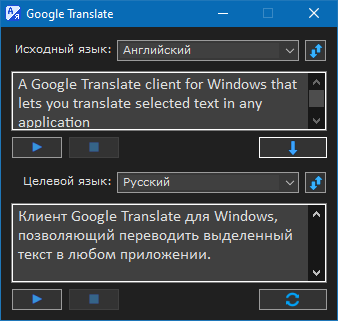
</code></pre></div><p>Сохраните скрипт в кодировке UTF-8 с <strong>BOM</strong>, (иначе получите кракозябры вместо кириллицы).<br />Если кто-нибудь захочет задать вопрос по работе скрипта или сообщить о замеченных багах — прошу писать в <a href="http://forum.script-coding.com/viewtopic.php?id=3328">эту</a> тему.</p>]]></summary>
			<author>
				<name><![CDATA[teadrinker]]></name>
				<uri>https://forum.script-coding.com/profile.php?id=24515</uri>
			</author>
			<updated>2026-07-04T23:47:07Z</updated>
			<id>https://forum.script-coding.com/viewtopic.php?id=18604&amp;action=new</id>
		</entry>
		<entry>
			<title type="html"><![CDATA[AHK: сохранение скриншота экрана в файл (обновление)]]></title>
			<link rel="alternate" href="https://forum.script-coding.com/viewtopic.php?id=18603&amp;action=new" />
			<summary type="html"><![CDATA[<p>Обновленный вариант скрипта из темы Коллекции: <a href="https://forum.script-coding.com/viewtopic.php?id=23">AutoHotkey: сохранение скриншота экрана в файл</a>.</p><p>Скрипт изначально писался под <strong>AutoHotkey 1.0.48.5 (32-бит, ANSI)</strong>. На современных сборках <strong>AutoHotkey_L / AHK v1.1 (64-бит)</strong> он запускался, интерфейс работал, но скриншот не сохранялся — ни в файл, ни в буфер обмена. Клод разобрался и починил, суть — ниже, вдруг кому пригодится (грабли типовые для любого старого скрипта с DllCall/GDI+).</p><p><strong>Причина №1 — усечение указателей в DllCall</strong></p><p>Весь скрипт был написан с типом <span class="bbu">UInt</span> (4 байта) для всех хендлов и указателей: HDC, HBITMAP, HCURSOR, указатели на GpBitmap/GpGraphics/GpBrush и т.д. На 32-битном AHK <span class="bbu">UInt</span> = размеру указателя, всё работало. На 64-битном AHK указатель — 8 байт, и <span class="bbu">UInt</span> его обрезает до младших 32 бит. Указатель на <span class="bbu">GpBitmap</span> (реальный адрес в куче, может быть больше 4 ГБ) превращался в мусор — отсюда <span class="bbu">GdipSaveImageToFile</span> тихо падал с ошибкой.</p><p>Фикс: все хендлы/указатели в DllCall переведены с <span class="bbu">UInt</span>/<span class="bbu">&quot;uint*&quot;</span> на <span class="bbu">&quot;Ptr&quot;</span>/<span class="bbu">&quot;Ptr*&quot;</span>. Заодно расставлены явные типы возврата там, где раньше DllCall неявно (по чётности пар аргументов) возвращал <span class="bbu">Int</span>, обрубая хендл (<span class="bbu">CreateCompatibleDC</span>, <span class="bbu">SelectObject</span>, <span class="bbu">GetDC</span>, <span class="bbu">GdiplusStartup</span> и т.д.).</p><p><strong>Причина №2 — размер структур зависит от битности</strong></p><p>Несколько Win32/GDI+ структур содержат поля-указатели, поэтому их размер и смещения полей отличаются на x86 и x64:<br />- <span class="bbu">GdiplusStartupInput</span> — 16 байт на x86, 24 на x64;<br />- <span class="bbu">CURSORINFO</span> — 20 / 24 байта;<br />- <span class="bbu">ICONINFO</span> — 20 / 32 байта;<br />- <span class="bbu">BITMAP</span>/<span class="bbu">DIBSECTION</span> — 24 / 32 байта (влияет на копирование в буфер обмена);<br />- <span class="bbu">ImageCodecInfo</span> — 76 / 104 байта (энумерация кодеков при сохранении в файл);<br />- <span class="bbu">EncoderParameter</span> — 28 / 32 байта (настройка качества JPEG).<br />Все хардкод-константы заменены на вычисление через <span class="bbu">A_PtrSize</span> во время выполнения.</p><p><strong>Причина №3 — самая коварная: тип по умолчанию у NumPut/NumGet</strong></p><p>Если в <span class="bbu">NumPut</span>/<span class="bbu">NumGet</span> не указать тип явно, AHK по умолчанию использует <span class="bbu">UPtr</span> — то есть <strong>8 байт на x64</strong> (а не 4, как на x86!). В коде было много мест вида <span class="bbu">NumPut(значение, буфер, смещение)</span> без явного типа — на x86 это писало ровно 4 байта и всё работало, а на x64 каждая такая запись стала писать 8 байт, затирая соседнее поле структуры. Например, <span class="bbu">NumPut(40, bi, 0)</span> (запись <span class="bbu">biSize</span> в <span class="bbu">BITMAPINFOHEADER</span>) вместе с собой обнуляла <span class="bbu">biWidth</span>, лежащий сразу следом (offset 4) — из-за этого <span class="bbu">CreateDIBSection</span> получала нулевую ширину и возвращала <span class="bbu">NULL</span>, и вся цепочка сохранения рушилась дальше по коду.</p><p>Тот же паттерн ловился и в блоке установки качества JPEG — там ещё и подсчёт количества параметров цикла (<span class="bbu">Loop, % NumGet(EncoderParameters)</span>) без явного типа мог прочитать 8 байт вместо 4 и увести в мусорное число итераций.</p><p>Фикс — расставить явный тип (<span class="bbu">&quot;UInt&quot;</span>, <span class="bbu">&quot;Int&quot;</span>, <span class="bbu">&quot;UShort&quot;</span>, <span class="bbu">&quot;Ptr&quot;</span>) вообще везде, без исключений.</p><p><strong>Итог:</strong> скрипт обновлён с AutoHotkey 1.0.48.5 (32-бит) под AutoHotkey_L / AHK v1.1.x (64-бит, Unicode).</p><p>Если у кого-то похожий старый GDI+/DllCall-скрипт не работает на новом AHK — первым делом проверяйте именно эти три места: <span class="bbu">UInt</span> вместо <span class="bbu">Ptr</span> для хендлов, хардкод-размеры структур, и голые <span class="bbu">NumPut</span>/<span class="bbu">NumGet</span> без типа.</p><div class="codebox"><pre><code>   #NoEnv
   #UseHook
   ;#SingleInstance Force
   OnExit, Exit
   SetWinDelay, 0
   SetBatchLines, -1
   SetTitleMatchMode, 3
   CoordMode, Mouse

   icoPath = %A_ScriptDir%\ScreenCatcher.ico
   if (FileExist(icoPath) &amp;&amp; !A_IsCompiled)
      Menu, Tray, Icon, % icoPath

   If !pToken := GdipStart()
   {
      MsgBox, 48, Ошибка GDI+!
         , Убедитесь в наличии gdiplus.dll в вашей системе!
      ExitApp
   }

   Ini_ReadSect(&quot;Color-Transparent&quot;, &quot;Red&quot;, Red_, &quot;FF&quot;
                                   , &quot;Green&quot;, Green_, &quot;C7&quot;
                                   , &quot;Blue&quot;, Blue_, &quot;00&quot;
                                   , &quot;Transparent&quot;, Trans, 130)

   Ini_ReadSect(&quot;Settings&quot;, &quot;Output&quot;, Output, &quot;File&quot;
                          , &quot;Out Directory&quot;, OutDirectory, A_ScriptDir
                          , &quot;Extension&quot;, ext, &quot;bmp&quot;
                          , &quot;Capture Cursor&quot;, CaptureCursor, 0
                          , &quot;High Speed&quot;, HighSpeed, 0
                          , &quot;Resize Pointers&quot;, ResizePointers, &quot;Cursors&quot;
                          , &quot;Quality JPEG&quot;, Quality, 100)

   Menu, OutDirectory, Add, % OutDirectory, OutDirectory
   Menu, OutDirectory, Add, Change OutDirectory, OutDirectory

   Menu, Tray, NoStandard
   Menu, Tray, Add, &amp;Открыть папку скрипта, DoubleClick
   Menu, Tray, Default, &amp;Открыть папку скрипта
   Menu, Tray, Add, Hide                  Pause, Pause
   Menu, Tray, Add
   Menu, Tray, Add, Out Directory, :OutDirectory
   Menu, Tray, Add, Help                  F1, Help
   if !A_IsCompiled
   {
      Menu, Tray, Add
      Menu, Tray, Add, Reload, Reload
      Menu, Tray, Add, Edit, Edit
   }
   Menu, Tray, Add
   Menu, Tray, Add, Exit, ExitApp

   Menu, ResizePointers, Add, Cursors, ResizePointers
   Menu, ResizePointers, Add, Markers, ResizePointers
   Menu, ResizePointers, Check, %ResizePointers%


   Menu, Quality, Add, Quality = %Quality%`%, QualityOK
   Menu, Quality, Add, Change Quality, SetQuality

   Menu, Extensions, Add, JPG, :Quality
   Menu, Extensions, Add, BMP, Extensions
   Menu, Extensions, Add, TIF, Extensions
   Menu, Extensions, Add, GIF, Extensions
   Menu, Extensions, Add, PNG, Extensions
   if Output = File
      Menu, Extensions, Check, %ext%

   Menu, Output, Add, Clipboard, OutClip
   Menu, Output, Add, File, :Extensions
   Menu, Output, Check, % Output

   Menu, MainMenu, Add, % &quot;Color – Transparent  &quot;, Settings
   Menu, MainMenu, Add
   Menu, MainMenu, Add, Resize Pointers, :ResizePointers
   Menu, MainMenu, Add, Out Directory, :OutDirectory
   Menu, MainMenu, Add, Output, :Output
   Menu, MainMenu, Add
   Menu, MainMenu, Add, Capture Cursor, CaptureCursor
   if CaptureCursor
      Menu, MainMenu, Check, Capture Cursor

   Menu, MainMenu, Add, High Speed, HighSpeed
   if HighSpeed
      Menu, MainMenu, Check, High Speed

   Menu, MainMenu, Add, Run on Windows Startup, Startup
   FileGetShortcut, % A_Startup &quot;\&quot; RegExReplace(A_ScriptName, &quot;(.*)\..*&quot;, &quot;$1.lnk&quot;)
      , OutTarget,, OutArgs
   if (OutTarget = A_ScriptFullPath &amp;&amp; OutArgs = 1)
   {
      Menu, MainMenu, Check, Run on Windows Startup
      Startup = 1
   }
   Menu, MainMenu, Add
   Menu, MainMenu, Add, Save                                            F12, AreaScreenshot
   Menu, MainMenu, Add, Hide                                             Pause, HideShow
   Menu, MainMenu, Add
   Menu, MainMenu, Add, Help                                             F1, Help
   Menu, MainMenu, Add
   Menu, MainMenu, Add, Exit, ExitApp

   Gui, +LastFound -Caption +AlwaysOnTop +Owner
   WinGet, ID
   WinSet, Transparent, 0
   Gui, Color, % Red_ Green_ Blue_

   Locations = x190 y190|x0 y190|x0 y0|x190 y0|x190 y95|x95 y190|x0 y95|x95 y0
   StringSplit, Location, Locations,|
   Loop 8
      Gui, Add, Text, % &quot;w10 h10 Hidden +0xE hwndText&quot; a_index &quot;ID &quot; Location%a_index%

   Gosub, MarkerColor

   Loop 7
      SetCursor(&quot;IDC_HAND&quot;, &quot;Static&quot; a_index)

   if 1 = 1
   {
      Gui, Show, h900 w900 Hide, ScreenСatcher
      GuiVisible := 0
      Menu, Tray, Rename, Hide                  Pause, Show                Pause
   }
   Else
   {
      Gui, Show, h900 w900, ScreenСatcher
      Melt(ID, Trans, 1), GuiVisible := 1
   }

   OnMessage(0x201, &quot;WM_LBUTTONDOWN&quot;)
   OnMessage(0x203, &quot;WM_LBUTTONDBLCLK&quot;)
   OnMessage(0x204, &quot;WM_RBUTTONDOWN&quot;)

   Hotkey, LButton, WinResize, Off
   SetTimer, %ResizePointers%, 50
   Return

Cursors:
   S = 10
   MouseGetPos, X_M, Y_M, ID_Win
   if (ID_Win = ID3) || (ID_Win = ID4)
   {
      RestoreCursors()
      Hotkey, LButton, Off
      Return
   }
   WinGetPos, X, Y, W, H, ahk_id %ID%
   XW := X + W, YH := Y + H
   if ((X_M &lt;= XW) &amp;&amp; (X_M &gt; XW - 2*S) &amp;&amp; (Y_M &lt;= YH) &amp;&amp; (Y_M &gt; YH - S))
               || ((X_M &lt;= XW) &amp;&amp; (X_M &gt; XW - S) &amp;&amp; (Y_M &lt;= YH) &amp;&amp; (Y_M &gt; YH - 2*S))
      Var = 1

   else if ((X_M &lt; X + 2*S) &amp;&amp; (X_M &gt;= X) &amp;&amp; (Y_M &lt;= YH) &amp;&amp; (Y_M &gt; YH - S))
               || ((X_M &lt; X + S) &amp;&amp; (X_M &gt;= X) &amp;&amp; (Y_M &lt;= YH) &amp;&amp; (Y_M &gt; YH - 2*S))
      Var = 2

   else if ((X_M &lt; X + 2*S) &amp;&amp; (X_M &gt;= X) &amp;&amp; (Y_M &lt; Y + S) &amp;&amp; (Y_M &gt;= Y))
               || ((X_M &lt; X + S) &amp;&amp; (X_M &gt;= X) &amp;&amp; (Y_M &lt; Y + 2*S) &amp;&amp; (Y_M &gt;= Y))
      Var = 3

   else if ((X_M &lt;= XW ) &amp;&amp; (X_M &gt; XW - 2*S) &amp;&amp; (Y_M &lt; Y + S) &amp;&amp; (Y_M &gt;= Y))
               || ((X_M &lt;= XW ) &amp;&amp; (X_M &gt; XW - S) &amp;&amp; (Y_M &lt; Y + 2*S) &amp;&amp; (Y_M &gt;= Y))
      Var = 4

   else if (X_M &lt;= XW) &amp;&amp; (X_M &gt; XW - S) &amp;&amp; (Y_M &lt;= YH - S) &amp;&amp; (Y_M &gt;= Y + S)
      Var = 5
   else if (X_M &lt;= XW - S) &amp;&amp; (X_M &gt;= X + S) &amp;&amp; (Y_M &lt;= YH) &amp;&amp; (Y_M &gt; YH - S)
      Var = 6
   else if (X_M &lt; X + S) &amp;&amp; (X_M &gt;= X) &amp;&amp; (Y_M &lt;= YH - S) &amp;&amp; (Y_M &gt;= Y + S)
      Var = 7
   else if (X_M &lt;= XW - S) &amp;&amp; (X_M &gt;= X + S) &amp;&amp; (Y_M &lt; Y + S) &amp;&amp; (Y_M &gt;= Y)
      Var = 8
   else
      Var =

   if Var
   {
      Hotkey, LButton, On
      if ((Var = 1) || (Var = 3)) &amp;&amp; (Cursor != &quot;IDC_SIZENWSE&quot;)
         RestoreCursors(), SetSystemCursor(&quot;IDC_SIZENWSE&quot;), Cursor := &quot;IDC_SIZENWSE&quot;

      if ((Var = 2) || (Var = 4)) &amp;&amp; (Cursor != &quot;IDC_SIZENESW&quot;)
         RestoreCursors(), SetSystemCursor(&quot;IDC_SIZENESW&quot;), Cursor := &quot;IDC_SIZENESW&quot;

      if ((Var = 5) || (Var = 7)) &amp;&amp; (Cursor != &quot;IDC_SIZEWE&quot;)
         RestoreCursors(), SetSystemCursor(&quot;IDC_SIZEWE&quot;), Cursor := &quot;IDC_SIZEWE&quot;

      if ((Var = 6) || (Var = 8)) &amp;&amp; (Cursor != &quot;IDC_SIZENS&quot;)
         RestoreCursors(), SetSystemCursor(&quot;IDC_SIZENS&quot;), Cursor := &quot;IDC_SIZENS&quot;
   }
   else
   {
      Hotkey, LButton, Off
      RestoreCursors(), Cursor := &quot;&quot;
   }
   Return

Markers:
   MouseGetPos, X_M, Y_M, ID_Win
   if (ID_Win = ID3) || (ID_Win = ID4)
   {
      Hotkey, LButton, Off
      Loop 8
         GuiControl, Hide, Static%a_index%
      Return
   }
   WinGetPos, X, Y, W, H, ahk_id %ID%
   XW := X + W, YH := Y + H

   if (X_M &lt;= XW + 20) &amp;&amp; (X_M &gt;= XW - 10) &amp;&amp; (Y_M &lt;= YH + 20) &amp;&amp; (Y_M &gt;= YH - 10)
      Var = 1

   else if (X_M &lt;= X + 10) &amp;&amp; (X_M &gt;= X - 20) &amp;&amp; (Y_M &lt;= YH + 20) &amp;&amp; (Y_M &gt;= YH - 10)
      Var = 2

   else if (X_M &lt;= X + 10) &amp;&amp; (X_M &gt;= X - 20) &amp;&amp; (Y_M &lt;= Y + 10) &amp;&amp; (Y_M &gt;= Y - 20)
      Var = 3

   else if (X_M &lt;= XW + 20) &amp;&amp; (X_M &gt;= XW - 10) &amp;&amp; (Y_M &lt;= Y + 10) &amp;&amp; (Y_M &gt;= Y - 20)
      Var = 4

   else if (X_M &lt;= XW + 20) &amp;&amp; (X_M &gt;= XW - 10) &amp;&amp; (Y_M &lt; YH - 10) &amp;&amp; (Y_M &gt; Y + 10)
      Var = 5

   else if (X_M &lt; XW - 10) &amp;&amp; (X_M &gt; X + 10) &amp;&amp; (Y_M &lt;= YH + 20) &amp;&amp; (Y_M &gt;= YH - 10)
      Var = 6

   else if (X_M &lt;= X + 10) &amp;&amp; (X_M &gt;= X - 20) &amp;&amp; (Y_M &lt; YH - 10) &amp;&amp; (Y_M &gt; Y + 10)
      Var = 7

   else if (X_M &lt; XW - 10) &amp;&amp; (X_M &gt; X + 10) &amp;&amp; (Y_M &lt;= Y + 10) &amp;&amp; (Y_M &gt;= Y - 20)
      Var = 8

   else Var =

   if Var
   {
      Hotkey, LButton, On
      GuiControl, Show, Static%Var%
      Loop 8
         if (a_index != Var)
            GuiControl, Hide, Static%a_index%
   }
   else
   {
      Hotkey, LButton, Off
      Loop 8
         GuiControl, Hide, Static%a_index%
   }
   Return

WinResize:
   SetTimer, %ResizePointers%, Off
   X_M_Old := X_M, Y_M_Old := Y_M
   While GetKeyState(&quot;LButton&quot;, &quot;P&quot;)
   {
      MouseGetPos, X_M, Y_M
      dX := X_M - X_M_Old, dY := Y_M - Y_M_Old
      IfEqual, Var, 1, WinMove, ahk_id %ID%,,,, W + dX, H + dY
      IfEqual, Var, 2, WinMove, ahk_id %ID%,, X + dX,, W - dX, H + dY
      IfEqual, Var, 3, WinMove, ahk_id %ID%,, X + dX, Y + dY, W - dX, H - dY
      IfEqual, Var, 4, WinMove, ahk_id %ID%,,, Y + dY, W + dX, H - dY
      IfEqual, Var, 5, WinMove, ahk_id %ID%,,,, W + dX
      IfEqual, Var, 6, WinMove, ahk_id %ID%,,,,, H + dY
      IfEqual, Var, 7, WinMove, ahk_id %ID%,, X + dX,, W - dX
      IfEqual, Var, 8, WinMove, ahk_id %ID%,,, Y + dY,, H - dY
      Sleep, 10
   }
   SetTimer, %ResizePointers%, On
   Return

GuiSize:
   GuiControl, Move, Static1, % &quot;x&quot; A_GuiWidth - 10 &quot;y&quot; A_GuiHeight - 10
   GuiControl, Move, Static2, % &quot;x0 y&quot; A_GuiHeight - 10
   GuiControl, Move, Static3, % &quot;x0 y0&quot;
   GuiControl, Move, Static4, % &quot;x&quot; A_GuiWidth - 10 &quot;y0&quot;
   GuiControl, Move, Static5, % &quot;x&quot; A_GuiWidth - 10 &quot;y&quot; (A_GuiHeight - 10)/2
   GuiControl, Move, Static6, % &quot;x&quot; (A_GuiWidth - 10)/2 &quot;y&quot; A_GuiHeight - 10
   GuiControl, Move, Static7, % &quot;x0 y&quot; (A_GuiHeight - 10)/2
   GuiControl, Move, Static8, % &quot;x&quot; (A_GuiWidth - 10)/2 &quot;y0&quot;
   Return

GuiClose:
   Gosub, HideShow
   Return

GuiEscape:
   Gosub, HideShow
   Return

GuiContextMenu:
   RestoreCursors()
   Menu, MainMenu, Show
   Return

QualityOK:
   Menu, Extensions, UnCheck, %ext%
   Menu, Extensions, Check, % (ext := &quot;jpg&quot;)
CheckOutput:
   Menu, Output, UnCheck, Clipboard
   Menu, Output, Check, File
   Output = File
   Return

SetQuality:
   Old_Quality := Quality
   Menu, Extensions, UnCheck, %ext%
   Menu, Extensions, Check, % (ext := &quot;jpg&quot;)
   Gosub, CheckOutput
   IfWinExist, ahk_id %ID4%
      Goto, 4GuiClose
   Gui, 4:+owner1 +LastFound
   WinGet, ID4
   WinSet, Transparent, 0
   Gui, 4:Color, CCC8C0
   Gui, 4:Font, s9, Arial
   Gui, 4:Add, Text, x11 y17 w29 cBlue, Quality:
   Gui, 4:Add, Slider, vQSlider gQualitySet x58 y15 w182 h25 ToolTip AltSubmit, % Quality
   Gui, 4:Add, Button, gQOk x80 y50 w90 h23, OK
   XQ := X_M - 260 &lt; 0 ? 0 : X_M - 260, YQ := Y_M - 105 &lt; 0 ? 0 : Y_M - 105
   Gui, 4:Show, x%XQ% y%YQ% w250 h85, Quality of JPEG
   Melt(ID4, 255, 1)
   Return

QualitySet:
   Quality := QSlider
   Return

QOk:
   WinClose, ahk_id %ID4%
   Return

4GuiClose:
   if (Quality != Old_Quality)
      Menu, Quality, Rename, Quality = %Old_Quality%`%, Quality = %Quality%`%
   Melt(ID4, 255, 0)
   Gui, 4:Destroy
   Return

Extensions:
   Menu, Extensions, UnCheck, %ext%
   StringLower, ext, A_ThisMenuItem
   Menu, Extensions, Check, %ext%
   Gosub, CheckOutput
   Return

OutClip:
   Menu, Output, UnCheck, File
   Menu, Extensions, UnCheck, %ext%
   Menu, Output, Check, Clipboard
   Output = Clipboard
   Return

OutDirectory:
   if A_ThisMenuItem = Change OutDirectory
   {
      Old_OutDirectory := OutDirectory
      Gosub, HideShow
      FileSelectFolder, OutDir, *%OutDirectory%, 3, Select Out Directory:
      OutDirectory := OutDir ? OutDir : OutDirectory
      if (OutDirectory != Old_OutDirectory)
         Menu, OutDirectory, Rename, %Old_OutDirectory%, %OutDirectory%
      if !GuiVisible
         Gosub, HideShow
   }
   Else
      Run, % OutDirectory
   Return

ResizePointers:
   Menu, ResizePointers, UnCheck, %ResizePointers%
   SetTimer, %ResizePointers%, Off
   ResizePointers := A_ThisMenuItem
   Menu, ResizePointers, Check, %ResizePointers%
   Loop 8
      GuiControl, Hide, Static%a_index%
   SetTimer, %ResizePointers%, 50
   RestoreCursors()
   Return

CaptureCursor:
   CaptureCursor := !CaptureCursor
   Menu, MainMenu, % CaptureCursor ? &quot;Check&quot; : &quot;UnCheck&quot;, Capture Cursor
   Return

HighSpeed:
   HighSpeed := !HighSpeed
   Menu, MainMenu, % HighSpeed ? &quot;Check&quot; : &quot;UnCheck&quot;, High Speed
   Return

Startup:
   if Startup := !Startup
   {
      FileCreateShortcut, % A_ScriptFullPath
         , % A_Startup &quot;\&quot; RegExReplace(A_ScriptName, &quot;(.*)\..*&quot;, &quot;$1.lnk&quot;)
         , % A_ScriptDir, 1
      Menu, MainMenu, Check, Run on Windows Startup
   }
   Else
   {
      FileDelete, % A_Startup &quot;\&quot; RegExReplace(A_ScriptName, &quot;(.*)\..*&quot;, &quot;$1.lnk&quot;)
      Menu, MainMenu, UnCheck, Run on Windows Startup
   }
   Return

Settings:
   IfWinExist, ahk_id %ID3%
      Goto, 3GuiClose
   Gui, 3:+owner1 +LastFound
   WinGet, ID3
   WinSet, Transparent, 0
   Gui, 3:Color, CCC8C0

   Gui, 3:Font, s9, Arial
   Gui, 3:Add, Text, x11 y17 w29 cRed, Red
   Gui, 3:Add, Text, x10 y47 w30 cGreen, Green
   Gui, 3:Add, Text, x11 y77 w29 cBlue, Blue
   Gui, 3:Add, Text, x10 y107 w30 cWhite, Trans

   Options = x43 w197 h20 Range0-255 ToolTip AltSubmit
   Gui, 3:Add, Slider, vRed gColorSet %Options% y15, 0x%Red_%
   Gui, 3:Add, Slider, vGreen gColorSet %Options% y45, 0x%Green_%
   Gui, 3:Add, Slider, vBlue gColorSet %Options% y75, 0x%Blue_%
   Gui, 3:Add, Slider, vTrans gTransSet %Options% y105, % Trans

   Gui, 3:Add, Button, g3GuiClose x80 y140 w90 h23, OK

   WinGetPos, X, Y, W, H, ahk_id %ID%
   3Gui_Y := (Y + H + 15 + 180 &lt;= A_ScreenHeight) ? Y + H + 15 : Y - 180 - 35
   3Gui_Y := (3Gui_Y &lt; 0) ? 0 : 3Gui_Y
   3Gui_X := (X+(W-250)/2+250 &gt; A_ScreenWidth) ? A_ScreenWidth - 250 : X + (W-256)/2
   3Gui_X := (3Gui_X &lt; 0) ? 0 : 3Gui_X

   GuiControl, 3:Focus, Static1
   Gui, 3:Show, x%3Gui_X% y%3Gui_Y% w250 h180, Color – Transparent
   Melt(ID3, 255, 1)
   Return

ColorSet:
   %A_GuiControl%_ := SubStr(&quot;00&quot; . Trans(%A_GuiControl%, 10, 16), -1)
   Gui, 1:Color, % Red_ Green_ Blue_

MarkerColor:
   MarkerColor := InvertColor(Red_, Green_, Blue_)
   Loop 8
      SetColorToControl(Text%a_index%ID, MarkerColor)
   Return

TransSet:
   WinSet, Transparent, % Trans, ahk_id %ID%
   Return

3GuiClose:
   Melt(ID3, 255, 0)
   Gui, 3:Destroy
   Return

Help:
   IfWinExist, ahk_id %ID5%
      Goto, 5GuiClose
   if ((X &lt; 540) &amp;&amp; (Y &lt; 590)) &amp;&amp; GuiVisible
   {
      DetectHiddenWindows On
      Melt(ID, Trans, 0)
      WinMove, ahk_id %ID%,, 540
      Melt(ID, Trans, 1)
   }
   Gui, 5:Default
   Gui, +LastFound +Resize
   WinGet, ID5
   Gui, Color, White
   Gui, Add, Text, x0 y0 w515 h550 -Background
   Gui, Add, Text, x4 y4 w507 h73 +0x6
   Gui, Font, s10 bold, Arial
   Gui, Add, Text, x9 y11 BackgroundTrans, Содержание:
   Gui, Font, s9 norm underline
   Gui, Add, Text, gPass x30 y32 cBlue BackgroundTrans, Работа с программой
   Gui, Add, Text, gPass xp yp+16 cBlue BackgroundTrans, Контекстное меню
   Gui, Add, Text, gPass x200 y32 cBlue BackgroundTrans, Меню иконки в трее
   Gui, Add, Text, gPass xp yp+16 cBlue BackgroundTrans, Горячие клавиши
   Gui, Font, s10 norm
   HelpText =
(Join
     Программа «ScreenСatcher» создана для получения скриншотов экрана или его областе
й и сохранения их в файлы с расширениями jpg, bmp, tif, gif, png.`r`n
`r`n                                        Работа с программой.`r`n`r`n     После запу
ска файла на экране появляется полупрозрачное окно, которое можно перемещать левой кнопко
й мыши и менять его размеры.`r`n`r`n     Чтобы получить скриншот области экрана, размести
те окно точно над ней и кликните дважды в пределах окна или нажмите F12. В зависимос
ти от установок, доступных через меню, изображение будет помещено либо в буфер обмена
, либо записано в файл, который появится в папке вывода (по умолчанию – в папке скрипта)
. Перед получением скриншота окно программы можно скрыть, если оно мешает, нажатием клав
иши Pause или средней кнопки мыши. В этом случае программа сработает при нажатии F12.
`r`n     Чтобы получить скриншот всего экрана, скройте окно программы и нажмите PrintScre
en.`r`n     Для получения скриншота активного окна нажмите Shift + PrintScreen
.`r`n`r`n     Управление программой осуществляется горячими клавишами, через контекстно
е меню главного окна (клик правой кнопкой мыши в пределах окна) и меню иконки программ
ы в трее (клик правой кнопкой мыши на иконке программы в трее)
.`r`n`r`n                                          Контекстное меню.`r`n`r`nColo
r – Transparent.`r`nУстановки цвета и прозрачности окна.`r`n`r`nResize Pointers.`r`nВыбо
р индикатора, отображаемого при изменении размеров окна: модифицированный курсор мыши, либ
о цветные маркеры.`r`n`r`nOut Directory.`r`nПри выборе этого пункта появляется подменю с н
азванием текущей папки, в которую будут помещаться файлы скриншотов. Для смены папки кликн
ите это подменю.`r`n`r`nOutput.`r`nПри выборе подменю Clipboard скриншот будет записыватьс
я в буфер обмена. File — выбор расширения файлов, в которые будут записываться скриншоты
. При выборе JPG открывается подменю с двумя пунктами. 1-ый – текущее значение качества (с
тепени сжатия) JPEG, кликните его, если оно Вас устраивает. 2-ой – Change Quality – смен
а качества JPEG.`r`n`r`nCapture Cursor.`r`nПри установке галочки в этот пункт меню в скрин
шот будет включен курсор.`r`n`r`nHigh Speed.`r`nЕсли преполагается делать скриншоты чаще
, чем раз в секунду, поставьте галочку в этот пункт меню. При выборе High Speed перед пол
учением скришота лучше скрыть окно скрипта. В этом режиме к названию файла бу
дут добавляться милисекунды.`r`n`r`nRun on Windows Startup.`r`nПри выборе этого пункта созд
аётся ярлык программы в папке автозагрузки текущего пользователя, и при следующей загрузк
е программа запустится автоматически, окно её первоначально будет скрыто. При снятии галочк
и с этого пункта ярлык удаляется.`r`n`r`nSave.`r`nПолучить скриншот области экрана под окно
м программы.`r`n`r`nHide.`r`nСпрятать окно программы
.`r`n`r`n                                          Меню иконки в трее.`r`n`r`nHide.`r`nСп
рятать окно программы.`n`nShow.`nПоказать окно программы.`r`n
`r`n                                            Горячие клавиши.`n`nMButton (средняя к
нопка мыши) — скрыть окно.`nCtrl + MButton — скрыть/показать окно.`nPause – скрыть/показат
ь окно.`nScrollLock – показать окно в центре экрана.`nF12 – скриншот области экрана, лежаще
й непосредственно под окном программы.`nPrintScreen — скриншот всего экрана.`nShift + Print
Screen – скриншот активного окна.`nEsc – закрытие окон установок и справки, если открыты, и
ли скрытие главного окна.`nЕсли открыто окно установок, щелчок ЛКМ по названию слайдер
а – установка в левую крайнюю позицию, ПКМ – в правую крайнюю.`nF1 – вызов справки.
)
   Gui, Add, Edit, x3 y81 w509 h466 ReadOnly hwndEditID, % HelpText
   GuiControl, Focus, Static1
   Gui, Show, x0 y0 w515 h550, ScreenСatcher Help
   Return

Reload:
   Reload
   Return

Edit:
   ;Edit
    If FileExist(&quot;C:\Program Files\Bred3\bred3_2k.exe&quot;)
      Run, &quot;C:\Program Files\Bred3\bred3_2k.exe&quot; &quot;%A_ScriptFullPath%&quot;
    Else If FileExist(&quot;C:\Program Files (86)\Bred3\bred3_2k.exe&quot;)
      Run, &quot;C:\Program Files (86)\Bred3\bred3_2k.exe&quot; &quot;%A_ScriptFullPath%&quot;
    Else If FileExist(&quot;C:\Program Files (x86)\Bred3\bred3_2k.exe&quot;)
      Run, &quot;C:\Program Files (x86)\Bred3\bred3_2k.exe&quot; &quot;%A_ScriptFullPath%&quot;
    Else If FileExist(&quot;C:\Program Files\PSPad editor\PSPad.exe&quot;)
      Run, &quot;C:\Program Files\PSPad editor\PSPad.exe&quot; &quot;%A_ScriptFullPath%&quot;
    Else
      Run, &quot;notepad.exe&quot; &quot;%A_ScriptFullPath%&quot;
   Return

Pass:
   SendMessage, EM_LINEFROMCHAR := 201, InStr(HelpText, A_GuiControl) - 1,,, ahk_id %EditID%
   GotoLineUp(ErrorLevel + 1, EditID)
   SendInput, {Home}+{Right 3}
   Return

5GuiSize:
   GuiControl, Move, Static1, w%A_GuiWidth% h%A_GuiHeight%
   GuiControl, Move, Static2, % &quot;w&quot; A_GuiWidth - 8
   GuiControl, MoveDraw, Edit1, % &quot;w&quot; A_GuiWidth - 6 &quot;h&quot; A_GuiHeight - 84
   Return

5GuiClose:
   Gui, 5:Destroy
   Return

Exit:
   GdipShutdown(pToken)
   While (idx := a_index + 2) &lt; 6
      IfWinExist, % &quot;ahk_id&quot; ID%idx%
         Gosub, %idx%GuiClose
   if GuiVisible
   {
      Melt(ID, Trans, 0)
      Gui, Destroy
   }
   RestoreCursors()

   Ini_WriteSect(&quot;Color-Transparent&quot;, &quot;Red&quot;, Red_
                                    , &quot;Green&quot;, Green_
                                    , &quot;Blue&quot;, Blue_
                                    , &quot;Transparent&quot;, Trans)

   Ini_WriteSect(&quot;Settings&quot;, &quot;Output&quot;, Output
                           , &quot;Out Directory&quot;, OutDirectory
                           , &quot;Extension&quot;, ext
                           , &quot;Capture Cursor&quot;, CaptureCursor
                           , &quot;High Speed&quot;, HighSpeed
                           , &quot;Resize Pointers&quot;, ResizePointers
                           , &quot;Quality JPEG&quot;, Quality)
ExitApp:
   ExitApp

Melt(hWnd, Trans, Appear, N = 20)
{
   WinShow, ahk_id %hWnd%
   While A_Index * N &lt; Trans
   {
      WinSet, Transparent, % Appear ? A_Index * N : Trans - A_Index * N, ahk_id %hWnd%
      Sleep, 10
   }
   if Appear
      WinSet, Transparent, % Trans, ahk_id %hWnd%
   Else
      WinHide, ahk_id %hWnd%
}

WM_LBUTTONDBLCLK()
{
   if A_Gui = 1
      Gosub, AreaScreenshot
}

WM_LBUTTONDOWN()
{
   WM_NCLBUTTONDOWN := 0xA1, HTCAPTION := 2
   if (A_Gui = 1) &amp;&amp; (!Var || GetKeyState(&quot;Alt&quot;))
      PostMessage, WM_NCLBUTTONDOWN, HTCAPTION
   if A_Gui = 3
      SetValue1(0)
   if A_Gui = 4
      SetValue2(0)
}

WM_RBUTTONDOWN()
{
   if A_Gui = 3
      SetValue1(255)
   if A_Gui = 4
      SetValue2(255)
}

SetValue1(Pos)
{
   local Control, Text
   MouseGetPos,,,, Control
   if !InStr(Control, &quot;Static&quot;)
      Return
   GuiControl, 3:, % &quot;msctls_trackbar32&quot; SubStr(Control, 7), % Pos
   Gui, 3:Submit, NoHide
   GuiControlGet, Text, 3:, % Control
   %Text%_ := SubStr(&quot;00&quot; . Trans(%Text%, 10, 16), -1)
   Gui, 1:Color, % Red_ Green_ Blue_

   Gosub, MarkerColor
   Gosub, TransSet
}

SetValue2(Pos)
{
   local Control
   MouseGetPos,,,, Control
   if !InStr(Control, &quot;Static&quot;)
      Return
   GuiControl, 4:, msctls_trackbar321, % Pos
   Gui, 4:Submit, NoHide
   Quality := QSlider
}

InvertColor(Red, Green, Blue)
{
   _Red := SubStr(&quot;00&quot; . Trans(Trans(Red, 16, 10) ^ 255, 10, 16), -1)
   _Green := SubStr(&quot;00&quot; . Trans(Trans(Green, 16, 10) ^ 255, 10, 16), -1)
   _Blue := SubStr(&quot;00&quot; . Trans(Trans(Blue, 16, 10) ^ 255, 10, 16), -1)
   Return &quot;0x&quot; _Red _Green _Blue
}

Ini_WriteSect(Section, Key1, Value1, Key2 = &quot;&quot;, Value2 = &quot;&quot;
   , Key3 = &quot;&quot;, Value3 = &quot;&quot;, Key4 = &quot;&quot;, Value4 = &quot;&quot;, Key5 = &quot;&quot;, Value5 = &quot;&quot;
   , Key6 = &quot;&quot;, Value6 = &quot;&quot;, Key7 = &quot;&quot;, Value7 = &quot;&quot;, Key8 = &quot;&quot;, Value8 = &quot;&quot;
   , Key9 = &quot;&quot;, Value9 = &quot;&quot;, Key10 = &quot;&quot;, Value10 = &quot;&quot;)
{
; Пишет секцию ini-файла в директории скрипта, за раз не более 10-ти ключей

   FileName := A_ScriptDir &quot;\&quot; RegExReplace(A_ScriptName, &quot;(.*)\..*&quot;, &quot;$1.ini&quot;)
   While Key%a_index%
      IniWrite, % Value%a_index%, % FileName, % Section, % Key%a_index%
}

Ini_ReadSect(Section, Key1, ByRef var1, Default1 = &quot;&quot;, Key2 = &quot;&quot;, ByRef var2 = &quot;&quot;, Default2 = &quot;&quot;
   , Key3 = &quot;&quot;, ByRef var3 = &quot;&quot;, Default3 = &quot;&quot;, Key4 = &quot;&quot;, ByRef var4 = &quot;&quot;, Default4 = &quot;&quot;
   , Key5 = &quot;&quot;, ByRef var5 = &quot;&quot;, Default5 = &quot;&quot;, Key6 = &quot;&quot;, ByRef var6 = &quot;&quot;, Default6 = &quot;&quot;
   , Key7 = &quot;&quot;, ByRef var7 = &quot;&quot;, Default7 = &quot;&quot;, Key8 = &quot;&quot;, ByRef var8 = &quot;&quot;, Default8 = &quot;&quot;
   , Key9 = &quot;&quot;, ByRef var9 = &quot;&quot;, Default9 = &quot;&quot;, Key10 = &quot;&quot;, ByRef var10 = &quot;&quot;, Default10 = &quot;&quot;)
{
; Читает секцию ini-файла в директории скрипта, за раз не более 10-ти ключей

   FileName := A_ScriptDir &quot;\&quot; RegExReplace(A_ScriptName, &quot;(.*)\..*&quot;, &quot;$1.ini&quot;)
   While Key%a_index%
      IniRead, var%a_index%, % FileName, % Section, % Key%a_index%, % Default%a_index%
}

Trans(Number, N, K)
{
; Переводит число Number из системы счисления N в систему счисления K. Number должно
; быть написано без префикса, и, если содержит буквенные символы, в кавычках.
; Возвращает значение без префикса.

   if N = 10
      Return Trans_Dec(Number, K)
   if K = 10
      Return Trans_ToDec(Number, N)
   Else
      Return Trans_Dec(Trans_ToDec(Number, N), K)
}

Trans_Dec(Number, K)
{
   if K = 16
   {
      SetFormat, integer, hex
      TransNumber := SubStr(Number + 0, 3)
      SetFormat, integer, dec
      Return TransNumber
   }
   if (Number &lt; K)
      Return Number &lt; 10 ? Number : Chr(Asc(&quot;A&quot;) + Number - 10)
   Mod := Mod(Number,K) &lt; 10 ? Mod(Number,K) : Chr(Asc(&quot;A&quot;) + Mod(Number,K) - 10)
   Return Trans_Dec(Floor(Number/K),K) . Mod
}

Trans_ToDec(Number, N)
{
   if N = 16
   {
      SetFormat, integer, d
      Number := &quot;0x&quot; . Number
      Return Number + 0
   }
   StringCaseSense on
   if StrLen(Number) = 1
   {
      if Number between a and z
         Number := Asc(Number) - Asc(&quot;a&quot;) + 10
      if Number between A and Z
         Number := Asc(Number) - Asc(&quot;A&quot;) + 10
      Return Number
   }
   SubString := SubStr(Number,1,1)
   if SubString between a and z
      SubString := Asc(SubString) - Asc(&quot;a&quot;) + 10
   if SubString between A and Z
      SubString := Asc(SubString) - Asc(&quot;A&quot;) + 10
   Return SubString*N**(StrLen(Number)-1) + Trans_ToDec(SubStr(Number,2),N)
}

GotoLineUp(N, Hwnd_Edit)
{
; Осуществляет переход к строке с номером N в контроле Edit, строка, если
; возможно, становится первой видимой

   EM_LINEINDEX := 0xBB, EM_SETSEL := 0xB1, EM_SCROLLCARET := 0xB7
   EM_GETFIRSTVISIBLELINE := 0xCE, EM_LINESCROLL := 0xB6
   SendMessage, EM_LINEINDEX, N - 1,,, ahk_id %Hwnd_Edit%
   SendMessage, EM_SETSEL, Errorlevel, Errorlevel,, ahk_id %Hwnd_Edit%
   SendMessage, EM_SCROLLCARET,,,, ahk_id %Hwnd_Edit%
   SendMessage, EM_GETFIRSTVISIBLELINE,,,, ahk_id %Hwnd_Edit%
   SendMessage, EM_LINESCROLL,, N - 1 - Errorlevel,, ahk_id %Hwnd_Edit%
   ControlFocus,, ahk_id %Hwnd_Edit%
   SendInput, {End}
}

SetCursor(pShape, pCtrl=&quot;&quot;)
{
   return SetCursor_(pShape, pCtrl, 0)
}

SetCursor_(wparam, lparam, msg)
{
   global ID, ID3, ID5
   static WM_SETCURSOR = 0x20, WM_MOUSEMOVE = 0x200
   static IDC_HAND = 32649, IDC_ARROW = 32512
   static hover, cursor, ctrls = &quot;`n&quot;, init

   if !init
      init := 1, OnMessage(WM_SETCURSOR, &quot;SetCursor_&quot;), OnMessage(WM_MOUSEMOVE, &quot;SetCursor_&quot;)

   if A_Gui =
   {
      cursor := DllCall(&quot;LoadCursor&quot;, &quot;Ptr&quot;, 0, &quot;Int&quot;, %WPARAM%, &quot;Ptr&quot;)   ; Ptr вместо UInt - на x64 хендл курсора может быть больше 32 бит
      ctrls .= lparam &quot;=&quot; cursor &quot;`n&quot;
   }

   If (msg = WM_SETCURSOR)
      ifEqual, hover, 1, return 1

   if (msg = WM_MOUSEMOVE)
   {
      MouseGetPos,,, ID_Win, Control
      if (ID_Win = ID)
         Return

      If j := InStr(ctrls, &quot;`n&quot; Control &quot;=&quot;)
      {
         if (ID_Win = ID5) &amp;&amp; (SubStr(Control, 7) &lt; 4)
         {
            DllCall(&quot;SetCursor&quot;, &quot;Ptr&quot;, IDC_ARROW), hover := &quot;&quot;
            Return
         }
         hover := true
         j += 2 + StrLen(Control)
         j := SubStr(ctrls, j, InStr(ctrls, &quot;`n&quot;, 0, j) - j + 1)
         DllCall(&quot;SetCursor&quot;, &quot;Ptr&quot;, j)
      }
      else DllCall(&quot;SetCursor&quot;, &quot;Ptr&quot;, IDC_ARROW), hover := &quot;&quot;
   }
}

SetSystemCursor(IDC)
{
   IDC_SIZENWSE = 32642
   IDC_SIZENESW = 32643
   IDC_SIZEWE = 32644
   IDC_SIZENS = 32645
   IDC_ARROW = 32512
   CursorHandle := DllCall( &quot;LoadCursor&quot;, &quot;Ptr&quot;, 0, &quot;Int&quot;, %IDC%, &quot;Ptr&quot;)
   DllCall(&quot;SetSystemCursor&quot;, &quot;Ptr&quot;, CursorHandle, &quot;Int&quot;, IDC_ARROW)
}

RestoreCursors()
{
   SPI_SETCURSORS = 0x57
   DllCall(&quot;SystemParametersInfo&quot;, UInt, SPI_SETCURSORS, UInt, 0, &quot;Ptr&quot;, 0, UInt, 0 ) ; fix x64: 3-й параметр это указатель (pvParam)
}

SetColorToControl(hwnd, Color)
{
   WinGetPos,,, w, h, ahk_id %hwnd%
   sColor := 0xFF000000|Color
   DllCall(&quot;gdiplus\GdipCreateSolidFill&quot;, &quot;Int&quot;, sColor, &quot;Ptr*&quot;, pBrush)
   DllCall(&quot;gdiplus\GdipCreateBitmapFromScan0&quot;, &quot;Int&quot;, w
      , &quot;Int&quot;, h, &quot;Int&quot;, 0, &quot;Int&quot;, 0x26200A, &quot;Ptr&quot;, 0, &quot;Ptr*&quot;, pBitmap)
   DllCall(&quot;gdiplus\GdipGetImageGraphicsContext&quot;, &quot;Ptr&quot;, pBitmap, &quot;Ptr*&quot;, G)
   DllCall(&quot;gdiplus\GdipFillRectangle&quot;
      , &quot;Ptr&quot;, G, &quot;Ptr&quot;, pBrush, &quot;float&quot;, 0, &quot;float&quot;, 0, &quot;float&quot;, w, &quot;float&quot;, h)
   DllCall(&quot;gdiplus\GdipCreateHBITMAPFromBitmap&quot;
      , &quot;Ptr&quot;, pBitmap, &quot;Ptr*&quot;, hBitmap, &quot;Int&quot;, 0xffffffff)
   SendMessage, STM_SETIMAGE := 0x172, 0x0, hBitmap,, ahk_id %hwnd%
   DllCall(&quot;DeleteObject&quot;, &quot;Ptr&quot;, ErrorLevel)
   DllCall(&quot;gdiplus\GdipDeleteBrush&quot;, &quot;Ptr&quot;, pBrush)
   DllCall(&quot;gdiplus\GdipDeleteGraphics&quot;, &quot;Ptr&quot;, G)
   DllCall(&quot;gdiplus\GdipDisposeImage&quot;, &quot;Ptr&quot;, pBitmap)
   DllCall(&quot;DeleteObject&quot;, &quot;Ptr&quot;, hBitmap)
}

CaptureScreen(aRect, sFile, nQuality, Cursor)
{
   pBitmap := BitmapFromScreen(aRect, Cursor, 0x40000000 | 0x00CC0020)
   If   sFile = 0
      SetBitmapToClipboard(pBitmap)
   Else
      SaveBitmapToFile(pBitmap, sFile, nQuality)
   DllCall(&quot;gdiplus\GdipDisposeImage&quot;, &quot;Ptr&quot;, pBitmap) ; fix x64: указатель на GpBitmap, не UInt
}

BitmapFromScreen(Screen, Cursor, Raster=&quot;&quot;)
{
   if (Screen = 0)
   {
      Sysget, x, 76
      Sysget, y, 77
      Sysget, w, 78
      Sysget, h, 79
   }
   else
   {
      StringSplit, S, Screen, |
      x := S1, y := S2, w := S3, h := S4
   }
   ; fix x64: дескрипторы (HDC/HBITMAP) и указатели — это &quot;Ptr&quot; (8 байт на x64), а не UInt (4 байта).
   ; Раньше при усечении 64-битных хендлов до 32 бит CreateDIBSection/SelectObject/GdipCreateBitmapFromHBITMAP
   ; ломались, и скриншот не сохранялся.
   chdc := DllCall(&quot;CreateCompatibleDC&quot;, &quot;Ptr&quot;, 0, &quot;Ptr&quot;)
   VarSetCapacity(bi, 40, 0)
   ; fix x64: NumPut/NumGet без явного типа по умолчанию используют &quot;UPtr&quot; (8 байт на x64!),
   ; что затирает соседние поля структуры при записи. Все поля ниже — DWORD(4)/LONG(4)/WORD(2),
   ; поэтому тип указывается явно.
   NumPut(40, bi, 0, &quot;UInt&quot;), NumPut(w, bi, 4, &quot;Int&quot;), NumPut(h, bi, 8, &quot;Int&quot;), NumPut(1, bi, 12, &quot;UShort&quot;)
   NumPut(32, bi, 14, &quot;UShort&quot;), NumPut(0, bi, 16, &quot;UInt&quot;)
   hbm := DllCall(&quot;CreateDIBSection&quot;
      , &quot;Ptr&quot; , chdc, &quot;Ptr&quot; , &amp;bi, UInt , 0, &quot;Ptr*&quot;, 0, &quot;Ptr&quot; , 0, UInt , 0, &quot;Ptr&quot;)
   obm := DllCall(&quot;SelectObject&quot;, &quot;Ptr&quot;, chdc, &quot;Ptr&quot;, hbm, &quot;Ptr&quot;)
   hhdc := DllCall(&quot;GetDC&quot;, &quot;Ptr&quot;, 0, &quot;Ptr&quot;)
   DllCall(&quot;gdi32\BitBlt&quot;, &quot;Ptr&quot;, chdc, Int, 0, Int, 0, Int, w, Int, h
      , &quot;Ptr&quot;, hhdc, Int, x, Int, y, UInt, Raster)
   DllCall(&quot;ReleaseDC&quot;, &quot;Ptr&quot;, 0, &quot;Ptr&quot;, hhdc)
   if Cursor
      CaptureCursor(chdc, x, y)
   DllCall(&quot;gdiplus\GdipCreateBitmapFromHBITMAP&quot;, &quot;Ptr&quot;, hbm, &quot;Ptr&quot;, 0, &quot;Ptr*&quot;, pBitmap)
   DllCall(&quot;SelectObject&quot;, &quot;Ptr&quot;, chdc, &quot;Ptr&quot;, obm, &quot;Ptr&quot;)
   DllCall(&quot;DeleteObject&quot;, &quot;Ptr&quot;, hbm)
   DllCall(&quot;DeleteDC&quot;, &quot;Ptr&quot;, hhdc)
   DllCall(&quot;DeleteDC&quot;, &quot;Ptr&quot;, chdc)
   return pBitmap
}

CaptureCursor(hDC, nL, nT)
{
   ; fix x64: структуры CURSORINFO и ICONINFO содержат поля-хендлы (pointer-sized),
   ; поэтому их размер и смещения полей различаются на 32-бит и 64-бит.
   ; Вычисляем размеры/смещения динамически через A_PtrSize, как делает Microsoft в WinAPI.
   miSize := 8 + A_PtrSize + 8        ; cbSize(4)+pad+flags(4)+hCursor(Ptr)+ptScreenPos.x(4)+ptScreenPos.y(4)
   VarSetCapacity(mi, miSize, 0)
   NumPut(miSize, mi, 0, &quot;UInt&quot;)
   DllCall(&quot;GetCursorInfo&quot;, &quot;Ptr&quot;, &amp;mi)
   bShow   := NumGet(mi, 4, &quot;UInt&quot;)
   hCursor := NumGet(mi, 8, &quot;Ptr&quot;)
   xCursor := NumGet(mi, 8+A_PtrSize, &quot;Int&quot;)
   yCursor := NumGet(mi, 12+A_PtrSize, &quot;Int&quot;)

   If   bShow &amp;&amp; hCursor:=DllCall(&quot;CopyIcon&quot;, &quot;Ptr&quot;, hCursor, &quot;Ptr&quot;)
   {
   ; ICONINFO: fIcon(4)+xHotspot(4)+yHotspot(4)+pad(на x64)+hbmMask(Ptr)+hbmColor(Ptr)
   hMaskOffset := (A_PtrSize = 8) ? 16 : 12
   niSize := hMaskOffset + 2*A_PtrSize
   VarSetCapacity(ni, niSize, 0)
   DllCall(&quot;GetIconInfo&quot;, &quot;Ptr&quot;, hCursor, &quot;Ptr&quot;, &amp;ni)
   bIcon    := NumGet(ni, 0, &quot;UInt&quot;)
   xHotspot := NumGet(ni, 4, &quot;UInt&quot;)
   yHotspot := NumGet(ni, 8, &quot;UInt&quot;)
   hBMMask  := NumGet(ni, hMaskOffset, &quot;Ptr&quot;)
   hBMColor := NumGet(ni, hMaskOffset + A_PtrSize, &quot;Ptr&quot;)

   DllCall(&quot;DrawIcon&quot;, &quot;Ptr&quot;, hDC, Int, xCursor - xHotspot - nL
      , Int, yCursor - yHotspot - nT, &quot;Ptr&quot;, hCursor)
   DllCall(&quot;DestroyIcon&quot;, &quot;Ptr&quot;, hCursor)
   If   hBMMask
      DllCall(&quot;DeleteObject&quot;, &quot;Ptr&quot;, hBMMask)
   If   hBMColor
      DllCall(&quot;DeleteObject&quot;, &quot;Ptr&quot;, hBMColor)
   }
}

SetBitmapToClipboard(pBitmap)
{
   ; fix x64: BITMAP/DIBSECTION содержат поле-указатель bmBits, поэтому размер структуры
   ; и смещения полей после него отличаются на 32 и 64 бит. Вычисляем динамически через A_PtrSize.
   DllCall(&quot;gdiplus\GdipCreateHBITMAPFromBitmap&quot;
      , &quot;Ptr&quot;, pBitmap, &quot;Ptr*&quot;, hBitmap, Int, 0xffffffff)
   bmBitsOffset := (A_PtrSize = 8) ? 24 : 20   ; смещение BITMAP.bmBits
   dsBmihOffset := bmBitsOffset + A_PtrSize    ; начало BITMAPINFOHEADER сразу после BITMAP
   biSizeImageOffset := dsBmihOffset + 20      ; BITMAPINFOHEADER.biSizeImage
   VarSetCapacity(oi, 128, 0)
   DllCall(&quot;GetObject&quot;, &quot;Ptr&quot;, hBitmap, Int, 128, &quot;Ptr&quot;, &amp;oi)
   nImgSize := NumGet(oi, biSizeImageOffset, &quot;UInt&quot;)
   hdib := DllCall(&quot;GlobalAlloc&quot;, UInt, 2, &quot;Ptr&quot;, 40+nImgSize, &quot;Ptr&quot;)
   pdib := DllCall(&quot;GlobalLock&quot;, &quot;Ptr&quot;, hdib, &quot;Ptr&quot;)
   DllCall(&quot;RtlMoveMemory&quot;, &quot;Ptr&quot;, pdib, &quot;Ptr&quot;, &amp;oi+dsBmihOffset, &quot;Ptr&quot;, 40)
   DllCall(&quot;RtlMoveMemory&quot;, &quot;Ptr&quot;, pdib+40, &quot;Ptr&quot;, NumGet(oi, bmBitsOffset, &quot;Ptr&quot;), &quot;Ptr&quot;, nImgSize)
   DllCall(&quot;GlobalUnlock&quot;, &quot;Ptr&quot;, hdib)
   DllCall(&quot;OpenClipboard&quot;, &quot;Ptr&quot;, 0)
   DllCall(&quot;EmptyClipboard&quot;)
   DllCall(&quot;SetClipboardData&quot;, UInt, 8, &quot;Ptr&quot;, hdib)
   DllCall(&quot;CloseClipboard&quot;)
}

SaveBitmapToFile(pBitmap, sOutput, Quality=75)
{
   SplitPath, sOutput,,, Extension
   if Extension not in BMP,DIB,RLE,JPG,JPEG,JPE,JFIF,GIF,TIF,TIFF,PNG
      return -1
   Extension := &quot;.&quot; Extension

   ; fix x64: ImageCodecInfo содержит 7 указателей (WCHAR* и BYTE*), поэтому размер записи
   ; и смещение поля FilenameExtension различаются на 32-бит и 64-бит.
   ;   32-бит: ICI_Size=76,  ICI_ExtOffset=44  (были захардкожены)
   ;   64-бит: ICI_Size=104, ICI_ExtOffset=56
   ICI_Size      := 48 + 7*A_PtrSize   ; sizeof(ImageCodecInfo)
   ICI_ExtOffset := 32 + 3*A_PtrSize   ; offsetof(FilenameExtension)

   DllCall(&quot;gdiplus\GdipGetImageEncodersSize&quot;, &quot;uint*&quot;, nCount, &quot;uint*&quot;, nSize)
   VarSetCapacity(ci, nSize)
   DllCall(&quot;gdiplus\GdipGetImageEncoders&quot;, UInt, nCount, UInt, nSize, &quot;Ptr&quot;, &amp;ci)
   if !(nCount &amp;&amp; nSize)
      return -2

   Loop, %nCount%
   {
      Location := NumGet(ci, ICI_ExtOffset + ICI_Size*(A_Index-1), &quot;Ptr&quot;) ; fix x64: WCHAR* → Ptr
      if !A_IsUnicode
      {
         nSize := DllCall(&quot;WideCharToMultiByte&quot;, UInt, 0, UInt, 0
            , &quot;Ptr&quot;, Location, Int, -1, UInt, 0, Int,  0, &quot;Ptr&quot;, 0, &quot;Ptr&quot;, 0)
         VarSetCapacity(sString, nSize)
         DllCall(&quot;WideCharToMultiByte&quot;, UInt, 0, UInt, 0, &quot;Ptr&quot;, Location
            , Int, -1, Str, sString, Int, nSize, &quot;Ptr&quot;, 0, &quot;Ptr&quot;, 0)
         if !InStr(sString, &quot;*&quot; Extension)
            continue
      }
      else
      {
         nSize := DllCall(&quot;WideCharToMultiByte&quot;, UInt, 0, UInt, 0
            , &quot;Ptr&quot;, Location, Int, -1, UInt, 0, Int,  0, &quot;Ptr&quot;, 0, &quot;Ptr&quot;, 0)
         sString := &quot;&quot;
         Loop, %nSize%
            sString .= Chr(NumGet(Location+0, 2*(A_Index-1), &quot;char&quot;))
         if !InStr(sString, &quot;*&quot; Extension)
            continue
      }
      pCodec := &amp;ci + ICI_Size*(A_Index-1)
      break
   }
   if !pCodec
      return -3

   if (Quality != 75)
   {
      Quality := (Quality &lt; 0) ? 0 : (Quality &gt; 100) ? 100 : Quality
      if Extension in .JPG,.JPEG,.JPE,.JFIF
      {
         ; fix x64: EncoderParameter.Value — это VOID* (указатель); его нужно читать как &quot;Ptr&quot;.
         ; EncoderParameters.Count — UInt(4 байта) в начале буфера, затем массив EncoderParameter
         ; начинается со смещения +4. Внутри записи: Guid(16)+NumberOfValues(4)+Type(4)+Value(Ptr).
         ;   32-бит: размер записи 28 байт (был захардкожен); 64-бит: 32 байта.
         ; ВАЖНО: раньше код полагался на &quot;тихий&quot; тип по умолчанию у NumPut/NumGet, который
         ; на 64-битной сборке AHK равен &quot;UPtr&quot; (8 байт), а не 4 байтам, как на 32-битной —
         ; это ломало и подсчёт количества параметров, и чтение полей NumberOfValues/Type.
         ; Ниже все типы указаны явно.
         EncoderParameter_Size := 24 + A_PtrSize
         DllCall(&quot;gdiplus\GdipGetEncoderParameterListSize&quot;
            , &quot;Ptr&quot;, pBitmap, &quot;Ptr&quot;, pCodec, &quot;uint*&quot;, nSize)
         VarSetCapacity(EncoderParameters, nSize, 0)
         DllCall(&quot;gdiplus\GdipGetEncoderParameterList&quot;, &quot;Ptr&quot;, pBitmap
            , &quot;Ptr&quot;, pCodec, UInt, nSize, &quot;Ptr&quot;, &amp;EncoderParameters)
         nParams := NumGet(EncoderParameters, 0, &quot;UInt&quot;)   ; fix x64: Count — явно UInt
         Loop, % nParams
         {
            entryBase := &amp;EncoderParameters + 4 + EncoderParameter_Size*(A_Index-1) ; +4 — пропускаем поле Count
            if (NumGet(entryBase, 16, &quot;UInt&quot;) = 1) &amp;&amp; (NumGet(entryBase, 20, &quot;UInt&quot;) = 6)
            {
               NumPut(1, entryBase, 16, &quot;UInt&quot;)        ; NumberOfValues = 1
               NumPut(4, entryBase, 20, &quot;UInt&quot;)        ; Type: LongRange(6) → Long(4)
               pValue := NumGet(entryBase, 24, &quot;Ptr&quot;)  ; Value — указатель на буфер значения
               NumPut(Quality, pValue, 0, &quot;Int&quot;)       ; записываем реальное значение качества
               p := &amp;EncoderParameters                 ; p передаётся в GdipSaveImageToFile — нужен указатель на ВСЮ структуру (с Count), не на одну запись
               break
            }
         }
      }
   }

   if !A_IsUnicode
   {
      nSize := DllCall(&quot;MultiByteToWideChar&quot;
         , UInt, 0, UInt, 0, &quot;Ptr&quot;, &amp;sOutput, Int, -1, UInt, 0, Int, 0)
      VarSetCapacity(wOutput, nSize*2)
      DllCall(&quot;MultiByteToWideChar&quot;
         , UInt, 0, UInt, 0, &quot;Ptr&quot;, &amp;sOutput, Int, -1, &quot;Ptr&quot;, &amp;wOutput, Int, nSize)
      VarSetCapacity(wOutput, -1)
      if !VarSetCapacity(wOutput)
         return -4
      ; fix x64: все 4 параметра GdipSaveImageToFile — указатели (GpImage*, WCHAR*, CLSID*, ...)
      E := DllCall(&quot;gdiplus\GdipSaveImageToFile&quot;
         , &quot;Ptr&quot;, pBitmap, &quot;Ptr&quot;, &amp;wOutput, &quot;Ptr&quot;, pCodec, &quot;Ptr&quot;, p ? p : 0)
   }
   else
      ; fix x64: все 4 параметра GdipSaveImageToFile — указатели
      E := DllCall(&quot;gdiplus\GdipSaveImageToFile&quot;
         , &quot;Ptr&quot;, pBitmap, &quot;Ptr&quot;, &amp;sOutput, &quot;Ptr&quot;, pCodec, &quot;Ptr&quot;, p ? p : 0)
   return E ? -5 : 0
}

GdipStart()
{
   ; fix x64: GetModuleHandle/LoadLibrary возвращают HMODULE (указатель) → тип возврата &quot;Ptr&quot;
   if !DllCall(&quot;GetModuleHandle&quot;, Str, &quot;gdiplus&quot;, &quot;Ptr&quot;)
      DllCall(&quot;LoadLibrary&quot;, Str, &quot;gdiplus&quot;, &quot;Ptr&quot;)
   ; fix x64: GdiplusStartupInput содержит указатель на callback-функцию — размер зависит от A_PtrSize.
   ;   32-бит: 16 байт; 64-бит: 24 байта (выравнивание перед полем-указателем)
   ; Старый способ «si := Chr(1)» записывал 16-битный код символа в начало буфера — неверно.
   siSize := (A_PtrSize = 8) ? 24 : 16
   VarSetCapacity(si, siSize, 0)
   NumPut(1, si, 0, &quot;UInt&quot;)  ; GdiplusVersion = 1
   ; fix x64: pToken — это ULONG_PTR (pointer-sized) → &quot;Ptr*&quot;; &amp;si и 3-й параметр → &quot;Ptr&quot;
   DllCall(&quot;gdiplus\GdiplusStartup&quot;, &quot;Ptr*&quot;, pToken, &quot;Ptr&quot;, &amp;si, &quot;Ptr&quot;, 0)
   return pToken
}

GdipShutdown(pToken)
{
   DllCall(&quot;gdiplus\GdiplusShutdown&quot;, &quot;Ptr&quot;, pToken) ; fix x64: ULONG_PTR → &quot;Ptr&quot;
   if hModule := DllCall(&quot;GetModuleHandle&quot;, Str, &quot;gdiplus&quot;, &quot;Ptr&quot;) ; fix x64: HMODULE → &quot;Ptr&quot;
      DllCall(&quot;FreeLibrary&quot;, &quot;Ptr&quot;, hModule)          ; fix x64: HMODULE → &quot;Ptr&quot;
   return 0
}

#IfWinExist ScreenСatcher ahk_class AutoHotkeyGUI
MButton:: Goto, HideShow

#IfWinActive ScreenСatcher ahk_class AutoHotkeyGUI
F1:: Goto, Help

#IfWinActive ScreenСatcher Help ahk_class AutoHotkeyGUI
F1:: Goto, Help
~WheelUp::
~WheelDown::
   GuiControl, 5:Focus, Edit1
   Return

#IfWinExist Color – Transparent ahk_class AutoHotkeyGUI
Esc:: Goto, 3GuiClose

#IfWinExist Quality of JPEG ahk_class AutoHotkeyGUI
Esc:: Goto, 4GuiClose

#IfWinExist ScreenСatcher Help ahk_class AutoHotkeyGUI
Esc:: Goto, 5GuiClose

#IfWinExist
F12::               ; Скриншот области под окном скрипта
AreaScreenshot:
   Critical
   OutFileName := A_Year  A_MM  A_DD &quot;-&quot; A_Hour A_Min A_Sec (HighSpeed ? &quot;-&quot; A_MSec : &quot;&quot;)
   IfWinExist, ahk_id %ID%
   {
      Vis = 1
      WinGetPos, X, Y, W, H, ahk_id %ID%
      Melt(ID, Trans, 0, 50)
   }
   Else
   {
      Vis = 0
      DetectHiddenWindows, On
      WinGetPos, X, Y, W, H, ahk_id %ID%
   }
   Rect := X &quot;|&quot; Y &quot;|&quot; W &quot;|&quot; H

   IfNotExist, % OutDirectory
      OutDirectory := A_ScriptDir

   if Output = File
      CaptureScreen(Rect, OutDirectory &quot;\&quot; OutFileName &quot;.&quot; ext, Quality, CaptureCursor)
   Else
      CaptureScreen(Rect, 0, Quality, CaptureCursor)
   if Vis = 1
      Melt(ID, Trans, 1, 50)
   Return

PrintScreen::      ; Скриншот всего экрана
   Critical
   OutFileName := A_Year  A_MM  A_DD &quot;-&quot; A_Hour A_Min A_Sec (HighSpeed ? &quot;-&quot; A_MSec : &quot;&quot;)
   if Output = File
      CaptureScreen(0, OutDirectory &quot;\&quot; OutFileName &quot;.&quot; ext, Quality, CaptureCursor)
   Else
      CaptureScreen(0, 0, Quality, CaptureCursor)
   Return

+PrintScreen::    ; Shift + PrintScreen — Скриншот активного окна
   Critical
   OutFileName := A_Year  A_MM  A_DD &quot;-&quot; A_Hour A_Min A_Sec (HighSpeed ? &quot;-&quot; A_MSec : &quot;&quot;)
   WinGetPos, X, Y, W, H, A
   Rect := X &quot;|&quot; Y &quot;|&quot; W &quot;|&quot; H
   if Output = File
      CaptureScreen(Rect, OutDirectory &quot;\&quot; OutFileName &quot;.&quot; ext, Quality, CaptureCursor)
   Else
      CaptureScreen(Rect, 0, Quality, CaptureCursor)
   Return

^MButton::         ; Ctrl + MButton — показать/скыть окно
Pause::
HideShow:
   Melt(ID, Trans, GuiVisible := !GuiVisible)
   if GuiVisible
      Menu, Tray, Rename, Show                Pause, Hide                  Pause
   Else
      Menu, Tray, Rename, Hide                  Pause, Show                Pause
   Return

ScrollLock::      ; показать окно в центре экрана
   if GuiVisible
      Melt(ID, Trans, 0)
   Else
      Menu, Tray, Rename, Show                Pause, Hide                  Pause
   Gui, Show, % &quot;x&quot; A_ScreenWidth/2 - 100 &quot;y&quot; A_ScreenHeight/2 - 118 &quot;w900 h900&quot;
   Melt(ID, 130, 1), Trans := 130, GuiVisible := 1
   GuiControl, 3:, Trans, 130
   Return


DoubleClick:
  If RClicked &lt;&gt; Yes
    {
      If Clicks =
        {
          ;Run, %A_ScriptDir%
          Clicks = 1
          Return
        }
    }

  Run, %A_ScriptDir%

  Clicks =
  RClicked =
Return

DoubleClickCmd:
  SetTimer, DoubleClickCmd, Off
  Clicks =
  RClicked =
Return
</code></pre></div>]]></summary>
			<author>
				<name><![CDATA[1srafel]]></name>
				<uri>https://forum.script-coding.com/profile.php?id=43566</uri>
			</author>
			<updated>2026-07-03T20:57:05Z</updated>
			<id>https://forum.script-coding.com/viewtopic.php?id=18603&amp;action=new</id>
		</entry>
		<entry>
			<title type="html"><![CDATA[AHK: сохранение скриншота экрана в файл (обновление)]]></title>
			<link rel="alternate" href="https://forum.script-coding.com/viewtopic.php?id=18602&amp;action=new" />
			<summary type="html"><![CDATA[<p>Обновленный вариант скрипта из темы Коллекции: <a href="https://forum.script-coding.com/viewtopic.php?id=23">AutoHotkey: сохранение скриншота экрана в файл</a>.</p><p>Скрипт изначально писался под <strong>AutoHotkey 1.0.48.5 (32-бит, ANSI)</strong>. На современных сборках <strong>AutoHotkey_L / AHK v1.1 (64-бит)</strong> он запускался, интерфейс работал, но скриншот не сохранялся — ни в файл, ни в буфер обмена. Клод разобрался и починил, суть — ниже, вдруг кому пригодится (грабли типовые для любого старого скрипта с DllCall/GDI+).</p><p><strong>Причина №1 — усечение указателей в DllCall</strong></p><p>Весь скрипт был написан с типом <span class="bbu">UInt</span> (4 байта) для всех хендлов и указателей: HDC, HBITMAP, HCURSOR, указатели на GpBitmap/GpGraphics/GpBrush и т.д. На 32-битном AHK <span class="bbu">UInt</span> = размеру указателя, всё работало. На 64-битном AHK указатель — 8 байт, и <span class="bbu">UInt</span> его обрезает до младших 32 бит. Указатель на <span class="bbu">GpBitmap</span> (реальный адрес в куче, может быть больше 4 ГБ) превращался в мусор — отсюда <span class="bbu">GdipSaveImageToFile</span> тихо падал с ошибкой.</p><p>Фикс: все хендлы/указатели в DllCall переведены с <span class="bbu">UInt</span>/<span class="bbu">&quot;uint*&quot;</span> на <span class="bbu">&quot;Ptr&quot;</span>/<span class="bbu">&quot;Ptr*&quot;</span>. Заодно расставлены явные типы возврата там, где раньше DllCall неявно (по чётности пар аргументов) возвращал <span class="bbu">Int</span>, обрубая хендл (<span class="bbu">CreateCompatibleDC</span>, <span class="bbu">SelectObject</span>, <span class="bbu">GetDC</span>, <span class="bbu">GdiplusStartup</span> и т.д.).</p><p><strong>Причина №2 — размер структур зависит от битности</strong></p><p>Несколько Win32/GDI+ структур содержат поля-указатели, поэтому их размер и смещения полей отличаются на x86 и x64:<br />- <span class="bbu">GdiplusStartupInput</span> — 16 байт на x86, 24 на x64;<br />- <span class="bbu">CURSORINFO</span> — 20 / 24 байта;<br />- <span class="bbu">ICONINFO</span> — 20 / 32 байта;<br />- <span class="bbu">BITMAP</span>/<span class="bbu">DIBSECTION</span> — 24 / 32 байта (влияет на копирование в буфер обмена);<br />- <span class="bbu">ImageCodecInfo</span> — 76 / 104 байта (энумерация кодеков при сохранении в файл);<br />- <span class="bbu">EncoderParameter</span> — 28 / 32 байта (настройка качества JPEG).<br />Все хардкод-константы заменены на вычисление через <span class="bbu">A_PtrSize</span> во время выполнения.</p><p><strong>Причина №3 — самая коварная: тип по умолчанию у NumPut/NumGet</strong></p><p>Если в <span class="bbu">NumPut</span>/<span class="bbu">NumGet</span> не указать тип явно, AHK по умолчанию использует <span class="bbu">UPtr</span> — то есть <strong>8 байт на x64</strong> (а не 4, как на x86!). В коде было много мест вида <span class="bbu">NumPut(значение, буфер, смещение)</span> без явного типа — на x86 это писало ровно 4 байта и всё работало, а на x64 каждая такая запись стала писать 8 байт, затирая соседнее поле структуры. Например, <span class="bbu">NumPut(40, bi, 0)</span> (запись <span class="bbu">biSize</span> в <span class="bbu">BITMAPINFOHEADER</span>) вместе с собой обнуляла <span class="bbu">biWidth</span>, лежащий сразу следом (offset 4) — из-за этого <span class="bbu">CreateDIBSection</span> получала нулевую ширину и возвращала <span class="bbu">NULL</span>, и вся цепочка сохранения рушилась дальше по коду.</p><p>Тот же паттерн ловился и в блоке установки качества JPEG — там ещё и подсчёт количества параметров цикла (<span class="bbu">Loop, % NumGet(EncoderParameters)</span>) без явного типа мог прочитать 8 байт вместо 4 и увести в мусорное число итераций.</p><p>Фикс — расставить явный тип (<span class="bbu">&quot;UInt&quot;</span>, <span class="bbu">&quot;Int&quot;</span>, <span class="bbu">&quot;UShort&quot;</span>, <span class="bbu">&quot;Ptr&quot;</span>) вообще везде, без исключений.</p><p><strong>Итог:</strong> скрипт обновлён с AutoHotkey 1.0.48.5 (32-бит) под AutoHotkey_L / AHK v1.1.x (64-бит, Unicode).</p><p>Если у кого-то похожий старый GDI+/DllCall-скрипт не работает на новом AHK — первым делом проверяйте именно эти три места: <span class="bbu">UInt</span> вместо <span class="bbu">Ptr</span> для хендлов, хардкод-размеры структур, и голые <span class="bbu">NumPut</span>/<span class="bbu">NumGet</span> без типа.</p><div class="codebox"><pre><code>   #NoEnv
   #UseHook
   ;#SingleInstance Force
   OnExit, Exit
   SetWinDelay, 0
   SetBatchLines, -1
   SetTitleMatchMode, 3
   CoordMode, Mouse

   icoPath = %A_ScriptDir%\ScreenCatcher.ico
   if (FileExist(icoPath) &amp;&amp; !A_IsCompiled)
      Menu, Tray, Icon, % icoPath

   If !pToken := GdipStart()
   {
      MsgBox, 48, Ошибка GDI+!
         , Убедитесь в наличии gdiplus.dll в вашей системе!
      ExitApp
   }

   Ini_ReadSect(&quot;Color-Transparent&quot;, &quot;Red&quot;, Red_, &quot;FF&quot;
                                   , &quot;Green&quot;, Green_, &quot;C7&quot;
                                   , &quot;Blue&quot;, Blue_, &quot;00&quot;
                                   , &quot;Transparent&quot;, Trans, 130)

   Ini_ReadSect(&quot;Settings&quot;, &quot;Output&quot;, Output, &quot;File&quot;
                          , &quot;Out Directory&quot;, OutDirectory, A_ScriptDir
                          , &quot;Extension&quot;, ext, &quot;bmp&quot;
                          , &quot;Capture Cursor&quot;, CaptureCursor, 0
                          , &quot;High Speed&quot;, HighSpeed, 0
                          , &quot;Resize Pointers&quot;, ResizePointers, &quot;Cursors&quot;
                          , &quot;Quality JPEG&quot;, Quality, 100)

   Menu, OutDirectory, Add, % OutDirectory, OutDirectory
   Menu, OutDirectory, Add, Change OutDirectory, OutDirectory

   Menu, Tray, NoStandard
   Menu, Tray, Add, &amp;Открыть папку скрипта, DoubleClick
   Menu, Tray, Default, &amp;Открыть папку скрипта
   Menu, Tray, Add, Hide                  Pause, Pause
   Menu, Tray, Add
   Menu, Tray, Add, Out Directory, :OutDirectory
   Menu, Tray, Add, Help                  F1, Help
   if !A_IsCompiled
   {
      Menu, Tray, Add
      Menu, Tray, Add, Reload, Reload
      Menu, Tray, Add, Edit, Edit
   }
   Menu, Tray, Add
   Menu, Tray, Add, Exit, ExitApp

   Menu, ResizePointers, Add, Cursors, ResizePointers
   Menu, ResizePointers, Add, Markers, ResizePointers
   Menu, ResizePointers, Check, %ResizePointers%


   Menu, Quality, Add, Quality = %Quality%`%, QualityOK
   Menu, Quality, Add, Change Quality, SetQuality

   Menu, Extensions, Add, JPG, :Quality
   Menu, Extensions, Add, BMP, Extensions
   Menu, Extensions, Add, TIF, Extensions
   Menu, Extensions, Add, GIF, Extensions
   Menu, Extensions, Add, PNG, Extensions
   if Output = File
      Menu, Extensions, Check, %ext%

   Menu, Output, Add, Clipboard, OutClip
   Menu, Output, Add, File, :Extensions
   Menu, Output, Check, % Output

   Menu, MainMenu, Add, % &quot;Color – Transparent  &quot;, Settings
   Menu, MainMenu, Add
   Menu, MainMenu, Add, Resize Pointers, :ResizePointers
   Menu, MainMenu, Add, Out Directory, :OutDirectory
   Menu, MainMenu, Add, Output, :Output
   Menu, MainMenu, Add
   Menu, MainMenu, Add, Capture Cursor, CaptureCursor
   if CaptureCursor
      Menu, MainMenu, Check, Capture Cursor

   Menu, MainMenu, Add, High Speed, HighSpeed
   if HighSpeed
      Menu, MainMenu, Check, High Speed

   Menu, MainMenu, Add, Run on Windows Startup, Startup
   FileGetShortcut, % A_Startup &quot;\&quot; RegExReplace(A_ScriptName, &quot;(.*)\..*&quot;, &quot;$1.lnk&quot;)
      , OutTarget,, OutArgs
   if (OutTarget = A_ScriptFullPath &amp;&amp; OutArgs = 1)
   {
      Menu, MainMenu, Check, Run on Windows Startup
      Startup = 1
   }
   Menu, MainMenu, Add
   Menu, MainMenu, Add, Save                                            F12, AreaScreenshot
   Menu, MainMenu, Add, Hide                                             Pause, HideShow
   Menu, MainMenu, Add
   Menu, MainMenu, Add, Help                                             F1, Help
   Menu, MainMenu, Add
   Menu, MainMenu, Add, Exit, ExitApp

   Gui, +LastFound -Caption +AlwaysOnTop +Owner
   WinGet, ID
   WinSet, Transparent, 0
   Gui, Color, % Red_ Green_ Blue_

   Locations = x190 y190|x0 y190|x0 y0|x190 y0|x190 y95|x95 y190|x0 y95|x95 y0
   StringSplit, Location, Locations,|
   Loop 8
      Gui, Add, Text, % &quot;w10 h10 Hidden +0xE hwndText&quot; a_index &quot;ID &quot; Location%a_index%

   Gosub, MarkerColor

   Loop 7
      SetCursor(&quot;IDC_HAND&quot;, &quot;Static&quot; a_index)

   if 1 = 1
   {
      Gui, Show, h900 w900 Hide, ScreenСatcher
      GuiVisible := 0
      Menu, Tray, Rename, Hide                  Pause, Show                Pause
   }
   Else
   {
      Gui, Show, h900 w900, ScreenСatcher
      Melt(ID, Trans, 1), GuiVisible := 1
   }

   OnMessage(0x201, &quot;WM_LBUTTONDOWN&quot;)
   OnMessage(0x203, &quot;WM_LBUTTONDBLCLK&quot;)
   OnMessage(0x204, &quot;WM_RBUTTONDOWN&quot;)

   Hotkey, LButton, WinResize, Off
   SetTimer, %ResizePointers%, 50
   Return

Cursors:
   S = 10
   MouseGetPos, X_M, Y_M, ID_Win
   if (ID_Win = ID3) || (ID_Win = ID4)
   {
      RestoreCursors()
      Hotkey, LButton, Off
      Return
   }
   WinGetPos, X, Y, W, H, ahk_id %ID%
   XW := X + W, YH := Y + H
   if ((X_M &lt;= XW) &amp;&amp; (X_M &gt; XW - 2*S) &amp;&amp; (Y_M &lt;= YH) &amp;&amp; (Y_M &gt; YH - S))
               || ((X_M &lt;= XW) &amp;&amp; (X_M &gt; XW - S) &amp;&amp; (Y_M &lt;= YH) &amp;&amp; (Y_M &gt; YH - 2*S))
      Var = 1

   else if ((X_M &lt; X + 2*S) &amp;&amp; (X_M &gt;= X) &amp;&amp; (Y_M &lt;= YH) &amp;&amp; (Y_M &gt; YH - S))
               || ((X_M &lt; X + S) &amp;&amp; (X_M &gt;= X) &amp;&amp; (Y_M &lt;= YH) &amp;&amp; (Y_M &gt; YH - 2*S))
      Var = 2

   else if ((X_M &lt; X + 2*S) &amp;&amp; (X_M &gt;= X) &amp;&amp; (Y_M &lt; Y + S) &amp;&amp; (Y_M &gt;= Y))
               || ((X_M &lt; X + S) &amp;&amp; (X_M &gt;= X) &amp;&amp; (Y_M &lt; Y + 2*S) &amp;&amp; (Y_M &gt;= Y))
      Var = 3

   else if ((X_M &lt;= XW ) &amp;&amp; (X_M &gt; XW - 2*S) &amp;&amp; (Y_M &lt; Y + S) &amp;&amp; (Y_M &gt;= Y))
               || ((X_M &lt;= XW ) &amp;&amp; (X_M &gt; XW - S) &amp;&amp; (Y_M &lt; Y + 2*S) &amp;&amp; (Y_M &gt;= Y))
      Var = 4

   else if (X_M &lt;= XW) &amp;&amp; (X_M &gt; XW - S) &amp;&amp; (Y_M &lt;= YH - S) &amp;&amp; (Y_M &gt;= Y + S)
      Var = 5
   else if (X_M &lt;= XW - S) &amp;&amp; (X_M &gt;= X + S) &amp;&amp; (Y_M &lt;= YH) &amp;&amp; (Y_M &gt; YH - S)
      Var = 6
   else if (X_M &lt; X + S) &amp;&amp; (X_M &gt;= X) &amp;&amp; (Y_M &lt;= YH - S) &amp;&amp; (Y_M &gt;= Y + S)
      Var = 7
   else if (X_M &lt;= XW - S) &amp;&amp; (X_M &gt;= X + S) &amp;&amp; (Y_M &lt; Y + S) &amp;&amp; (Y_M &gt;= Y)
      Var = 8
   else
      Var =

   if Var
   {
      Hotkey, LButton, On
      if ((Var = 1) || (Var = 3)) &amp;&amp; (Cursor != &quot;IDC_SIZENWSE&quot;)
         RestoreCursors(), SetSystemCursor(&quot;IDC_SIZENWSE&quot;), Cursor := &quot;IDC_SIZENWSE&quot;

      if ((Var = 2) || (Var = 4)) &amp;&amp; (Cursor != &quot;IDC_SIZENESW&quot;)
         RestoreCursors(), SetSystemCursor(&quot;IDC_SIZENESW&quot;), Cursor := &quot;IDC_SIZENESW&quot;

      if ((Var = 5) || (Var = 7)) &amp;&amp; (Cursor != &quot;IDC_SIZEWE&quot;)
         RestoreCursors(), SetSystemCursor(&quot;IDC_SIZEWE&quot;), Cursor := &quot;IDC_SIZEWE&quot;

      if ((Var = 6) || (Var = 8)) &amp;&amp; (Cursor != &quot;IDC_SIZENS&quot;)
         RestoreCursors(), SetSystemCursor(&quot;IDC_SIZENS&quot;), Cursor := &quot;IDC_SIZENS&quot;
   }
   else
   {
      Hotkey, LButton, Off
      RestoreCursors(), Cursor := &quot;&quot;
   }
   Return

Markers:
   MouseGetPos, X_M, Y_M, ID_Win
   if (ID_Win = ID3) || (ID_Win = ID4)
   {
      Hotkey, LButton, Off
      Loop 8
         GuiControl, Hide, Static%a_index%
      Return
   }
   WinGetPos, X, Y, W, H, ahk_id %ID%
   XW := X + W, YH := Y + H

   if (X_M &lt;= XW + 20) &amp;&amp; (X_M &gt;= XW - 10) &amp;&amp; (Y_M &lt;= YH + 20) &amp;&amp; (Y_M &gt;= YH - 10)
      Var = 1

   else if (X_M &lt;= X + 10) &amp;&amp; (X_M &gt;= X - 20) &amp;&amp; (Y_M &lt;= YH + 20) &amp;&amp; (Y_M &gt;= YH - 10)
      Var = 2

   else if (X_M &lt;= X + 10) &amp;&amp; (X_M &gt;= X - 20) &amp;&amp; (Y_M &lt;= Y + 10) &amp;&amp; (Y_M &gt;= Y - 20)
      Var = 3

   else if (X_M &lt;= XW + 20) &amp;&amp; (X_M &gt;= XW - 10) &amp;&amp; (Y_M &lt;= Y + 10) &amp;&amp; (Y_M &gt;= Y - 20)
      Var = 4

   else if (X_M &lt;= XW + 20) &amp;&amp; (X_M &gt;= XW - 10) &amp;&amp; (Y_M &lt; YH - 10) &amp;&amp; (Y_M &gt; Y + 10)
      Var = 5

   else if (X_M &lt; XW - 10) &amp;&amp; (X_M &gt; X + 10) &amp;&amp; (Y_M &lt;= YH + 20) &amp;&amp; (Y_M &gt;= YH - 10)
      Var = 6

   else if (X_M &lt;= X + 10) &amp;&amp; (X_M &gt;= X - 20) &amp;&amp; (Y_M &lt; YH - 10) &amp;&amp; (Y_M &gt; Y + 10)
      Var = 7

   else if (X_M &lt; XW - 10) &amp;&amp; (X_M &gt; X + 10) &amp;&amp; (Y_M &lt;= Y + 10) &amp;&amp; (Y_M &gt;= Y - 20)
      Var = 8

   else Var =

   if Var
   {
      Hotkey, LButton, On
      GuiControl, Show, Static%Var%
      Loop 8
         if (a_index != Var)
            GuiControl, Hide, Static%a_index%
   }
   else
   {
      Hotkey, LButton, Off
      Loop 8
         GuiControl, Hide, Static%a_index%
   }
   Return

WinResize:
   SetTimer, %ResizePointers%, Off
   X_M_Old := X_M, Y_M_Old := Y_M
   While GetKeyState(&quot;LButton&quot;, &quot;P&quot;)
   {
      MouseGetPos, X_M, Y_M
      dX := X_M - X_M_Old, dY := Y_M - Y_M_Old
      IfEqual, Var, 1, WinMove, ahk_id %ID%,,,, W + dX, H + dY
      IfEqual, Var, 2, WinMove, ahk_id %ID%,, X + dX,, W - dX, H + dY
      IfEqual, Var, 3, WinMove, ahk_id %ID%,, X + dX, Y + dY, W - dX, H - dY
      IfEqual, Var, 4, WinMove, ahk_id %ID%,,, Y + dY, W + dX, H - dY
      IfEqual, Var, 5, WinMove, ahk_id %ID%,,,, W + dX
      IfEqual, Var, 6, WinMove, ahk_id %ID%,,,,, H + dY
      IfEqual, Var, 7, WinMove, ahk_id %ID%,, X + dX,, W - dX
      IfEqual, Var, 8, WinMove, ahk_id %ID%,,, Y + dY,, H - dY
      Sleep, 10
   }
   SetTimer, %ResizePointers%, On
   Return

GuiSize:
   GuiControl, Move, Static1, % &quot;x&quot; A_GuiWidth - 10 &quot;y&quot; A_GuiHeight - 10
   GuiControl, Move, Static2, % &quot;x0 y&quot; A_GuiHeight - 10
   GuiControl, Move, Static3, % &quot;x0 y0&quot;
   GuiControl, Move, Static4, % &quot;x&quot; A_GuiWidth - 10 &quot;y0&quot;
   GuiControl, Move, Static5, % &quot;x&quot; A_GuiWidth - 10 &quot;y&quot; (A_GuiHeight - 10)/2
   GuiControl, Move, Static6, % &quot;x&quot; (A_GuiWidth - 10)/2 &quot;y&quot; A_GuiHeight - 10
   GuiControl, Move, Static7, % &quot;x0 y&quot; (A_GuiHeight - 10)/2
   GuiControl, Move, Static8, % &quot;x&quot; (A_GuiWidth - 10)/2 &quot;y0&quot;
   Return

GuiClose:
   Gosub, HideShow
   Return

GuiEscape:
   Gosub, HideShow
   Return

GuiContextMenu:
   RestoreCursors()
   Menu, MainMenu, Show
   Return

QualityOK:
   Menu, Extensions, UnCheck, %ext%
   Menu, Extensions, Check, % (ext := &quot;jpg&quot;)
CheckOutput:
   Menu, Output, UnCheck, Clipboard
   Menu, Output, Check, File
   Output = File
   Return

SetQuality:
   Old_Quality := Quality
   Menu, Extensions, UnCheck, %ext%
   Menu, Extensions, Check, % (ext := &quot;jpg&quot;)
   Gosub, CheckOutput
   IfWinExist, ahk_id %ID4%
      Goto, 4GuiClose
   Gui, 4:+owner1 +LastFound
   WinGet, ID4
   WinSet, Transparent, 0
   Gui, 4:Color, CCC8C0
   Gui, 4:Font, s9, Arial
   Gui, 4:Add, Text, x11 y17 w29 cBlue, Quality:
   Gui, 4:Add, Slider, vQSlider gQualitySet x58 y15 w182 h25 ToolTip AltSubmit, % Quality
   Gui, 4:Add, Button, gQOk x80 y50 w90 h23, OK
   XQ := X_M - 260 &lt; 0 ? 0 : X_M - 260, YQ := Y_M - 105 &lt; 0 ? 0 : Y_M - 105
   Gui, 4:Show, x%XQ% y%YQ% w250 h85, Quality of JPEG
   Melt(ID4, 255, 1)
   Return

QualitySet:
   Quality := QSlider
   Return

QOk:
   WinClose, ahk_id %ID4%
   Return

4GuiClose:
   if (Quality != Old_Quality)
      Menu, Quality, Rename, Quality = %Old_Quality%`%, Quality = %Quality%`%
   Melt(ID4, 255, 0)
   Gui, 4:Destroy
   Return

Extensions:
   Menu, Extensions, UnCheck, %ext%
   StringLower, ext, A_ThisMenuItem
   Menu, Extensions, Check, %ext%
   Gosub, CheckOutput
   Return

OutClip:
   Menu, Output, UnCheck, File
   Menu, Extensions, UnCheck, %ext%
   Menu, Output, Check, Clipboard
   Output = Clipboard
   Return

OutDirectory:
   if A_ThisMenuItem = Change OutDirectory
   {
      Old_OutDirectory := OutDirectory
      Gosub, HideShow
      FileSelectFolder, OutDir, *%OutDirectory%, 3, Select Out Directory:
      OutDirectory := OutDir ? OutDir : OutDirectory
      if (OutDirectory != Old_OutDirectory)
         Menu, OutDirectory, Rename, %Old_OutDirectory%, %OutDirectory%
      if !GuiVisible
         Gosub, HideShow
   }
   Else
      Run, % OutDirectory
   Return

ResizePointers:
   Menu, ResizePointers, UnCheck, %ResizePointers%
   SetTimer, %ResizePointers%, Off
   ResizePointers := A_ThisMenuItem
   Menu, ResizePointers, Check, %ResizePointers%
   Loop 8
      GuiControl, Hide, Static%a_index%
   SetTimer, %ResizePointers%, 50
   RestoreCursors()
   Return

CaptureCursor:
   CaptureCursor := !CaptureCursor
   Menu, MainMenu, % CaptureCursor ? &quot;Check&quot; : &quot;UnCheck&quot;, Capture Cursor
   Return

HighSpeed:
   HighSpeed := !HighSpeed
   Menu, MainMenu, % HighSpeed ? &quot;Check&quot; : &quot;UnCheck&quot;, High Speed
   Return

Startup:
   if Startup := !Startup
   {
      FileCreateShortcut, % A_ScriptFullPath
         , % A_Startup &quot;\&quot; RegExReplace(A_ScriptName, &quot;(.*)\..*&quot;, &quot;$1.lnk&quot;)
         , % A_ScriptDir, 1
      Menu, MainMenu, Check, Run on Windows Startup
   }
   Else
   {
      FileDelete, % A_Startup &quot;\&quot; RegExReplace(A_ScriptName, &quot;(.*)\..*&quot;, &quot;$1.lnk&quot;)
      Menu, MainMenu, UnCheck, Run on Windows Startup
   }
   Return

Settings:
   IfWinExist, ahk_id %ID3%
      Goto, 3GuiClose
   Gui, 3:+owner1 +LastFound
   WinGet, ID3
   WinSet, Transparent, 0
   Gui, 3:Color, CCC8C0

   Gui, 3:Font, s9, Arial
   Gui, 3:Add, Text, x11 y17 w29 cRed, Red
   Gui, 3:Add, Text, x10 y47 w30 cGreen, Green
   Gui, 3:Add, Text, x11 y77 w29 cBlue, Blue
   Gui, 3:Add, Text, x10 y107 w30 cWhite, Trans

   Options = x43 w197 h20 Range0-255 ToolTip AltSubmit
   Gui, 3:Add, Slider, vRed gColorSet %Options% y15, 0x%Red_%
   Gui, 3:Add, Slider, vGreen gColorSet %Options% y45, 0x%Green_%
   Gui, 3:Add, Slider, vBlue gColorSet %Options% y75, 0x%Blue_%
   Gui, 3:Add, Slider, vTrans gTransSet %Options% y105, % Trans

   Gui, 3:Add, Button, g3GuiClose x80 y140 w90 h23, OK

   WinGetPos, X, Y, W, H, ahk_id %ID%
   3Gui_Y := (Y + H + 15 + 180 &lt;= A_ScreenHeight) ? Y + H + 15 : Y - 180 - 35
   3Gui_Y := (3Gui_Y &lt; 0) ? 0 : 3Gui_Y
   3Gui_X := (X+(W-250)/2+250 &gt; A_ScreenWidth) ? A_ScreenWidth - 250 : X + (W-256)/2
   3Gui_X := (3Gui_X &lt; 0) ? 0 : 3Gui_X

   GuiControl, 3:Focus, Static1
   Gui, 3:Show, x%3Gui_X% y%3Gui_Y% w250 h180, Color – Transparent
   Melt(ID3, 255, 1)
   Return

ColorSet:
   %A_GuiControl%_ := SubStr(&quot;00&quot; . Trans(%A_GuiControl%, 10, 16), -1)
   Gui, 1:Color, % Red_ Green_ Blue_

MarkerColor:
   MarkerColor := InvertColor(Red_, Green_, Blue_)
   Loop 8
      SetColorToControl(Text%a_index%ID, MarkerColor)
   Return

TransSet:
   WinSet, Transparent, % Trans, ahk_id %ID%
   Return

3GuiClose:
   Melt(ID3, 255, 0)
   Gui, 3:Destroy
   Return

Help:
   IfWinExist, ahk_id %ID5%
      Goto, 5GuiClose
   if ((X &lt; 540) &amp;&amp; (Y &lt; 590)) &amp;&amp; GuiVisible
   {
      DetectHiddenWindows On
      Melt(ID, Trans, 0)
      WinMove, ahk_id %ID%,, 540
      Melt(ID, Trans, 1)
   }
   Gui, 5:Default
   Gui, +LastFound +Resize
   WinGet, ID5
   Gui, Color, White
   Gui, Add, Text, x0 y0 w515 h550 -Background
   Gui, Add, Text, x4 y4 w507 h73 +0x6
   Gui, Font, s10 bold, Arial
   Gui, Add, Text, x9 y11 BackgroundTrans, Содержание:
   Gui, Font, s9 norm underline
   Gui, Add, Text, gPass x30 y32 cBlue BackgroundTrans, Работа с программой
   Gui, Add, Text, gPass xp yp+16 cBlue BackgroundTrans, Контекстное меню
   Gui, Add, Text, gPass x200 y32 cBlue BackgroundTrans, Меню иконки в трее
   Gui, Add, Text, gPass xp yp+16 cBlue BackgroundTrans, Горячие клавиши
   Gui, Font, s10 norm
   HelpText =
(Join
     Программа «ScreenСatcher» создана для получения скриншотов экрана или его областе
й и сохранения их в файлы с расширениями jpg, bmp, tif, gif, png.`r`n
`r`n                                        Работа с программой.`r`n`r`n     После запу
ска файла на экране появляется полупрозрачное окно, которое можно перемещать левой кнопко
й мыши и менять его размеры.`r`n`r`n     Чтобы получить скриншот области экрана, размести
те окно точно над ней и кликните дважды в пределах окна или нажмите F12. В зависимос
ти от установок, доступных через меню, изображение будет помещено либо в буфер обмена
, либо записано в файл, который появится в папке вывода (по умолчанию – в папке скрипта)
. Перед получением скриншота окно программы можно скрыть, если оно мешает, нажатием клав
иши Pause или средней кнопки мыши. В этом случае программа сработает при нажатии F12.
`r`n     Чтобы получить скриншот всего экрана, скройте окно программы и нажмите PrintScre
en.`r`n     Для получения скриншота активного окна нажмите Shift + PrintScreen
.`r`n`r`n     Управление программой осуществляется горячими клавишами, через контекстно
е меню главного окна (клик правой кнопкой мыши в пределах окна) и меню иконки программ
ы в трее (клик правой кнопкой мыши на иконке программы в трее)
.`r`n`r`n                                          Контекстное меню.`r`n`r`nColo
r – Transparent.`r`nУстановки цвета и прозрачности окна.`r`n`r`nResize Pointers.`r`nВыбо
р индикатора, отображаемого при изменении размеров окна: модифицированный курсор мыши, либ
о цветные маркеры.`r`n`r`nOut Directory.`r`nПри выборе этого пункта появляется подменю с н
азванием текущей папки, в которую будут помещаться файлы скриншотов. Для смены папки кликн
ите это подменю.`r`n`r`nOutput.`r`nПри выборе подменю Clipboard скриншот будет записыватьс
я в буфер обмена. File — выбор расширения файлов, в которые будут записываться скриншоты
. При выборе JPG открывается подменю с двумя пунктами. 1-ый – текущее значение качества (с
тепени сжатия) JPEG, кликните его, если оно Вас устраивает. 2-ой – Change Quality – смен
а качества JPEG.`r`n`r`nCapture Cursor.`r`nПри установке галочки в этот пункт меню в скрин
шот будет включен курсор.`r`n`r`nHigh Speed.`r`nЕсли преполагается делать скриншоты чаще
, чем раз в секунду, поставьте галочку в этот пункт меню. При выборе High Speed перед пол
учением скришота лучше скрыть окно скрипта. В этом режиме к названию файла бу
дут добавляться милисекунды.`r`n`r`nRun on Windows Startup.`r`nПри выборе этого пункта созд
аётся ярлык программы в папке автозагрузки текущего пользователя, и при следующей загрузк
е программа запустится автоматически, окно её первоначально будет скрыто. При снятии галочк
и с этого пункта ярлык удаляется.`r`n`r`nSave.`r`nПолучить скриншот области экрана под окно
м программы.`r`n`r`nHide.`r`nСпрятать окно программы
.`r`n`r`n                                          Меню иконки в трее.`r`n`r`nHide.`r`nСп
рятать окно программы.`n`nShow.`nПоказать окно программы.`r`n
`r`n                                            Горячие клавиши.`n`nMButton (средняя к
нопка мыши) — скрыть окно.`nCtrl + MButton — скрыть/показать окно.`nPause – скрыть/показат
ь окно.`nScrollLock – показать окно в центре экрана.`nF12 – скриншот области экрана, лежаще
й непосредственно под окном программы.`nPrintScreen — скриншот всего экрана.`nShift + Print
Screen – скриншот активного окна.`nEsc – закрытие окон установок и справки, если открыты, и
ли скрытие главного окна.`nЕсли открыто окно установок, щелчок ЛКМ по названию слайдер
а – установка в левую крайнюю позицию, ПКМ – в правую крайнюю.`nF1 – вызов справки.
)
   Gui, Add, Edit, x3 y81 w509 h466 ReadOnly hwndEditID, % HelpText
   GuiControl, Focus, Static1
   Gui, Show, x0 y0 w515 h550, ScreenСatcher Help
   Return

Reload:
   Reload
   Return

Edit:
   ;Edit
    If FileExist(&quot;C:\Program Files\Bred3\bred3_2k.exe&quot;)
      Run, &quot;C:\Program Files\Bred3\bred3_2k.exe&quot; &quot;%A_ScriptFullPath%&quot;
    Else If FileExist(&quot;C:\Program Files (86)\Bred3\bred3_2k.exe&quot;)
      Run, &quot;C:\Program Files (86)\Bred3\bred3_2k.exe&quot; &quot;%A_ScriptFullPath%&quot;
    Else If FileExist(&quot;C:\Program Files (x86)\Bred3\bred3_2k.exe&quot;)
      Run, &quot;C:\Program Files (x86)\Bred3\bred3_2k.exe&quot; &quot;%A_ScriptFullPath%&quot;
    Else If FileExist(&quot;C:\Program Files\PSPad editor\PSPad.exe&quot;)
      Run, &quot;C:\Program Files\PSPad editor\PSPad.exe&quot; &quot;%A_ScriptFullPath%&quot;
    Else
      Run, &quot;notepad.exe&quot; &quot;%A_ScriptFullPath%&quot;
   Return

Pass:
   SendMessage, EM_LINEFROMCHAR := 201, InStr(HelpText, A_GuiControl) - 1,,, ahk_id %EditID%
   GotoLineUp(ErrorLevel + 1, EditID)
   SendInput, {Home}+{Right 3}
   Return

5GuiSize:
   GuiControl, Move, Static1, w%A_GuiWidth% h%A_GuiHeight%
   GuiControl, Move, Static2, % &quot;w&quot; A_GuiWidth - 8
   GuiControl, MoveDraw, Edit1, % &quot;w&quot; A_GuiWidth - 6 &quot;h&quot; A_GuiHeight - 84
   Return

5GuiClose:
   Gui, 5:Destroy
   Return

Exit:
   GdipShutdown(pToken)
   While (idx := a_index + 2) &lt; 6
      IfWinExist, % &quot;ahk_id&quot; ID%idx%
         Gosub, %idx%GuiClose
   if GuiVisible
   {
      Melt(ID, Trans, 0)
      Gui, Destroy
   }
   RestoreCursors()

   Ini_WriteSect(&quot;Color-Transparent&quot;, &quot;Red&quot;, Red_
                                    , &quot;Green&quot;, Green_
                                    , &quot;Blue&quot;, Blue_
                                    , &quot;Transparent&quot;, Trans)

   Ini_WriteSect(&quot;Settings&quot;, &quot;Output&quot;, Output
                           , &quot;Out Directory&quot;, OutDirectory
                           , &quot;Extension&quot;, ext
                           , &quot;Capture Cursor&quot;, CaptureCursor
                           , &quot;High Speed&quot;, HighSpeed
                           , &quot;Resize Pointers&quot;, ResizePointers
                           , &quot;Quality JPEG&quot;, Quality)
ExitApp:
   ExitApp

Melt(hWnd, Trans, Appear, N = 20)
{
   WinShow, ahk_id %hWnd%
   While A_Index * N &lt; Trans
   {
      WinSet, Transparent, % Appear ? A_Index * N : Trans - A_Index * N, ahk_id %hWnd%
      Sleep, 10
   }
   if Appear
      WinSet, Transparent, % Trans, ahk_id %hWnd%
   Else
      WinHide, ahk_id %hWnd%
}

WM_LBUTTONDBLCLK()
{
   if A_Gui = 1
      Gosub, AreaScreenshot
}

WM_LBUTTONDOWN()
{
   WM_NCLBUTTONDOWN := 0xA1, HTCAPTION := 2
   if (A_Gui = 1) &amp;&amp; (!Var || GetKeyState(&quot;Alt&quot;))
      PostMessage, WM_NCLBUTTONDOWN, HTCAPTION
   if A_Gui = 3
      SetValue1(0)
   if A_Gui = 4
      SetValue2(0)
}

WM_RBUTTONDOWN()
{
   if A_Gui = 3
      SetValue1(255)
   if A_Gui = 4
      SetValue2(255)
}

SetValue1(Pos)
{
   local Control, Text
   MouseGetPos,,,, Control
   if !InStr(Control, &quot;Static&quot;)
      Return
   GuiControl, 3:, % &quot;msctls_trackbar32&quot; SubStr(Control, 7), % Pos
   Gui, 3:Submit, NoHide
   GuiControlGet, Text, 3:, % Control
   %Text%_ := SubStr(&quot;00&quot; . Trans(%Text%, 10, 16), -1)
   Gui, 1:Color, % Red_ Green_ Blue_

   Gosub, MarkerColor
   Gosub, TransSet
}

SetValue2(Pos)
{
   local Control
   MouseGetPos,,,, Control
   if !InStr(Control, &quot;Static&quot;)
      Return
   GuiControl, 4:, msctls_trackbar321, % Pos
   Gui, 4:Submit, NoHide
   Quality := QSlider
}

InvertColor(Red, Green, Blue)
{
   _Red := SubStr(&quot;00&quot; . Trans(Trans(Red, 16, 10) ^ 255, 10, 16), -1)
   _Green := SubStr(&quot;00&quot; . Trans(Trans(Green, 16, 10) ^ 255, 10, 16), -1)
   _Blue := SubStr(&quot;00&quot; . Trans(Trans(Blue, 16, 10) ^ 255, 10, 16), -1)
   Return &quot;0x&quot; _Red _Green _Blue
}

Ini_WriteSect(Section, Key1, Value1, Key2 = &quot;&quot;, Value2 = &quot;&quot;
   , Key3 = &quot;&quot;, Value3 = &quot;&quot;, Key4 = &quot;&quot;, Value4 = &quot;&quot;, Key5 = &quot;&quot;, Value5 = &quot;&quot;
   , Key6 = &quot;&quot;, Value6 = &quot;&quot;, Key7 = &quot;&quot;, Value7 = &quot;&quot;, Key8 = &quot;&quot;, Value8 = &quot;&quot;
   , Key9 = &quot;&quot;, Value9 = &quot;&quot;, Key10 = &quot;&quot;, Value10 = &quot;&quot;)
{
; Пишет секцию ini-файла в директории скрипта, за раз не более 10-ти ключей

   FileName := A_ScriptDir &quot;\&quot; RegExReplace(A_ScriptName, &quot;(.*)\..*&quot;, &quot;$1.ini&quot;)
   While Key%a_index%
      IniWrite, % Value%a_index%, % FileName, % Section, % Key%a_index%
}

Ini_ReadSect(Section, Key1, ByRef var1, Default1 = &quot;&quot;, Key2 = &quot;&quot;, ByRef var2 = &quot;&quot;, Default2 = &quot;&quot;
   , Key3 = &quot;&quot;, ByRef var3 = &quot;&quot;, Default3 = &quot;&quot;, Key4 = &quot;&quot;, ByRef var4 = &quot;&quot;, Default4 = &quot;&quot;
   , Key5 = &quot;&quot;, ByRef var5 = &quot;&quot;, Default5 = &quot;&quot;, Key6 = &quot;&quot;, ByRef var6 = &quot;&quot;, Default6 = &quot;&quot;
   , Key7 = &quot;&quot;, ByRef var7 = &quot;&quot;, Default7 = &quot;&quot;, Key8 = &quot;&quot;, ByRef var8 = &quot;&quot;, Default8 = &quot;&quot;
   , Key9 = &quot;&quot;, ByRef var9 = &quot;&quot;, Default9 = &quot;&quot;, Key10 = &quot;&quot;, ByRef var10 = &quot;&quot;, Default10 = &quot;&quot;)
{
; Читает секцию ini-файла в директории скрипта, за раз не более 10-ти ключей

   FileName := A_ScriptDir &quot;\&quot; RegExReplace(A_ScriptName, &quot;(.*)\..*&quot;, &quot;$1.ini&quot;)
   While Key%a_index%
      IniRead, var%a_index%, % FileName, % Section, % Key%a_index%, % Default%a_index%
}

Trans(Number, N, K)
{
; Переводит число Number из системы счисления N в систему счисления K. Number должно
; быть написано без префикса, и, если содержит буквенные символы, в кавычках.
; Возвращает значение без префикса.

   if N = 10
      Return Trans_Dec(Number, K)
   if K = 10
      Return Trans_ToDec(Number, N)
   Else
      Return Trans_Dec(Trans_ToDec(Number, N), K)
}

Trans_Dec(Number, K)
{
   if K = 16
   {
      SetFormat, integer, hex
      TransNumber := SubStr(Number + 0, 3)
      SetFormat, integer, dec
      Return TransNumber
   }
   if (Number &lt; K)
      Return Number &lt; 10 ? Number : Chr(Asc(&quot;A&quot;) + Number - 10)
   Mod := Mod(Number,K) &lt; 10 ? Mod(Number,K) : Chr(Asc(&quot;A&quot;) + Mod(Number,K) - 10)
   Return Trans_Dec(Floor(Number/K),K) . Mod
}

Trans_ToDec(Number, N)
{
   if N = 16
   {
      SetFormat, integer, d
      Number := &quot;0x&quot; . Number
      Return Number + 0
   }
   StringCaseSense on
   if StrLen(Number) = 1
   {
      if Number between a and z
         Number := Asc(Number) - Asc(&quot;a&quot;) + 10
      if Number between A and Z
         Number := Asc(Number) - Asc(&quot;A&quot;) + 10
      Return Number
   }
   SubString := SubStr(Number,1,1)
   if SubString between a and z
      SubString := Asc(SubString) - Asc(&quot;a&quot;) + 10
   if SubString between A and Z
      SubString := Asc(SubString) - Asc(&quot;A&quot;) + 10
   Return SubString*N**(StrLen(Number)-1) + Trans_ToDec(SubStr(Number,2),N)
}

GotoLineUp(N, Hwnd_Edit)
{
; Осуществляет переход к строке с номером N в контроле Edit, строка, если
; возможно, становится первой видимой

   EM_LINEINDEX := 0xBB, EM_SETSEL := 0xB1, EM_SCROLLCARET := 0xB7
   EM_GETFIRSTVISIBLELINE := 0xCE, EM_LINESCROLL := 0xB6
   SendMessage, EM_LINEINDEX, N - 1,,, ahk_id %Hwnd_Edit%
   SendMessage, EM_SETSEL, Errorlevel, Errorlevel,, ahk_id %Hwnd_Edit%
   SendMessage, EM_SCROLLCARET,,,, ahk_id %Hwnd_Edit%
   SendMessage, EM_GETFIRSTVISIBLELINE,,,, ahk_id %Hwnd_Edit%
   SendMessage, EM_LINESCROLL,, N - 1 - Errorlevel,, ahk_id %Hwnd_Edit%
   ControlFocus,, ahk_id %Hwnd_Edit%
   SendInput, {End}
}

SetCursor(pShape, pCtrl=&quot;&quot;)
{
   return SetCursor_(pShape, pCtrl, 0)
}

SetCursor_(wparam, lparam, msg)
{
   global ID, ID3, ID5
   static WM_SETCURSOR = 0x20, WM_MOUSEMOVE = 0x200
   static IDC_HAND = 32649, IDC_ARROW = 32512
   static hover, cursor, ctrls = &quot;`n&quot;, init

   if !init
      init := 1, OnMessage(WM_SETCURSOR, &quot;SetCursor_&quot;), OnMessage(WM_MOUSEMOVE, &quot;SetCursor_&quot;)

   if A_Gui =
   {
      cursor := DllCall(&quot;LoadCursor&quot;, &quot;Ptr&quot;, 0, &quot;Int&quot;, %WPARAM%, &quot;Ptr&quot;)   ; Ptr вместо UInt - на x64 хендл курсора может быть больше 32 бит
      ctrls .= lparam &quot;=&quot; cursor &quot;`n&quot;
   }

   If (msg = WM_SETCURSOR)
      ifEqual, hover, 1, return 1

   if (msg = WM_MOUSEMOVE)
   {
      MouseGetPos,,, ID_Win, Control
      if (ID_Win = ID)
         Return

      If j := InStr(ctrls, &quot;`n&quot; Control &quot;=&quot;)
      {
         if (ID_Win = ID5) &amp;&amp; (SubStr(Control, 7) &lt; 4)
         {
            DllCall(&quot;SetCursor&quot;, &quot;Ptr&quot;, IDC_ARROW), hover := &quot;&quot;
            Return
         }
         hover := true
         j += 2 + StrLen(Control)
         j := SubStr(ctrls, j, InStr(ctrls, &quot;`n&quot;, 0, j) - j + 1)
         DllCall(&quot;SetCursor&quot;, &quot;Ptr&quot;, j)
      }
      else DllCall(&quot;SetCursor&quot;, &quot;Ptr&quot;, IDC_ARROW), hover := &quot;&quot;
   }
}

SetSystemCursor(IDC)
{
   IDC_SIZENWSE = 32642
   IDC_SIZENESW = 32643
   IDC_SIZEWE = 32644
   IDC_SIZENS = 32645
   IDC_ARROW = 32512
   CursorHandle := DllCall( &quot;LoadCursor&quot;, &quot;Ptr&quot;, 0, &quot;Int&quot;, %IDC%, &quot;Ptr&quot;)
   DllCall(&quot;SetSystemCursor&quot;, &quot;Ptr&quot;, CursorHandle, &quot;Int&quot;, IDC_ARROW)
}

RestoreCursors()
{
   SPI_SETCURSORS = 0x57
   DllCall(&quot;SystemParametersInfo&quot;, UInt, SPI_SETCURSORS, UInt, 0, &quot;Ptr&quot;, 0, UInt, 0 ) ; fix x64: 3-й параметр это указатель (pvParam)
}

SetColorToControl(hwnd, Color)
{
   WinGetPos,,, w, h, ahk_id %hwnd%
   sColor := 0xFF000000|Color
   DllCall(&quot;gdiplus\GdipCreateSolidFill&quot;, &quot;Int&quot;, sColor, &quot;Ptr*&quot;, pBrush)
   DllCall(&quot;gdiplus\GdipCreateBitmapFromScan0&quot;, &quot;Int&quot;, w
      , &quot;Int&quot;, h, &quot;Int&quot;, 0, &quot;Int&quot;, 0x26200A, &quot;Ptr&quot;, 0, &quot;Ptr*&quot;, pBitmap)
   DllCall(&quot;gdiplus\GdipGetImageGraphicsContext&quot;, &quot;Ptr&quot;, pBitmap, &quot;Ptr*&quot;, G)
   DllCall(&quot;gdiplus\GdipFillRectangle&quot;
      , &quot;Ptr&quot;, G, &quot;Ptr&quot;, pBrush, &quot;float&quot;, 0, &quot;float&quot;, 0, &quot;float&quot;, w, &quot;float&quot;, h)
   DllCall(&quot;gdiplus\GdipCreateHBITMAPFromBitmap&quot;
      , &quot;Ptr&quot;, pBitmap, &quot;Ptr*&quot;, hBitmap, &quot;Int&quot;, 0xffffffff)
   SendMessage, STM_SETIMAGE := 0x172, 0x0, hBitmap,, ahk_id %hwnd%
   DllCall(&quot;DeleteObject&quot;, &quot;Ptr&quot;, ErrorLevel)
   DllCall(&quot;gdiplus\GdipDeleteBrush&quot;, &quot;Ptr&quot;, pBrush)
   DllCall(&quot;gdiplus\GdipDeleteGraphics&quot;, &quot;Ptr&quot;, G)
   DllCall(&quot;gdiplus\GdipDisposeImage&quot;, &quot;Ptr&quot;, pBitmap)
   DllCall(&quot;DeleteObject&quot;, &quot;Ptr&quot;, hBitmap)
}

CaptureScreen(aRect, sFile, nQuality, Cursor)
{
   pBitmap := BitmapFromScreen(aRect, Cursor, 0x40000000 | 0x00CC0020)
   If   sFile = 0
      SetBitmapToClipboard(pBitmap)
   Else
      SaveBitmapToFile(pBitmap, sFile, nQuality)
   DllCall(&quot;gdiplus\GdipDisposeImage&quot;, &quot;Ptr&quot;, pBitmap) ; fix x64: указатель на GpBitmap, не UInt
}

BitmapFromScreen(Screen, Cursor, Raster=&quot;&quot;)
{
   if (Screen = 0)
   {
      Sysget, x, 76
      Sysget, y, 77
      Sysget, w, 78
      Sysget, h, 79
   }
   else
   {
      StringSplit, S, Screen, |
      x := S1, y := S2, w := S3, h := S4
   }
   ; fix x64: дескрипторы (HDC/HBITMAP) и указатели — это &quot;Ptr&quot; (8 байт на x64), а не UInt (4 байта).
   ; Раньше при усечении 64-битных хендлов до 32 бит CreateDIBSection/SelectObject/GdipCreateBitmapFromHBITMAP
   ; ломались, и скриншот не сохранялся.
   chdc := DllCall(&quot;CreateCompatibleDC&quot;, &quot;Ptr&quot;, 0, &quot;Ptr&quot;)
   VarSetCapacity(bi, 40, 0)
   ; fix x64: NumPut/NumGet без явного типа по умолчанию используют &quot;UPtr&quot; (8 байт на x64!),
   ; что затирает соседние поля структуры при записи. Все поля ниже — DWORD(4)/LONG(4)/WORD(2),
   ; поэтому тип указывается явно.
   NumPut(40, bi, 0, &quot;UInt&quot;), NumPut(w, bi, 4, &quot;Int&quot;), NumPut(h, bi, 8, &quot;Int&quot;), NumPut(1, bi, 12, &quot;UShort&quot;)
   NumPut(32, bi, 14, &quot;UShort&quot;), NumPut(0, bi, 16, &quot;UInt&quot;)
   hbm := DllCall(&quot;CreateDIBSection&quot;
      , &quot;Ptr&quot; , chdc, &quot;Ptr&quot; , &amp;bi, UInt , 0, &quot;Ptr*&quot;, 0, &quot;Ptr&quot; , 0, UInt , 0, &quot;Ptr&quot;)
   obm := DllCall(&quot;SelectObject&quot;, &quot;Ptr&quot;, chdc, &quot;Ptr&quot;, hbm, &quot;Ptr&quot;)
   hhdc := DllCall(&quot;GetDC&quot;, &quot;Ptr&quot;, 0, &quot;Ptr&quot;)
   DllCall(&quot;gdi32\BitBlt&quot;, &quot;Ptr&quot;, chdc, Int, 0, Int, 0, Int, w, Int, h
      , &quot;Ptr&quot;, hhdc, Int, x, Int, y, UInt, Raster)
   DllCall(&quot;ReleaseDC&quot;, &quot;Ptr&quot;, 0, &quot;Ptr&quot;, hhdc)
   if Cursor
      CaptureCursor(chdc, x, y)
   DllCall(&quot;gdiplus\GdipCreateBitmapFromHBITMAP&quot;, &quot;Ptr&quot;, hbm, &quot;Ptr&quot;, 0, &quot;Ptr*&quot;, pBitmap)
   DllCall(&quot;SelectObject&quot;, &quot;Ptr&quot;, chdc, &quot;Ptr&quot;, obm, &quot;Ptr&quot;)
   DllCall(&quot;DeleteObject&quot;, &quot;Ptr&quot;, hbm)
   DllCall(&quot;DeleteDC&quot;, &quot;Ptr&quot;, hhdc)
   DllCall(&quot;DeleteDC&quot;, &quot;Ptr&quot;, chdc)
   return pBitmap
}

CaptureCursor(hDC, nL, nT)
{
   ; fix x64: структуры CURSORINFO и ICONINFO содержат поля-хендлы (pointer-sized),
   ; поэтому их размер и смещения полей различаются на 32-бит и 64-бит.
   ; Вычисляем размеры/смещения динамически через A_PtrSize, как делает Microsoft в WinAPI.
   miSize := 8 + A_PtrSize + 8        ; cbSize(4)+pad+flags(4)+hCursor(Ptr)+ptScreenPos.x(4)+ptScreenPos.y(4)
   VarSetCapacity(mi, miSize, 0)
   NumPut(miSize, mi, 0, &quot;UInt&quot;)
   DllCall(&quot;GetCursorInfo&quot;, &quot;Ptr&quot;, &amp;mi)
   bShow   := NumGet(mi, 4, &quot;UInt&quot;)
   hCursor := NumGet(mi, 8, &quot;Ptr&quot;)
   xCursor := NumGet(mi, 8+A_PtrSize, &quot;Int&quot;)
   yCursor := NumGet(mi, 12+A_PtrSize, &quot;Int&quot;)

   If   bShow &amp;&amp; hCursor:=DllCall(&quot;CopyIcon&quot;, &quot;Ptr&quot;, hCursor, &quot;Ptr&quot;)
   {
   ; ICONINFO: fIcon(4)+xHotspot(4)+yHotspot(4)+pad(на x64)+hbmMask(Ptr)+hbmColor(Ptr)
   hMaskOffset := (A_PtrSize = 8) ? 16 : 12
   niSize := hMaskOffset + 2*A_PtrSize
   VarSetCapacity(ni, niSize, 0)
   DllCall(&quot;GetIconInfo&quot;, &quot;Ptr&quot;, hCursor, &quot;Ptr&quot;, &amp;ni)
   bIcon    := NumGet(ni, 0, &quot;UInt&quot;)
   xHotspot := NumGet(ni, 4, &quot;UInt&quot;)
   yHotspot := NumGet(ni, 8, &quot;UInt&quot;)
   hBMMask  := NumGet(ni, hMaskOffset, &quot;Ptr&quot;)
   hBMColor := NumGet(ni, hMaskOffset + A_PtrSize, &quot;Ptr&quot;)

   DllCall(&quot;DrawIcon&quot;, &quot;Ptr&quot;, hDC, Int, xCursor - xHotspot - nL
      , Int, yCursor - yHotspot - nT, &quot;Ptr&quot;, hCursor)
   DllCall(&quot;DestroyIcon&quot;, &quot;Ptr&quot;, hCursor)
   If   hBMMask
      DllCall(&quot;DeleteObject&quot;, &quot;Ptr&quot;, hBMMask)
   If   hBMColor
      DllCall(&quot;DeleteObject&quot;, &quot;Ptr&quot;, hBMColor)
   }
}

SetBitmapToClipboard(pBitmap)
{
   ; fix x64: BITMAP/DIBSECTION содержат поле-указатель bmBits, поэтому размер структуры
   ; и смещения полей после него отличаются на 32 и 64 бит. Вычисляем динамически через A_PtrSize.
   DllCall(&quot;gdiplus\GdipCreateHBITMAPFromBitmap&quot;
      , &quot;Ptr&quot;, pBitmap, &quot;Ptr*&quot;, hBitmap, Int, 0xffffffff)
   bmBitsOffset := (A_PtrSize = 8) ? 24 : 20   ; смещение BITMAP.bmBits
   dsBmihOffset := bmBitsOffset + A_PtrSize    ; начало BITMAPINFOHEADER сразу после BITMAP
   biSizeImageOffset := dsBmihOffset + 20      ; BITMAPINFOHEADER.biSizeImage
   VarSetCapacity(oi, 128, 0)
   DllCall(&quot;GetObject&quot;, &quot;Ptr&quot;, hBitmap, Int, 128, &quot;Ptr&quot;, &amp;oi)
   nImgSize := NumGet(oi, biSizeImageOffset, &quot;UInt&quot;)
   hdib := DllCall(&quot;GlobalAlloc&quot;, UInt, 2, &quot;Ptr&quot;, 40+nImgSize, &quot;Ptr&quot;)
   pdib := DllCall(&quot;GlobalLock&quot;, &quot;Ptr&quot;, hdib, &quot;Ptr&quot;)
   DllCall(&quot;RtlMoveMemory&quot;, &quot;Ptr&quot;, pdib, &quot;Ptr&quot;, &amp;oi+dsBmihOffset, &quot;Ptr&quot;, 40)
   DllCall(&quot;RtlMoveMemory&quot;, &quot;Ptr&quot;, pdib+40, &quot;Ptr&quot;, NumGet(oi, bmBitsOffset, &quot;Ptr&quot;), &quot;Ptr&quot;, nImgSize)
   DllCall(&quot;GlobalUnlock&quot;, &quot;Ptr&quot;, hdib)
   DllCall(&quot;OpenClipboard&quot;, &quot;Ptr&quot;, 0)
   DllCall(&quot;EmptyClipboard&quot;)
   DllCall(&quot;SetClipboardData&quot;, UInt, 8, &quot;Ptr&quot;, hdib)
   DllCall(&quot;CloseClipboard&quot;)
}

SaveBitmapToFile(pBitmap, sOutput, Quality=75)
{
   SplitPath, sOutput,,, Extension
   if Extension not in BMP,DIB,RLE,JPG,JPEG,JPE,JFIF,GIF,TIF,TIFF,PNG
      return -1
   Extension := &quot;.&quot; Extension

   ; fix x64: ImageCodecInfo содержит 7 указателей (WCHAR* и BYTE*), поэтому размер записи
   ; и смещение поля FilenameExtension различаются на 32-бит и 64-бит.
   ;   32-бит: ICI_Size=76,  ICI_ExtOffset=44  (были захардкожены)
   ;   64-бит: ICI_Size=104, ICI_ExtOffset=56
   ICI_Size      := 48 + 7*A_PtrSize   ; sizeof(ImageCodecInfo)
   ICI_ExtOffset := 32 + 3*A_PtrSize   ; offsetof(FilenameExtension)

   DllCall(&quot;gdiplus\GdipGetImageEncodersSize&quot;, &quot;uint*&quot;, nCount, &quot;uint*&quot;, nSize)
   VarSetCapacity(ci, nSize)
   DllCall(&quot;gdiplus\GdipGetImageEncoders&quot;, UInt, nCount, UInt, nSize, &quot;Ptr&quot;, &amp;ci)
   if !(nCount &amp;&amp; nSize)
      return -2

   Loop, %nCount%
   {
      Location := NumGet(ci, ICI_ExtOffset + ICI_Size*(A_Index-1), &quot;Ptr&quot;) ; fix x64: WCHAR* → Ptr
      if !A_IsUnicode
      {
         nSize := DllCall(&quot;WideCharToMultiByte&quot;, UInt, 0, UInt, 0
            , &quot;Ptr&quot;, Location, Int, -1, UInt, 0, Int,  0, &quot;Ptr&quot;, 0, &quot;Ptr&quot;, 0)
         VarSetCapacity(sString, nSize)
         DllCall(&quot;WideCharToMultiByte&quot;, UInt, 0, UInt, 0, &quot;Ptr&quot;, Location
            , Int, -1, Str, sString, Int, nSize, &quot;Ptr&quot;, 0, &quot;Ptr&quot;, 0)
         if !InStr(sString, &quot;*&quot; Extension)
            continue
      }
      else
      {
         nSize := DllCall(&quot;WideCharToMultiByte&quot;, UInt, 0, UInt, 0
            , &quot;Ptr&quot;, Location, Int, -1, UInt, 0, Int,  0, &quot;Ptr&quot;, 0, &quot;Ptr&quot;, 0)
         sString := &quot;&quot;
         Loop, %nSize%
            sString .= Chr(NumGet(Location+0, 2*(A_Index-1), &quot;char&quot;))
         if !InStr(sString, &quot;*&quot; Extension)
            continue
      }
      pCodec := &amp;ci + ICI_Size*(A_Index-1)
      break
   }
   if !pCodec
      return -3

   if (Quality != 75)
   {
      Quality := (Quality &lt; 0) ? 0 : (Quality &gt; 100) ? 100 : Quality
      if Extension in .JPG,.JPEG,.JPE,.JFIF
      {
         ; fix x64: EncoderParameter.Value — это VOID* (указатель); его нужно читать как &quot;Ptr&quot;.
         ; EncoderParameters.Count — UInt(4 байта) в начале буфера, затем массив EncoderParameter
         ; начинается со смещения +4. Внутри записи: Guid(16)+NumberOfValues(4)+Type(4)+Value(Ptr).
         ;   32-бит: размер записи 28 байт (был захардкожен); 64-бит: 32 байта.
         ; ВАЖНО: раньше код полагался на &quot;тихий&quot; тип по умолчанию у NumPut/NumGet, который
         ; на 64-битной сборке AHK равен &quot;UPtr&quot; (8 байт), а не 4 байтам, как на 32-битной —
         ; это ломало и подсчёт количества параметров, и чтение полей NumberOfValues/Type.
         ; Ниже все типы указаны явно.
         EncoderParameter_Size := 24 + A_PtrSize
         DllCall(&quot;gdiplus\GdipGetEncoderParameterListSize&quot;
            , &quot;Ptr&quot;, pBitmap, &quot;Ptr&quot;, pCodec, &quot;uint*&quot;, nSize)
         VarSetCapacity(EncoderParameters, nSize, 0)
         DllCall(&quot;gdiplus\GdipGetEncoderParameterList&quot;, &quot;Ptr&quot;, pBitmap
            , &quot;Ptr&quot;, pCodec, UInt, nSize, &quot;Ptr&quot;, &amp;EncoderParameters)
         nParams := NumGet(EncoderParameters, 0, &quot;UInt&quot;)   ; fix x64: Count — явно UInt
         Loop, % nParams
         {
            entryBase := &amp;EncoderParameters + 4 + EncoderParameter_Size*(A_Index-1) ; +4 — пропускаем поле Count
            if (NumGet(entryBase, 16, &quot;UInt&quot;) = 1) &amp;&amp; (NumGet(entryBase, 20, &quot;UInt&quot;) = 6)
            {
               NumPut(1, entryBase, 16, &quot;UInt&quot;)        ; NumberOfValues = 1
               NumPut(4, entryBase, 20, &quot;UInt&quot;)        ; Type: LongRange(6) → Long(4)
               pValue := NumGet(entryBase, 24, &quot;Ptr&quot;)  ; Value — указатель на буфер значения
               NumPut(Quality, pValue, 0, &quot;Int&quot;)       ; записываем реальное значение качества
               p := &amp;EncoderParameters                 ; p передаётся в GdipSaveImageToFile — нужен указатель на ВСЮ структуру (с Count), не на одну запись
               break
            }
         }
      }
   }

   if !A_IsUnicode
   {
      nSize := DllCall(&quot;MultiByteToWideChar&quot;
         , UInt, 0, UInt, 0, &quot;Ptr&quot;, &amp;sOutput, Int, -1, UInt, 0, Int, 0)
      VarSetCapacity(wOutput, nSize*2)
      DllCall(&quot;MultiByteToWideChar&quot;
         , UInt, 0, UInt, 0, &quot;Ptr&quot;, &amp;sOutput, Int, -1, &quot;Ptr&quot;, &amp;wOutput, Int, nSize)
      VarSetCapacity(wOutput, -1)
      if !VarSetCapacity(wOutput)
         return -4
      ; fix x64: все 4 параметра GdipSaveImageToFile — указатели (GpImage*, WCHAR*, CLSID*, ...)
      E := DllCall(&quot;gdiplus\GdipSaveImageToFile&quot;
         , &quot;Ptr&quot;, pBitmap, &quot;Ptr&quot;, &amp;wOutput, &quot;Ptr&quot;, pCodec, &quot;Ptr&quot;, p ? p : 0)
   }
   else
      ; fix x64: все 4 параметра GdipSaveImageToFile — указатели
      E := DllCall(&quot;gdiplus\GdipSaveImageToFile&quot;
         , &quot;Ptr&quot;, pBitmap, &quot;Ptr&quot;, &amp;sOutput, &quot;Ptr&quot;, pCodec, &quot;Ptr&quot;, p ? p : 0)
   return E ? -5 : 0
}

GdipStart()
{
   ; fix x64: GetModuleHandle/LoadLibrary возвращают HMODULE (указатель) → тип возврата &quot;Ptr&quot;
   if !DllCall(&quot;GetModuleHandle&quot;, Str, &quot;gdiplus&quot;, &quot;Ptr&quot;)
      DllCall(&quot;LoadLibrary&quot;, Str, &quot;gdiplus&quot;, &quot;Ptr&quot;)
   ; fix x64: GdiplusStartupInput содержит указатель на callback-функцию — размер зависит от A_PtrSize.
   ;   32-бит: 16 байт; 64-бит: 24 байта (выравнивание перед полем-указателем)
   ; Старый способ «si := Chr(1)» записывал 16-битный код символа в начало буфера — неверно.
   siSize := (A_PtrSize = 8) ? 24 : 16
   VarSetCapacity(si, siSize, 0)
   NumPut(1, si, 0, &quot;UInt&quot;)  ; GdiplusVersion = 1
   ; fix x64: pToken — это ULONG_PTR (pointer-sized) → &quot;Ptr*&quot;; &amp;si и 3-й параметр → &quot;Ptr&quot;
   DllCall(&quot;gdiplus\GdiplusStartup&quot;, &quot;Ptr*&quot;, pToken, &quot;Ptr&quot;, &amp;si, &quot;Ptr&quot;, 0)
   return pToken
}

GdipShutdown(pToken)
{
   DllCall(&quot;gdiplus\GdiplusShutdown&quot;, &quot;Ptr&quot;, pToken) ; fix x64: ULONG_PTR → &quot;Ptr&quot;
   if hModule := DllCall(&quot;GetModuleHandle&quot;, Str, &quot;gdiplus&quot;, &quot;Ptr&quot;) ; fix x64: HMODULE → &quot;Ptr&quot;
      DllCall(&quot;FreeLibrary&quot;, &quot;Ptr&quot;, hModule)          ; fix x64: HMODULE → &quot;Ptr&quot;
   return 0
}

#IfWinExist ScreenСatcher ahk_class AutoHotkeyGUI
MButton:: Goto, HideShow

#IfWinActive ScreenСatcher ahk_class AutoHotkeyGUI
F1:: Goto, Help

#IfWinActive ScreenСatcher Help ahk_class AutoHotkeyGUI
F1:: Goto, Help
~WheelUp::
~WheelDown::
   GuiControl, 5:Focus, Edit1
   Return

#IfWinExist Color – Transparent ahk_class AutoHotkeyGUI
Esc:: Goto, 3GuiClose

#IfWinExist Quality of JPEG ahk_class AutoHotkeyGUI
Esc:: Goto, 4GuiClose

#IfWinExist ScreenСatcher Help ahk_class AutoHotkeyGUI
Esc:: Goto, 5GuiClose

#IfWinExist
F12::               ; Скриншот области под окном скрипта
AreaScreenshot:
   Critical
   OutFileName := A_Year  A_MM  A_DD &quot;-&quot; A_Hour A_Min A_Sec (HighSpeed ? &quot;-&quot; A_MSec : &quot;&quot;)
   IfWinExist, ahk_id %ID%
   {
      Vis = 1
      WinGetPos, X, Y, W, H, ahk_id %ID%
      Melt(ID, Trans, 0, 50)
   }
   Else
   {
      Vis = 0
      DetectHiddenWindows, On
      WinGetPos, X, Y, W, H, ahk_id %ID%
   }
   Rect := X &quot;|&quot; Y &quot;|&quot; W &quot;|&quot; H

   IfNotExist, % OutDirectory
      OutDirectory := A_ScriptDir

   if Output = File
      CaptureScreen(Rect, OutDirectory &quot;\&quot; OutFileName &quot;.&quot; ext, Quality, CaptureCursor)
   Else
      CaptureScreen(Rect, 0, Quality, CaptureCursor)
   if Vis = 1
      Melt(ID, Trans, 1, 50)
   Return

PrintScreen::      ; Скриншот всего экрана
   Critical
   OutFileName := A_Year  A_MM  A_DD &quot;-&quot; A_Hour A_Min A_Sec (HighSpeed ? &quot;-&quot; A_MSec : &quot;&quot;)
   if Output = File
      CaptureScreen(0, OutDirectory &quot;\&quot; OutFileName &quot;.&quot; ext, Quality, CaptureCursor)
   Else
      CaptureScreen(0, 0, Quality, CaptureCursor)
   Return

+PrintScreen::    ; Shift + PrintScreen — Скриншот активного окна
   Critical
   OutFileName := A_Year  A_MM  A_DD &quot;-&quot; A_Hour A_Min A_Sec (HighSpeed ? &quot;-&quot; A_MSec : &quot;&quot;)
   WinGetPos, X, Y, W, H, A
   Rect := X &quot;|&quot; Y &quot;|&quot; W &quot;|&quot; H
   if Output = File
      CaptureScreen(Rect, OutDirectory &quot;\&quot; OutFileName &quot;.&quot; ext, Quality, CaptureCursor)
   Else
      CaptureScreen(Rect, 0, Quality, CaptureCursor)
   Return

^MButton::         ; Ctrl + MButton — показать/скыть окно
Pause::
HideShow:
   Melt(ID, Trans, GuiVisible := !GuiVisible)
   if GuiVisible
      Menu, Tray, Rename, Show                Pause, Hide                  Pause
   Else
      Menu, Tray, Rename, Hide                  Pause, Show                Pause
   Return

ScrollLock::      ; показать окно в центре экрана
   if GuiVisible
      Melt(ID, Trans, 0)
   Else
      Menu, Tray, Rename, Show                Pause, Hide                  Pause
   Gui, Show, % &quot;x&quot; A_ScreenWidth/2 - 100 &quot;y&quot; A_ScreenHeight/2 - 118 &quot;w900 h900&quot;
   Melt(ID, 130, 1), Trans := 130, GuiVisible := 1
   GuiControl, 3:, Trans, 130
   Return


DoubleClick:
  If RClicked &lt;&gt; Yes
    {
      If Clicks =
        {
          ;Run, %A_ScriptDir%
          Clicks = 1
          Return
        }
    }

  Run, %A_ScriptDir%

  Clicks =
  RClicked =
Return

DoubleClickCmd:
  SetTimer, DoubleClickCmd, Off
  Clicks =
  RClicked =
Return
</code></pre></div>]]></summary>
			<author>
				<name><![CDATA[1srafel]]></name>
				<uri>https://forum.script-coding.com/profile.php?id=43566</uri>
			</author>
			<updated>2026-07-03T20:56:54Z</updated>
			<id>https://forum.script-coding.com/viewtopic.php?id=18602&amp;action=new</id>
		</entry>
		<entry>
			<title type="html"><![CDATA[CMD/BAT: ЭТО КОТ?]]></title>
			<link rel="alternate" href="https://forum.script-coding.com/viewtopic.php?id=18600&amp;action=new" />
			<summary type="html"><![CDATA[<div class="codebox"><pre><code>SET K1=ЭТО ЗДЕСЬ
SET K3=ЭТО ЗДЕСЬ
SET K2=ЭТО 12/86
SET K1=НАУКА И ЖИЗНЬ
SET K5=ЭТО 12/86
SET K4=ЭТО 12/87
SET K2=РЕАКЦИЯ ЧИТАТЕЛЕЙ
SET K7=ЭТО ЗДЕСЬ
SET K6=ЭТО СОВЕТЫ 16 И 17
SET K3=КНИГА 128 СОВЕТОВ
SET K15=ЭТО ЗДЕСЬ
SET K14=ЭТО ТОМ 1 ГЛАВА 3
SET K7=МОИ ЗАМЕТКИ
SET K31=ЭТО ЗДЕСЬ
SET K30=ЭТО НАЕЗД НА ИНФОЦЫГАН
SET K15=НА ФОРУМЕ СТАРОГО ДОСА</code></pre></div><p>Что это такое? Очевидно, это кусок командного скрипта DOS/WIN. А зачем? Затем, что это БАЗА ДАНЫХ! Для той самой программы ЭТО КОТ, ссылки на которую перечислены. А это зачем? Затем, что мне показалось удобным вести по ходу дела записи о каких-то сиюминутных делах. Нет, конечно, ранее я предполагал, что на основе этой программки можно сделать более удобным форумное общение. Мол, не обмениваться случайными репликами, а высказывать свои тезисы более структурированно. Например, не &quot;топ 10 лучших игр для меня&quot;, а &quot;какие игры мне вспомнились сейчас и почему?&quot;.</p><p>Однако, с форумной версией ничего не получилось. Слишком высок оказался порог вхождения в игру. Ввести методу исподволь тоже оказалось сложным. Современные Сетевые технологии далеко переросли простые потребности обмена информацией. Я перенес эту игрушку в HTML (см. K62 ниже - <a href="https://gudleifr.mybb.ru/pages/kot">https://gudleifr.mybb.ru/pages/kot</a> ) и засунул на технологический форум. Но центр тяжести моментальна переключился с базы данных на эмуляцию консоли (с чем столкнулись уже первые первые современные переписчики BASIC-программы - K126 - <a href="https://gudleifr.forum2x2.ru/t18-topic#390">https://gudleifr.forum2x2.ru/t18-topic#390</a>) (<span class="postimg"><img src="http://gudleifr.byethost8.com/rkn.gif" alt="http://gudleifr.byethost8.com/rkn.gif" /></span> - форумная площадка попала под роскомнадзор). Но хуже того, задача автоматизации передачи результатов запуска программы обратно на форум простыми средствами не решается.</p><p><span class="postimg"><img src="https://gudleifr.byethost8.com/etokot.jpg" alt="https://gudleifr.byethost8.com/etokot.jpg" /></span></p><p>Так что, если удобная консоль - это DOS-овская, а передачу данных удобнее всего копипастить, то зачем изобретать велосипед? Хотите КОТА? Создайте в notepad файл etokot.bat:</p><div class="codebox"><pre><code>@ECHO OFF
SETLOCAL ENABLEEXTENSIONS ENABLEDELAYEDEXPANSION
&gt;&gt;ETOKOT.TXT ECHO.

REM СЛЕДУЮЩИЕ ТРИ СТРОЧКИ ЗАМЕНИТЬ ПОСЛЕ ПЕРВОГО ЗАПУСКА
REM НА ТЕКСТ ETOKOT.TXT. В ДАЛЬНЕЙШЕМ ДОБАВЛЯТЬ И ЧИСТИТЬ

SET K1=ЭТО %~1
IF &quot;%~1&quot;==&quot;&quot; SET K1=ЭТО ЧТО-ТО НЕПОНЯТНОЕ
&gt;&gt;ETOKOT.TXT ECHO SET K1=%K1%

REM КОНЕЦ БАЗЫ ДАННЫХ

:P10
SET I=1
:P20
SET /P O=!K%I%!? 
SET /A N=I*2
IF DEFINED K%N% GOTO P70
IF /I &quot;%O%&quot; NEQ &quot;Д&quot; GOTO P50
ECHO УРРА-А!
SET /P O=ХВАТИТ? 
IF /I &quot;%O%&quot;==&quot;Д&quot; EXIT /B
GOTO P10
:P50
SET /A N+=1
SET K%N%=!K%I%!
&gt;&gt;ETOKOT.TXT ECHO SET K%N%=!K%N%!
SET /P O=А ЧТО ЭТО? 
SET /A N=I*2
SET K%N%=ЭТО %O%
&gt;&gt;ETOKOT.TXT ECHO SET K%N%=!K%N%!
SET /P O=ЧЕМ ОТЛИЧАЕТСЯ? 
SET K%I%=%O%
&gt;&gt;ETOKOT.TXT ECHO SET K%I%=!K%I%!
GOTO P10
:P70
SET /A I*=2
IF /I &quot;%O%&quot; NEQ &quot;Д&quot; SET /A I+=1
GOTO P20</code></pre></div><p>Можно заметить, что метки примерно соответствуют номерам BASIC-строкам. Хитрости запуска сводятся к тому, что лучше заранее решить, что будем классифицировать. Лучше, если это будут однотипные &quot;предметы одного размера&quot;. Хорошо, весело например, протекает игра в оценку присутствующих студентов и отсутствующих преподов.</p><p>Если запустить скрипт без параметров, игра начинается так:</p><div class="codebox"><pre><code>&gt;etokot.bat
ЭТО ЧТО-ТО НЕПОНЯТНОЕ?</code></pre></div><p>с параметром (кавычки нужны если есть пробелы):</p><div class="codebox"><pre><code>&gt;etokot.bat &quot;ФИЛЬМ О СТЕЛС В ГРУЗОВОМ ОТСЕКЕ&quot;
ЭТО ФИЛЬМ О СТЕЛС В ГРУЗОВОМ ОТСЕКЕ?</code></pre></div><p>Дальше - все как раньше:<br /><span class="postimg"><img src="https://gudleifr.byethost8.com/c861.jpg" alt="https://gudleifr.byethost8.com/c861.jpg" /></span></p><p>После УРРА-А! можно выйти:</p><div class="codebox"><pre><code>ЭТО 12/87? Д
УРРА-А
ХВАТИТ? Д</code></pre></div><p>Результат накапливается по ходу разговора в ETOKOT.TXT - см. &quot;код&quot; в начале поста. По окончании первого диалога этим кодом нужно заменить ввод K1:</p><div class="codebox"><pre><code>@ECHO OFF
SETLOCAL ENABLEEXTENSIONS ENABLEDELAYEDEXPANSION
&gt;&gt;ETOKOT.TXT ECHO.

SET K1=ЭТО ЗДЕСЬ
SET K3=ЭТО ЗДЕСЬ
SET K2=ЭТО 12/86
SET K1=НАУКА И ЖИЗНЬ
SET K5=ЭТО 12/86
SET K4=ЭТО 12/87
SET K2=РЕАКЦИЯ ЧИТАТЕЛЕЙ
SET K7=ЭТО ЗДЕСЬ
SET K6=ЭТО СОВЕТЫ 16 И 17
SET K3=КНИГА 128 СОВЕТОВ
SET K15=ЭТО ЗДЕСЬ
SET K14=ЭТО ТОМ 1 ГЛАВА 3
SET K7=МОИ ЗАМЕТКИ
SET K31=ЭТО ЗДЕСЬ
SET K30=ЭТО НАЕЗД НА ИНФОЦЫГАН
SET K15=НА ФОРУМЕ СТАРОГО ДОСА

REM КОНЕЦ БАЗЫ ДАННЫХ
...</code></pre></div><p>После этого можно продолжить:</p><div class="codebox"><pre><code>&gt;etokot.bat
НАУКА И ЖИЗНЬ? Н
КНИГА 128 СОВЕТОВ? Н
МОИ ЗАМЕТКИ? Д
ЭТО ТОМ 1 ГЛАВА 3? Н
А ЧТО ЭТО? ТОМ 2 ГЛАВА 2
ЧЕМ ОТЛИЧАЕТСЯ? ПРИМЕР BASIC КОНСОЛИ
НАУКА И ЖИЗНЬ? Н
КНИГА 128 СОВЕТОВ? Н
МОИ ЗАМЕТКИ? Д
ПРИМЕР BASIC КОНСОЛИ? Д
...</code></pre></div><p>При этом в ETOKOT.TXT допишется (то, что я забыл при первом сеансе):</p><div class="codebox"><pre><code>SET K29=ЭТО ТОМ 1 ГЛАВА 3
SET K28=ЭТО ТОМ 2 ГЛАВА 2
SET K14=ПРИМЕР BASIC КОНСОЛИ
SET K63=ЭТО ЗДЕСЬ
SET K62=ЭТО HTML ПРОГРАММА
SET K31=НА НОВОМ ФОРУМЕ
SET K127=ЭТО ЗДЕСЬ
SET K126=ЭТО ЗАДАЧКА 1
SET K63=В ПРОЧИХ СТАТЬЯХ</code></pre></div><p>Т.к. все новое просто дописывается в конец ETOKOT.TXT, то можно копипастить в/из него все, что угодно. Например, черновик этого поста я пишу прямо в нем. Нужно только не забывать сохраняться перед перезапуском etokot.bat.</p><p>После накопления базы в ETOKOT.TXT ее можно привести в нужный вид. Например, я написал kotogluk.bat для преобразования базы в заголовки ГЛЮКВЫ:</p><div class="codebox"><pre><code>@ECHO OFF
SETLOCAL ENABLEEXTENSIONS ENABLEDELAYEDEXPANSION

REM СЮДА ВСТАВИТЬ ETOKOT.TXT

SET K1=ЭТО ЗДЕСЬ
... не буду повторять
SET K63=В ПРОЧИХ СТАТЬЯХ

REM КОНЕЦ БАЗЫ ДАННЫХ

SET I=1
SET O1=\
:POWTOR
SET /A N=I*2
IF DEFINED K%N% GOTO WPERED
ECHO !O%I%!!K%I%:~4!
GOTO WPRAWO
:WPERED
SET O%N%=!O%I%!!K%I%!\
SET /A N+=1
SET O%N%=!O%I%!
SET /A I=N-1
GOTO POWTOR
:WPRAWO
SET /A N=&quot;I&gt;&gt;1&lt;&lt;1&quot;
IF %N% NEQ %I% GOTO NET
SET /A I+=1
GOTO POWTOR
:NET
SET /A I/=2
IF %I% NEQ 0 GOTO WPRAWO</code></pre></div><p>Получилось гораздо короче (хотя, часть информации о порядке поиска была потяряна):</p><div class="codebox"><pre><code>\НАУКА И ЖИЗНЬ\РЕАКЦИЯ ЧИТАТЕЛЕЙ\12/87
\НАУКА И ЖИЗНЬ\12/86
\КНИГА 128 СОВЕТОВ\СОВЕТЫ 16 И 17
\МОИ ЗАМЕТКИ\ПРИМЕР BASIC КОНСОЛИ\ТОМ 2 ГЛАВА 2
\МОИ ЗАМЕТКИ\ТОМ 1 ГЛАВА 3
\НА ФОРУМЕ СТАРОГО ДОСА\НАЕЗД НА ИНФОЦЫГАН
\НА НОВОМ ФОРУМЕ\HTML ПРОГРАММА
\В ПРОЧИХ СТАТЬЯХ\ЗАДАЧКА 1
\ЗДЕСЬ</code></pre></div><p>По окончании работы нужно ETOKKOT.TXT (и/или etokot.bat c базой) сохранить в какой-нибудь директории.</p><p>МОРАЛЬ: При программировании DOS-скриптов можно хранить код, данные и комментарии в одном и том же текстовом файле. И копипастить в другие по необходимости. И это зачастую удобнее, чем организовывать правильный файловый обмен и разрабатывать интерфейсы.</p><p>ВОПРОС: До какого места Вы дочитали?</p>]]></summary>
			<author>
				<name><![CDATA[gudleifr]]></name>
				<uri>https://forum.script-coding.com/profile.php?id=39638</uri>
			</author>
			<updated>2026-06-12T10:59:48Z</updated>
			<id>https://forum.script-coding.com/viewtopic.php?id=18600&amp;action=new</id>
		</entry>
		<entry>
			<title type="html"><![CDATA[AHK: Обновление Онлайн переводчика]]></title>
			<link rel="alternate" href="https://forum.script-coding.com/viewtopic.php?id=18593&amp;action=new" />
			<summary type="html"><![CDATA[<p>Просьба обновить <a href="https://forum.script-coding.com/viewtopic.php?id=4492">Онлайн переводчик</a>, по возможности с поддержкой v1.</p>]]></summary>
			<author>
				<name><![CDATA[1srafel]]></name>
				<uri>https://forum.script-coding.com/profile.php?id=43566</uri>
			</author>
			<updated>2026-06-01T01:12:47Z</updated>
			<id>https://forum.script-coding.com/viewtopic.php?id=18593&amp;action=new</id>
		</entry>
		<entry>
			<title type="html"><![CDATA[AHK v2:  Нестабильность ControlClick]]></title>
			<link rel="alternate" href="https://forum.script-coding.com/viewtopic.php?id=18592&amp;action=new" />
			<summary type="html"><![CDATA[<p>У меня ControlClick часто не срабатывает: кнопка выделяется, но действия по ней не происходит. В результате все ControlClick заменил на<br /></p><div class="codebox"><pre><code>	WinExist(&quot;A&quot;) ; Set the Last Found Window to the active window
	hWndControl := ControlGetHwnd(Control)  ; Get HWND of Button
	SendMessage 0x0028, hWndControl, True  ; 0x0028 is WM_NEXTDLGCTL
	send &#039;{Enter}&#039;
</code></pre></div><p>Это работает.<br />В чём тут дело? Хотелось бы, конечно, просто кликать.</p>]]></summary>
			<author>
				<name><![CDATA[haridev]]></name>
				<uri>https://forum.script-coding.com/profile.php?id=45040</uri>
			</author>
			<updated>2026-05-28T13:27:45Z</updated>
			<id>https://forum.script-coding.com/viewtopic.php?id=18592&amp;action=new</id>
		</entry>
</feed>
